Kepler Kubernetes Energy Monitoring: Pod and Node Attribution
Kepler (Kubernetes-based Efficient Power Level Exporter) is a Prometheus exporter that measures energy consumption at the Kubernetes Pod and Node level. It reads hardware sensors, attributes power to containers, and gives per-workload visibility into where energy goes. Let's make every watt matter.
At a glance
- What is it?
- Kepler is a Prometheus exporter that measures energy use for Kubernetes containers, pods, and nodes. Its current architecture targets Linux power data through RAPL and powercap, with experimental HWMon, NVIDIA GPU, and Redfish support.
- Who is it for?
- Kepler fits Kubernetes operators who need per-workload energy metrics and can verify that the host exposes the required power interfaces. It is a poor fit for clusters without compatible sensor data or for teams that only need whole-node consumption without attribution.
- Can I use it commercially?
- Yes. Apache-2.0 is a permissive licence: you can use, modify and sell software built on it, as long as you keep its copyright and licence notices.
- Is it still maintained?
- Yes. The repository last received commits 4 days ago.
- What is it written in?
- Mainly Go, according to GitHub's language statistics.
Answers come from the project's GitHub data, last synced on November 4, 2026, and from our analysis. They are not legal advice.
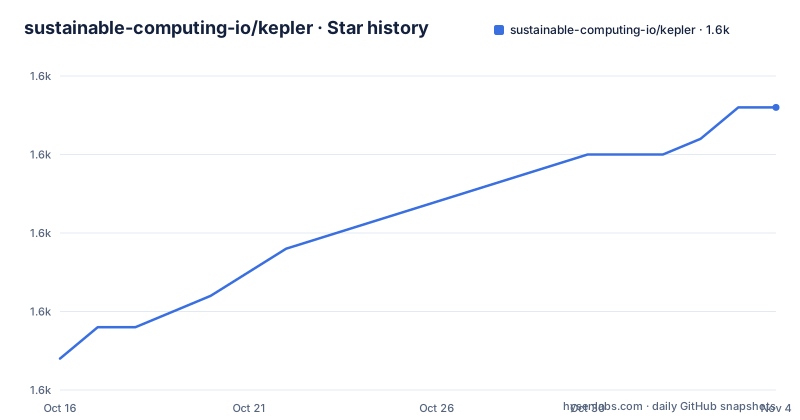
Star history
- sustainable-computing-io/kepler1,598 ★ · +16
| Repository | 2026-10-16 | 2026-11-04 |
|---|---|---|
| sustainable-computing-io/kepler | 1.6k | 1.6k |
16 Stars in the last 19 days, measured from the daily GitHub snapshot. Compare with other projects
Editorial analysis
Kepler's Kubernetes Energy Accounting Scope
Kepler addresses a measurement gap that ordinary Kubernetes resource metrics do not cover. CPU and memory metrics describe how much of a cluster's capacity a workload requests or uses, but they do not say how much energy that workload consumes. Kepler adds energy-oriented Prometheus measurements at container, pod, and node level so operators can investigate where power is going inside a Kubernetes cluster.
The intended users are cluster operators, platform engineers, and sustainability teams that need workload-level visibility. Kepler can feed the `/metrics` endpoint into Prometheus, and the repository's development compose configuration includes Prometheus and Grafana. This makes the exporter useful as a monitoring component rather than as a complete energy accounting platform. It supplies measurements and labels, while the surrounding observability system stores, queries, and visualizes them.
Kepler's attribution model is based on active CPU usage according to the README. That choice gives each workload an activity-related share of measured power. It is not the same as measuring electricity at the wall for every individual pod, so users should not treat the output as a billing meter without understanding the hardware path and allocation assumptions.
How Kepler Reads and Attributes Power
The current Kepler architecture is based on service-oriented components with thread-safe operations, structured logging, and graceful shutdown handling. At the measurement boundary, the exporter reads energy information exposed by the host. The documented primary path is the RAPL and powercap framework, which exposes processor power zones through Linux interfaces. The current README also lists HWMon, NVIDIA GPU, and Redfish BMC platform power as experimental support, so those paths should be treated differently from the main RAPL path.
The resulting data is exposed as Prometheus metrics with Kubernetes workload context. The quick-start tutorial specifically checks `kepler_node_cpu_watts`, a node-level CPU power metric. The repository description and README also state that Kepler measures metrics at container, pod, and node levels. The Go module shows direct integrations with Prometheus client libraries, Kubernetes client packages, NVIDIA `go-nvml`, Redfish through `gofish`, and Linux filesystem access through `golang.org/x/sys` and Prometheus procfs packages. Those dependencies match the documented sensor and Kubernetes-facing responsibilities.
The rewrite beginning with version 0.10.0 changed several implementation details. The README lists dynamic detection of node RAPL zones instead of hardcoded zones, improved power attribution based on active CPU usage, better virtual machine, container, and pod detection, and lower resource use. It also says the rewritten version needs read-only access to host `/proc` and `/sys`, without requiring `CAP_SYS_ADMIN` or `CAP_BPF`. Those are architectural boundaries worth checking during deployment, especially on clusters with restricted host access.
Helm Installation and First Metrics Check
The README's Kubernetes quick start installs the Kepler Helm chart from the OCI registry. The documented commands create the namespace, wait for the pods, list them, forward the service, and query the metrics endpoint. Run the following from a machine with Helm, `kubectl`, and `curl` access to the cluster:
helm install kepler oci://quay.io/sustainable_computing_io/charts/kepler \
  --namespace kepler \
  --create-namespace
This creates the `kepler` namespace when it does not exist and starts the chart. The README then gives this readiness check:
kubectl wait --for=condition=ready --timeout=120s pod -n kepler --allThe reader should see the Kepler pods become ready. The next command checks the installed pods:
kubectl get pods -n keplerA successful verification requires access to the service's metrics endpoint. The README uses port `28282` for the forward and filters the output for a CPU watt metric:
kubectl port-forward -n kepler svc/kepler 28282:28282In a second terminal, query the endpoint:
curl http://localhost:28282/metrics | grep kepler_node_cpu_wattsThe README does not provide sample output, so the concrete check is whether the endpoint returns `kepler_node_cpu_watts` rather than whether a particular numeric value appears. For production lifecycle management, the README points to the Kepler Operator. It also provides local development and Docker Compose paths, but those are separate deployment models rather than substitutes for the Kubernetes Helm installation.
Configuration, Hardware Boundaries, and Operational Limits
The repository points users to `docs/user/configuration.md` for configuration options, `docs/user/installation.md` for prerequisites and troubleshooting, and `docs/user/metrics.md` for metric definitions. The visible README does not enumerate those configuration keys, so a deployment cannot be assumed to support a particular sensor or tuning option without consulting those documents.
The main constraint is hardware and kernel interface support. RAPL or powercap is the documented foundation. A cluster with no usable powercap data may therefore have no meaningful power measurement for Kepler to attribute. Experimental support for HWMon, NVIDIA GPU, and Redfish BMC should not be equated with the same compatibility status as RAPL. Each source may expose different fields and update behavior, and the README does not promise identical results across them.
Host access is also part of the operating boundary. The rewrite requires read-only host `/proc` and `/sys` access. A restrictive cluster security policy, a container runtime configuration, or a node operating system that hides these interfaces can prevent collection even when Kubernetes workloads themselves are healthy. The README's reduced privilege requirement helps with deployment, but it does not mean Kepler can run without the host data it is designed to read.
There is also a version boundary. Releases `0.9.x` and earlier are described as frozen, with no bug fixes or feature requests accepted. Users of those deployments should treat an upgrade as a migration review rather than a routine image update. The README specifically directs users to the new configuration format and deployment methods for upgrades to `0.10.0+`.
Kepler Compared with Whole-Node Power Monitoring
A real alternative is to monitor total node energy with a platform BMC or another node-level power source, then query only the aggregate value. That approach measures the machine's power envelope without asking the exporter to divide it among containers, pods, and virtual machines. It can be simpler when the operational question is simply how much power a node consumes.
Kepler takes a different approach. It reads supported host power interfaces and attributes portions of that power to active Kubernetes workloads. Its added value is per-workload context. The trade-off is additional dependence on RAPL, powercap, or an explicitly experimental hardware path, plus the need for host access and correct workload detection. A node-level BMC reading can still be useful for validation, but the README does not document a Kepler command for reconciling its per-pod results against an independent meter.
For a cluster with mixed hardware or unsupported sensors, a node-level approach may be the better first step. Kepler is more relevant when the question is which workloads account for node consumption and the cluster exposes compatible power data. Neither approach should be assumed to provide direct electrical submetering for every pod. The README describes attribution, not individual wall-outlet measurement.
Maintenance, Licensing, and Release Choice
Kepler is not archived. Its last push was on 2026-10-14, so the repository is receiving recent code changes based on the available maintenance facts. The listed releases include `v0.12.0` on 2026-09-22, `v0.11.4` on 2026-02-16, and `v0.11.3` on 2025-11-24. The README also says that the rewrite applies to `0.10.0` and above and that `0.9.x` is the final legacy line. That makes release selection part of the adoption decision.
The repository is licensed under Apache-2.0. The Dockerfile labels the produced image with `org.opencontainers.image.licenses="Apache-2.0"`. This identifies the project's stated license, but it does not by itself answer questions about a particular organization's compliance, dependency review, or distribution process. Users should review the repository's `LICENSE` and `LICENSES/` files as part of their own process.
The main upgrade cost is architectural. A user moving from a legacy deployment must review changed configuration and deployment methods. Users building the project also need the Go toolchain indicated by `go.mod`, which declares `go 1.26.0`, and the Makefile or container build process. The README's local path is:
make build && sudo ./bin/keplerThat command builds the binary and starts it with elevated privileges, so it is a development or administrative path, not the documented Kubernetes-first installation.
Editorial conclusion
Kepler fits Kubernetes operators who need per-workload energy metrics and can verify that the host exposes the required power interfaces. It is a poor fit for clusters without compatible sensor data or for teams that only need whole-node consumption without attribution. Check RAPL, powercap, host mounts, labels, and the `/metrics` output before adopting version 0.12.0 or later.
Frequently asked questions
How do I install Kepler on Kubernetes with Helm?
Install the chart from `oci://quay.io/sustainable_computing_io/charts/kepler` into the `kepler` namespace, then wait for the pods to become ready. The README uses port `28282` for a service port-forward and checks the `/metrics` endpoint for `kepler_node_cpu_watts`.
What hardware sources does Kepler support?
The current README identifies RAPL and powercap as the main supported framework. It also lists HWMon, NVIDIA GPU, and platform power through Redfish BMC as experimental support.
Does Kepler require CAP_SYS_ADMIN or CAP_BPF?
The rewrite documentation states that Kepler requires only read-only access to host `/proc` and `/sys` and no longer requires `CAP_SYS_ADMIN` or `CAP_BPF`. A cluster policy that blocks those host interfaces can still prevent the required sensor data from being available.
Official sources
Add this badge to your README
If you maintain this project, the badge below links readers to this analysis and shows its maintenance status from the daily GitHub snapshot. Paste the markdown into your README; add ?metric=license or ?metric=stars to the image URL for a different field.

[](https://hysenlabs.com/projects/sustainable-computing-io-kepler)Star history chart for your README
[](https://hysenlabs.com/projects/sustainable-computing-io-kepler)Was this useful?