Swiftcord: a native SwiftUI Discord client still shipping by waitlist
A fully native Discord client for macOS built 100% in Swift!
At a glance
- What is it?
- The macOS Discord client built in SwiftUI, now on a v2 branch whose source is not in the repository yet. What the releases say, what the README promises, and why the two disagree.
- Who is it for?
- Swiftcord is a closed beta with a public repository attached, and knowing which half you are looking at saves a lot of confusion. The default branch is v2 and contains only README.md plus docs and docs-res directories, so there is no Swift source to read, no licence file, and no way to build it from what is published.
- Can I use it commercially?
- Not without permission. GitHub finds no licence file in the repository, and without a licence all rights are reserved by default: you may read the code but not reuse it. Check the README, or ask the authors, before using it.
- Is it still maintained?
- Yes. The repository last received commits 36 days ago.
- What is it written in?
- GitHub does not report a main language for this repository.
Answers come from the project's GitHub data, last synced on November 7, 2026, and from our analysis. They are not legal advice.
Star history
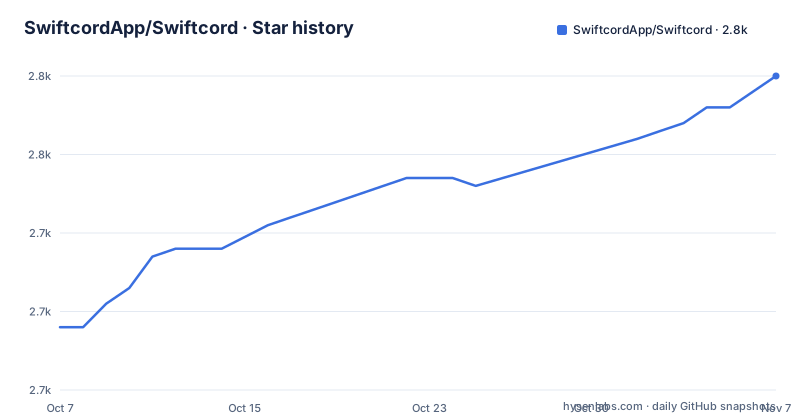
- SwiftcordApp/Swiftcord2,760 ★ · +32
| Repository | 2026-10-07 | 2026-11-07 |
|---|---|---|
| SwiftcordApp/Swiftcord | 2.7k | 2.8k |
32 Stars in the last 31 days, measured from the daily GitHub snapshot. Compare with other projects
Editorial analysis
A public repository that contains no Swift source
The first thing to know about SwiftcordApp/Swiftcord is that the repository is not what a repository usually is. Its default branch is v2, and the entire tree on that branch is four entries: .gitignore, README.md, a docs directory and a docs-res directory. The latter two hold the documentation and the images the README links to. There is no Sources directory, no Package.swift, no Xcode project, and no licence file. The repository has 2,699 stars and 103 forks, which is a level of interest you would associate with an installable application rather than a code library.
That absence is deliberate, and the README states it in the section headed Open Source: Swiftcord is under heavy development and is not currently accepting external contributions, and source code will be made available following public release. A note underneath points legacy code seekers at the `main` branch, describing it as archived.
So there are two codebases referenced and neither is present on the branch you land on. The old SwiftUI client that had GitHub releases lives on `main`, which the README calls archived, and the v2 rewrite on the default branch has no code yet. If you arrived to read the implementation, that is the disappointment, and it is worth knowing before you clone anything.
What the v2 README claims for the rewrite
The v2 README is short and entirely promotional. It calls the app the 100% native SwiftUI macOS Discord client, now with Liquid Glass, and describes two things: that it looks and feels like a natural part of the machine because it uses system controls while rendering messages, rich text and embeds the way you expect, and that it is fast because it was rebuilt from the ground up with performance at its core, launching instantly and staying light on the system.
It also states the distribution model plainly. Swiftcord v2 is in prerelease and will be released in phases, and joining the waitlist at swiftcord.app gets you an email with a code to install it once a spot opens. Follow along on X or Discord for updates, and there is a community server linked from the README.
The Liquid Glass reference is the detail that dates this branch. That is the visual language Apple introduced for its own interfaces in a later macOS generation, which tells you this rewrite targets current hardware and current OS versions rather than trying to support older Macs. Combined with the empty tree, the picture is consistent: a rewrite in progress, not yet public, being released gradually to a list.
What the v1 releases say, and why v1 is finished
The release history documents the older client, and its final entry is blunt. Version 0.7.1, tagged Bug Terminator and published on 2023-11-09, opens with a warning that Swiftcord v1 is deprecated and no longer functional, directing readers to swiftcord.app for whatever comes next. The same block adds a second problem: builds will also fail to launch because of an expired signing certificate.
That is worth pausing on, because it means there is no working download on the releases page. The notes for each release carry a standing instruction that the build is unsigned, and to open it the first time you right click the application and choose Open to get past the macOS warning. An expired certificate removes even that workaround for anyone who has not already downloaded a build.
The substantive work in those releases does show what the client was capable of. Version 0.7.0 added channel permissions support, so visibility and message send rights were respected, rendered usernames properly after Discord removed discriminators, showed account creation and server join dates, and rendered the author and thumbnail fields of embeds. Version 0.6.1, from May 2023, brought unread dots per channel, multiline message input, folder animations, a Ventura-styled settings panel and smoother scrolling through message history. That is a competent feature list for a third-party client.
DiscordKit did the protocol work underneath
Both v1 release notes credit DiscordKit, the separate library that handles the Discord gateway and API, which tells you where the difficult part of a Discord client actually lives. The v0.7.0 notes say DiscordKit was updated to work with the latest gateway capabilities set, which allowed more information to be pre-cached, so faster rendering came from a library upgrade rather than from new client code.
The v0.7.1 login failure was also fixed upstream rather than locally. The note credits the fix to DiscordKit upstream by a named contributor, which is a reasonable division of labour: SwiftUI handles the interface, DiscordKit handles authentication, gateway events and the REST calls. It also means a Discord-side change can break the client without any Swiftcord code changing at all, which is the structural weakness of every third-party Discord client.
One smaller contributor is named directly in the v0.7.0 notes, credited with a username copy button and with sticker packs, along with a separate fix to password dialog labels. The v0.6.1 notes credit a Ventura-style settings overhaul and a fix for a bug where messages could be sent twice, the kind of defect that makes a chat client unusable quickly.
How to judge this against other macOS Discord clients
The honest comparison is not between this and another SwiftUI rewrite, because there are few serious ones, but between waiting for access and installing something today. Official alternatives are the browser client and Discord's own desktop application, both of which are maintained by Discord and therefore immune to the kind of upstream breakage described above. Community clients built as layers on top of the official application, which patch it rather than reimplementing the protocol, are the other option, and they update when Discord ships changes.
Swiftcord's argument against both is performance and native feel. The v2 README's claim is that a SwiftUI application using system controls should launch instantly, move between conversations smoothly and stay light on the system, which is a fair thing to want from a chat client people keep open all day. Whether the rewrite delivers it is not something the repository can show you, since there is no build and no code.
The signals to watch are all outside the source. Whether the waitlist opens, whether the email codes start arriving, and whether a public release is followed by an actual licence and a commit history. The repository is not archived and the last push was on 2026-06-20, so the project is still being worked on, but the last published binary is nearly three years old and its own author has marked it unusable.
Editorial conclusion
Swiftcord is a closed beta with a public repository attached, and knowing which half you are looking at saves a lot of confusion. The default branch is v2 and contains only README.md plus docs and docs-res directories, so there is no Swift source to read, no licence file, and no way to build it from what is published. The v2 README sells a rewritten client with Liquid Glass styling that is handed out in phases through an email waitlist. The GitHub releases tell the older story: v0.7.1 in November 2023 was the last build, and its own notes declare v1 deprecated and no longer functional, with builds that fail to launch on an expired signing certificate. Judge it as a product being tested in private rather than a library, and put a community client such as Vencord or an official desktop app next to it if you need something you can install today.
Frequently asked questions
What is swiftcord?
A macOS Discord client written in SwiftUI that aims to look and behave like a native Mac application rather than a wrapped web page. The current v2 branch is a rewrite that is in prerelease and distributed in phases through an email waitlist at swiftcord.app, and its source code is not in the repository yet.
What is the best Discord client for macOS?
Discord's own desktop app is the safest choice, since Discord maintains it and it receives protocol updates first. Community clients that patch the official app also update quickly. Swiftcord is the interesting option if you specifically want a client rewritten in SwiftUI for native appearance and launch speed, but at present it is waitlist only rather than something you can download and install today.
Can I download a working Swiftcord build from the GitHub releases?
No. The v0.7.1 release notes state that Swiftcord v1 is deprecated and no longer functional, and add that builds will fail to launch because of an expired signing certificate. Those builds were unsigned to begin with, requiring a right click and Open to bypass the macOS warning. The current v2 line is handed out through the waitlist instead.
Why is there no Swift source code in the Swiftcord repository?
The README says source code will be made available following public release, and that external contributions are not being accepted while development is heavy. The default v2 branch holds only README.md plus docs and docs-res directories. The older client that produced the GitHub releases is on the main branch, which the README describes as archived.
Official sources
Add this badge to your README
If you maintain this project, the badge below links readers to this analysis and shows its maintenance status from the daily GitHub snapshot. Paste the markdown into your README; add ?metric=license or ?metric=stars to the image URL for a different field.

[](https://hysenlabs.com/projects/swiftcordapp-swiftcord)Star history chart for your README
[](https://hysenlabs.com/projects/swiftcordapp-swiftcord)Was this useful?