Magisk is four tools wearing one name, and the boot image comes first
The Magic Mask for Android. This is not an officially supported Google product Introduction Magisk is a suite of open source software for customizing Android, supporting devices higher than Android 6.0.
At a glance
- What is it?
- Magisk bundles root, a module system, a boot image repacker and Zygisk, which injects code into every running app. The repository is thin on purpose, so the install instructions and the download live in documentation and GitHub releases rather than in the README.
- Who is it for?
- Adopt Magisk if you own the device, can recover from a failed flash, and need root or a module that no system mechanism provides. Leave it alone if the phone is financed, work-managed, or needed for banking, because Zygisk places your code inside those apps' processes and the repository documents no way to avoid that.
- Can I use it commercially?
- Yes, with conditions. GPL-3.0 is a copyleft licence: if you distribute software that includes it, you must release that software's source code under the same licence. Running it internally without distributing it does not trigger that obligation.
- Is it still maintained?
- Yes. The repository last received commits 3 days ago.
- What is it written in?
- Mainly Kotlin, according to GitHub's language statistics.
Answers come from the project's GitHub data, last synced on November 13, 2026, and from our analysis. They are not legal advice.
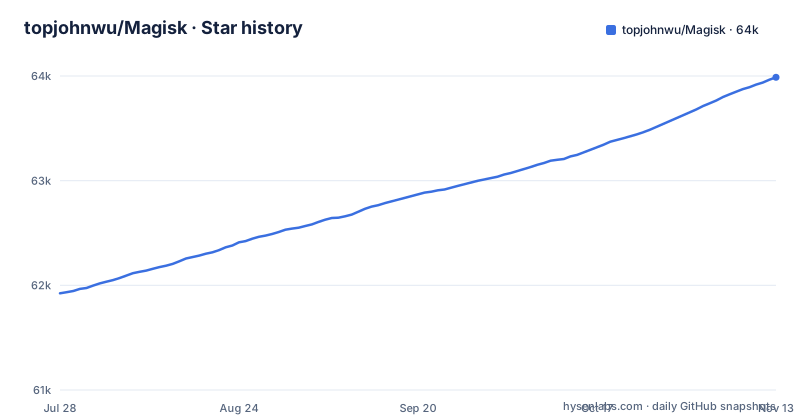
Star history
- topjohnwu/Magisk63,988 ★ · +2,064
| Repository | 2026-07-28 | 2026-11-13 |
|---|---|---|
| topjohnwu/Magisk | 61.9k | 64k |
2,064 Stars in the last 108 days, measured from the daily GitHub snapshot. Compare with other projects
Editorial analysis
Zygisk puts your code inside every app's process
Of the four components, Zygisk is the one that changes what other software sees. It is described as a way to run code in every Android application's processes, which means a module built on it is not a background service with a settings screen but something executing inside the app you are reading. That is a genuinely useful capability and it is also the one with consequences the repository does not address. Payment and banking apps inspect their own process, and the README says nothing about detection, exemptions or running Zygisk off. A sample project is published separately as zygisk-module-sample, so the intended entry point for building one is a template rather than a guide in this tree. Anyone evaluating Magisk for a device used for banking is reading past the documentation this project publishes.
Modules layer over read-only partitions rather than editing them
Magisk Modules are described as modifying read-only partitions by installing modules, and the phrasing is doing real work. The README does not explain how the mechanism works. The repository gives no module format, no list of compatible modules and no compatibility statement, so a reader cannot tell from this source whether a given module will work on a given Android version. The documentation site is the only place that answers it.
MagiskBoot is the part you touch first, and the part that bricks devices
MagiskBoot is called the most complete tool for unpacking and repacking Android boot images, and it is the reason installing Magisk is a two-stage operation rather than an app install. The boot image has to be extracted, patched and flashed before anything else is available to you, which means the first irreversible step happens before you have any of the four components running. The project does not publish the flashing procedure here; installation instructions are a separate document at topjohnwu.github.io/Magisk/install.html, and there is no install command in the repository to copy. For installation problems the stated evidence is both the boot image and the install logs, which tells you the project expects to see exactly what was flashed.
Only Debug builds get their bug reports read
The bug report policy is one line and it excludes most people: only bug reports from Debug builds will be accepted. A user who installed a release build and hit a problem is therefore not in a position to file anything useful, and a contributor aiming at a fix has to reproduce against a debug build first. The three categories of evidence are separated as well. Installation issues need the boot image and the install logs, Magisk issues need the boot logcat or dmesg, and app crashes need a logcat recorded at the moment of the crash rather than afterwards. This is a defensible rule for a project whose failure mode is an unbootable phone, and an irritating one for anyone who only has a release zip and a problem they cannot reproduce.
GitHub releases is the only official download
The Downloads section carries a single instruction: GitHub is the only source where you can get official Magisk information and downloads. That is a supply-chain claim made unusually plainly, and it does real work for a project whose artefact is a zip you flash to a boot partition with root privileges. A mirror, a reposted APK or a bundle from an app store is not a lesser option here, it is outside what the project supports. The same reasoning explains the floor on platform, since the README limits support to devices higher than Android 7.0. The remaining links are documentation, the build guide and the Zygisk sample, all hosted outside the repository.
GPL-3.0-or-later, and the grant explicitly covers submodules
The licence text in the README goes out of its way to close a gap that often gets left open, stating that Magisk including all git submodules is free software, redistributable and modifiable under the GNU General Public License version 3 or, at your option, any later version. That wording matters for anyone shipping a derivative, because a later version is a real option rather than a formality, and because the submodules are named rather than left to be discovered. The standard disclaimer follows: the program is distributed in the hope that it will be useful, but without warranty, and the project points readers at the licence text itself. Nothing here is legal advice, but the or-later clause and the submodule sentence are the two facts to carry into a compliance review.
Two strings.xml files are the whole translation surface
Contributing to the app is narrower than the repository suggests. Default string resources for the Magisk app live in app/core/src/main/res/values/strings.xml, and a translator places each translation in the matching location under values-[lang] for the relevant module. That is the entire documented localisation surface. The build side is Python rather than a Gradle wrapper, with build.py at the repository root alongside config.prop.sample for configuration, plus native/, scripts/, tools/ and an AGENTS.md. The README does not walk through running the build, so the separate build guide is where that is answered.
Editorial conclusion
Adopt Magisk if you own the device, can recover from a failed flash, and need root or a module that no system mechanism provides. Leave it alone if the phone is financed, work-managed, or needed for banking, because Zygisk places your code inside those apps' processes and the repository documents no way to avoid that. Verify first where you downloaded the zip, since the project states GitHub releases is the only official source, and keep the install log, because the project asks for the boot image and install logs with installation issues.
Frequently asked questions
What is the Magisk app used for?
Magisk is a suite of four tools for customizing Android: MagiskSU for root access to applications, Magisk Modules, MagiskBoot for boot images, and Zygisk. Support is for devices higher than Android 7.0.
Does installing Magisk root your device?
Root comes from MagiskSU, which is described as providing root access for applications, so it is part of the suite rather than a separate product. The installation itself goes through a patched boot image, since MagiskBoot unpacks and repacks those.
Is it safe to install Magisk?
The project states that it is not an officially supported Google product, and it does not claim safety anywhere in the README. The irreversible step is flashing a boot image, and the stated guidance for a failed installation is to supply the boot image and the install logs.
how to install magisk
The README contains no install command. Installation instructions are a separate document at topjohnwu.github.io/Magisk/install.html, and the only source of official downloads and information is the GitHub releases page.
how to use magisk modules
Modules modify read-only partitions by being installed as modules. No module format or compatibility list appears in the README.
Official sources
Add this badge to your README
If you maintain this project, the badge below links readers to this analysis and shows its maintenance status from the daily GitHub snapshot. Paste the markdown into your README; add ?metric=license or ?metric=stars to the image URL for a different field.

[](https://hysenlabs.com/projects/topjohnwu-magisk)Star history chart for your README
[](https://hysenlabs.com/projects/topjohnwu-magisk)Was this useful?