SmsForwarder on Android: forwarding SMS to bots, and the remote control it adds
Android APP bark webhook Telegram Server PushPlus V3.0 PS. APK BUG ISSUE PR .
At a glance
- What is it?
- SmsForwarder is a BSD-licensed Android app that watches messages, calls and app notifications on a spare handset and relays them to chat bots, email and other phones. Since v3.0 it also lets something inbound drive that phone, which is the part worth reading twice.
- Who is it for?
- SmsForwarder suits an Android owner with a spare handset who wants their own messages reaching a chat bot or a second phone, and who is willing to grant it message, call and notification access. It is a poor fit for a phone you cannot leave to a background service, and the stated platform range stops at Android 13.0.
- Can I use it commercially?
- Yes. BSD-2-Clause is a permissive licence: you can use, modify and sell software built on it, as long as you keep its copyright and licence notices.
- Is it still maintained?
- Yes. The repository last received commits 1 day ago.
- What is it written in?
- Mainly Kotlin, according to GitHub's language statistics.
Answers come from the project's GitHub data, last synced on November 13, 2026, and from our analysis. They are not legal advice.
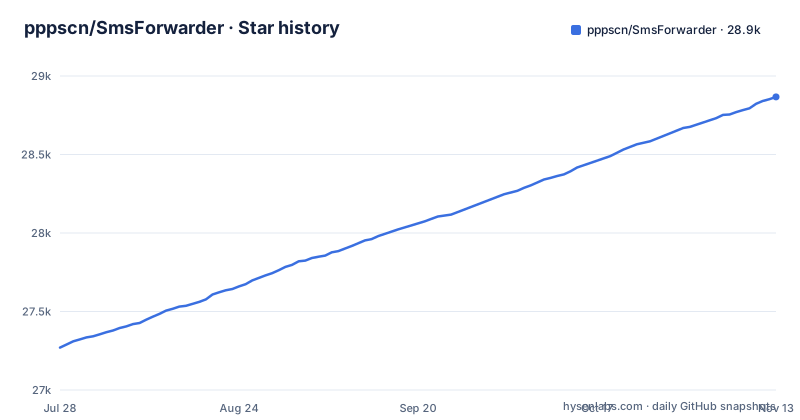
Star history
- pppscn/SmsForwarder28,867 ★ · +1,597
| Repository | 2026-07-28 | 2026-11-13 |
|---|---|---|
| pppscn/SmsForwarder | 27.3k | 28.9k |
1,597 Stars in the last 108 days, measured from the daily GitHub snapshot. Compare with other projects
Editorial analysis
One spare phone reads three event streams and fans them out
SmsForwarder is built for a handset you are not using as a phone. It watches three input streams on one Android device: SMS messages, incoming calls, and notifications posted by other apps. Each event then travels to destinations you configure by rule, so a message arriving while you are elsewhere still reaches somewhere you actually read.
Destinations are spread across platforms rather than funnelled into one endpoint. DingTalk and Feishu group bots are there, along with enterprise WeCom app messages, email, bark, a generic webhook, Telegram, and plain SMS to another number. A generic webhook is the option that fits an existing pipeline, while the bot targets cover the team chat you already live in.
Rules apply per event type, so you decide which streams travel and which stay on the handset. Auto tasks and quick commands arrived in v3.3 to cut down on tapping through the app for the repeated cases.
v3.0 turned the spare phone into something a server can drive
Version 3.0 moved past passive relaying. That release added active control of both the server side and the client side, so a phone sitting in a pocket can be told to send an SMS, and the same app can be queried for stored messages, call history, the contact list and battery level.
That is a different exposure from forwarding. Forwarding pushes your events outward to channels you chose. Remote control lets something inbound decide what the phone does and read what is on it, including the contact list. Anyone weighing this for a personal handset should work out which of those two directions is actually needed, because the build and the licence are identical either way but the risk is not.
The README does not describe how that endpoint is authenticated, so keep the phone on a network you control rather than treating the feature as a remote administration console.
Android 4.4 to 13.0, and the Java build is frozen on v2.x
The supported range is stated plainly: the v3.x line targets Android 4.4 through 13.0. A handset running anything newer sits outside that range, and because notification access has been tightened across recent Android versions, an app that cannot read notifications has nothing to forward in the first place.
A second, older codebase lives in the same repository. From 2022-06-06 the Java version was moved to a v2.x branch and is no longer updated, so anyone reading the repository expecting Java sources that reflect current behaviour is looking at a frozen snapshot rather than the app you would install.
The Gradle layout matches the live Android project: an `app/` module, `build.gradle`, `settings.gradle` and a `versions.gradle` that centralises version numbers, with `gradlew` and `gradlew.bat` for the wrapper. A `PRIVACY` file and an English `README_en.md` sit beside the Chinese one.
Weekly builds come from an Actions workflow, not from a release
Two update channels exist, and they are not interchangeable. Tagged releases are the stable line, and they are infrequent: v3.5.0 shipped on 2026-02-14, v3.3.3 on 2025-02-14, and v3.3.2 on 2024-08-15. The last push to `main` was on 2026-11-02.
Quicker fixes arrive through the preview program, which delivers weekly builds by online update, switched on from the in-app About page. That path applies from v3.3.0_240305 onward, and its manual equivalent is a download from the project's Weekly_Build.yml workflow rather than from the releases page.
So the choice is about which bugs you would rather have. A weekly build carries fixes before any tagged release does, and it also carries whatever else changed during that week. Pin a release if you want a build you can name later, and take the weekly one only when the pending fix matters more than a known version.
Three download mirrors, and the third one asks for a password
APKs come from three places. The GitHub releases page is named as the primary source, a Gitee mirror stands in for networks that cannot reach GitHub, and a netdisk link is published with the access password `pppscn`.
Two of those three sit outside a repository you can audit. A mirror and a file host both rehost a binary, and neither carries commit history that would let you confirm which build you are holding. Running a relay that reads your messages and can drive your phone is reason enough to spend a minute matching the APK against a tagged release, and the mirror or netdisk copy is exactly where that check matters most.
Sizes, hashes and signatures are not stated in the README, so there is no documented way to verify an APK beyond comparing it with the release you meant to install.
The privacy claim is one startup ping, wrapped in a broad disclaimer
The privacy notice is narrow and specific. Version information goes to Umeng (友盟) analytics when the app starts, a version number is sent when you manually check for updates, and nothing else is collected.
Around that sits a disclaimer that disclaims more than most projects do. The released code and APK are said to be for testing, learning and research only, commercial use is prohibited, and legality, accuracy, completeness and effectiveness are explicitly not guaranteed. Contributors are further released from responsibility for consequences including privacy leaks, and the project asks to be notified with proof of identity and ownership if code is believed to infringe a right.
The licence file says BSD while that same notice forbids commercial use. Which of the two governs a particular deployment is a question for your own counsel, but the tension sits on the page and both documents are worth reading before anything is built on top of them.
Every capability is borrowed from a named library
Little here is original. TranspondSms was the prototype, the interface is built on XUI, and online upgrades come from XUpdate. Permissions are requested through XXPermissions, and the socket layer is kmnkt.
Three of those dependencies explain the design better than any feature list does. frpc_android is credited for intranet traversal, Cactus for keeping the process alive, and AndServer for the HTTP server. A relay that keeps working while the phone is idle, and that stays reachable for remote control, needs precisely those three things, which is also why the app asks for the permissions and battery headroom that it does.
Attribution cuts both ways. If a background forward stops arriving, the likelier cause is a killed process or a revoked notification permission than a defect in this repository, so check keep-alive and permission state before filing an issue.
Editorial conclusion
SmsForwarder suits an Android owner with a spare handset who wants their own messages reaching a chat bot or a second phone, and who is willing to grant it message, call and notification access. It is a poor fit for a phone you cannot leave to a background service, and the stated platform range stops at Android 13.0. Check two things before installing: which mirror you trust with the APK, and who can reach the remote control endpoint added in v3.0.
Frequently asked questions
what is sms forwarder
SmsForwarder is an Android app that monitors SMS messages, incoming calls and app notifications on one phone and forwards them to other destinations according to rules you set. Supported targets include DingTalk and Feishu group bots, email, bark, a generic webhook, Telegram and plain SMS to another number.
how to use sms forwarder
Install the APK from one of the published download locations, grant the Android permissions it needs to read messages and notifications, then add forwarding destinations and rules per event type. Since v3.0 the app can also be driven and queried remotely for messages, calls, contacts and battery level, and v3.3 added auto tasks and quick commands. Setup details live in the project wiki rather than the README.
sms forwarder alternative
The project credits TranspondSms as the prototype it grew from, and its remaining dependencies are component libraries such as XUI for the interface, XUpdate for online upgrades and XXPermissions for permission prompts rather than competing SMS forwarders. No alternative app is named in the README.
Official sources
Add this badge to your README
If you maintain this project, the badge below links readers to this analysis and shows its maintenance status from the daily GitHub snapshot. Paste the markdown into your README; add ?metric=license or ?metric=stars to the image URL for a different field.

[](https://hysenlabs.com/projects/pppscn-smsforwarder)Star history chart for your README
[](https://hysenlabs.com/projects/pppscn-smsforwarder)Was this useful?