swift-docker: Building and Deploying Swift Containers
Docker Official Image packaging for Swift
At a glance
- What is it?
- swift-docker packages Swift compiler images and smaller runtime images for Docker. It is best suited to Swift developers and CI workflows that build Linux container artifacts without installing the Swift toolchain directly on the host.
- Who is it for?
- Adopt swift-docker when reproducible Linux builds and smaller deployment images matter, especially for CI pipelines. Do not choose it if you need a GUI, host-level Swift installation, or a documented rollback process.
- Can I use it commercially?
- Yes. Apache-2.0 is a permissive licence: you can use, modify and sell software built on it, as long as you keep its copyright and licence notices.
- Is it still maintained?
- Yes. The repository last received commits 1 day ago.
- What is it written in?
- Mainly Dockerfile, according to GitHub's language statistics.
Answers come from the project's GitHub data, last synced on October 24, 2026, and from our analysis. They are not legal advice.
Star history
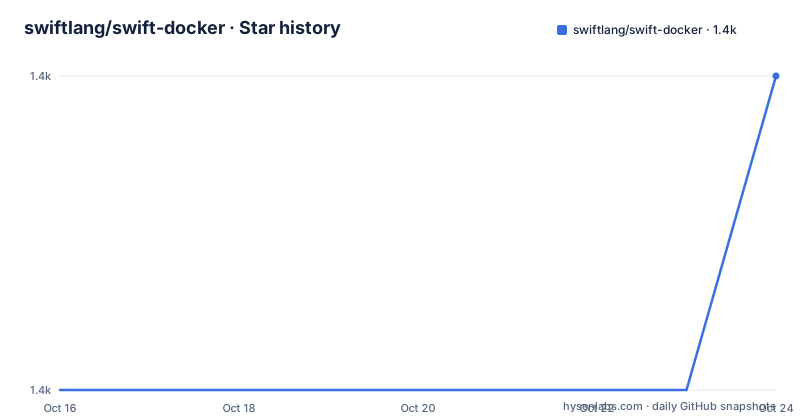
- swiftlang/swift-docker1,434 ★ · +1
| Repository | 2026-10-16 | 2026-10-24 |
|---|---|---|
| swiftlang/swift-docker | 1.4k | 1.4k |
1 Stars in the last 8 days, measured from the daily GitHub snapshot. Compare with other projects
Editorial analysis
The Compiler and Runtime Split in swift-docker
swift-docker addresses a specific packaging problem for Swift developers: reproducing a Swift build environment in a container and then producing a deployment image that does not need to carry the compiler. The repository is associated with the Docker Official Image for Swift, while its README directs users to Docker Hub for standard images and to a separate Docker Hub repository for nightly tags.
The image family has two forms. The normal `swift` image contains the Swift compiler, so it can compile source code and start the Swift REPL. The `swift:slim` image is intended for running an already built Swift program and deliberately omits the compiler. This distinction matters during image selection. A compile image is useful in development and CI, but it includes tooling that may be unnecessary in production. The slim image reduces that deployment surface, although the README does not publish its resulting size or give a detailed inventory of installed system packages.
The intended users are developers who package server-side Swift applications, maintain reproducible CI jobs, or want to separate compilation from deployment. The repository is not presented as a general-purpose container runtime. It is a set of Docker packaging definitions centered on Swift, with version directories ranging from `3.1/` through `6.4/`, plus `nightly-main/` and several nightly branches. That layout indicates organization by Swift release line and nightly build line.
Pulling Swift and Opening an Interactive Container
The README's quickest path uses the unqualified `swift` image tag from Docker Hub. The command below downloads the image if it is not already present and opens an interactive Bash session inside the container. The command should complete without requiring a repository clone from this project.
docker pull swiftOnce the pull succeeds, start Bash with an interactive terminal. At this point, the container is running the image's default command replaced by `/bin/bash`.
docker run -it swift /bin/bashFor a compile-time session that starts the Swift REPL instead, the README calls for additional privileges. On Linux, it specifies `--security-opt seccomp=unconfined`. On macOS, it specifies `--privileged`. These are not interchangeable interfaces, and the documentation gives no narrower explanation of which syscall or Docker operation causes the requirement. Treat the examples as host-specific instructions supplied by the project rather than as a general permission policy.
Linux users can start the REPL container with the documented security option:
docker run --security-opt seccomp=unconfined -it swiftmacOS users can use the documented privileged mode:
docker run --privileged -it swiftBecause the commands alter container security settings, reviewers should account for them in local development rules and CI configuration. The README does not provide a non-privileged workaround.
A First Multi-Stage Build with swift:slim
The repository's clearest workflow builds in a full Swift image and copies the compiled output into `swift:slim`. The builder stage copies the project into `/root`, runs `swift build -c release`, and places the entire `/root` directory into the runtime stage. The slim stage then starts `.build/release/docker-test`.
The README presents this Dockerfile:
FROM swift:latest as builder
WORKDIR /root
COPY . .
RUN swift build -c release

FROM swift:slim
WORKDIR /root
COPY --from=builder /root .
CMD [".build/release/docker-test"]
This file belongs in a project that has a Swift executable named `docker-test` and a corresponding Package.swift manifest. The shown `docker-test` name is part of the documentation example, not a claim that every Swift project produces that binary. A different package must update `CMD` to match the executable generated by SwiftPM.
The build context is copied with `COPY . .`, so a suitable `.dockerignore` can prevent unnecessary local files from entering the builder stage. The README does not include a `.dockerignore` example, a supported architecture matrix, or an exact output from `swift build`. It also does not describe health checks, signal handling, log configuration, or a non-root runtime user. The useful part of the example is the stage boundary: compilation happens once in `swift:latest`, while the final image references `swift:slim` and contains the already built application.
Choosing Stable, Versioned, or Nightly Swift Tags
The repository layout contains directories for numerous Swift release lines, including `5.10/`, `6.0/`, `6.1/`, `6.2/`, `6.3/`, and `6.4/`. It also contains `nightly-main/` and branch-specific directories such as `nightly-6.4.x/`. This makes the distinction between compiler generations visible at the repository level even though the abbreviated README does not publish a complete tag table.
A development environment that should follow the newest Swift changes has separate nightly image locations documented. Stable users are pointed to Docker Hub's standard `swift` repository. The README's `swift:latest` and `swift:slim` examples are convenient, but they do not define whether those tags are repinned over time. For a repeatable deployment, the absent pin-selection instructions are a material documentation gap. Repository maintainers and users must determine which exact stable or nightly tags are intended for their build.
The last repository push was on 2026-10-13, so the repository itself has recent repository activity based solely on that recorded push. That fact does not establish that every image tag, branch directory, or supported Swift release has an equally recent image. The listed releases are much older: `4.0.2` on 2017-11-10, `3.0.2` on 2016-12-15, and `0.0.1` on 2015-12-04. The release list therefore should not be read as a current catalog of downloadable Swift images.
Where swift-docker Differs from Host Toolchain Installation
The direct alternative is installing Swift on the build host and managing the operating system, Swift runtime, and deployment dependencies outside Docker. That approach leaves each CI runner responsible for reproducing the toolchain environment. swift-docker moves that responsibility into image selection: the compiler comes from a Swift image, the application is built inside a container, and the deployment stage can use the smaller image without the compiler.
This difference does not eliminate environment management. A team still needs to select the correct Swift image tag, ensure its target platform matches the build output, and configure Docker permissions for any interactive REPL container. A host installation may be easier for a developer who wants direct access to compiler diagnostics, local debugging, or editor integration without managing a container. The README does not document editor support, remote debugging, source-map handling, or mounting a local project into an interactive container.
The slim image is not a separate distribution format. It is another Docker stage in the same packaging approach, and the documented multi-stage Dockerfile transfers the built `/root` directory from the full image. Projects with external runtime assets, operating-system packages, or services must account for those separately because the README does not say that `swift:slim` contains arbitrary application dependencies. It specifically defines slim as an image for running an already built Swift program without the Swift compiler.
Maintenance Signals, Licensing, and Upgrade Boundaries
The repository is not archived, and its last push was on 2026-10-13. The presence of many version directories makes upgrade work visible, but the README does not provide a support policy, tag retirement schedule, migration guide, or compatibility matrix. The old release dates also leave uncertainty about which historical image versions remain available from Docker Hub.
An upgrade can change more than a Docker tag. A newer Swift release may alter compiler output, Package.swift compatibility, executable naming, or required runtime behavior. The repository's `ci_test.py`, `.github/`, `swift-ci/`, and version directories indicate that packaging and continuous integration definitions exist, but the README does not document how to run that test script or what pass criteria it applies. It would therefore be misleading to claim that a local build or image promotion can be reproduced using only the commands on the README page.
The project is licensed under the Apache License, Version 2.0. The repository's `LICENSE.md` is the controlling project file for licensing terms. This review does not interpret that license or provide legal advice. The licensing fact matters to adoption because redistribution and modification of the container definitions occur under the stated Apache-2.0 terms, while application licensing remains a separate concern for the software placed in an image.
Editorial conclusion
Adopt swift-docker when reproducible Linux builds and smaller deployment images matter, especially for CI pipelines. Do not choose it if you need a GUI, host-level Swift installation, or a documented rollback process. Verify your chosen Swift tag, platform support, and required container privileges before making it part of a release pipeline.
Frequently asked questions
How do I install swift-docker?
You do not need to clone the repository for the README's basic workflow. Pull the published image from Docker Hub with `docker pull swift`, then create an interactive container with `docker run -it swift /bin/bash`.
Why does the Swift REPL container require extra privileges?
The README uses `--security-opt seccomp=unconfined` when Docker runs on Linux and `--privileged` when it runs on macOS. It does not document a narrower alternative or explain which operation requires the additional privileges.
What is the difference between the `swift` and `swift:slim` images?
The normal image includes the Swift compiler and can build programs. The slim image is intended for running an already built Swift program and does not contain the Swift compiler.
Can I use swift-docker for a multi-stage build?
Yes. The README documents a Dockerfile that builds with `swift:latest`, then copies `/root` into a `swift:slim` stage and starts `.build/release/docker-test`. The executable name must match the output of the user's Swift package.
Where are nightly Swift images published?
The README directs users to `https://hub.docker.com/r/swiftlang/swift` for nightly image tags. It separately points to Docker Hub's `_/swift` repository for Docker Hub Swift images.
Official sources
Add this badge to your README
If you maintain this project, the badge below links readers to this analysis and shows its maintenance status from the daily GitHub snapshot. Paste the markdown into your README; add ?metric=license or ?metric=stars to the image URL for a different field.

[](https://hysenlabs.com/projects/swiftlang-swift-docker)Star history chart for your README
[](https://hysenlabs.com/projects/swiftlang-swift-docker)Was this useful?