swift-format: lint exits zero by default, and the build example pins a version three Swift generations behind
Formatting technology for Swift source code
At a glance
- What is it?
- The formatter behind SourceKit-LSP, usable as a command line tool or as a package dependency, and explicit that no default Swift style has been agreed on yet. The mechanics are well specified: version matching against SwiftSyntax, three ways to obtain the binary, and a strictness flag that decides whether the linter can fail a build at all.
- Who is it for?
- swift-format is a sound choice for a Swift codebase that wants one formatter shared between continuous integration and an editor, since the same binary backs both and it is the formatter SourceKit-LSP itself uses. Two things to check before you wire it in.
- Can I use it commercially?
- Yes. Apache-2.0 is a permissive licence: you can use, modify and sell software built on it, as long as you keep its copyright and licence notices.
- Is it still maintained?
- Yes. The repository last received commits 3 days ago.
- What is it written in?
- Mainly Swift, according to GitHub's language statistics.
Answers come from the project's GitHub data, last synced on November 14, 2026, and from our analysis. They are not legal advice.
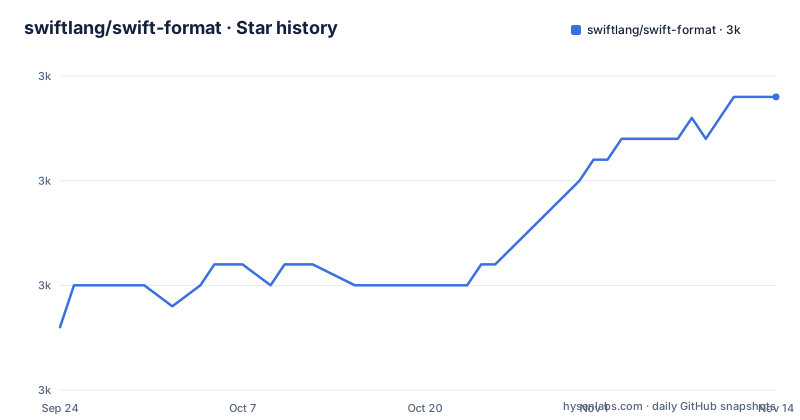
Star history
- swiftlang/swift-format2,969 ★ · +11
| Repository | 2026-09-24 | 2026-11-14 |
|---|---|---|
| swiftlang/swift-format | 3k | 3k |
11 Stars in the last 51 days, measured from the daily GitHub snapshot. Compare with other projects
Editorial analysis
Lint passes by default, so it cannot fail a build without a flag
The lint subcommand checks files for style violations and prints diagnostics to standard error, but its default exit behaviour is the surprise. Warnings do not prevent a successful exit; only fatal errors, such as trying to lint a file that does not exist, make the tool exit unsuccessfully. A single option changes that:
swift-format lint [OPTIONS...] [FILES...]Passing `-s` or `--strict` makes warnings cause a non-zero exit code. So the tool in its default configuration is a reporter rather than a gate, and a continuous integration job that runs the lint subcommand without the flag will go green on code the linter flagged. The format subcommand has the same shape of risk in reverse: its in-place option overwrites the input files with no backup of the original made beforehand, which is a deliberate choice but worth knowing before pointing it at a working tree. Both subcommands also read source from standard input when no paths are given, and the file gives a flag for that case: `--assume-filename` sets the path that appears in diagnostics, defaulting to the literal name stdin.
The same binary has two names depending on how you got it
There are three ways to obtain the formatter, and the first one changes how you type it. Swift 6, included with Xcode 16 and above, ships swift-format inside the toolchain, and from there you run it as `swift format`, with a space, from anywhere on the system. The file draws attention to that detail explicitly. Every other example uses the hyphenated name, `swift-format`, including the general invocation syntax and the build-from-source instructions. So a team with mixed installation paths, one member on Xcode 16 and another on Homebrew, ends up with two invocations for one tool, and any script or documentation that hardcodes one form breaks for the other person. Finding the toolchain copy's path is done with `xcrun --find swift-format`. The other two routes differ in who decides the version. The toolchain copy is whatever your compiler shipped, so it changes only when Xcode updates, while Homebrew installs the latest release, so it changes when the package manager updates. Neither gives you a pinned formatter, which is the argument for building from source and checking out a tag.
Three ways to install, with different maintenance obligations
The toolchain route gives you a version matched to your Swift compiler and no upgrade step of your own. Homebrew is a single command, `brew install swift-format`, and it installs the latest version, which means your formatter version changes when the package manager updates rather than when you choose. Building from source is four commands, and the file walks through them:
VERSION=510.1.0  # replace this with the version you need
git clone https://github.com/swiftlang/swift-format.git
cd swift-format
git checkout "tags/$VERSION"
swift build -c release
The checkout leaves the repository in a detached HEAD state, which the file says is fine if building and running the tool is all you want. The executable lands at `.build/release/swift-format`, and `swift test --parallel` is offered as a way to confirm the build works with your toolchain, recommended because the test suite is large.
The build example pins 5.10.1 while the current release is 604.0.0
That build recipe sets its version variable to 510.1.0, with a comment telling you to replace it. The recent releases are 604.0.0 from September 2026, 603.0.0 from June 2026, and a 603.0.0 prerelease from the same day. So the worked example builds a version from the Swift 5.10 generation while the newest tag is on the 6.0 generation, three Swift major versions later. It is an example rather than a recommendation, and the comment says as much, but a reader who copies the block without editing the variable ends up with a formatter from a much older language generation and no indication that anything is out of date.
Two numbering schemes, and the table that maps them has two conventions
As of Swift 5.8 the project depends on a version of SwiftSyntax whose parser was rewritten in Swift with no dependency on toolchain libraries, which lets swift-format be built with any Swift version able to compile it. The decoupling cuts both ways, and the file says so: earlier versions of swift-format still cannot recognise syntax added by later versions of the language and parser, so a formatter built for an older generation will not simply fall back, it will fail to understand the file. That change also renamed the versioning scheme to match SwiftSyntax, so the 5.8 release is `508.0.0` rather than `0.50800.0`. Before that, versions such as `0.50700.0` and earlier depended on a parsing library shipped in the toolchain, and the rule was that the major and minor components of swift-format and SwiftSyntax must match each other and match your installed toolchain, a constraint expressed in the dependency declaration rather than in prose. The compatibility table encodes it row by row, with Xcode 14.0 mapped to Swift 5.7 and a 0.50700.x tag, down to Xcode 11.0 to 11.3 mapped to Swift 5.1. It also uses two different branch naming conventions: two rows use a `release/5.x` style while five use a `swift-5.x-branch` style, and the Swift 5.1 row lists a branch with no tag pattern at all.
The style it applies is admitted to be one opinion
The most consequential statement in the file is a note rather than a feature. No default Swift code style guidelines have yet been proposed, the style currently applied by swift-format is just one possibility, and the code is provided so that it can be tested on real-world code and experiments can be made by modifying it. That framing tells you what the tool is for: a testbed and a default, not a standard. It also means a project that adopts it should commit its configuration rather than inherit whatever the tool happens to do at a given version, since the style is explicitly allowed to change with the code. The corollary is that formatting churn is expected rather than exceptional, so a team that runs the formatter over an existing codebase should expect a large first diff rather than treating the volume of changes as a problem with their own code. The repository itself is arranged for that expectation, carrying its own configuration at the top level and hooks that run before a commit is created.
The repository formats itself and tracks its own API breakage
The tree carries a configuration file for the formatter, which is the project formatting its own Swift sources with its own rules. Alongside it sit a pre-commit hooks file, a configuration for the Swift Package Index, a license header template with an ignore list, a continuous integration directory, and a file named for API breakages. That last one matters for anyone linking this as a dependency rather than shelling out to it, because it implies the public surface is tracked against changes deliberately rather than incidentally. The build side is plural as well: a package manifest, a CMake build with its own directory, a plugins directory for build tool plugins, a scripts directory, a documentation directory and a test suite, plus a Python helper script, which is also why a Python linter configuration appears in a Swift repository. The formatter is therefore both a tool you run and a library you build against, and the repository is set up for both.
Editorial conclusion
swift-format is a sound choice for a Swift codebase that wants one formatter shared between continuous integration and an editor, since the same binary backs both and it is the formatter SourceKit-LSP itself uses. Two things to check before you wire it in. Lint exits successfully even when it reports warnings, so a pipeline that omits the strict flag will pass on code the linter objects to, and that failure mode is invisible until you read the diagnostics. And the project states plainly that no default Swift style guidelines have been proposed, so the output you get is one maintainer's opinion rather than a community standard, which is fine as a default and worth pinning explicitly if your team cares.
Frequently asked questions
what is swift format
It is the formatting technology for Swift source code, providing the formatting used by SourceKit-LSP and the building blocks for code formatting transformations. The file notes that no default Swift code style guidelines have been proposed, so the style it applies is one possibility offered for testing.
how to install swift format
Three ways: Swift 6 and above include it in the toolchain and it runs as swift format from anywhere, Homebrew installs it with brew install swift-format, or it can be built from source with a git clone, a checkout of the version tag and swift build -c release, which leaves the executable at .build/release/swift-format.
How do you run swift-format on files or on standard input?
The general form is swift-format followed by an optional subcommand, options and files. Formatting is the default when no subcommand is given, and both subcommands read source from standard input when no file paths are supplied. Diagnostics then print the name stdin unless you pass --assume-filename with a path.
Why does swift-format lint succeed even when it reports warnings?
By default lint warnings do not prevent a successful exit, and only fatal errors such as linting a file that does not exist cause failure. Passing -s or --strict makes warnings produce a non-zero exit code.
Which version of swift-format matches my Swift toolchain?
From Swift 5.8 onward, swift-format matches the SwiftSyntax version numbering and can be built with any Swift version that compiles it. For 5.7 and earlier, the major and minor components of swift-format and SwiftSyntax must match each other and your toolchain, with older branches and tags listed in the file's compatibility table.
Is swift-format the same as SwiftLint?
The file does not make that comparison and does not mention SwiftLint. It describes swift-format as a formatter with a format subcommand and a lint subcommand, where the latter reports style violations to standard error and only fails the run under the strict flag.
Official sources
Add this badge to your README
If you maintain this project, the badge below links readers to this analysis and shows its maintenance status from the daily GitHub snapshot. Paste the markdown into your README; add ?metric=license or ?metric=stars to the image URL for a different field.

[](https://hysenlabs.com/projects/swiftlang-swift-format)Star history chart for your README
[](https://hysenlabs.com/projects/swiftlang-swift-format)Was this useful?