Swift Markdown's own setup snippet tracks a branch
A Swift package for parsing, building, editing, and analyzing Markdown documents.
At a glance
- What is it?
- Swift Markdown is a Swift package for parsing, building, editing and analyzing Markdown, backed by GitHub's cmark-gfm parser. Its getting started example depends on the main branch rather than a release, and the repository ships both a Swift package manifest and a CMake build.
- Who is it for?
- Swift Markdown fits a Swift codebase that needs a Markdown tree rather than a rendered string, particularly one that already depends on the sibling syntax tooling and wants the same value semantics.
- Can I use it commercially?
- Yes. Apache-2.0 is a permissive licence: you can use, modify and sell software built on it, as long as you keep its copyright and licence notices.
- Is it still maintained?
- Yes. The repository last received commits 4 days ago.
- What is it written in?
- Mainly Swift, according to GitHub's language statistics.
Answers come from the project's GitHub data, last synced on November 15, 2026, and from our analysis. They are not legal advice.
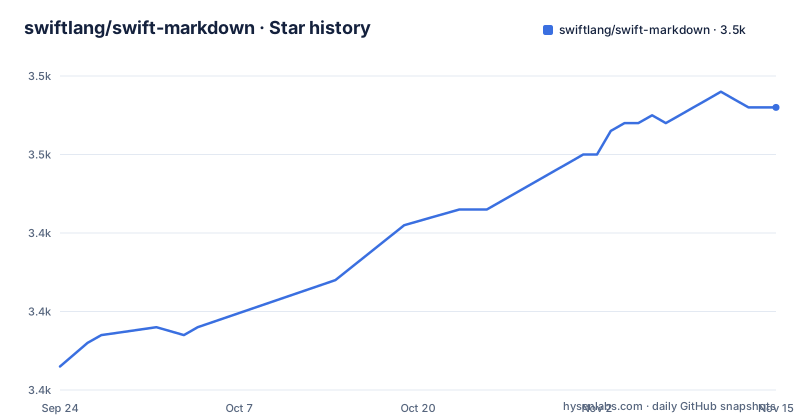
Star history
- swiftlang/swift-markdown3,456 ★ · +33
| Repository | 2026-09-24 | 2026-11-15 |
|---|---|---|
| swiftlang/swift-markdown | 3.4k | 3.5k |
33 Stars in the last 52 days, measured from the daily GitHub snapshot. Compare with other projects
Editorial analysis
The setup snippet pins a branch
The getting started section opens with a manifest line, and it is worth reading twice:
.package(url: "https://github.com/swiftlang/swift-markdown.git", branch: "main"),The dependency is declared by branch rather than by version requirement, which means a project copied from this snippet resolves to whatever the default branch contains on the day it is built. The project itself is versioned, with recent releases in the 0.7, 0.8 and 0.9 lines, so the pinning is available and simply not used in the example. Everything else in the setup follows the ordinary pattern: the dependency is added to the manifest, and the product is then declared as a dependency of a target by name and package. Nothing else in the file warns about the branch, which makes this the first thing to change when you take it.
The dialect is explicitly allowed to move
The parser is not written by this project. It is the GitHub-flavored Markdown implementation of the reference C parser, and the README says the library follows that specification closely as a result. Then comes the sentence that matters more than the first one: as the needs of the community change, the effective dialect this library implements may change. That is a deliberate statement that parsing behaviour is not frozen, even when no version of the package changes. For a tool that formats documents, that is reasonable. For a tool with golden-file tests, or one whose output must match another implementation byte for byte, it means a dependency bump can change your output, and the file offers no compatibility promise to lean on instead.
A copy-on-write tree borrowed from SwiftSyntax
The markup tree is described in one dense sentence: immutable, persistent, thread-safe, copy-on-write value types that copy only the substructure that has changed. That combination is the whole design. Immutability is what makes sharing safe, thread safety follows from it rather than being added separately, and copy-on-write is what stops a document with a thousand paragraphs from copying a thousand paragraphs every time one of them is edited. The README names where the strategy comes from, pointing at the sibling syntax tooling project, so anyone who has met that model already knows what to expect here. It also means editing is an operation that returns a new tree rather than mutating one, which is worth internalising before writing the first loop over a document.
Two manifests and a second build system
Most Swift packages carry one manifest. This repository carries two: the current one and a version-specific companion for an older Swift release, so a package using an older toolchain can still resolve it. Then there is a CMake build. The top level has a CMake list file, a cmake directory, a bin directory, a tools directory and a snippets directory alongside the sources and tests, which is the shape of a repository that has to be consumable by more than one toolchain at a time. A metadata file for the package index sits there too, which is why the project shows up in a searchable index of packages rather than only on its own documentation site. None of this is explained in the README, and all of it affects how you consume the library.
Parsing takes a string or a URL
One initialiser covers both cases. You hand it either a string or a URL and get a document back:
import Markdown

let source = "This is a markup *document*."
let document = Document(parsing: source)
print(document.debugDescription())
What comes back is a tree, and the README prints it as an indented outline where a document contains a paragraph, the paragraph contains text runs and an emphasis node, and the emphasis contains the emphasised text:
Document
└─ Paragraph
   ├─ Text "This is a markup "
   ├─ Emphasis
   │  └─ Text "document"
   └─ Text "."
That outline is the fastest way to understand the API, because it is the API. Nodes are values, children are children, and a debug description is available on any of them.
Feature requests point at the documentation forum
The contributing section is short and points outward for its rules. Bug reports go to the project's issue tracker, which has a component selector so issues specific to this package can be told apart from the rest of the ecosystem, and the file asks reporters to follow the wider Swift bug reporting guidelines and give as many details as they can. Feature requests can go to an issue or to a discussion on the Swift forums. That forum link is worth noting for what it is: it resolves to the category for the documentation tooling, not a general development category, so a parser feature request lands in a room full of people working on something else. The contribution guide itself is the Swift project's, not this repository's.
A 2023 copyright beside a 2026 release
The last line of the file is a copyright notice covering 2021 to 2023, attributed to Apple and the Swift project authors. The releases tell a later story: the most recent is from September 2026, following one in May and one in October 2025, and the last commit to the default branch is dated 2026-10-03. So the notice is not a statement that the project stopped, it is a notice that has not been extended. A licence file and a notice file sit at the root beside it, which is the standard arrangement for a package whose code carries both an Apache licence and third-party attributions. No project homepage is declared for the repository, while the README links a documentation site and the package index entry.
Editorial conclusion
Swift Markdown fits a Swift codebase that needs a Markdown tree rather than a rendered string, particularly one that already depends on the sibling syntax tooling and wants the same value semantics. Check three things before you depend on it: that you pin a version rather than copying the manifest snippet, since the snippet in the README tracks a branch and your build would then move under you, that you are comfortable with the dialect being allowed to change as the community moves, and that your toolchain matches the manifest you use, because the repository keeps a second manifest for an older Swift release alongside a CMake build for non-SwiftPM setups. The tree is cheap to inspect, which makes it a good fit for tooling.
Frequently asked questions
What is Swift Markdown?
A Swift package for parsing, building, editing and analyzing Markdown documents. Its parser is powered by the GitHub-flavored Markdown cmark-gfm implementation, so it follows that specification closely.
How do I add Swift Markdown to a Swift project?
Add the package to the dependencies in the manifest and declare its product as a target dependency. Note that the README's snippet pins the dependency to the main branch rather than to a version, while the project publishes versioned releases.
Is the Swift Markdown markup tree safe to share between threads?
Yes, by design. The tree is made up of immutable, persistent, thread-safe, copy-on-write value types that copy only the substructure that has actually changed.
What can Swift Markdown parse?
A document from a string or a URL, through a single initialiser. The package covers parsing, building, editing and analyzing, and a debug description prints the tree of nodes, such as paragraphs, text runs and emphasis nodes.
Where do I report a bug in Swift Markdown?
On its GitHub issue tracker, which has a component selector for issues specific to this package, following the wider Swift project's bug reporting guidelines. Feature requests can go to an issue or to a discussion on the Swift forums.
Official sources
Add this badge to your README
If you maintain this project, the badge below links readers to this analysis and shows its maintenance status from the daily GitHub snapshot. Paste the markdown into your README; add ?metric=license or ?metric=stars to the image URL for a different field.

[](https://hysenlabs.com/projects/swiftlang-swift-markdown)Star history chart for your README
[](https://hysenlabs.com/projects/swiftlang-swift-markdown)Was this useful?