quick-look-plugins is a link list, and the fix for a silent plugin is qlmanage -r
List of useful Quick Look plugins for developers
At a glance
- What is it?
- Sindre Sorhus's Quick Look plugins repository is a curated list and nothing else, with a readme and a screenshots directory and no code, a package manifest or a licence that metadata can identify. The operational content is short and specific: a .qlgenerator goes into ~/Library/QuickLook, `qlmanage -r` is what makes Quick Look notice it, and on Catalina and later many plugins need the quarantine attribute stripped from that directory before they run at all.
- Who is it for?
- quick-look-plugins fits a Mac user who previews a lot of unfamiliar file types and wants a maintained answer to which generator handles which format, particularly Markdown, archives, JSON, video and, unusually for a developer list, chemistry and 3D printing formats.
- Can I use it commercially?
- Not without permission. GitHub finds no licence file in the repository, and without a licence all rights are reserved by default: you may read the code but not reuse it. Check the README, or ask the authors, before using it.
- Is it still maintained?
- Yes. The repository last received commits 111 days ago.
- What is it written in?
- GitHub does not report a main language for this repository.
Answers come from the project's GitHub data, last synced on November 13, 2026, and from our analysis. They are not legal advice.
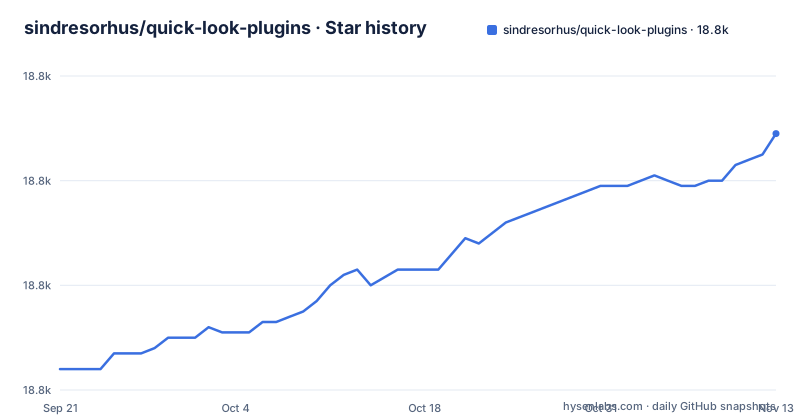
Star history
- sindresorhus/quick-look-plugins18,809 ★ · +45
| Repository | 2026-09-21 | 2026-11-13 |
|---|---|---|
| sindresorhus/quick-look-plugins | 18.8k | 18.8k |
45 Stars in the last 53 days, measured from the daily GitHub snapshot. Compare with other projects
Editorial analysis
qlmanage -r is the step that makes a copied generator load
The manual install section is three steps and the third one is the one people miss. Click download manually. Move the downloaded .qlgenerator file into `~/Library/QuickLook`. And then run:
qlmanage -r`qlmanage` is the command line tool that drives macOS Quick Look, and `-r` resets it. Quick Look maintains a set of registered generators, and copying a file into the directory does not by itself put it into that set. So the failure mode without the reset is the confusing one: the plugin is in the right place, the file type still previews with the system default, and there is no error to explain it.
That single command is the most useful thing in this repository for anyone installing by hand, and it is easy to miss because it is a bare utility invocation with no output described.
The directory itself is also part of the contract. `~/Library/QuickLook` is the per-user plugin location, so a plugin installed this way belongs to one account rather than the machine, and the manual path is the one that does not go through Homebrew. Most entries are Homebrew formulae and casks, where a maintainer has already done the file placement.
The Catalina fix strips the quarantine attribute from the whole directory
There is a subsection headed Catalina notes, and it starts by saying that to get many plugins working in Catalina and later you will need to remove the quarantine attribute. It gives two commands, one to inspect and one to act:
xattr -r ~/Library/QuickLookxattr -d -r com.apple.quarantine ~/Library/QuickLookThe first lists the extended attributes on everything in the directory. The second deletes the quarantine attribute from all of it, recursively.
Read carefully, that second command is not scoped to the plugin you just downloaded. It clears the attribute from every file in `~/Library/QuickLook`, which is the set of plugins you have installed. The quarantine attribute is what macOS sets on files that arrive from a browser or an archive, and it is what Gatekeeper consults, so the documented cure for plugins that will not run is to remove the gate for the whole directory.
That is a reasonable trade for a developer who has decided they want these plugins, and it is worth making deliberately. It is also why exactly one entry in the list is installed differently, because `SourceCodeSyntaxHighlight` is the only one whose command carries the flag itself, `brew install --cask --no-quarantine syntax-highlight`, and it is also the only one the list warns might overwrite other plugins.
Six of nineteen entries are paid, and four are one vendor's apps
Count the entries and the money markers. There are nineteen plugins in the list, and six of them carry a money emoji, which in this list means purchase rather than free install.
Those six are Source Code Preview, Peek, Folder Preview, Folder Quick Look, Markdown Preview and EPS Preview. Four of them carry an `anybox.ltd` address: Source Code Preview, Folder Preview, Markdown Preview and EPS Preview, and all four are purchased on the App Store except EPS Preview, which is bought from the vendor's own site.
So a list whose description is useful Quick Look plugins for developers is roughly a third commercial catalogue, and close to a quarter of it is one company's products. That does not make it wrong, and a markdown renderer with Mermaid support is a reasonable thing to pay for. It does mean a reader working down the list will hit a paywall sooner than the word curated suggests.
The other thirteen install free, either through Homebrew or as a direct download, and the Homebrew entries are the ones with a version to track.
The two riskiest entries are the ones the list flags
Two entries carry warnings, and it is worth reading both before installing.
Peek is described as allowing you to copy and find text, jump to line numbers, render GitHub-flavoured Markdown with a generated table of contents, restore scroll positions and highlight syntax across over 300 file extensions. It is a paid app, and then there is a line under it: the app is abandoned and buggy, but still functional.
`SourceCodeSyntaxHighlight` previews many different source code files, and its note is blunter: this might overwrite some other Quick Look plugins. It is also the entry with the widest scope in the list by implication, because a syntax highlighter that handles many file types is a natural candidate to claim the extensions other plugins also claim.
Both warnings sit next to the entry rather than in a separate caveats section, which is the useful thing about this list. A reader is told before installing, not after.
It is also worth pairing this with the previous section: the entry that might overwrite other plugins is the one installed with `--no-quarantine`.
Three Markdown generators, two of them free, one needs a custom tap
Markdown is the most contested slot in the list, with three entries.
`QLMarkdown` is described simply as preview Markdown files, installed with `brew install --cask qlmarkdown`. `FluxMarkdown` is the feature-heavy free one: Markdown with Mermaid diagrams, KaTeX math, GFM support and an interactive table of contents, installed with `brew tap xykong/tap && brew install --cask flux-markdown`. The paid `Markdown Preview` from the same anybox.ltd vendor offers KaTeX and Mermaid.
So the overlap is substantial. Two of the three do math and diagrams, and the difference between the two free ones is that FluxMarkdown adds Mermaid diagrams, KaTeX math, GFM support and an interactive table of contents, and needs a tap added before install.
The choice is therefore between a plain cask, a cask behind a custom tap with more features, and a paid app. For a reader who previews Markdown often, that is a genuine decision rather than a search, and the fact that three people built one is a fair signal that the built-in preview is not enough.
The same pattern appears in archives, with three entries where two are paid, and in folder previews, where the two paid ones are the only ones that do it.
The list has drifted from source code into chemistry and 3D printing
The description says plugins for developers, and the first entries are what you would expect: `QLStephen` previews plain text files with no or unknown extensions, with README, CHANGELOG and index.styl given as the examples, and `SourceCodeSyntaxHighlight` previews many different source code files. `QLMarkdown` and `ProvisionQL`, which previews iOS and macOS app and provision information, are developer infrastructure.
Then the entries stop being about code. `Burrete` previews PDB, mmCIF, SDF, XYZ, trajectories and chemistry tables in Finder, and has no Homebrew path at all, only a manual download. `Preview3MF` previews 3MF 3D-printing models, with real 3D rendering plus Finder thumbnails, installed from a third-party cask tap at `cavoco/tap/preview3mf`.
So the list has grown well past source code into scientific file formats and manufacturing formats, which is not a criticism so much as a description of where the gaps in macOS's built-in preview are. A structural biologist and someone looking at 3D print files are as underserved by Quick Look as a developer reading a README.
The other non-code entries confirm the spread: QuickLookJSON, QLVideo for video files with thumbnails, cover art and metadata, and WebP for images.
WebP is here only in case you dislike qlImageSize
Two entries exist mainly for historical reasons, and both say so.
`WebP` previews WebP images, and the note under it is that this is already covered by `qlImageSize`, so the plugin is listed here only in case you do not like `qlImageSize`. The plugin it duplicates is named, the reason for keeping the alternative is a preference rather than a capability, and nothing else about the entry suggests a difference.
`BetterZipQL` previews archives, and the note is that the plugin was integrated with the BetterZip app. So `brew install betterzip` installs the app and its Quick Look plugin together, and the standalone plugin is still downloadable as a legacy version, BetterZipQL-1.5.zip.
Both entries make the list a record rather than only a recommendation. A list that deleted superseded entries would be shorter and would lose the information that qlImageSize already handles WebP, and that the archive preview you want now comes bundled with a different application.
For a reader, the practical effect is that the list is not sorted by quality and the ordering is not an endorsement. `WebP` appears between `ProvisionQL` and `SourceCodeSyntaxHighlight` for no reason a reader can infer.
The metadata reports no licence, and the README dedicates it to the public domain
The top level of this repository is two entries, `readme.md` and a `screenshots/` directory. There is no source code, no package manifest, no test configuration and no build. The primary language is not identified, and there are no GitHub releases.
So there is nothing here to install, compile or depend on. It is an Awesome list, which the badge in the title line says, and its entire value is the curation.
The licence is where the metadata and the content disagree. The repository's licence field does not resolve to an identifier, while the README ends with a section carrying a CC0 badge and a sentence: to the extent possible under law, Sindre Sorhus has waived all copyright and related or neighbouring rights to this work.
CC0 is a public domain dedication, which is the strongest grant available and the opposite of unknown. If you want to reuse the list, the README is the authority and the badge tells you the terms, and the missing metadata identifier is a gap in how the repository is described rather than a gap in what you are allowed to do.
The last push to the default branch was on 2026-07-25, so the curation is current even though the repository has no release history to point at.
Editorial conclusion
quick-look-plugins fits a Mac user who previews a lot of unfamiliar file types and wants a maintained answer to which generator handles which format, particularly Markdown, archives, JSON, video and, unusually for a developer list, chemistry and 3D printing formats. It does not fit anyone expecting a tool, because there is nothing to install from the repository, and it does not fit a user unwilling to strip the quarantine attribute from `~/Library/QuickLook`, which the README states is what many plugins need on Catalina and later. Before acting on the list, check three things: whether the entry you want is free, because six of the nineteen are paid apps and four of those carry an anybox.ltd address, whether you will run `qlmanage -r` after copying a generator manually, since Quick Look caches its set, and whether you are installing SourceCodeSyntaxHighlight, which the README warns might overwrite other Quick Look plugins and which is the only entry installed with a no-quarantine flag.
Frequently asked questions
How do I install Quick Look plugins?
The list gives two routes. With Homebrew, run `brew install <package>` for the specific plugin, since most entries are formulae or casks. Manually, click the download link, move the .qlgenerator file to `~/Library/QuickLook`, and then run `qlmanage -r` so Quick Look reloads its generator set. On Catalina and later you may also need `xattr -d -r com.apple.quarantine ~/Library/QuickLook` to remove the quarantine attribute.
What is Quick Look on a Mac?
The repository does not describe macOS Quick Look itself, it maintains a list of plugins for it. What the list shows about the mechanism is that a plugin is a .qlgenerator file placed in `~/Library/QuickLook`, that Quick Look has to be reset with `qlmanage -r` before a newly copied generator takes effect, and that many plugins need the quarantine attribute removed to run on Catalina and later.
Is Quick Look free?
The list is free to read and reuse, since the README states that Sindre Sorhus has waived all copyright and related rights to the work and carries a CC0 badge. The plugins are a mix: thirteen of the nineteen entries install free through Homebrew or a direct download, while six are marked as paid and are bought on the App Store or a vendor's site, four of those six carrying an anybox.ltd address.
Official sources
Add this badge to your README
If you maintain this project, the badge below links readers to this analysis and shows its maintenance status from the daily GitHub snapshot. Paste the markdown into your README; add ?metric=license or ?metric=stars to the image URL for a different field.

[](https://hysenlabs.com/projects/sindresorhus-quick-look-plugins)Star history chart for your README
[](https://hysenlabs.com/projects/sindresorhus-quick-look-plugins)Was this useful?