crafted-emacs: a baseline Emacs configuration you are meant to outgrow
A sensible base Emacs configuration.
At a glance
- What is it?
- Crafted Emacs is a modular Emacs Lisp configuration that deliberately leaves holes, prefers built-in Emacs features over packages, and expects you to eventually rewrite it into something of your own.
- Who is it for?
- crafted-emacs fits Emacs users who want to learn by reading a small, well documented configuration and who intend to own the result, especially on Guix Home or with a package manager that supplies Emacs packages outside package.el. It does not fit someone who wants a finished, batteries included editor, because the project states plainly that there will be holes the user must fill, and it does not fit a team that needs a specific IDE workflow out of the box.
- Can I use it commercially?
- Yes. MIT is a permissive licence: you can use, modify and sell software built on it, as long as you keep its copyright and licence notices.
- Is it still maintained?
- Yes. The repository last received commits 6 days ago.
- What is it written in?
- Mainly Emacs Lisp, according to GitHub's language statistics.
Answers come from the project's GitHub data, last synced on November 7, 2026, and from our analysis. They are not legal advice.
Star history
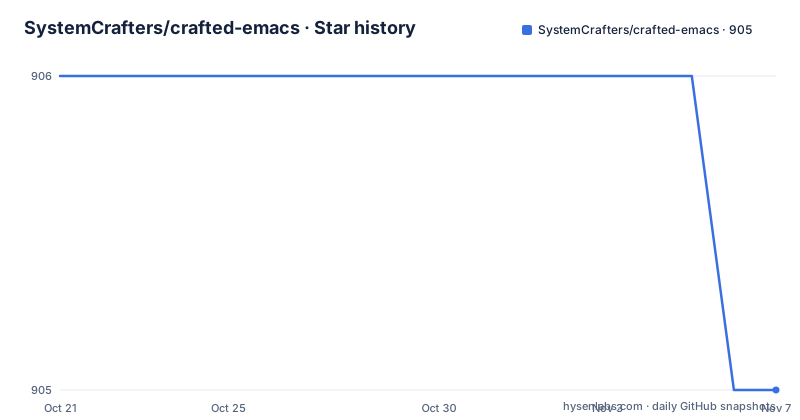
- SystemCrafters/crafted-emacs905 ★ · -1
| Repository | 2026-10-21 | 2026-11-07 |
|---|---|---|
| SystemCrafters/crafted-emacs | 906 | 905 |
-1 Stars in the last 17 days, measured from the daily GitHub snapshot. Compare with other projects
Editorial analysis
The stated goal is that you stop using it
Crafted Emacs is an attempt to simplify creating a configuration for Emacs, and the README is unusually honest about where that leads. It is not intended to provide all possible configuration for every eventuality. The project envisions it as a nice baseline for users who want to create their own Emacs configuration, and it says outright that as a user develops their skill with Emacs Lisp, they may end up rewriting their configuration to the point where they are no longer using Crafted Emacs. That is described as an exciting possibility rather than a failure.
This framing decides everything else. The project takes the word starter in the sense of starting kit, and it says so: they help you start your configuration, they are not the kitchen sink, and they do not provide every possible configuration. The last line of that thought is blunt. It is your configuration.
For a reader deciding whether to adopt it, that is a rare and useful signal. A configuration that is designed to be replaced teaches by being read, and it does not pretend that the author knows which packages belong in your workflow. A configuration that tries to be everything is a bundle of opinions you will spend an afternoon turning off. Crafted Emacs makes the opposite bet, and the bet is what you are really evaluating when you choose it.
Opt-in modules and a core that sets almost nothing
The mechanics are simple enough to describe in a sentence. The core configuration only sets up Emacs to have a cleaner presentation with sensible defaults, and it is up to the user to decide which crafted- modules to load. Configuration modules depend on other modules and the base configuration as little as possible.
That last line has a consequence the project spells out: someone should be able to install or copy code from a crafted- module into their own configuration without using Crafted Emacs. The modules are not bound together, they are not a framework, and copying a file out of the modules folder is a supported way to use the project rather than an escape hatch.
The goals list also sets a rule about surprise. Customizations in the modules are opt-in by default to avoid surprising behavior, and there is a strong preference for fewer packages over more, with the project staying closer to built-in functionality as much as possible. The project also prefers customize-set-variable instead of setq for defcustom values, because the attached constructors and setters then run when the value is set. That last choice is small but revealing: the code is written for someone who will read it and change it, not for someone who will only load it.
project.el, tab-bar-mode and eglot instead of the usual suspects
The built-in-first principle is not abstract, it is a list of named substitutions. The README gives project.el instead of Projectile. It gives tab-bar-mode instead of Perspective.el, persp-mode and eyebrowse. It gives eglot instead of lsp-mode, with the reason spelled out: eglot prioritizes built-in functionality. Where external packages are used, the project prefers those layered on top of existing built-in behaviour rather than ones that replace it.
For someone who already runs Emacs, this list is the fastest way to understand the configuration's character. It is a set of opinions about the cost of a dependency. Projectile is faster to search in many cases, and it also brings its own index, its own key bindings and its own file discovery rules, which is a lot of surface area to learn and to debug. tab-bar-mode is a tab bar, and persp-mode is a workspace system, and adopting the second changes how you think about buffers. eglot speaks the language server protocol without taking over the way lsp-mode does.
None of this is a claim that the built-in versions are better in every case. It is a claim that the amount of Emacs you have to understand is smaller, and that is a decision about learning cost rather than about raw capability.
Cloning the repo and loading two files
Getting started is a clone and two load forms, and the README says so directly. The first step is fetching the project from GitHub:
git clone https://github.com/SystemCrafters/crafted-emacsAfter that you add a load form to your early-init.el, and the README gives it with the comment that it assumes you cloned Crafted Emacs in your home directory, and to update the path if you did not:
(load "~/crafted-emacs/modules/crafted-early-init-config")And a second load form in your init.el:
(load "~/crafted-emacs/modules/crafted-init-config")These two lines add the crafted-emacs/modules folder to the load-path, which is the whole wiring. After that you pick your modules by hand. If you need packages installed, you look for modules ending with -packages.el, and if you only want the configuration, the modules ending with -config.el are the ones you want.
The detail worth noticing is that the two load forms are separate files, early-init and init, matching the two phases of Emacs startup. The modules folder is also where a Guix Home configuration can hook in, and the project notes that it can use packages installed via the Guix package manager instead of package.el.
An info manual ships with the source, and there is a v1 to v2 transition guide
Documentation is one of the stated goals, and it is thorough, complete and easy to find according to the project. There is an info manual for Crafted Emacs distributed with the source, referenced from the README with the info:crafted-emacs link.
That is worth a comment, because an Info manual is a different artefact from a documentation website. It is read with the built-in info reader, it is indexed with tags, and it travels with the checkout, so it works on a machine with no network. For a project whose stated audience includes people who are new to Emacs Lisp, having the explanation of the code in the same place as the code, in the format Emacs already knows how to open, removes a whole category of friction.
The repository root also carries a v1tov2transition-guide.md file, which tells you something about the project's history without needing a release feed. There are no GitHub releases for the repository, so the transition guide and the per-version branches are how the history is recorded. The docs/ folder holds the Getting Started Guide referenced from the README as docs/getting-started-guide.org, and the examples/ folder contains worked configurations: base, elpaca, evil, rust and straight-el.
Everything is meant to be reversible, and the hole is the point
Reversibility is listed as a principle rather than a feature. The project says it recognizes not everyone will agree with its decisions, so each customization should be easily reversible in the user's configuration file. Nothing in the design locks you in, which follows from the modular structure: if a module's choices are wrong for you, you do not load that module, or you override the variable afterwards.
The related principle is that Crafted Emacs helps you learn Emacs Lisp. Instead of providing a higher-level configuration system out of the box like other Emacs configurations, it follows standard Emacs Lisp patterns so that you can learn by reading the configuration, with comments where they help the reader understand the choices and how the code works. The contributing guidelines push the same way, asking for defcustom variables for things users are expected to modify, verbose doc-strings for defvar, defcustom, defun and defmacro, and comments for blocks.
The cost of that philosophy is the hole the project names outright. It is not a turn-key solution and there will be gaps for you to fill. A new user should expect to spend the first afternoon wiring up the pieces they actually need. What they get in exchange is a configuration they can read end to end, in code that is mostly straight Emacs Lisp with no macros, layers or new configuration system on top.
Guix Home compatibility is a design constraint, not a feature toggle
One of the five principles is that the configuration can be integrated with a Guix configuration. It should be possible to customize aspects of the Crafted Emacs configuration inside a Guix Home configuration so that things like font sizes and themes can be system-specific, and it can use packages installed via the Guix package manager instead of package.el.
That principle is a good deal of work to satisfy, and it explains a lot about the shape of the code. If the user can change font size and theme from the system level, then those values cannot be hardcoded deep inside a module. They have to be defcustom variables, which is exactly what the contributing guidelines ask for, and the preference for customize-set-variable over setq is what makes an external override behave the way the system expects. The Guix requirement and the learnability requirement turn out to be the same requirement.
The examples/ folder reflects the same openness. Alongside base there is an elpaca example and a straight-el example, which are different ways of getting third-party packages into Emacs, and an evil example, which is a modal editing layer. The point of shipping them is that package management and editing style are choices the user makes, and the base configuration has to survive all of them.
Editorial conclusion
crafted-emacs fits Emacs users who want to learn by reading a small, well documented configuration and who intend to own the result, especially on Guix Home or with a package manager that supplies Emacs packages outside package.el. It does not fit someone who wants a finished, batteries included editor, because the project states plainly that there will be holes the user must fill, and it does not fit a team that needs a specific IDE workflow out of the box. Before adopting it, read the Getting Started Guide in docs/getting-started-guide.org, decide which crafted- modules you actually want, and check the licence field on the repository says MIT before you copy code out of it. The last push was on 2026-10-19, and the repository publishes no GitHub releases.
Frequently asked questions
How do I install crafted-emacs?
Clone the repository with git clone https://github.com/SystemCrafters/crafted-emacs, then add a load form for ~/crafted-emacs/modules/crafted-early-init-config in your early-init.el and a load form for ~/crafted-emacs/modules/crafted-init-config in your init.el. The Getting Started Guide in docs/getting-started-guide.org has the details.
Which crafted-emacs modules should I load?
The core configuration only sets sensible defaults and you decide which crafted- modules to load. Modules ending with -packages.el install packages, and modules ending with -config.el only provide configuration, so the examples folder under crafted-emacs/examples is a good place to start.
Does crafted-emacs include a documentation manual?
Yes, there is an info manual for Crafted Emacs distributed with the source, referenced from the README as info:crafted-emacs. It is read with the built-in Emacs info reader, so it works without a network connection.
Can I use crafted-emacs with Guix?
Yes, the project lists integration with a Guix configuration as a design principle, so aspects such as font sizes and themes can be set system-specific inside a Guix Home configuration. It can also use packages installed via the Guix package manager instead of package.el.
Is crafted-emacs a complete Emacs setup?
No. The project states it is not a turn-key or kitchen sink solution and that there will be holes the user must fill. It is meant as a baseline for people who want to build their own configuration and eventually replace it.
Official sources
Add this badge to your README
If you maintain this project, the badge below links readers to this analysis and shows its maintenance status from the daily GitHub snapshot. Paste the markdown into your README; add ?metric=license or ?metric=stars to the image URL for a different field.

[](https://hysenlabs.com/projects/systemcrafters-crafted-emacs)Star history chart for your README
[](https://hysenlabs.com/projects/systemcrafters-crafted-emacs)Was this useful?