obsidian-various-complements-plugin completes words inside Obsidian
This plugin for Obsidian enables you complete words like the auto-completion of IDE.
At a glance
- What is it?
- This Obsidian plugin brings IDE-style word completion to your notes, and its repository is written for contributors rather than users. The interesting engineering story is in the dependency list and the verify chain: a Svelte UI bundled by esbuild, a Chinese tokenizer, and a mobile build check that is part of every release.
- Who is it for?
- Adopt this plugin if you write in Obsidian and want completion suggestions in your notes, and evaluate it from the hosted documentation rather than the repository, because the README covers contributor setup and says nothing about the completion sources or the settings you can configure.
- Can I use it commercially?
- Yes. MIT is a permissive licence: you can use, modify and sell software built on it, as long as you keep its copyright and licence notices.
- Is it still maintained?
- Yes. The repository last received commits 74 days ago.
- What is it written in?
- Mainly TypeScript, according to GitHub's language statistics.
Answers come from the project's GitHub data, last synced on November 7, 2026, and from our analysis. They are not legal advice.
Star history
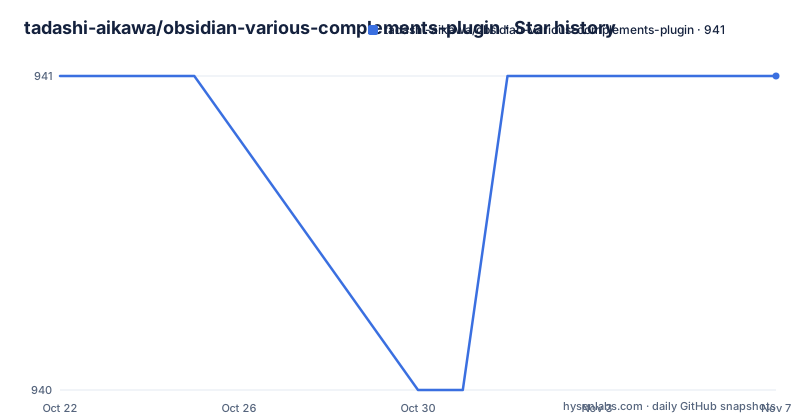
- tadashi-aikawa/obsidian-various-complements-plugin941 ★ · +0
| Repository | 2026-10-22 | 2026-11-07 |
|---|---|---|
| tadashi-aikawa/obsidian-various-complements-plugin | 941 | 941 |
0 Stars in the last 16 days, measured from the daily GitHub snapshot. Compare with other projects
Editorial analysis
A completion plugin whose README talks to contributors
The plugin does one thing, and the description says it plainly: it enables you to complete words like the auto-completion of an IDE, inside Obsidian. The project is a TypeScript Obsidian plugin, licensed under MIT, and the demonstration is a short animated GIF hosted on the author's documentation site.
What is unusual is where the documentation lives. The README has a documentation section that points at an official documentation site, and it also links to a DeepWiki entry. Below that, the README switches audience: for users it lists where to file feature requests and bugs, where to ask questions in discussions, and a note that pull requests should be preceded by an issue or a discussion. Then a section for developers covers the toolchain and the commands.
So the repository answers the engineering questions well and the user questions not at all. Nothing in it describes what the completion actually suggests, which sources it draws on, what settings exist, or how the suggestion list is ranked. Those details live in the hosted documentation, which is a reasonable split for a plugin with many users and a small maintainer, but it does mean you cannot evaluate the feature set from the source alone.
The version history suggests active work. Releases 11.4.0 on 2026-06-24, 11.4.1 and 11.4.2 both on 2026-08-26 show a plugin that ships small increments often, and the last push was on 2026-08-26.
What the dependency list says about the design
The manifest is short and each entry tells you something.
chinese-tokenizer, pulled from a GitHub repository rather than a registry, is the clearest signal about the scope of the completion. Splitting Chinese text into words is not a trivial problem, and a plugin that wants to complete words sensibly for Chinese notes needs a proper segmenter rather than whitespace splitting. It also implies the completion logic is not purely Latin-script oriented.
emoji-regex is there to recognise emoji in the text, which matters for a completion engine because an emoji counts as a character in a word that is being completed, and treating it as several code units would corrupt the offsets.
minimatch is a glob matcher. In a note-taking app that is the natural way to scope a rule to a path pattern, for instance a completion source that only applies inside a particular folder or to notes matching a pattern.
svelte-lucide-icons provides icon components for the settings interface, which tells you the plugin ships a settings UI built with Svelte, and ts-deepmerge merges configuration objects.
The build side is equally telling. The plugin entry point is main.js, the build is driven by an esbuild config at esbuild.config.mjs, and the user interface is written in Svelte with svelte-preprocess. The dev dependency list includes the Obsidian type definitions, Jest with esbuild-jest, Prettier with a Svelte plugin, and a TypeScript native preview compiler named tsgo, which is used for the typecheck step rather than the standard tsc binary.
Setting up a development environment with pnpm
The contributor path is short and entirely scripted.
The requirements are Node.js v24 and Betterleaks, the project that checks for leaked credentials in the repository. The first step points Git at the hooks directory bundled with the project, so the checks run on commit:
git config core.hooksPath hooksThen install the dependencies with pnpm, using the lockfile:
pnpm ciA development build runs the esbuild config in watch mode:
pnpm devTests run through Jest, and the script is defined as jest with coverage, so a plain run reports coverage:
pnpm testFor continuous work, the watch variant is available:
pnpm test --watchThe package manager is pnpm rather than npm, and the repository carries pnpm-lock.yaml and pnpm-workspace.yaml, so a contributor working on a fork should use pnpm to match the lockfile rather than generating a new one with npm. There is also a mise.toml at the root, which is a convenient way to pin the tool versions the author expects.
Releases are not done from a laptop. The README says to run a Release Action in the GitHub Actions workflows, and the repository has a version-bump.mjs script alongside versions.json and a .releaserc.mjs configuration, so the version bump and the release note are automated steps rather than manual edits.
The verify chain is the real quality contract
The most useful thing in package.json is the verify script, because it defines what has to pass before a change is considered done:
"verify": "pnpm ci && pnpm build && pnpm pre:push && pnpm mobile:check"Read in order, it installs from the lockfile, builds, runs the pre-push gate, and then checks the mobile bundle. The pre-push gate itself is:
"pre:push": "pnpm typecheck && pnpm format && pnpm test"Three things in a row, type checking, formatting, and tests. The type check runs tsgo with -noEmit and -skipLibCheck, so it verifies types without writing output and without checking the whole dependency tree. The format step is a Prettier list over the TypeScript files, run with -l so it reports files that differ from the expected formatting rather than rewriting them, which is what you want in a check. The test step is Jest with coverage.
The last step is the interesting one:
"mobile:check": "node esbuild.config.mjs production --bundle --platform=browser"That is a production bundle built for the browser platform, run as a check rather than as an artifact. The browser platform flag is what forces the plugin code to bundle without Node built-ins, which is the constraint a mobile install imposes. Catching that mismatch in CI instead of on a user's phone is the entire point of the step.
There is also a manifest-beta.json next to manifest.json, so a beta channel exists alongside the stable one, and a tests badge in the README pointing at a Tests workflow.
Licence, packaging and the cost of staying current
The licence is MIT, declared in the manifest and with a LICENSE file at the repository root, which is the usual choice for an Obsidian community plugin and means you can fork and modify it freely.
The packaging is the part a user actually touches. The plugin is published with a manifest.json that Obsidian reads to list the plugin, and the compiled entry point is main.js, which is what the manifest points at. A versions.json file maps older versions of the plugin to their compatibility metadata, which is how Obsidian knows what to do with an installation that predates a manifest format change. The beta manifest supports a pre-release track for people who want changes earlier.
The upgrade cost for a user is low, and that is the project's real strength. A plugin that is not a separate application can be updated from inside Obsidian, and the release cadence suggests that path is well trodden.
The cost falls on the maintainer instead, and the tooling shows the effort involved. Jest with esbuild-jest, a Svelte preprocessing chain, a native preview TypeScript compiler, Prettier with an import organising plugin, a browser-platform bundle check, credential scanning through Betterleaks, git hooks wired to a hooks directory, and an automated release action all have to keep working as the Obsidian API moves. The manifest pins the Obsidian type definitions at 1.11.4, so a change in the host API surfaces as a type error in CI.
With a single listed author and a project at version 11.4.2, the maintainer concentration is the same risk it is for most Obsidian plugins, and the practical advice is to check the plugin's own documentation for the settings you care about rather than relying on the release notes to explain them.
Where this plugin does not reach
The obvious limit is scope. This is a completion plugin for the editor buffer, and nothing in the repository suggests it does anything else. It does not transform notes, it does not provide an AI assistant, and it does not touch your vault structure. If what you want is a note taking system that reasons about your content, a completion popup is the wrong shape of tool.
The second limit is what you can learn before installing. The README documents the contributor workflow in detail and says nothing about the completion behaviour, so a reader has to leave the repository to find out which sources feed the suggestions, whether the list is filtered by context, and what the settings look like. For a plugin that sits in the middle of your typing flow, that is a real gap in evaluating it, and the DeepWiki link and the hosted documentation site are the places to close it.
The alternative approach, if you want completion without a plugin, is to lean on the editor you already have. Any editor that supports user-defined snippets, custom completion sources or a text expander can do the same job for repeated phrases, and for a fixed vocabulary of your own, a snippet or template workflow gives you full control over what appears, with no plugin dependency and no version to track. What you give up is the context aware behaviour that a plugin with a tokenizer and a matcher can offer, and what you keep is a setup that cannot break when the plugin updates or when Obsidian changes its plugin API.
For Chinese text, the difference matters more than for Latin text. A snippet workflow inserts text you typed by hand, so segmentation never comes into play, while a completion engine that tokenises the input has to segment to know where the word starts.
Editorial conclusion
Adopt this plugin if you write in Obsidian and want completion suggestions in your notes, and evaluate it from the hosted documentation rather than the repository, because the README covers contributor setup and says nothing about the completion sources or the settings you can configure. Before installing, check the plugin's own documentation for how it decides what to suggest, and if you need completion that works the same way everywhere, a plain text editor with its own completion or a script that inserts snippets will serve you with less to maintain.
Frequently asked questions
What does obsidian-various-complements-plugin do?
It is a plugin for Obsidian that completes words as you type, in the style of IDE auto-completion. The plugin is written in TypeScript with a Svelte settings interface and is released under the MIT licence.
How do I set up a development environment for obsidian-various-complements-plugin?
You need Node.js v24 and Betterleaks. Run git config core.hooksPath hooks to enable the bundled hooks, install dependencies with pnpm ci, start a development build with pnpm dev and run the tests with pnpm test or pnpm test --watch.
What does the pnpm verify command check in obsidian-various-complements-plugin?
It runs pnpm ci, then pnpm build, then pnpm pre:push and then pnpm mobile:check. The pre-push gate runs the type check, the Prettier format check and the Jest tests, while the mobile check produces a production bundle for the browser platform, which is how plugin breakage on the mobile webview is caught in CI.
Does obsidian-various-complements-plugin work with Chinese text?
The manifest lists a Chinese tokenizer as a runtime dependency, alongside emoji-regex for emoji detection and minimatch for glob matching. Segmentation of Chinese words is therefore handled by a dedicated tokenizer rather than by whitespace splitting.
Where can I find the user documentation and the release notes for obsidian-various-complements-plugin?
The README links to an official documentation site and to a DeepWiki entry, and the releases are listed on the GitHub releases page. The README itself is written for contributors, with the user section pointing to issues and discussions.
Official sources
Add this badge to your README
If you maintain this project, the badge below links readers to this analysis and shows its maintenance status from the daily GitHub snapshot. Paste the markdown into your README; add ?metric=license or ?metric=stars to the image URL for a different field.

[](https://hysenlabs.com/projects/tadashi-aikawa-obsidian-various-complements-plugin)Star history chart for your README
[](https://hysenlabs.com/projects/tadashi-aikawa-obsidian-various-complements-plugin)Was this useful?