The Tailscale GitHub Action joins a runner to your tailnet
A GitHub Action to connect your workflow to your Tailscale network.
At a glance
- What is it?
- tailscale/github-action adds a step to a GitHub workflow that puts the runner inside your Tailscale network, so later steps can reach nodes that are not on the public internet. Nodes are created as ephemeral and preapproved, and they are removed when the run ends, but the authentication model and the Tailnet Lock case are where the sharp edges are.
- Who is it for?
- tailscale/github-action suits a CI pipeline that has to reach private services during a build or test run, and it suits teams that would otherwise expose those services to the internet or build brittle tunnels. It is the wrong choice if the runner needs permanent membership of the tailnet, since the node logs out and is removed after the run, and the wrong choice on a tailnet with Tailnet Lock unless you switch to a pre-signed auth key and set a state directory.
- Can I use it commercially?
- Yes. BSD-3-Clause is a permissive licence: you can use, modify and sell software built on it, as long as you keep its copyright and licence notices.
- Is it still maintained?
- Yes. The repository last received commits 4 days ago.
- What is it written in?
- Mainly TypeScript, according to GitHub's language statistics.
Answers come from the project's GitHub data, last synced on November 7, 2026, and from our analysis. They are not legal advice.
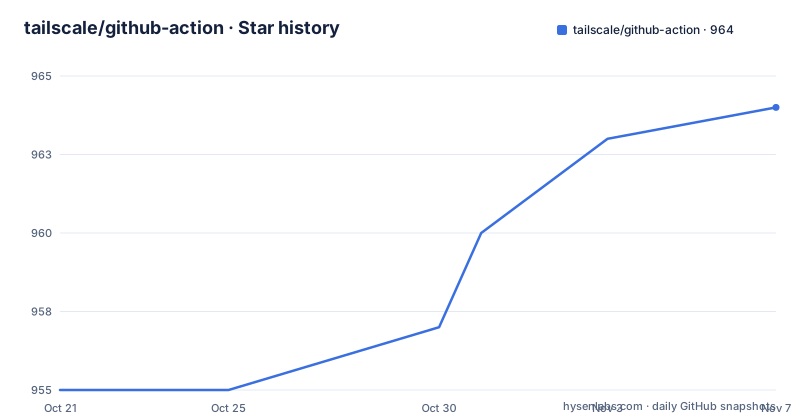
Star history
- tailscale/github-action964 ★ · +9
| Repository | 2026-10-21 | 2026-11-07 |
|---|---|---|
| tailscale/github-action | 955 | 964 |
9 Stars in the last 17 days, measured from the daily GitHub snapshot. Compare with other projects
Editorial analysis
One workflow step, and the rest of the job can reach the tailnet
The Tailscale GitHub Action connects to your Tailscale network by adding a step to your workflow. Subsequent steps in the Action can then access nodes in your Tailnet.
That is the entire promise, and it solves a problem that shows up in every organisation with internal services. A test job needs to reach a database, a staging API or a build artifact server that is not exposed to the internet. The usual answers are to open the service up, to build a tunnel, or to run the job inside the network. This action takes the last option for the duration of a single job.
The configuration is one step with three inputs:
- name: Tailscale
  uses: tailscale/github-action@v4
  with:
    oauth-client-id: ${{ secrets.TS_OAUTH_CLIENT_ID }}
    oauth-secret: ${{ secrets.TS_OAUTH_SECRET }}
    tags: tag:ci
The oauth-client-id and oauth-secret are an OAuth client for the tailnet being accessed, and the README recommends storing them as GitHub Encrypted Secrets. The tags input is a comma-separated list of one or more Tags for the node.
That last point is not optional detail. An OAuth client is not associated with any of the Users on the tailnet, so it has to Tag its nodes, and at least one tag is required. If you leave tags out, or use a tag the trust credential is not permitted to claim, the run fails with the error about requested tags being invalid or not permitted. Tags are how the tailnet decides what this identity is allowed to join, and they are the main thing you configure on the tailnet side.
Ephemeral and preapproved by default
The lifecycle of the node is deliberate, and it is the safety property that makes this usable from shared CI infrastructure.
Nodes created by the Action are marked as Ephemeral, so they log out immediately after finishing their CI run, at which point they are automatically removed by the coordination server. A job that hangs, is cancelled, or dies with the runner does not leave a machine sitting in your tailnet.
The nodes are also marked Preapproved on tailnets which use Device Approval. Without that flag, every CI run on a device approval tailnet would produce a pending device request for a human to approve, which defeats the purpose of having automation.
Both properties are defaults rather than options, and that is worth pausing on. Ephemeral means the action is designed for the case where the runner is not yours and should not persist. Preapproved means the action assumes it holds a credential with enough authority to bypass a human gate, which is also why the credential requirements are strict.
The related note is about self-hosted runners that persist after CI jobs have finished. In that case the GitHub Action leaves Tailscale binaries installed but stops the Tailscale background processes. So the runner image keeps the downloaded client and its cache, which is useful for the next job, and the process is gone, which is what prevents a stale node from lingering.
Three credentials, and only one of them avoids a long-lived secret
There are three ways to authenticate the runner against the tailnet, and they differ in what you have to store and what you have to trust.
The first is the OAuth client, as shown above, and it is the default path. The README is explicit that OAuth clients used for this purpose must have the writable auth_keys scope, which is the scope that lets the credential create nodes.
The second is workload identity federation, where the workflow proves its identity to the tailnet with a federated identity instead of a shared secret:
- name: Tailscale
  uses: tailscale/github-action@v4
  with:
    oauth-client-id: ${{ secrets.TS_OAUTH_CLIENT_ID }}
    audience: ${{ secrets.TS_AUDIENCE }}
    tags: tag:ci
This needs the id-token: write permission setting in the workflow, because the action has to request a JWT from GitHub:
permissions:
  id-token: write # This is required for the tailscale action to request a JWT from GitHub
The federated identity credentials must also have the writable auth_keys scope, and the same tag rule applies, since a federated identity is not associated with any of the Users on the tailnet and has to tag its nodes. There is also a hard version floor here, with Tailscale version 1.90.1 or later required for workload identity federation.
The third is an auth key, which the README lists as an alternative credential in the prerequisites along with the OAuth client ID and secret or the federated identity client ID and audience. The auth key path is the one used for Tailnet Lock, and it is where the configuration changes.
The trend across the three is clear. Each step removes a long-lived secret from the runner and moves trust to an identity the platform already issues, at the cost of a permission setting and a scope you have to get right.
Tailnet Lock breaks the usual recipe
If you are using this Action in a Tailnet Lock enabled network, the setup is different in two specific ways.
The first is the credential. You need to authenticate using an ephemeral reusable pre-signed auth key rather than an OAuth client. The word ephemeral matters here, since a pre-signed key in a lock-enabled network is bound to a single node and cannot be reused, which is what makes the lock meaningful.
The second is the state directory. You need to specify a state directory for the client to store the Tailnet Key Authority data in, which looks like this:
- name: Tailscale
  uses: tailscale/github-action@v4
  with:
    authkey: tskey-auth-...
    statedir: /tmp/tailscale-state/
That statedir is the part people miss. Without a place to keep the Tailnet Key Authority data, the node cannot participate in the lock, and the failure appears as an authentication problem rather than as a missing directory.
So if you are on a locked tailnet, the OAuth example at the top of the README is not your starting point. The auth key and statedir pair is, and the difference is not optional.
One more thing to note about how credentials are stored. The README recommends GitHub Encrypted Secrets for the OAuth client id and secret, which is the right place for them, but the key is still a shared credential with write scope in your tailnet. Anyone who can read that secret can create tagged nodes. Federated identity is the answer to that problem when your workflow platform supports it.
The node takes time to appear, so wait for it
There is a race condition in this design, and the documentation handles it directly rather than leaving you to discover it.
Propagating information about new peers, such as the node created by this action, across your tailnet is an eventually consistent process, and brief delays are expected. Until the GitHub workflow node becomes visible, other peers will not accept connections. The guidance is to verify connectivity to the intended nodes before executing steps that rely on them.
There are two ways to do that, and the choice depends on whether you know the peer addresses at workflow authoring time. If you do, the action has a ping input taking a list of hosts:
- name: Tailscale
  uses: tailscale/github-action@v4
  with:
    ping: 100.x.y.z,my-machine.my-tailnet.ts.net
If you do not know the peers at the time of installing Tailscale in the workflow, the action can be left out of it and you can run the tailscale ping command yourself:
tailscale ping my-target.my-tailnet.ts.netThe ping option will wait up to 3 minutes for a connection, direct or relayed.
That timeout is the practical consequence of the eventual consistency model. A step that assumes the tailnet is fully converged the instant the action finishes will fail intermittently, and the failure looks like a connection refused from the target service rather than like a setup problem. Adding the ping input converts an intermittent race into a bounded wait, and the 3 minute ceiling is the cost of that conversion.
If the nodes are being addressed by name, the relayed case is worth noting, since a relay is not a direct path and is slower.
Pinning the client, caching it, and quieting the log
Three knobs control how the client itself is installed and how noisy the step is.
The version input decides which Tailscale client runs. You can pin an exact version such as 1.52.0, set it to latest for the latest stable release, or set it to unstable. The unstable option is defined precisely, using the version published at the Tailscale package service for Linux and Windows, and the HEAD of the main branch of the Tailscale repository for MacOS. The README also points at the stable package listing to find the current version number.
Pinning is the safer choice for CI, because it makes the runner reproducible and it stops a new client from changing behaviour in the middle of a pipeline. The unstable option is for people testing a fix before it ships.
Caching is enabled by default as of v4 of this action, because caching can reduce download times and download failures on runners with slower network connectivity. It can be disabled by passing false to the use-cache input:
- name: Tailscale
  uses: tailscale/github-action@v4
  with:
    oauth-client-id: ${{ secrets.TS_OAUTH_CLIENT_ID }}
    oauth-secret: ${{ secrets.TS_OAUTH_SECRET }}
    use-cache: "false"
The log-mode input controls verbosity, and the default is grouped, folding the action's major setup and cleanup phases into GitHub Actions log groups. The supported values are grouped as the default, normal to print routine action logs without grouping, and quiet to suppress routine informational output while preserving warnings and errors.
For a step that appears in nearly every workflow, quiet is a reasonable choice, and it is a good demonstration of the difference between the action doing its job and the action narrating what it did.
The action ships as compiled JavaScript and needs a recent runner
The packaging tells you what you are actually running when a workflow uses tailscale/github-action@v4.
The repository is a TypeScript project whose build output is committed. The package manifest sets the entry point to dist/main.js, and the build script runs ncc over src/main.ts into dist, with a second build for the logout entry point into dist/logout. The repository contains src/, dist/, action.yml and the package files, and there is a Makefile with clean, install, build, format, lint and run targets, where build runs a clean, a prettier format pass and then the npm build.
This is the standard pattern for JavaScript GitHub Actions, where the compiled bundle is committed so the runner does not need to install dependencies at run time. The consequence for you is that the action's runtime behaviour is fixed by the tag you reference, and reviewing it means reading dist rather than src.
The runtime requirements are stated in two places. The package manifest requires node >=24.0.0, and the prerequisites require a runner image version of at least 2.237.1 to support running Node.js 24. On self-hosted runners that is a real constraint, since the runner image is what you install.
The prerequisites list also spells out the access you need before anything works: a Tailscale account with Owner, Admin or Network admin permissions, admin access to the GitHub repository to set up the action, at least one configured tag if you use OAuth or workload identity federation, and the credential itself.
Maintenance looks healthy. The last push was on 2026-10-14, the repository is not archived, and the recent tags are v4.2.0 on 2026-09-22, v4.1.3 on 2026-06-29 and v4.1.2 on 2026-03-11. The licence is BSD-3-Clause, which permits use and modification inside closed source products, and the repository keeps a README_CI.md alongside the main README for the continuous integration use of the action itself.
Editorial conclusion
tailscale/github-action suits a CI pipeline that has to reach private services during a build or test run, and it suits teams that would otherwise expose those services to the internet or build brittle tunnels. It is the wrong choice if the runner needs permanent membership of the tailnet, since the node logs out and is removed after the run, and the wrong choice on a tailnet with Tailnet Lock unless you switch to a pre-signed auth key and set a state directory. Before adopting it, decide which credential you will use, because the OAuth client, the workload identity federation and the auth key paths have different scope requirements and different version floors, and the Tailscale client version needs to be at least 1.90.1 if you use workload identity federation.
Frequently asked questions
How do I add Tailscale to a GitHub Actions workflow?
Add a step that uses tailscale/github-action@v4 with oauth-client-id, oauth-secret and tags. The oauth-client-id and oauth-secret are an OAuth client for the tailnet, the tags input is a comma-separated list of at least one tag, and subsequent steps can then access nodes in your Tailnet.
Can I use workload identity federation instead of an OAuth secret?
Yes. Pass the audience input instead of the OAuth secret, and give the workflow the id-token: write permission so the action can request a JWT from GitHub. The federated identity needs the writable auth_keys scope, and Tailscale version 1.90.1 or later is required.
What happens to the node created by the Tailscale GitHub Action?
Nodes are marked Ephemeral, so they log out immediately after the CI run finishes and are then automatically removed by the coordination server. They are also marked Preapproved on tailnets that use Device Approval, so no manual approval is needed.
How do I use the Tailscale action on a Tailnet Lock network?
Authenticate with an ephemeral reusable pre-signed auth key rather than an OAuth client, and set the statedir input to a directory where the client can store the Tailnet Key Authority data.
Why does my workflow fail to reach a tailnet node right after the setup step?
Propagating information about new peers across the tailnet is eventually consistent, so other peers will not accept connections until the node is visible. Add the ping input with the hosts you need, which waits up to 3 minutes for a direct or relayed connection, or run tailscale ping yourself.
Official sources
Add this badge to your README
If you maintain this project, the badge below links readers to this analysis and shows its maintenance status from the daily GitHub snapshot. Paste the markdown into your README; add ?metric=license or ?metric=stars to the image URL for a different field.

[](https://hysenlabs.com/projects/tailscale-github-action)Star history chart for your README
[](https://hysenlabs.com/projects/tailscale-github-action)Was this useful?