annyang: voice commands in 2 KB, with the reference kept out of the README
💬 Speech recognition for your site
At a glance
- What is it?
- A tiny JavaScript speech recognition library with no dependencies, four documented ways to load it, and a command table made of phrase patterns. Version 3.0.0 shipped in March 2026 after a gap of nearly eight years, and the API reference lives in docs, not in the README.
- Who is it for?
- Use annyang when you want a page to react to a short list of spoken phrases and you would rather add one small dependency than build an interface for them. Treat it as a thin layer rather than a speech system: there is no fallback when isSpeechRecognitionSupported() returns false, no handler for speech that matches nothing, and no guidance on microphone permission.
- Can I use it commercially?
- Yes. MIT is a permissive licence: you can use, modify and sell software built on it, as long as you keep its copyright and licence notices.
- Is it still maintained?
- Yes. The repository last received commits 24 days ago.
- What is it written in?
- Mainly TypeScript, according to GitHub's language statistics.
Answers come from the project's GitHub data, last synced on November 22, 2026, and from our analysis. They are not legal advice.
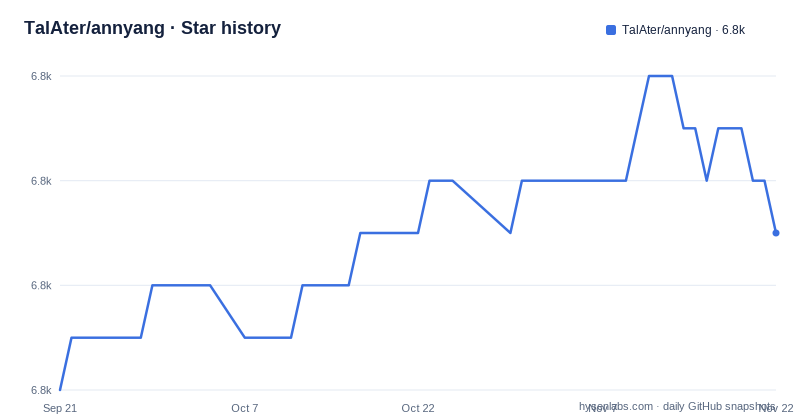
Star history
- TalAter/annyang6,819 ★ · +3
| Repository | 2026-09-21 | 2026-11-22 |
|---|---|---|
| TalAter/annyang | 6.8k | 6.8k |
3 Stars in the last 62 days, measured from the daily GitHub snapshot. Compare with other projects
Editorial analysis
Four load paths for one 2 KB bundle
The README documents four ways to load the same library, and the differences are about which build your page or bundler can consume. ESM comes first and is marked as the recommended one, where you import the default export and call methods on it. Named imports are the second option, pulling individual functions such as addCommands, start and isSpeechRecognitionSupported straight from the package. CommonJS gets a single require line for older setups. A script tag loads an IIFE bundle from jsDelivr for pages with no bundler at all.
The version story inside those four is easy to miss. The CDN URL names annyang@3 explicitly in its path, so the script tag example is pinned to the 3 line, while the install command names no version at all. With no dependencies and a stated weight of just 2 KB, the choice between these routes is about compatibility rather than size, so the only question worth asking up front is which module format your build already speaks.
Install is one command, the reference lives in docs
Installation is a single line, and it is the only command in the README:
npm install annyangEverything else the project wants you to read lives elsewhere. The README links an FAQ, an API reference at docs/README.md, a tutorial and a repository CHANGELOG, and it points at talater.com/annyang for live speech recognition demos and advanced samples. That split is worth understanding before you start: the file you land on after cloning is a landing page with an install line and four snippets, not a manual.
So expect to move between an npm package, a documentation site and the repository while you work. Per call behaviour belongs to the API reference, common questions belong to the FAQ, and worked examples belong to the tutorial page and the demo site, all of which are separate from the code. That is a normal shape for a one author library, but it means the repository's README alone cannot answer most questions about the full command set.
Commands are phrase patterns and *term captures the rest
The whole model is a plain object whose keys are phrase patterns and whose values are callbacks. In the ESM example, 'hello' calls alert, and 'search for *term' takes a term argument and logs it, which shows the wildcard syntax: the asterisk captures the words spoken in that position and passes them to the function. Commands are registered with addCommands, and listening starts with start.
import annyang from 'annyang';

if (annyang.isSpeechRecognitionSupported()) {
  // Let's define a command.
  const commands = {
    'hello': () => { alert('Hello world!'); },
    'search for *term': (term) => { console.log(`Searching for ${term}`); },
  };

  // Add our commands to annyang
  annyang.addCommands(commands);

  // Start listening.
  annyang.start();
}
Two details in those lines drive the design. The command table lives in your own code rather than in a configuration file, so adding a voice command means adding a key, and the wildcard gives you argument passing without writing a parser. What the example leaves out is any handler for speech that matches nothing, and the README describes no callback for unmatched phrases and no transcript stream, so recognising a sentence you did not anticipate is not part of this surface.
isSpeechRecognitionSupported() guards every documented example
Every snippet in the README except the one-line CommonJS require is wrapped in the same guard, the call to isSpeechRecognitionSupported. That call is the documented contract for whether speech recognition is usable in the current browser, and each example checks it before registering commands or calling start. In the ESM version it wraps the whole block, in the named import version it is the if statement itself, and in the script tag version it is a plain check inside an ordinary script block.
What sits on the other side of that check is not spelled out. The README names no alternative recognition backend, no polyfill and no fallback path, and it does not describe how microphone permission is requested, how a denial is handled, or what an interface should show when the check fails. The unsupported case is therefore yours to design: the guard tells you when to stop, and the library offers nothing to switch to. The underlying browser interface is never named either, only this one availability function, which leaves the portability question open.
The published surface is dist, with separate types per module system
What npm receives is small and described precisely. package.json sets type to module, publishes only the dist directory through the files field, and marks sideEffects as false, which lets a bundler drop the import when nothing from it is used. The exports map gives each module system its own pair of files: the import condition resolves to dist/annyang.js with types from dist/annyang.d.ts, and the require condition resolves to dist/annyang.cjs with types from dist/annyang.d.cts. The older main, module and types fields are still declared next to it.
The build runs on tsup, with a watch mode for development, and the type check runs tsc with no emit. Node 18 is the floor, set through the engines field. One script explains how the documentation page comes together: it runs typedoc, then concatenates docs/api-intro.md, the generated docs/README.md and docs/api-footer.md into a temporary file and moves that over docs/README.md. So the API reference is generated output sandwiched between two hand written files, which is worth knowing before you edit it by hand.
v3.0.0 arrived nearly eight years after v2.6.1
The release history is where this project looks least like a steady dependency. v2.6.0, titled Added soundstart event, was published on 2016-10-07. v2.6.1, titled Maintenance release, followed on 2018-05-07. Then the list jumps to v3.0.0 on 2026-03-11, a gap of nearly eight years. Since then v3.1.0 followed on 2026-10-06 and v3.1.1 on 2026-10-13, package.json now reads 3.1.1, and the most recent push is dated 2026-10-29.
The older titles describe their own changes, and a soundstart event and a maintenance release are narrow, identifiable work. v3.0.0 carries a major number with nothing in its title beyond the version, and the README does not summarise what changed or what broke. For a dependency free library the risk is low, but anyone crossing the major boundary has to find the migration story in the CHANGELOG inside the repository, because nothing about it is reproduced in the README.
Vitest for units, an http-server page for the shipped bundles
Testing is split between an automated runner and a hand served browser page. The automated side uses vitest, with a run script for a single pass and a watch script for a loop, and there are separate scripts for eslint over src and test, prettier over the same paths, and tsc with no emit. Configuration sits alongside as vitest.config.js, eslint.config.js, .prettierrc and tsconfig.json, and both test and test-manual appear in the top level listing.
The manual path is the unusual one and is worth knowing before you extend the library. Its script builds the package, copies the IIFE bundle into test-manual, then calls esbuild twice to bundle an ESM app and a CommonJS app while aliasing annyang to the two different dist files, which is how both module systems get exercised against the same source. It finishes by running http-server. That exercises the files users actually load rather than the source tree, and nothing else in the listed scripts inspects dist.
Editorial conclusion
Use annyang when you want a page to react to a short list of spoken phrases and you would rather add one small dependency than build an interface for them. Treat it as a thin layer rather than a speech system: there is no fallback when isSpeechRecognitionSupported() returns false, no handler for speech that matches nothing, and no guidance on microphone permission. Before you commit, check the FAQ and API reference in docs, read the CHANGELOG for what changed between 2.x and 3.0.0, and confirm that the build style you need is the one the exports map actually produces.
Frequently asked questions
Is there a JavaScript library that can convert speech to text?
For command phrases, yes. annyang is a JavaScript speech recognition library with no dependencies and a stated weight of 2 KB. You register phrases such as search for *term, and the wildcard hands the spoken words to your callback. The README describes no general transcription function.
What do I add next to annyang for a user interface?
Speech KITT, from the same author. It adds a graphical interface for starting and stopping speech recognition, shows the current status, gives users instructions and sample commands, and ships with several themes plus guidance for designing your own.
How do I install annyang and start listening?
Run npm install annyang, import it, check isSpeechRecognitionSupported(), pass your command phrases to addCommands(), then call start(). A CommonJS require and a jsDelivr script tag are documented as well, for pages that do not use a bundler.
Official sources
Add this badge to your README
If you maintain this project, the badge below links readers to this analysis and shows its maintenance status from the daily GitHub snapshot. Paste the markdown into your README; add ?metric=license or ?metric=stars to the image URL for a different field.

[](https://hysenlabs.com/projects/talater-annyang)Star history chart for your README
[](https://hysenlabs.com/projects/talater-annyang)Was this useful?