sandboxd gives every app its own container, and the control plane drives the host Docker socket to do it
Open-source, self-hosted AI app builder, an agent builds real apps in isolated sandboxes on your own server, each live at a preview URL. Self-host in one command. MIT.
At a glance
- What is it?
- sandboxd is a Go program that runs coding agents inside throwaway containers on your own machine and hands each one a preview URL, with an edge router for names and a SQLite file for state. There is no cluster, no queue, and no separate database. The cost of that simplicity is stated in the compose file itself: the control plane shells out to the host Docker daemon, and the console login is printed at install and reprintable on demand.
- Who is it for?
- sandboxd is a good fit if you want to try app building agents on a box you already own and do not need multi-tenancy, because the whole engine is one binary, one router, and one file. Two things to settle first.
- Can I use it commercially?
- Yes. MIT is a permissive licence: you can use, modify and sell software built on it, as long as you keep its copyright and licence notices.
- Is it still maintained?
- Yes. The repository received new commits within the last day.
- What is it written in?
- Mainly Go, according to GitHub's language statistics.
Answers come from the project's GitHub data, last synced on November 15, 2026, and from our analysis. They are not legal advice.
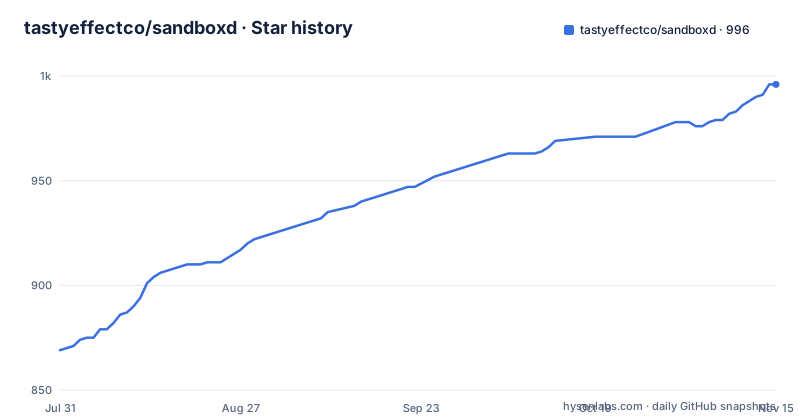
Star history
- tastyeffectco/sandboxd996 ★ · +127
| Repository | 2026-07-31 | 2026-11-15 |
|---|---|---|
| tastyeffectco/sandboxd | 869 | 996 |
127 Stars in the last 107 days, measured from the daily GitHub snapshot. Compare with other projects
Editorial analysis
The control plane creates containers by shelling out to the host Docker daemon
The compose file says it plainly, in a comment, and it is the single most important line in the repository. The control plane creates, stops, and destroys sandbox containers by shelling out to the host Docker daemon over the mounted socket, stores state in SQLite, and runs the idle and pressure reapers along with the wake path. Access to that socket is host root in practice, so any agent you let run inside a sandbox is one bug away from the host. The file also names its own mitigation, which is unusual and worth reading twice. The edge router and the control plane are marked to run in the host user namespace, because they need host level access to that socket and to the data directory sandboxes bind mount; the comment says this is a no op on a daemon without user namespace remapping and keeps those two containers working on one that has it enabled. Per sandbox containers are deliberately not listed, so they keep the daemon's default isolation.
Idle sandboxes sleep, which is how one small box holds many apps
The capacity story is a lifecycle story. Sandboxes are described as sleeping and waking on demand, so one ordinary machine holds many apps rather than needing a virtual machine each, and the control plane owns two reapers, one for idleness and one for pressure, plus the path that wakes a stopped sandbox. Names are handled by the edge router, which reads labels on each sandbox and turns them into a route, and the same router is what wakes a container when a request arrives for something that was asleep. That is why the preview URL is the load bearing object rather than a nicety: the hostname encodes the sandbox identifier and the port, the router parses it, and the request either answers or wakes. The stated starting hardware is two virtual CPUs and four gigabytes of memory, described as plenty to start, and the images are prebuilt, which is why the per sandbox containers are not services in the compose file at all but are launched at runtime.
The console login is printed at install and reprintable by anyone on the box
Installation is the one liner the page leads with:
curl -fsSL https://raw.githubusercontent.com/tastyeffectco/sandboxd/main/install.sh | bashThere is no password step. The installer builds the images, starts the stack with the web console, and prints a console URL together with a generated login, and the page then says that if you lose it, one script will show it again any time. That is convenient and it is a plain statement of the security model: anyone who can read files on that machine can read the console credential, so the console is protected by host access rather than by a secret you memorised. The API side is shown in the same spirit, with a walkthrough that registers an agent key, creates a sandbox, and posts a task without a credential on any of the three calls. The newest release is where that changes: its title is scoped API keys and cloud analytics, which reads as the point at which the API stopped being an open local socket and started having keys with scopes.
Preview URLs default to plain HTTP on port 80 of a localhost domain
The example environment file is unusually well commented, and the defaults are the story. The preview domain is localhost, because browsers resolve wildcard localhost names to the loopback address, so previews work with no DNS and no certificate; TLS is off; and the port mapping is 80. The file then explains how to change that, and the sentence that matters for anyone putting this on a public server is that previews are then plain HTTP unless you set a real wildcard domain and switch TLS on. There is a second layer about host naming. The default nested layout puts previews, the console, and the API under a common prefix, while a flat layout puts them side by side and adds a short tag so several instances can share one domain. The comment notes that flat needs a wildcard certificate because the common one level certificates cover only one level, and that in flat mode each preview host authorises private previews separately with no shared session cookie.
The build target compiles the Go binaries straight to /dev/null
The Makefile is small and covers two subprojects, the Go control plane and a Vite and React console. Its build target sets cross compilation off and then builds both commands, named sandboxd and runtimed, with the output path set to the null device, so the target verifies that the code compiles and throws the binaries away. Nothing in that target produces something you can run; the runnable artefact is the image built by the installer. The same file is disciplined about checks: formatting is verified by asking whether the formatter would change anything and failing if it would, the vet tool runs over the control plane, and the console gets a type check. Tests split the same way, with the Go tests run in place and the console tests preceded by a frozen lockfile install, so a stale lockfile fails the test target rather than silently resolving something new.
The console is a compose profile, so the engine is genuinely usable without it
The optionality is structural rather than a promise. The console is served behind a compose profile in the build and teardown targets, so the default stack is the router plus the control plane, and the page gives an environment variable and a matching flag to start without the console at all. When it is there, the console is described as a pure client of the versioned API, which is the claim that makes the other mode credible: if the console only speaks the same public interface a script would, then removing it removes a user interface rather than a capability. The API listens on a fixed port on loopback with a health endpoint that answers with a short string, and the quickstart shows the shape of a scripted build, registering an agent credential, creating a sandbox with a port list, then posting a task with a prompt and an agent name, in four lines:
API=http://127.0.0.1:9090
curl -s -XPOST $API/v1/agents/claude-code/api-key -d '{"api_key":"sk-ant-..."}'
ID=$(curl -s -XPOST $API/sandbox -d '{"ports":[3000]}' | sed -E 's/.*"id":"([^"]+)".*/\1/')
curl -s -XPOST $API/v1/sandboxes/$ID/tasks -d '{"prompt":"build a todo app on port 3000","agent":"opencode"}'
The identifier comes back as JSON and is extracted with a one line pattern match, which is fine and will break the moment the field order or shape changes.
arm64 Linux is a first class claim, macOS is described as best effort
Platform support is stated in one paragraph and it is worth reading precisely. The requirements are Docker with the Compose plugin and git on Linux, and macOS is covered through Docker Desktop and called best effort. Native execution is claimed for both amd64 and arm64, with Apple Silicon Macs and arm64 Linux hosts such as a specific cloud instance family named as examples, and every image is said to build from multi architecture bases with no cross compilation. So the arm64 story is really about Linux hosts, and the machine most people will try this on is the one the page hedges. That is not a criticism so much as a reading instruction: the arm64 claim is about the server, and the Mac path inherits whatever the Docker Desktop socket gives you, which is also why the Mac experience depends on the same host socket access described earlier.
It is version 0.3.21, and two of its newest features point at the cloud
The release history is short and moves fast. The newest is 0.3.21, titled scoped API keys and cloud analytics, and the two before it are 0.3.20 and 0.3.19 published six minutes apart on the same day in late August, which is the cadence of a project shipping on demand rather than on a schedule. Against that, the page spends a paragraph asking whether you would rather have the 1.0 release and a managed cloud instead of running the box yourself, with two links and an assurance that the cloud is optional and the self hosted engine is always the full product. The architectural commitment in the repository matches that: one Go program driving Docker, the edge router for names, a SQLite file for state, and an explicit list of what is absent, no Kubernetes, no separate database, no queue. At the root there are five shell entry points, for install, upgrade, uninstall, release, and a development runner, plus a script that prints the console login.
Editorial conclusion
sandboxd is a good fit if you want to try app building agents on a box you already own and do not need multi-tenancy, because the whole engine is one binary, one router, and one file. Two things to settle first. The control plane's access to the host Docker socket is equivalent to host root, so treat every agent you point at it as having that access, and keep the previews on a private network until you have switched on TLS. And pin your version: this is a 0.3 release whose newest features are scoped API keys and cloud analytics, so the auth model you read about may be newer than the one you installed.
Frequently asked questions
what is sandboxd
It is an open source, self hosted engine for the class of tool where you type a request for an app and get a running site. One HTTP request spins up a private container, runs a coding agent inside it against your prompt, and hands back a live preview URL. It is one Go program driving Docker, with an edge router for names and SQLite for state.
What is sandboxd on a Mac?
The page lists Docker with the Compose plugin and git on Linux as the requirements, and describes macOS through Docker Desktop as best effort. Native execution is claimed for both amd64 and arm64, including Apple Silicon Macs and arm64 Linux hosts, with every image built from multi architecture bases.
How do I install and upgrade sandboxd?
Installation is one line that pipes the install script into a shell; it builds the images, starts the stack with the console, and prints a console URL and a generated login. Upgrades run a separate script that backs up the database first, health checks the new version, and rolls back automatically if that check fails. A check flag on the same script only reports your version.
Can I run sandboxd without the web console?
Yes. The console sits behind a compose profile, and the page gives both an environment variable and a flag to start without it. The engine is then reachable headless on its API port with a health endpoint, and the console is described as a pure client of that same versioned interface.
How are sandboxd preview URLs served?
Labels on each sandbox become a route through the edge router, which also wakes stopped sandboxes on demand. The default is a localhost domain over plain HTTP on port 80, so a public deployment needs a real wildcard domain and TLS switched on. Hostnames can be nested or flat, and flat requires a wildcard certificate because one level certificates do not cover it.
Official sources
Add this badge to your README
If you maintain this project, the badge below links readers to this analysis and shows its maintenance status from the daily GitHub snapshot. Paste the markdown into your README; add ?metric=license or ?metric=stars to the image URL for a different field.

[](https://hysenlabs.com/projects/tastyeffectco-sandboxd)Star history chart for your README
[](https://hysenlabs.com/projects/tastyeffectco-sandboxd)Was this useful?