UAC for Unix-like artifact collection and incident response
UAC is a powerful and extensible incident response tool designed for forensic investigators, security analysts, and IT professionals. It automates the collection of artifacts from a wide range of Unix-like systems, including AIX, ESXi, FreeBSD, Linux, macOS, NetBSD, NetScaler, OpenBSD and Solaris.
At a glance
- What is it?
- UAC is a dependency-free Shell collector for forensic investigators, security analysts, and IT professionals. It gathers artifacts from AIX, ESXi, BSD systems, Linux, macOS, NetScaler, OpenBSD, and Solaris through customizable YAML profiles, while remaining dependent on the commands and tools available on the target.
- Who is it for?
- UAC fits investigators who need repeatable collection across varied Unix-like systems and value a portable Shell tool with YAML control. It is a poor fit when the target requires unavailable local utilities, guaranteed write access, or a complete memory-acquisition workflow without external tools.
- Can I use it commercially?
- Yes. Apache-2.0 is a permissive licence: you can use, modify and sell software built on it, as long as you keep its copyright and licence notices.
- Is it still maintained?
- Yes. The repository last received commits 12 days ago.
- What is it written in?
- Mainly Shell, according to GitHub's language statistics.
Answers come from the project's GitHub data, last synced on November 7, 2026, and from our analysis. They are not legal advice.
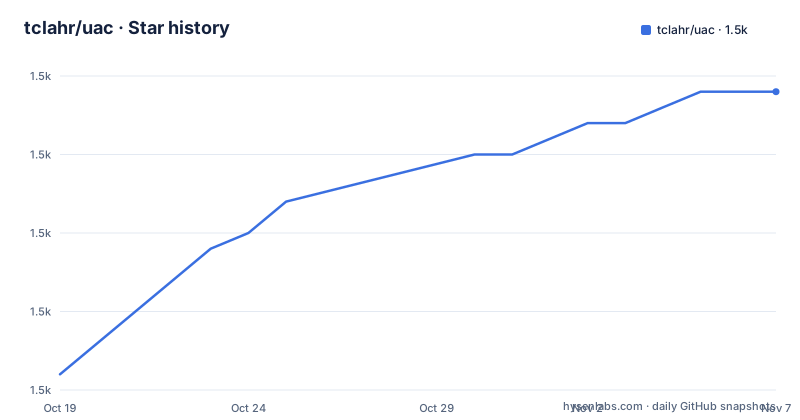
Star history
- tclahr/uac1,509 ★ · +18
| Repository | 2026-10-19 | 2026-11-07 |
|---|---|---|
| tclahr/uac | 1.5k | 1.5k |
18 Stars in the last 19 days, measured from the daily GitHub snapshot. Compare with other projects
Editorial analysis
UAC targets volatile Unix evidence
Unix-like Artifacts Collector, or UAC, addresses the collection stage of incident response and forensic examination. It is intended for forensic investigators, security analysts, and IT professionals who need to acquire system information from AIX, ESXi, FreeBSD, Linux, macOS, NetBSD, NetScaler, OpenBSD, and Solaris. The repository also describes collection on NAS devices, network devices such as OpenWrt, and IoT devices.
The problem is not simply copying files from a machine. A collection run must capture running-process information, executable files, configuration and log data, and other artifacts while the incident is still being examined. UAC presents these operations as artifacts organized through profiles and YAML definitions. The README says the tool follows the order of volatility, so the design is oriented toward collecting changeable data before more stable artifacts.
This makes UAC most relevant when an investigator needs a consistent collection recipe across several Unix-like platforms or when a target cannot receive a conventional application installation. It is not a complete forensic analysis package. Based on the repository description, UAC collects material for later examination rather than providing an incident-management console, timeline viewer, or malware-analysis environment.
UAC profiles drive artifact selection
UAC is implemented primarily in Shell. The top-level repository contains the `uac` entry point, an `artifacts/` directory, `profiles/`, `config/`, `lib/`, and supporting project documentation. The README describes collections and artifacts as customizable and extensible. That arrangement indicates that collection behavior is data-driven rather than limited to one fixed command sequence.
The documented invocation accepts a profile path or profile name, an output directory, and optional artifact specifications. A profile such as `ir_triage` defines a practical subset for triage, while `full` is used in the README for a broader collection. Artifact paths can identify an individual module, exclude one module, or add a directory of custom artifacts. The memory example passes `./artifacts/memory_dump/avml.yaml`, showing that a specific artifact definition can be combined with a profile.
The documentation states that UAC collects information about current running processes, including processes without a binary on disk. It can hash running processes and executable files, extract file and directory status into a bodyfile, and gather system, user-specific, configuration, and log data. Volatile memory acquisition is supported on Linux through different methods and tools. The README also mentions writing output to various cloud platforms, but it does not enumerate those platforms or document their configuration, so that capability should be checked in the project documentation before it is relied upon.
UAC runs without installation on the target
UAC does not need to be installed on the system being examined. The README instructs users to download the latest release, uncompress the archive, and execute the extracted tool from a terminal. This is useful during incidents because the collector can be copied to a target without adding a package or installing dependencies. The first documented collection uses the `ir_triage` profile and writes results to `/tmp`.
The following command is copied from the README. The destination is the local directory that receives the collected artifacts. The README does not specify the exact archive filename or extraction command, so those steps are left to the release package instructions.
./uac -p ir_triage /tmpFor a broader collection, the README gives this command. It selects the `full` profile and requests the memory dump artifact defined by `avml.yaml`. The memory method is one of the platform-specific collection mechanisms, and the README does not claim that every target supports every memory method.
./uac -a ./artifacts/memory_dump/avml.yaml -p full /tmpThe output directory should be selected with the investigation workflow in mind. UAC is portable, but collection can still be constrained by the target account's permissions, available filesystems, shell environment, and local utilities. The README does not document a rollback procedure or an offline installation procedure beyond downloading and uncompressing the release.
UAC custom profiles suit repeatable collection
UAC supports both shipped profiles and user-defined profiles. The README's custom profile example uses `/my_custom_uac_data/my_custom_uac_profile.yaml`, which means an investigator can keep an investigation-specific artifact list outside the extracted release. That is useful when different incidents require different balances between collection scope, execution time, output size, and target impact.
The documented custom collection command is:
./uac -p /my_custom_uac_data/my_custom_uac_profile.yaml /tmpArtifacts can also be selected or removed around a profile. The README shows exclusion with an escaped exclamation mark, so the following command requests the `full` profile while excluding the bodyfile artifact:
./uac -p full -a \!artifacts/bodyfile/bodyfile.yaml .A separate example adds all artifacts from a custom directory while using `ir_triage`:
./uac -p ir_triage -a /my_custom_artifacts/\* /mnt/sda1These examples show a practical composition model: profiles define the main collection, while `-a` adjusts the artifact set. They also show that the output destination is explicit. The README does not provide the complete YAML schema, validation procedure, or a complete custom profile, so a team should consult the project documentation before creating a new definition.
UAC has target and tooling boundaries
The strongest claim in the README is portability: UAC runs on Unix-like systems regardless of processor architecture and needs only a shell. That claim does not mean that every artifact will be available everywhere. A process listing, file hash, bodyfile, or memory capture can depend on commands and interfaces present on the target. The README specifically describes Linux memory acquisition through different methods and tools, which means the chosen method still has to exist on the system being collected.
UAC also gathers data that may require elevated privileges. The repository does not state which specific artifacts require root or administrative access, nor does it provide a privilege-escalation procedure. Running the collector with an underprivileged account could therefore produce incomplete output. The absence of installation also does not eliminate filesystem permissions, execute permissions on the extracted archive, or space constraints at the selected destination.
Another limitation is scope. UAC is a collector, not an analysis suite. The README does not claim timeline reconstruction, event correlation, automated malware triage, or long-term evidence management. Those tasks belong in separate tools. UAC is the wrong choice when the requirement is to inspect collected evidence interactively rather than acquire it. It is also unsuitable as the sole acquisition method when the organization requires a formally validated chain of custody workflow, because the README does not describe such a workflow.
UAC differs from platform-specific acquisition tools
A real alternative is a platform-specific forensic acquisition package or an imaging workflow provided by a commercial or distribution-backed tool. Those approaches generally center collection around a particular operating system, filesystem, or acquisition format. UAC instead uses one Shell-based command and YAML profiles across a broad set of Unix-like platforms. Its differentiator is portability and profile-driven composition, not a documented forensic image format or analysis workflow.
That difference creates a practical trade-off. UAC may be easier to stage across heterogeneous systems because it does not require installation on the target. A platform-specific package may provide deeper integration with that platform, but the UAC README does not establish how it compares with any particular product. It also does not document an equivalent command for imaging a complete disk, so UAC should not be assumed to replace imaging-based acquisition where one is required.
For incident responders, the choice depends on the question being answered. UAC is a reasonable fit for collecting process, system, configuration, log, file-status, and selected memory artifacts. It is less suitable when another tool is needed to create a full-volume image, decode specialized formats, or perform post-collection analysis.
UAC maintenance and license affect adoption
UAC is not archived, and the last push was on 2026-09-09. Recent releases include `v3.4.0` on 2026-09-09, `v3.3.0` on 2026-04-16, and `v3.2.0` on 2025-08-13. These dates indicate repository activity during the period covered by the release history, but the README does not define a support policy, compatibility matrix, or response time for issues.
The maintenance cost is partly operational. Because collection rules are represented through profiles and artifact YAML files, changing an investigation recipe may require reviewing those files rather than editing a conventional application configuration. Extracting a new release also means managing the version used for a case. The repository contains `CHANGELOG.md`, `CONTRIBUTING.md`, `MAINTAINERS.md`, and license-related files, but the README does not describe an upgrade migration procedure or a formal release-retention policy.
UAC is distributed under `Apache-2.0`. The repository identifies the `LICENSE` and `LICENSES.md` files, so an organization should review those files for its compliance and distribution requirements. That is a repository-level license statement, not a determination about a particular investigation, system, or collection output.
Editorial conclusion
UAC fits investigators who need repeatable collection across varied Unix-like systems and value a portable Shell tool with YAML control. It is a poor fit when the target requires unavailable local utilities, guaranteed write access, or a complete memory-acquisition workflow without external tools. Check the selected profile, target permissions, required shell commands, and destination before adoption.
Frequently asked questions
What is UAC used for?
UAC is used to collect artifacts from Unix-like systems for incident response, forensic investigations, and compliance checks. Its documented collection includes running processes, executable files, system data, logs, bodyfile data, and supported memory artifacts.
Does UAC need to be installed on the target system?
No. The README says UAC does not need installation on the target system. Download the latest release, uncompress the archive, and execute the tool from a terminal.
Which Unix-like systems does UAC support?
The README lists AIX, ESXi, FreeBSD, Linux, macOS, NetBSD, NetScaler, OpenBSD, and Solaris. It also states that UAC can run on NAS devices, network devices such as OpenWrt, and IoT devices.
Can UAC collect memory from Linux?
Yes. The README states that UAC supports volatile memory acquisition from Linux using different methods and tools. The available method can depend on the target environment.
Can I customize UAC collection with YAML?
Yes. UAC profiles and artifact definitions are customizable through YAML files. The README documents using a custom profile and adding or excluding artifacts with the `-a` option.
Official sources
Add this badge to your README
If you maintain this project, the badge below links readers to this analysis and shows its maintenance status from the daily GitHub snapshot. Paste the markdown into your README; add ?metric=license or ?metric=stars to the image URL for a different field.

[](https://hysenlabs.com/projects/tclahr-uac)Star history chart for your README
[](https://hysenlabs.com/projects/tclahr-uac)Was this useful?