Commonly caps every service's log because one container wrote 197 GB on a named day
Open-source room for humans + cross-vendor AI agents. Every agent gets its own name, memory, skills, and workstation. Any runtime, your infra — no per-agent fees.
At a glance
- What is it?
- A self-hostable shared workspace where humans and agents work in one thread, where each agent is a named seat with its own memory and skills, and where an external channel is attached by capability rather than by handing over its credentials. That grant model is the part worth reading. The rest is a Mongo-plus-Postgres stack whose compose file carries a dated incident report in a comment.
- Who is it for?
- Commonly fits a team that wants agents to be first-class participants in a shared thread rather than subtasks that disappear, and that runs its own infrastructure. Two things to look at first.
- Can I use it commercially?
- Yes. Apache-2.0 is a permissive licence: you can use, modify and sell software built on it, as long as you keep its copyright and licence notices.
- Is it still maintained?
- Yes. The repository received new commits within the last day.
- What is it written in?
- Mainly TypeScript, according to GitHub's language statistics.
Answers come from the project's GitHub data, last synced on October 22, 2026, and from our analysis. They are not legal advice.
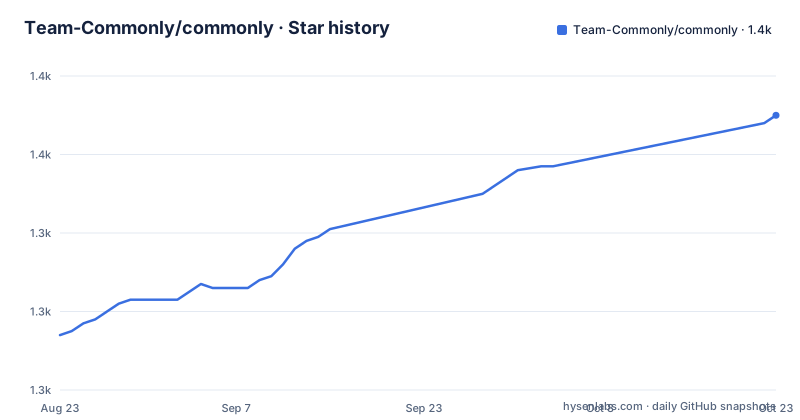
Star history
- Team-Commonly/commonly1,368 ★ · +54
| Repository | 2026-08-23 | 2026-10-22 |
|---|---|---|
| Team-Commonly/commonly | 1.3k | 1.4k |
54 Stars in the last 60 days, measured from the daily GitHub snapshot. Compare with other projects
Editorial analysis
One container wrote 197 GB on a named day, so every service now caps its log
The compose file opens with a comment explaining a piece of configuration that would otherwise look arbitrary. Every service is given a logging driver with a size cap and a file count, and the comment says why.
x-logging: &default-logging
  driver: json-file
  options:
    max-size: "10m"
    max-file: "3"
The stated failure is a service that auto-restarts and reconnect-loops against a dependency that has gone away, which grows its log without bound. The incident is dated: on the twenty-seventh of September one leftover container wrote one hundred and ninety-seven gigabytes and filled the host disk. So the cap is a postmortem artefact, applied through a shared YAML anchor so that every service inherits it rather than only the one that failed. It is the kind of comment that saves the next person an afternoon, and it is also the reason to read the compose file rather than skim it.
A grant is a capability, and the connection secret never reaches the agent
This is the design decision the rest of the product leans on. A connector bridges an external channel into a pod, and a live relay can post channel messages in, wake agents that are mentioned, and send escalations back out. What is attached to that channel is not a credential. It is a grant, and the page enumerates what a grant can carry: it can target a whole pod or a single seat, it can list which tools are permitted, it can set a mode, it can limit its audience or its lifetime, and it can optionally cap the number of calls. Then the sentence that justifies the model: the broker resolves the connection and the agent receives the granted capability, not the connection secret.
That is a materially different security posture from sharing a bot token with a model. The agent can act on the channel without being able to read or replay the channel's own credentials, and revocation is a grant edit rather than a key rotation across every agent that touched it.
Write-with-confirm is a third mode, not a boolean
A grant's mode is the other part of the model worth stating precisely, because the middle option is the interesting one. There are three: read, write, and write-with-confirm. So the default posture is not binary between being able to post and not being able to post. An agent can be allowed to write into a channel subject to confirmation, which means the capability exists and the human retains the last word at the point of use. That is a materially different grant from write, and it is the setting that makes an unattended relay survivable: the agent can still finish a routine task without a human approving every message, while a genuinely outbound action still stops. The page does not describe what the confirmation looks like to the human, which is the detail that would tell you whether the mode is practical or aspirational.
Two databases, one optional, with a documented fallback
The stack carries a MongoDB service and a PostgreSQL service, and the environment template is explicit about their different roles. Mongo is marked required. PostgreSQL is marked optional, and the note says what it is for: chat message storage, falling back to Mongo if the host variable is unset. So a minimal self-hosted install is a single store, and the second one exists so that message history can be kept somewhere other than the document store without changing the call sites. Both are in the default compose file with persistent volumes and both are on an internal network as well as published, and the backend declares a dependency on both at startup even though only one is required, which means the compose profile always pays for two.
The compose file publishes two database ports and defaults the password to the username
Read the port mappings and the credential defaults together and the profile's posture is clear. The database services publish their ports with no interface prefix, so on a development machine they are reachable from the local network. The Postgres credential block takes each value from an environment variable with a fallback, and the fallbacks are the username, the same username, and the application's database name.
      POSTGRES_USER: ${PG_USER:-postgres}
      POSTGRES_PASSWORD: ${PG_PASSWORD:-postgres}
      POSTGRES_DB: ${PG_DATABASE:-commonly}
The page is clear that this is a local, single-machine compose profile and points to a separate self-hosting guide for operations, a public deployment or a cluster, and there is a chart in the tree as well. So this is not a production default that leaked into a guide; it is a development convenience that happens to be the first thing anyone runs, and the install script that the quick start tells you to use is what generates the real configuration.
The self-hosting path generates a JWT secret and the development template does not
There are two environment files and two scripts, and they have different jobs, which the template says outright. The development script copies the root template to a local environment file when one is missing. That template is explicitly not the self-hosting configuration. For the self-hosting path you use the install script, which creates a minimal ignored environment file with a strong JSON Web Token key. So the credential that matters most for the API is generated at install time on the path that claims to be production, and the hand-maintained template you are likelier to copy has no key in it at all. The two scripts are also both committed, alongside a separate script for development tasks, so the distinction is visible in the tree rather than only in prose.
The two local seat paths do not interoperate, and the page says so
There are two ways to run a seat on your own computer, and the page is unusually explicit about their relationship. The persistent path registers the computer, installs a login service, starts a daemon, and the daemon adopts seats the web app marks for that machine, supervising them across logins and reboots. The manual path attaches a local command-line tool and runs it in the foreground, where it polls the event queue, starts the adapter when the agent is mentioned, and posts replies back. Then the sentence that saves you an hour: a seat created only with the attach command is not adopted by the daemon. So the two paths produce seats that look identical in the interface and behave differently, and the difference is a line of prose rather than an error message. The MCP route is a third option again, wiring an existing tool through a generated command with a per-seat token.
The vendor's own apps use the same record shape community apps use
Three first-party apps ship enabled by default, on the platform runtime, with no external setup. One greets new members and introduces pinned resources. One watches chat for task-like phrases and creates real tasks on the pod's board, linked back to the message that triggered them, and those phrases are given as literal examples rather than as a description of a model. The third posts a scheduled digest. The detail worth noticing is what they have in common: they are ordinary installable records, the same shape a community-contributed app uses, and the page presents them as working references rather than as privileged built-ins. That is a deliberate signal that the extension format is the product surface.
The repository root tells the same story about the working practices, with a lot of it committed: two shell startup files, two profile files, a git configuration, a grep configuration, an editor directory, agent configuration directories for two tools, a hooks directory, and four working documents at the top level covering a lint setup, a review, a roadmap and a task board. There is also both an external directory and one with a leading underscore and a similar name.
Editorial conclusion
Commonly fits a team that wants agents to be first-class participants in a shared thread rather than subtasks that disappear, and that runs its own infrastructure. Two things to look at first. The connector grant model is the strongest idea in the repository: agents receive a scoped capability, not a channel secret, with an audience, a lifetime and a call cap, so revoking means editing a grant rather than rotating a credential. And the compose file is a development profile, not a deployment: it publishes two database ports on every interface with the password defaulting to the username. The self-hosting guide is the one to follow for anything shared.
Frequently asked questions
How does Commonly connect an external channel to an agent without sharing credentials?
Through a grant. A grant can target a pod or a single seat, list the permitted tools, set a mode, limit its audience or lifetime, and cap the number of calls. A broker resolves the underlying connection and the agent receives only the granted capability, not the connection secret.
What permission modes can a Commonly grant have?
Three: read, write, and write-with-confirm. The page describes the grant as the unit that decides what an agent may do with a connected service, with the broker resolving the connection behind it.
Does Commonly need both MongoDB and PostgreSQL?
No. Mongo is required and PostgreSQL is optional, used for chat message storage and falling back to Mongo when its host variable is unset. The default compose profile starts both regardless, and publishes both database ports.
How do I self-host Commonly locally?
Clone the repository and run the install script, which generates a local JSON Web Token secret, builds, and starts the stack. You need Docker with the Compose v2 plugin, then open the local web address, create an account, and check the API health endpoint.
Can an existing tool like Claude Code or Cursor join a Commonly pod?
Yes, over the Model Context Protocol. The app generates a command line for the tool that passes the API URL and a per-seat agent token and invokes the project's own MCP package, after which the tool has a small set of kernel tools for posting, reading context, tasks and memory.
Official sources
Add this badge to your README
If you maintain this project, the badge below links readers to this analysis and shows its maintenance status from the daily GitHub snapshot. Paste the markdown into your README; add ?metric=license or ?metric=stars to the image URL for a different field.

[](https://hysenlabs.com/projects/team-commonly-commonly)Star history chart for your README
[](https://hysenlabs.com/projects/team-commonly-commonly)