VideoRAG and Vimo: What the HKUDS Repository Actually Ships
[KDD'2026] "VideoRAG: Chat with Your Videos"
At a glance
- What is it?
- VideoRAG is a Python retrieval-augmented generation framework for long-video question answering, paired with a desktop client called Vimo. The README promises extreme long-context handling, but the repository material leaves the operational details unstated, so adoption should start with a close read of the code layout rather than the feature list.
- Who is it for?
- Adopt VideoRAG if you need retrieval over many hours of video and you are willing to read the source to fill in what the README omits, because the licence field reads NOASSERTION and the repository links to arXiv 2502.01549. Do not adopt it if you need a supported product with versioned releases, since none were retrieved.
- Can I use it commercially?
- Check first. The repository uses a licence we do not classify automatically, so read its LICENSE file before any commercial use.
- Is it still maintained?
- Activity is slowing. The repository last received commits 8 months ago.
- What is it written in?
- Mainly Python, according to GitHub's language statistics.
Answers come from the project's GitHub data, last synced on November 14, 2026, and from our analysis. They are not legal advice.
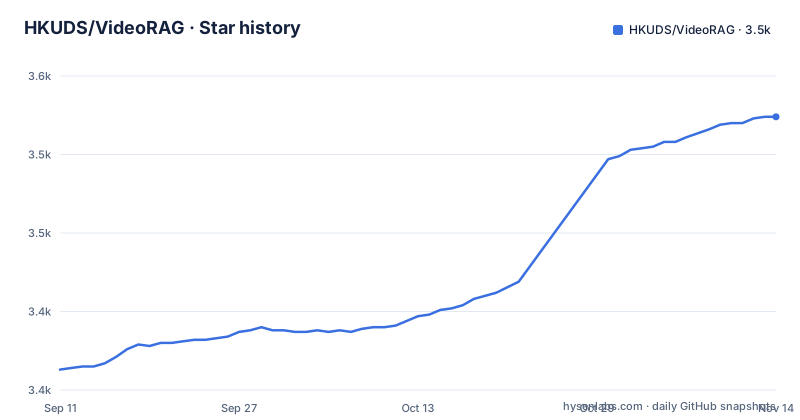
Star history
- HKUDS/VideoRAG3,524 ★ · +161
| Repository | 2026-09-11 | 2026-11-14 |
|---|---|---|
| HKUDS/VideoRAG | 3.4k | 3.5k |
161 Stars in the last 64 days, measured from the daily GitHub snapshot. Compare with other projects
Editorial analysis
The gap VideoRAG targets: questions that span hours of footage
A standard video question answering model takes a clip and a question and returns an answer. That works when the clip is short enough to fit in the model's context. It stops working when the question is about a two-hour lecture, a multi-day recording, or a set of videos that need to be compared against each other. The README frames the project around exactly this case, describing the ability to process videos "up to hundreds of hours" and to answer questions about them. The audience named in the README splits into three groups: general users who drag files into the desktop client, power users who want multi-video comparison and export, and researchers who want the framework itself plus the LongerVideos benchmark, described as 134+ hours of content. That third group is the one the repository is really built for. The desktop application is a demonstration layer on top of a research framework, not the other way around.
Retrieval over video, not a bigger context window
The name states the mechanism. VideoRAG is retrieval-augmented generation applied to video: rather than feeding an entire recording into a language model, the system indexes the video and retrieves the relevant segments when a question arrives, then passes those segments to the model. The README describes this as "Advanced Retrieval" for finding "specific moments and scenes with precision," and lists retrieval-augmented generation among the repository topics alongside long-video understanding and multi-modal LLMs. There is no description of the chunking strategy, the embedding model, the vector store, or how visual and audio tracks are combined into a retrievable unit. The repository layout gives one clue: there is a directory named VideoRAG-algorithm containing at least a cover image, which suggests the algorithmic core is separated from the desktop client. Anyone evaluating this for production should treat that directory as the thing to read first, because the retrieval design determines both answer quality and indexing cost, and neither is specified in the README.
Vimo is the client, and the README treats it as the product
Most of the README describes Vimo, the desktop application, rather than the framework. The stated features are drag-and-drop upload, natural-language questions, support for MP4, MKV and AVI, and builds for macOS, Windows and Linux. For heavier use it lists multi-video analysis and export of insights and references. This is a deliberate packaging choice: the research code is hard to run, so the project ships a GUI that hides it. The trade-off is that the README's feature list tells you what the client exposes, not what the framework can do. If you want to embed VideoRAG in a pipeline of your own, the Vimo sections are largely irrelevant to you, and the material that would matter (the API surface, the indexing entry point, the output format) is not in the README at all. That asymmetry is the single most important thing to understand before deciding whether this repository is useful to you.
Getting it running: what the README does and does not give you
The README provides no installation command. There is no pip install line, no conda environment file referenced, no build instructions for the desktop application, and no configuration keys. What it does provide is a set of pointers: a link to arXiv paper 2502.01549, a YouTube demo at watch?v=D5vsxcp4QZI, a LearnOpenCV blog post about long-context video comprehension, and links to a Discord server and a WeChat or Feishu group. It also states the platform support as macOS, Windows and Linux, and lists the accepted input formats as MP4, MKV and AVI. Since the primary language is Python and the repository contains a VideoRAG-algorithm directory, the realistic path to running it is to clone the repository, inspect that directory for an entry point, and read the paper for the intended pipeline. Treat any tutorial that presents a single install command as coming from outside this material. I have not run this project and cannot confirm what the install actually involves.
Where the project is thin, and where it may be the wrong tool
Three gaps stand out. First, there are no releases. The repository metadata returned none, so there is no versioned artifact to pin, no changelog, and no way to reason about upgrade cost. You track the main branch or you track nothing. Second, the licence is listed as NOASSERTION, which means the licence could not be automatically identified. The README does not state terms either. For a research framework that is tolerable; for anything shipped inside a commercial product it is a blocking question, and the answer has to come from the repository's licence file rather than from this article. Third, the README's performance language is unquantified. It claims "remarkable accuracy" and "extreme long-context processing" without a number attached in the text supplied. The paper is where any evaluation would live. Beyond the documentation gaps, there is a structural limitation worth naming: retrieval-based video QA is only as good as its index. If the relevant moment is not retrieved, the model never sees it. For questions that require reasoning across an entire recording rather than locating a specific passage, a retrieve-then-answer design is the wrong shape, regardless of how well it is implemented.
How this differs from feeding video into a long-context model
The obvious alternative is a native multi-modal model with a large context window: hand it the video, ask the question, skip the index. The difference in approach is fundamental. A long-context model processes everything you give it on every query, so cost and latency scale with video length and you hit a hard ceiling when the recording exceeds the window. VideoRAG inverts that: it pays an indexing cost once and then retrieves a small set of segments per question, which is why the README can claim support for hundreds of hours. The price is an extra failure mode. A long-context model that has the footage in front of it cannot miss a detail because of a retrieval error; VideoRAG can. The two designs also differ in what they let you inspect. With retrieval, you can look at which segments were selected, which is useful for debugging and for citation. With a single long-context pass, there is nothing to inspect. Choose retrieval when the corpus is large and the questions are locational. Choose long context when the corpus is small and the questions are synthetic.
Maintenance, upgrades and the licence question
The repository is not archived and the last push is dated 2026-03-18, so the project is active. There are no releases, which means there is no upgrade path in the conventional sense: no semantic version to move between, no migration notes, no compatibility guarantee. If you depend on VideoRAG, you depend on a moving main branch, and you should pin a commit hash rather than a tag. The licence situation deserves the same treatment. NOASSERTION is a metadata field, not a licence. It means the automated check could not classify the terms, and it says nothing about whether the terms are permissive or restrictive. Before any use beyond local experimentation, read the licence file in the repository directly. This is not legal advice and the terms cannot be inferred from the README, which does not mention licensing at all. The arXiv paper is the other artifact to check, since research code sometimes carries terms that differ from the paper's distribution.
Editorial conclusion
Adopt VideoRAG if you need retrieval over many hours of video and you are willing to read the source to fill in what the README omits, because the licence field reads NOASSERTION and the repository links to arXiv 2502.01549. Do not adopt it if you need a supported product with versioned releases, since none were retrieved. Before committing, verify three things: the actual licence terms on the repository, the entry point inside the VideoRAG-algorithm directory, and whether the Vimo desktop build is distributed as a binary or must be built from source.
Frequently asked questions
What is VideoRAG?
A retrieval-augmented generation framework for extreme long-context video, described in a 2025 arXiv preprint and tagged in this repository with a 2026 conference name. Its stated architecture combines graph-driven knowledge indexing, hierarchical context encoding, adaptive retrieval and cross-video understanding.
What is Vimo?
A desktop application for asking questions about videos, built on the VideoRAG framework, with drag and drop upload, multi-format support, multi-video analysis and export. Its download is marked as coming soon, with a beta release being prepared for macOS on Apple Silicon first.
How do I run VideoRAG?
From source: set up the Python backend environment and start the VideoRAG server, launch the Electron frontend application, then start chatting. The desktop folder holds its installation details, and the algorithm folder holds setup for a conda environment, model checkpoints, dependencies and evaluation scripts.
What hardware does VideoRAG need?
The readme states that hundreds of hours of video can be handled on a single RTX 3090 with 24GB of memory, and describes video lengths from 30-second clips to documentaries of 100 hours or more. It does not describe how memory scales with video length.
What is the LongerVideos benchmark?
A benchmark created by this project to evaluate long-context video understanding: 22 collections, 164 videos, 602 queries and about 134.6 hours in total, split across lectures, documentaries and entertainment. Reproduction instructions and scripts live in a subdirectory of the algorithm folder.
Official sources
Add this badge to your README
If you maintain this project, the badge below links readers to this analysis and shows its maintenance status from the daily GitHub snapshot. Paste the markdown into your README; add ?metric=license or ?metric=stars to the image URL for a different field.

[](https://hysenlabs.com/projects/hkuds-videorag)Star history chart for your README
[](https://hysenlabs.com/projects/hkuds-videorag)Was this useful?