AndroidMic for PC: Setup, Virtual Cables, and USB Options
Use your Android phone as a microphone for your PC
At a glance
- What is it?
- AndroidMic turns an Android phone into a microphone source for a PC over WiFi or USB, but the PC application requires a virtual audio cable to expose the stream as a selectable input.
- Who is it for?
- AndroidMic is appropriate for users who want their Android phone to serve as a PC microphone and can configure a virtual audio endpoint. It is a poor fit for users expecting a direct replacement for a conventional USB microphone or a setup with no platform-specific audio routing.
- Can I use it commercially?
- Yes, with conditions. GPL-3.0 is a copyleft licence: if you distribute software that includes it, you must release that software's source code under the same licence. Running it internally without distributing it does not trigger that obligation.
- Is it still maintained?
- Yes. The repository last received commits 1 day ago.
- What is it written in?
- Mainly Rust, according to GitHub's language statistics.
Answers come from the project's GitHub data, last synced on November 7, 2026, and from our analysis. They are not legal advice.
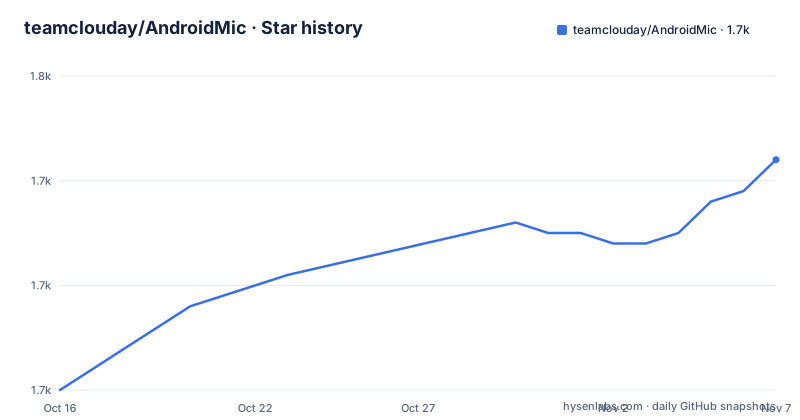
Star history
- teamclouday/AndroidMic1,742 ★ · +22
| Repository | 2026-10-16 | 2026-11-07 |
|---|---|---|
| teamclouday/AndroidMic | 1.7k | 1.7k |
22 Stars in the last 22 days, measured from the daily GitHub snapshot. Compare with other projects
Editorial analysis
Why AndroidMic Needs a PC-Side Virtual Audio Cable
AndroidMic addresses a specific gap: using an Android phone's microphone as an input source for desktop applications without treating the phone as a standard USB audio interface. It is intended for PC users who have a compatible Android phone and want the phone placed separately from the computer, connected by WiFi or USB. The README names voice chat, streaming, and recording applications such as Discord, Teams, Zoom, OBS, Audacity, and FL Studio as possible destinations.
The important constraint is that the PC application does not by itself guarantee that applications will see the incoming stream as a microphone. The README states that a virtual audio cable is required. On Windows, it recommends Virtual Audio Cable or VB Cable. These drivers create a paired playback output and recording input. AndroidMic sends the phone's audio to that virtual output, while another application selects the corresponding virtual input as its microphone. Selecting ordinary speakers would send the audio somewhere, but it would not follow the intended virtual routing.
Linux uses PulseAudio or PipeWire virtual devices, while macOS uses BlackHole or a similar driver. This makes AndroidMic a complete routing task rather than a single application installation. The user must install and configure the audio backend before diagnosing a connection as the source of a missing microphone. Linux also has a documented PipeWire and PulseAudio adjustment: set the PC application's channel count to Mono after selecting one of those systems.
AndroidMic's Phone-to-PC Audio Flow
The documented flow begins on Android. After the Android application starts recording with microphone permission, it sends the phone's microphone data to the PC application through the selected transport. The README identifies three connection families: TCP or UDP over WiFi, USB Serial, and USB ADB. WiFi requires the phone and PC to be on the same network. The phone receives the PC IP address and port from the PC application's log.
USB ADB uses the Android Debug Bridge and USB debugging. The PC application supplies a port number in its log, which the phone uses to establish the connection. This method has a practical dependency absent from WiFi setup: ADB must be installed on the PC and USB debugging must be enabled on the phone.
USB Serial follows a different path. The phone is set to Charging only mode, and Windows users must close Android Studio, ensure that the ADB process is not running, and use Zadig to install the WinUSB driver when required. The README notes that the phone may initially switch to accessory mode, requiring a second Connect action. Linux requires suitable udev permissions. Selecting USB Serial therefore does not make the generic USB setup steps interchangeable with USB ADB.
The PC application handles incoming audio with configurable sample rate, channel count, and bit depth. The README also lists noise cancellation and waveform visualization as application features. It does not document the codec, packet format, buffering policy, latency figures, or exact resampling behavior, so those details cannot be assumed. The repository's `Android/` and `RustApp/` directories and its Rust primary-language designation support a split Android and desktop application structure, but the README does not expose lower-level protocol specifications.
Installing AndroidMic and Creating the First Linux Virtual Input
For Nix or NixOS, the README documents this direct way to run the packaged desktop application:
nix run nixpkgs#android-micFor other systems, download the PC application from the GitHub releases page and install the Android APK from releases or F-Droid. A virtual audio cable is a separate prerequisite. On Linux with PulseAudio, the README gives these commands to create a null sink and expose its monitor as a source:
pactl load-module module-null-sink sink_name=virtual_mic
pactl load-module module-remap-source master=virtual_mic.monitor source_name=virtual_mic_source
After launching the PC application, select the virtual output device, not regular speakers or headphones. With PipeWire or PulseAudio, set its channel count to Mono. On the phone, open the side drawer and choose the same connection method as the desktop application.
For a first WiFi connection, put both devices on the same network, read the PC IP address and port from the PC application's log, and enter them in the Android application. Grant Microphone and Notification permissions, start recording, and establish the connection. Then select `virtual_mic_source` or the corresponding virtual input in the target PC application. The README does not document an automatic discovery mechanism, command-line configuration, or rollback procedure for these routing steps.
WiFi and USB Trade-offs in AndroidMic
WiFi is the simplest documented route because AndroidMic requires only a shared network and no additional connection software. It also separates the phone physically from the PC, which can help with placement. The trade-off is dependence on network configuration and IP addressing. The user must obtain the address and port from the desktop log rather than relying on account pairing or automatic device discovery, neither of which is documented.
USB can avoid dependence on the local network, but the two USB modes carry different setup costs. USB ADB is tied to Android Debug Bridge and requires USB debugging. It is unsuitable when the PC policy prevents ADB use or when the user does not want to enable developer access. USB Serial depends on lower-level USB permission and driver configuration. On Windows, replacing the current driver with WinUSB through Zadig is a system-level change, while Linux needs udev rules. The first accessory-mode connection may also require another attempt.
These modes are connection transports, not substitutes for the virtual cable. Whichever route carries the audio, the PC application must play it into a virtual endpoint that applications can select as their microphone. The README does not state whether one transport has lower latency, supports automatic reconnection, or is recommended for live performance. It also does not provide measured latency or failure-recovery behavior, so the choice should follow the platform constraints documented above rather than an unsupported performance claim.
AndroidMic Limits Across Desktop Audio Backends
The largest limitation is the dependency on platform audio drivers. On Windows, a missing or incorrectly selected VAC or VB Cable device is the first item in the README's troubleshooting list. On Linux, PulseAudio and PipeWire require virtual device creation and, for this configuration, Mono output. On macOS, a driver such as BlackHole must be installed. AndroidMic cannot substitute for these operating-system facilities.
Format mismatch is another configuration boundary. The README recommends selecting a format supported by the virtual device, with 44.1 kHz or 48 kHz sample rate, Mono, and 16-bit or 24-bit depth listed as common choices. It also says the Android and PC audio settings may be adjusted independently. However, the README does not describe automatic negotiation or conversion when those settings differ, so matching supported formats is the safer first check.
Applications must then select the virtual input rather than a physical microphone. The PC application's output selection and the target application's input selection are separate operations. Failure to hear audio, absence of a microphone, or silence in Discord, Zoom, or a recorder should not automatically be attributed to WiFi latency or the Android side. The documented diagnostic order begins with the virtual cable, followed by the PC application's output choice and the consuming application's input choice.
The README mentions a Windows Defender false-positive warning and directs affected users to report the detection to Microsoft. That warning does not document the detection mechanism, signed-build status, or a supported antivirus exclusion. Users should not treat the README's characterization as proof that every warning is harmless.
AndroidMic Maintenance, Releases, and GPL-3.0 Implications
The repository is not archived, and the last push was on 2026-10-13. Releases include version 2.2.10 on 2026-10-06, version 2.2.9 on 2026-09-04, and version 2.2.8 on 2026-06-08. This is recent repository activity, but release history alone does not establish that every supported Android, Windows, Linux, or macOS combination is compatible.
Users of the Nix package have a direct upgrade path through the named package and release artifacts on GitHub or F-Droid. The README does not provide a changelog, migration notes, rollback instructions, or a compatibility matrix for the listed versions. It therefore does not confirm whether upgrading preserves virtual-device settings or whether each release changes audio defaults. Drivers and the PC application may also be separate pieces of the deployment, which means updating AndroidMic does not itself update VAC, VB Cable, BlackHole, PulseAudio, or PipeWire.
The repository uses the GPL-3.0 license. That identifies the license under which the project is offered and implies obligations associated with GPL-3.0 when its license terms and applicable distribution conditions are relevant. It is not a compatibility guarantee for every desktop driver or third-party virtual cable, and the README does not provide legal interpretation. Code signing, release provenance, and driver compatibility are also not documented in the repository README.
Editorial conclusion
AndroidMic is appropriate for users who want their Android phone to serve as a PC microphone and can configure a virtual audio endpoint. It is a poor fit for users expecting a direct replacement for a conventional USB microphone or a setup with no platform-specific audio routing. Verify the virtual cable, matching connection method, channel layout, and phone permissions first, because failures in these areas can leave audio streaming without producing a usable PC microphone.
Frequently asked questions
Does AndroidMic work without installing a virtual audio cable?
No. The README explicitly says AndroidMic requires a virtual audio cable because the PC needs a way to recognize the incoming stream as a microphone input.
Which connection methods can AndroidMic use between Android and PC?
AndroidMic supports WiFi through TCP or UDP, USB Serial, and USB ADB. Each method has separate setup requirements, including ADB for USB ADB and possible driver changes for USB Serial on Windows.
Where do I get AndroidMic for the PC and Android phone?
The PC application and Android APK are available from GitHub releases. The Android application is also listed on F-Droid, and Nix or NixOS users can run `nix run nixpkgs#android-mic`.
Official sources
Add this badge to your README
If you maintain this project, the badge below links readers to this analysis and shows its maintenance status from the daily GitHub snapshot. Paste the markdown into your README; add ?metric=license or ?metric=stars to the image URL for a different field.

[](https://hysenlabs.com/projects/teamclouday-androidmic)Star history chart for your README
[](https://hysenlabs.com/projects/teamclouday-androidmic)Was this useful?