RustOwl: seeing what the borrow checker concluded
Visualize Ownership and Lifetimes in Rust
At a glance
- What is it?
- A language server that draws variable lifetimes and ownership movement as coloured underlines, running against rustc internals through the nightly toolchain.
- Who is it for?
- The useful thing RustOwl adds is not another lint but a picture of what the compiler already concluded. Underlines that distinguish definitely live from maybe live, immutable borrow from mutable borrow, and a move from an error turn a borrow checker message into a span you can read directly under the identifier, which is the point at which most confusion about lifetimes actually happens.
- Can I use it commercially?
- Yes, with conditions. MPL-2.0 is a weak copyleft licence: you can use it inside commercial and closed-source software, but if you distribute changes to its own files, you must publish those changes under the same licence.
- Is it still maintained?
- Yes. The repository last received commits 1 day ago.
- What is it written in?
- Mainly Rust, according to GitHub's language statistics.
Answers come from the project's GitHub data, last synced on October 22, 2026, and from our analysis. They are not legal advice.
Star history
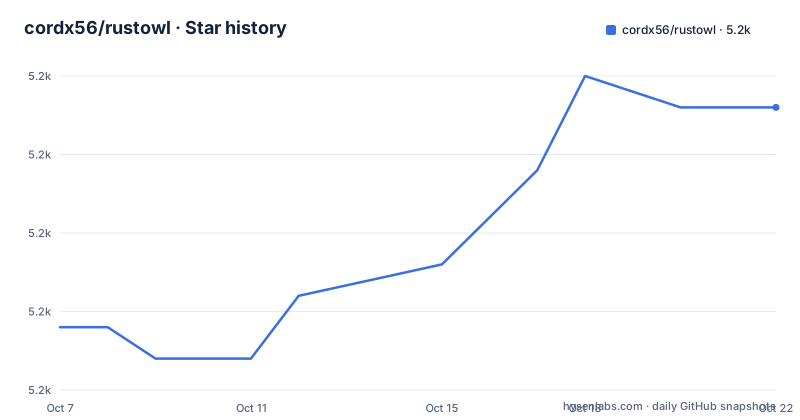
- cordx56/rustowl5,239 ★ · +7
| Repository | 2026-10-07 | 2026-10-22 |
|---|---|---|
| cordx56/rustowl | 5.2k | 5.2k |
7 Stars in the last 15 days, measured from the daily GitHub snapshot. Compare with other projects
Editorial analysis
The borrow checker knows this already, nobody drew it
Rust's borrow checker decides, for every expression in your program, whether a variable is initialized, whether it has been moved, whether it is borrowed immutably or mutably, and over exactly which span of code. What it does not do is show you that answer inline. It reports a violation as a diagnostic and otherwise stays silent.
RustOwl's premise is that silence is the problem. It visualizes ownership movement and lifetimes of variables, and the trigger is ordinary: when you save Rust source code it is analyzed, and the ownership and lifetimes of variables are visualized when you hover over a variable or function call. No build step to run, no command to remember. You move the cursor and wait about two seconds.
The output is underlines, which is a deliberate choice. The README lists the vocabulary as a color legend rather than as UI documentation, because the colors are the entire interface: green for a variable's lifetime, blue for immutable borrowing, purple for mutable borrowing, orange for a value moved or a function call, and red for a lifetime error.
The project describes itself as visualizing ownership and lifetimes in Rust for debugging and optimization, with a repository of roughly 5,214 stars, 113 forks and 11 open issues, MPL-2.0 licensed, last pushed on 2026-09-22.
Definitely live versus maybe live is the distinction that matters
Two of the color entries carry sub-definitions, and they are the most substantive part of the README.
A green underline for a variable's lifetime comes in two varieties. Definitely live means the variable is provably initialized on every path reaching that point. Maybe live, drawn as a wavy underline, means the variable is initialized on some paths but may have been moved, dropped, or be uninitialized on others.
That distinction is the whole reason to want a visualizer. The maybe live state is exactly where conditional control flow, early returns and loop exits conspire to produce code that compiles but reads as though it is obviously fine. Seeing a wavy underline under a name that looked certainly initialized is often more informative than any error message, and the README documents it as a first-class result rather than an approximation.
Red covers lifetime errors, and the README splits that into two specific cases: a diff of lifetime between actual and expected, and an invalid overlapped lifetime of mutable and shared, that is immutable, references. The first is a range problem you can read as a span mismatch. The second is the borrow checker complaining about aliasing, and drawing it directly under both references makes the overlap visible rather than something you have to reconstruct from two line numbers in a diagnostic.
One honest caveat appears at the end of the README. Due to the limitations of VS Code's decoration specifications, characters with descenders such as g or parentheses may occasionally not display underlines properly.
An LSP server with an extended protocol, so any editor is reachable
RustOwl is not an editor plugin with an analysis core bolted on. It implements an LSP server with an extended protocol, and the README says explicitly that this means it can be used easily from other editors. Editors with real RustOwl support ship as a VS Code extension, a Neovim plugin and an Emacs package; for anything else, the project publishes The RustOwl LSP specification and invites you to implement a client.
The distinction that follows from an extended protocol is worth understanding. Standard LSP defines requests such as hover, and RustOwl's hover carries the lifetime and ownership picture. Extensions beyond the standard are what let a client request the underline decorations themselves, so a thin client can render the same information the first-party plugins do.
The three first-party integrations differ mainly in how much setup they absorb. In VS Code and Vscodium, RustOwl is installed automatically when the extension activates, and the extension runs RustOwl when you save any Rust program in a cargo workspace. The initial analysis may take some time, but from the second run onward compile caching reduces it.
Neovim and Emacs both require you to install the RustOwl LSP server yourself first. The Neovim minimal setup is four fields:
{
  'cordx56/rustowl',
  version = '*', -- Latest stable version
  build = 'cargo install rustowl',
  lazy = false, -- This plugin is already lazy
  opts = {},
}
The Emacs setup is an Elpaca declaration followed by a use-package form, and the README notes you must install the LSP server manually:
(elpaca
  (rustowl
    :host github
:repo "cordx56/rustowl"))(use-package rustowl
:after lsp-mode)RustRover and other IntelliJ IDEs, and Sublime Text, both go through third-party repositories rather than anything in this tree.
The analysis runs against rustc internals, and the toolchain shows it
The dependency list explains the technical shape better than the README does. `Cargo.toml` sets `rustc_private = true` under `package.metadata.rust-analyzer`, and there is a `rust-toolchain.toml` at the root. Both point at the same requirement: RustOwl links against compiler internals, so it needs a nightly toolchain rather than stable Rust.
The rest of the dependency set is what you would expect for a build tool that has to compile and analyze a workspace. `cargo_metadata` for reading the workspace manifest, `clap` with the `cargo` and `derive` features for the command line surface, `clap_complete` and `clap_complete_nushell` for shell completions, `reqwest` with `socks` for fetching a toolchain, `tokio` with a broad feature set for async work, `tower-lsp` as the LSP framework, and `rustversion` for conditional compilation.
Two entries point directly at the visualization. `tree-sitter-rust` and `tree-sitter-highlight` are there for syntax-level work, and `rayon` is there for parallelism, which is what the v1.0.0 release candidate credits for its speedup. `indicatif` handles progress output, and `flate2` with `tar` and `tempfile` handle downloading and unpacking.
The `Dockerfile` shows the packaging story and the toolchain bootstrap in one file. It is a multi-stage build on `debian:bookworm-slim` that installs `cargo-chef` for dependency caching, prepares a recipe, cooks it, builds with `--release`, then copies two binaries into the final image:
COPY --from=builder /app/target/release/rustowl /usr/local/bin/
COPY --from=builder /app/target/release/rustowlc /usr/local/bin/
The final image then runs `rustowl toolchain install --skip-rustowl-toolchain` and sets `ENTRYPOINT` to `rustowl`. That single line explains the whole UX: the binary manages its own compiler toolchain rather than assuming you have the right nightly already. There is also a `Dockerfile`-adjacent `build.rs`, and separate `benches/`, `perf-tests/`, `algo-tests/`, `tests/` and `nvim-tests/` directories, which is an unusually thorough test layout for a tool of this kind.
Version numbers went backwards once, which tells you what happened
The release list has an oddity worth reading closely. v1.0.0-rc.1 was published on 2025-08-19. v0.4.0 was published on 2026-05-28. The lower version number is the newer release.
What v1.0.0-rc.1 advertised was speed: analysis about 7 times faster, measured in the RustOwl repo, thanks to new multithreading and caching, plus updated support for the latest Rust version and an improved editor plugin experience. It was a release candidate for a 1.0 that had not landed.
v0.4.0 then arrived with a different headline. It introduces a new analysis method for faster and more accurate lifetime visualization, up to 1.5 times faster analysis compared to v1.0.0-rc.1, benchmarked by analyzing RustOwl itself. The way it frames that comparison makes it clear which line of work continued. Alongside the speed claim it splits lifetimes into two categories, definitely live and maybe live, which is the green underline distinction described earlier and now part of the documented visual vocabulary rather than an implementation detail.
The breaking changes listed for v0.4.0 also say something about the project's direction. Moving installation docs to the README came from a contributor. Multiple Rust version support, a switch to Polonius subset calculation, and a change so live range calculation uses StorageLive and StorageDead and shows correct ranges point at one underlying theme: the tool had been getting answers wrong, not merely slowly, and the fix was to rework how it computes them. `Cargo.toml` agrees with the release tag, declaring `version = "0.4.0"` on `edition = "2024"`, so the current line is the 0.4 series rather than the release candidate.
Packaging reaches past cargo install
Distribution is handled in several places at once, which is a sign of a tool with a non-Rust audience as well as a Rust one.
The README badges point at a crates.io package, an Arch User Repository package named `rustowl-bin`, and a WinGet package under `Cordx56.Rustowl`. That covers cargo users, Arch users and Windows package manager users, and it means someone on Windows can install the analyzer without touching a Rust toolchain at all.
`Cargo.toml` adds a fourth path with a `package.metadata.binstall` section. It builds a download URL template from the repository and version, sets the archive format to `tgz`, disables the quick-install strategy, and overrides the format to `zip` for both `x86_64-pc-windows-msvc` and `aarch64-pc-windows-msvc`. In plain terms, the project publishes prebuilt binaries in a layout the `binstall` ecosystem can fetch directly.
There is also a hosted instance at `play.rustowl.rs`, which the README offers as a way to try the tool without installing anything, and editor plugin badges for the VS Code Marketplace, Open VSX and a JetBrains plugin.
The stated support boundary is at the end of the README: the five latest versions of Rust, on a best effort basis. Combined with the nightly toolchain requirement and the extended LSP protocol, that is the honest summary of where the tool sits. It is a debugger for understanding one specific class of compiler conclusion, it is version-sensitive because it depends on compiler internals, and it is distributed widely because the people who need it are not only Rust programmers.
Editorial conclusion
The useful thing RustOwl adds is not another lint but a picture of what the compiler already concluded. Underlines that distinguish definitely live from maybe live, immutable borrow from mutable borrow, and a move from an error turn a borrow checker message into a span you can read directly under the identifier, which is the point at which most confusion about lifetimes actually happens. The cost is structural rather than philosophical: the analysis needs rustc internals through a nightly toolchain, it covers the five latest Rust versions on a best effort basis, and the editor front ends are thin because the LSP protocol is extended rather than standard. The repository documents its editor setups clearly and keeps a public LSP specification for anyone writing another client, so the honest entry point is the VS Code extension for a look, then the LSP spec if your editor is not on the list.
Frequently asked questions
What does RustOwl visualize?
It visualizes ownership movement and lifetimes of variables as underlines under your code, triggered by hovering over a variable or function call after a save. Green marks a variable's lifetime, blue immutable borrowing, purple mutable borrowing, orange a value moved or a function call, and red a lifetime error.
What is the difference between definitely live and maybe live?
Definitely live means the variable is provably initialized on every path reaching that point. Maybe live, shown with a wavy underline, means it is initialized on some paths but may have been moved, dropped, or be uninitialized on others.
Do I need a nightly Rust toolchain to use RustOwl?
The project depends on compiler internals, with Cargo.toml setting rustc_private = true and a rust-toolchain.toml at the repository root. The shipped Dockerfile reflects this by running rustowl toolchain install as part of the image build, so the binary manages its own toolchain.
Which editors does RustOwl support?
First-party support covers VS Code, Vscodium, Neovim and Emacs. RustRover and other IntelliJ IDEs and Sublime Text are supported through third-party repositories, and because RustOwl runs an LSP server with an extended protocol, you can write your own client against the published LSP specification.
How do I install RustOwl without cargo?
Beyond the crates.io package and cargo install, the project publishes an Arch User Repository package named rustowl-bin and a WinGet package under Cordx56.Rustowl. There is also a hosted instance at play.rustowl.rs for trying the tool without installing anything.
Which Rust versions does RustOwl support?
The README states support for the 5 latest versions of Rust on a best effort basis. Because the analysis relies on compiler internals rather than only on stable language surface, that window is a real constraint when working across a mixed toolchain setup.
Official sources
Add this badge to your README
If you maintain this project, the badge below links readers to this analysis and shows its maintenance status from the daily GitHub snapshot. Paste the markdown into your README; add ?metric=license or ?metric=stars to the image URL for a different field.

[](https://hysenlabs.com/projects/cordx56-rustowl)Star history chart for your README
[](https://hysenlabs.com/projects/cordx56-rustowl)Was this useful?