OpenCluely: two licences, a manifest stuck at 1.0.0, and no macOS build
OpenCluely is a free, open source Cluely (alternative), built for technical interviews like DSA, OAs, and CP. It offers an invisible overlay, real-time AI help, Smart Image Processing for question capture, and multi-language support : 100% customizable and private.
At a glance
- What is it?
- An Electron desktop app whose stated purpose is to answer a live technical interview on an overlay that screen recording does not capture. What the repository files make checkable are the licence disagreement, the version that never moved off 1.0.0, what actually reaches a cloud model, and the three platforms treated differently.
- Who is it for?
- Read this one as an engineering artefact rather than a product recommendation. OpenCluely is built for DSA, online assessment and competitive programming practice, and the parts worth studying are ordinary Electron work: a prompt set loaded from files, two interchangeable speech backends, a packaging exclude list that keeps the model directory and the environment file out of the artifact, and daily rotating logs.
- Can I use it commercially?
- Yes. Apache-2.0 is a permissive licence: you can use, modify and sell software built on it, as long as you keep its copyright and licence notices.
- Is it still maintained?
- Yes. The repository last received commits 23 days ago.
- What is it written in?
- Mainly JavaScript, according to GitHub's language statistics.
Answers come from the project's GitHub data, last synced on November 25, 2026, and from our analysis. They are not legal advice.
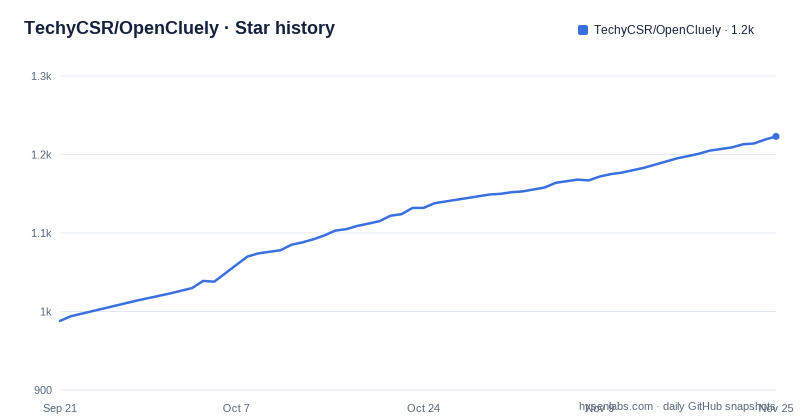
Star history
- TechyCSR/OpenCluely1,223 ★ · +235
| Repository | 2026-09-21 | 2026-11-25 |
|---|---|---|
| TechyCSR/OpenCluely | 988 | 1.2k |
235 Stars in the last 65 days, measured from the daily GitHub snapshot. Compare with other projects
Editorial analysis
The product is built around not being visible on a live call
The README states the purpose without euphemism, calling the app an invisible AI interview copilot, an overlay for technical interviews and practice, and naming its target work as DSA, online assessments and competitive programming. The visibility claims are specific and central. The overlay is described as a window that recording and conferencing tools do not capture, with Zoom, Google Meet, Microsoft Teams, Discord and OBS named. A second mechanism hides every window on its own when a screen share starts. A third runs the app under ordinary system names. A shortcut toggles the visibility of all windows at once. None of that is an incidental feature; it is the reason the application exists, and it is what separates it from a practice timer. Read the rest of the repository as the engineering around that one idea, and read the idea itself as something to keep out of any hiring process. Answers arriving on an overlay the other party cannot see, produced by a model that does not know the conversation has an audience, are not assistance, and the fact that the code is Apache-2.0 or ISC or open source changes nothing about that.
Three sources name two different licences
Apache-2.0 is the licence recorded for this repository. The manifest at the root of the same repository records `"license": "ISC"`. A `LICENSE` file sits beside them, and the badge row at the top of the README links to that file rather than to either licence name. So a reader who checks one source gets a different answer from a reader who checks another, and the file that would settle it is named only by its existence. For most projects this is a packaging slip. Here it is worth resolving before doing anything with the code, because two of the project's advertised qualities are redistribution and white-label style customisation, and the difference between Apache-2.0 and ISC is not cosmetic: the first carries an explicit patent grant and a patent-termination clause, the second is a short permissive licence with neither. The README describes the project as free and open source and as 100% customizable, and Apache-2.0 is the licence that would support the second claim more comfortably. The repository does not say which was intended, and picking one on the author's behalf would be a guess.
The manifest version is 1.0.0 while the newest tag is v1.8.7
The version field in `package.json` reads 1.0.0. The release history reads differently: v1.8.5 on 2026-07-03, v1.8.6 on 2026-07-10, and v1.8.7 on 2026-07-28. So the manifest has not tracked the tags for at least three releases, and either the version is set by something outside the file or nobody bumps it. The last recorded push is dated 2026-07-29, one day after v1.8.7, which means there is work in the tree that no tag contains. The build configuration draws its identity from other fields instead, with an appId of `com.opencluely.app` and a productName of OpenCluely, so a build produced from the current tree would identify itself as the product while carrying the version 1.0.0. The installers are what a user actually downloads, and the README says every build is produced automatically on GitHub Actions and ships with SHA-256 checksums, and that each release lists the full set of commits it includes. That last detail is the useful one: since the release pages enumerate their commits, the gap between a tag and the tree is traceable without trusting the version field.
Screenshots and microphone audio go to a cloud model
The claim to check is that processing stays on your machine and the only thing that leaves the device is the request sent to the AI provider, alongside a highlight that the app ships with no telemetry and keeps your session local. The dependency list and the feature text describe what that request carries. Screenshots go straight to Gemini for visual reasoning, with no OCR step in between, so an image of the interviewer's screen is the payload. Voice is a separate path with two options: a local Whisper install for offline transcription, or Azure Speech as the cloud alternative, and setting the provider is what switches between them. Session memory is described as the whole conversation being remembered so follow-ups keep their context, which means the context grows across the call. The local claim is checkable in a specific place, because the dependencies include two logging packages, one of them a daily rotating file transport, so whatever is kept locally is kept in rotating log files on disk. If the privacy claim matters to you, those files and the provider setting are where to look first, not the README.
Auto-hide on screen share depends on behaviour the README never describes
Three separate mechanisms are claimed, and only one of them is described well enough to reason about. The overlay itself is a window that capture does not pick up, which is a statement about how each named application composites its screen share rather than about anything the app does. The manual control is explicit: a shortcut toggles visibility of all windows. The automatic one is the gap. The README says that when a share starts, the app can hide every window on its own, and it does not say how the app knows a share has started, what it detects, or whether detection is per application or global. There is also no test matrix: five conferencing and recording applications are named as cases the overlay stays out of, with no statement of versions, window managers, or platforms on which that was checked. Practically, that means the reliability of the central feature is undocumented, and the only published evidence is a demo video link in the README. The three named mechanisms also have different failure modes, and the one you can verify yourself is the manual toggle, which is blunt by design: hiding every window takes the interface away as well as the answers, so the same switch conceals the tool and cleans up a screen you have finished narrating.
macOS has no installer because the app is unsigned
Pre-built installers cover two of the three named platforms. Windows gets an NSIS installer that adds a Start Menu shortcut. Debian and Ubuntu get a `.deb` that pulls system dependencies automatically, naming Python, ffmpeg and GTK. Linux generally gets an AppImage with no install step. macOS gets nothing, and the reason is stated plainly: the application is unsigned and un-notarized, so Gatekeeper blocks it as damaged and can't be opened, and the platform has to build from source instead. That is an honest explanation and a real distribution gap in one sentence. Two things follow from the `.deb` behaviour as well. An installer that pulls Python, ffmpeg and GTK automatically is mutating the host system rather than shipping a self-contained bundle, so what it installs is not confined to the app. And the AppImage route is the only one that leaves the system alone, which makes the choice of package format a decision about how much of the machine the tool is allowed to change.
Speech adds a Python environment and ten settings to an Electron app
Voice is the part of the architecture that does not look like an Electron application. The local path creates a dedicated virtual environment, installs a Python speech package into it, points the environment file at that interpreter, creates a model directory, and runs a speech test, all as part of setup. The app then reads its own PCM WAV recordings directly, which is why ffmpeg is only needed when transcribing other audio formats through a command-line fallback, and why the `.deb` can treat ffmpeg as an automatic dependency for the general case. Ten settings govern it, and two of them are bare timeouts: a manual capture ceiling of 90000 ms and a GPU idle threshold of 60000 ms. The rest select a provider, a model default of small, a capture mode defaulting to voice activity detection, an automatic language setting, an automatic device setting, and where the reply goes. Capture itself is either automatic voice-activity detection or manual start and stop, and the README is explicit that the automatic mode avoids fixed-timer sentence cuts. Sox is an optional extra for the microphone, and when no speech provider is configured the microphone button hides itself across the whole app. The interpreter path is a setting with an empty default, so a machine whose Python is not where the script expects has to be told, and the model directory is created during setup rather than shipped.
The interface is loose HTML at the root beside three source directories
The whole application arrives from one clone, and the layout that clone leaves behind is where the architecture is least tidy:
git clone https://github.com/TechyCSR/OpenCluely.git
cd OpenCluely
The entry point is `main.js`, and beside it sit five HTML files at the top level, a chat page, a settings page, a login-free index page, a response page and an onboarding page, each with its own script for onboarding and speech recognition, plus `preload.js` and a dedicated prompt loader. Alongside those are three parallel source directories, `src/`, `lib/` and `webapp/`, and nothing in the README says how they divide. Prompt behaviour is file driven, since a `prompts/` directory is loaded by the prompt loader script, which is what makes the project's claim of full customisation a directory edit rather than a setting. There is a misspelled `assests/` directory next to it, and a `CLAUDE.md` at the root. The packaging exclude list is the tidiest part of the whole tree, because it enumerates what must not ship: the markdown files, anything matching `.env*`, the Whisper virtual environment, the Whisper model directory and the `bin/` directory. The two build-time dependencies are electron at 29 and electron-builder at 24, and the development launch script clears `ELECTRON_RUN_AS_NODE` before starting Electron and then passes `--no-sandbox` and `--disable-gpu`, so that one run has the Chromium sandbox switched off.
Editorial conclusion
Read this one as an engineering artefact rather than a product recommendation. OpenCluely is built for DSA, online assessment and competitive programming practice, and the parts worth studying are ordinary Electron work: a prompt set loaded from files, two interchangeable speech backends, a packaging exclude list that keeps the model directory and the environment file out of the artifact, and daily rotating logs. The part that decides whether you should install it is the one it advertises. An overlay built to stay out of a capture stream, that hides itself when a share begins, and that runs under ordinary system names is a tool for giving yourself an advantage your interviewer cannot see, and using it in a real hiring process is misrepresentation whether or not anyone catches it. The README's own framing is the honest summary: an invisible interview copilot. Two further reasons to keep it in a practice environment. The licence is unsettled, since the repository overview and the manifest name different licences and a third file sits beside them. And macOS has no build at all, because the app is unsigned and un-notarized, so the platform a Mac reader is on is the one platform that cannot install from a release.
Frequently asked questions
What does OpenCluely send to a cloud provider?
Screenshots go straight to Gemini for visual reasoning, with no OCR step in between, and voice has a cloud option through Azure Speech alongside a local Whisper path. The README states that processing stays on the machine and that the only thing that leaves the device is the request sent to the AI provider. Two dependencies handle local file logging, one of them rotating daily.
Why is there no macOS download for OpenCluely?
Because the application is unsigned and un-notarized, so Gatekeeper blocks a downloaded build as damaged and can't be opened, and the README states macOS has no pre-built `.dmg` and has to run from source. Windows and Linux do have pre-built installers, as an NSIS `.exe`, a `.deb` that pulls Python, ffmpeg and GTK automatically, and an AppImage that needs no install.
What licence is OpenCluely released under?
The sources disagree. Apache-2.0 is the licence recorded for the repository, while `package.json` records `"license": "ISC"`, and a `LICENSE` file sits at the root that the README badge links to without naming which terms it holds. Nothing in the repository says which was intended.
Does OpenCluely send telemetry or keep interview data locally?
The highlights state that it ships with no telemetry and keeps your session local, and the What it is section says processing stays on your machine. The dependency list includes winston alongside winston-daily-rotate-file, so local state is written to rotating log files, and session memory is described as retaining the whole conversation so follow-ups keep context.
Official sources
Add this badge to your README
If you maintain this project, the badge below links readers to this analysis and shows its maintenance status from the daily GitHub snapshot. Paste the markdown into your README; add ?metric=license or ?metric=stars to the image URL for a different field.

[](https://hysenlabs.com/projects/techycsr-opencluely)Star history chart for your README
[](https://hysenlabs.com/projects/techycsr-opencluely)Was this useful?