Tencent Lemon Cleaner: a macOS cleanup utility built as a set of Xcode modules
Tencent Lemon Cleaner is a cleanup tool built specifically for macOS. Features include duplicate file and similar photo detection, customized junk scanning per app, visual full-disk space analysis, memory release, browser privacy cleaning, and real-time device status monitoring. Focused on cleanup, it offers tailored cleaning plans for hundreds of apps and helps users clean up with one click.
At a glance
- What is it?
- An Objective-C project from Tencent with twelve separately named modules for junk scanning, duplicate files, similar photos, app uninstalling, login items, and a menu bar monitor, split across two GPL versions.
- Who is it for?
- Lemon Cleaner is worth a look for a specific reason rather than as a Mac utility you would install on your own machine: the code is organized into small, well-named Objective-C modules, each of which does one job, and the whole thing is released under GPL. That makes it a reference for how a menu bar utility with privileged file operations is put together in a pre-SwiftUI codebase.
- Can I use it commercially?
- Check first. The repository uses a licence we do not classify automatically, so read its LICENSE file before any commercial use.
- Is it still maintained?
- Yes. The repository last received commits 168 days ago.
- What is it written in?
- Mainly Objective-C, according to GitHub's language statistics.
Answers come from the project's GitHub data, last synced on October 22, 2026, and from our analysis. They are not legal advice.
Star history
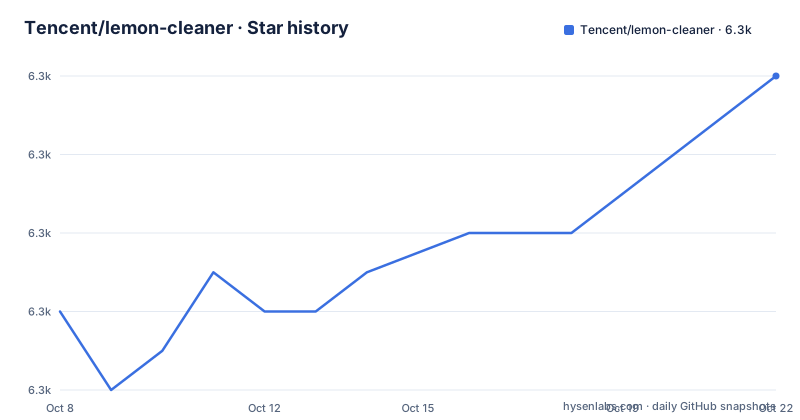
- Tencent/lemon-cleaner6,344 ★ · +6
| Repository | 2026-10-08 | 2026-10-22 |
|---|---|---|
| Tencent/lemon-cleaner | 6.3k | 6.3k |
6 Stars in the last 14 days, measured from the daily GitHub snapshot. Compare with other projects
Editorial analysis
A macOS cleanup tool, and the reason it targets Chinese users
The repository description explains the product's premise directly. Tencent Lemon Cleaner is a cleanup tool built specifically for macOS, focused on identifying duplicate files and similar photos, doing app-specific junk scanning, visual full-disk space analysis, releasing memory, clearing browser privacy data, and monitoring device state in real time. The stated focus is cleanup, with customized scanning recipes for a hundred or more applications.
The README makes the same point with the reasoning that is unusual about this project. It is built around the habitual cleanup behavior of Chinese users, and it positions itself as systematically solving the space problem on Mac devices, with one-click cleanup and professional cleanup advice.
That framing explains the app-specific scanning that distinguishes this from a generic file sweeper. The feature list names Xcode and Sketch as examples of applications that get their own tailored scanning recipe, which means the tool has hardcoded knowledge about where those applications leave caches and what is safe to remove. The README frames the classification as plain-language and easy to understand, which is the point of a cleanup tool: it has to tell you what it found before it deletes anything.
The other headline features follow the same pattern. Large file cleanup looks for files over 50M and lets you choose the folders to scan. Duplicate file cleanup compares content. Similar photo cleanup sorts through your photo library. Browser privacy cleanup covers Safari and Chrome among others. Application uninstalling is designed to leave no residue. Login item management controls what starts at boot. And the status bar can be customized to show memory use, disk space, CPU temperature, fan speed, or network speed in real time.
The official site is lemon.qq.com. The repository has 6,328 stars and 795 forks, with 35 open issues, and GitHub reports the language as Objective-C. There are no repository topics set, which is unusual for a project of this size.
Twelve modules, each with one job
The technical module list in the README is the most useful thing in the document, because it turns a monolithic desktop app into a map you can navigate.
Lemon is the main project. LemonMonitor is the status bar component. LemonBigOldFile handles large file cleanup, LemonDuplicateFile handles duplicate files, and LemonPhotoClean handles similar photos. LemonUninstaller removes applications. LemonPrivacyClean handles browser privacy data. LemonLoginItemManager manages startup items. LemonSpaceAnalyse does disk space analysis, LemonFileMove moves files, LemonHardware reads hardware information, and LemonNetSpeed measures network speed.
The twelfth is LemonCleaner, described as the module performing the actual cleanup operations. That distinction between the module that finds things and the module that deletes them is the interesting architectural decision here. Detection and destruction are separated, which is the correct shape for a tool with privileged filesystem access, because it means the scanning logic can be reasoned about without touching anything.
The same split shows up in the naming. Each feature is its own module with a name that states its job, rather than a layer of service classes inside one target. For someone reading the source to understand how macOS cleanup tools are built, that is more instructive than the feature list.
The Xcode structure at the repository root supports the same reading. There is a Lemon.xcodeproj and a Lemon.xcworkspace, plus a Podfile, a Podfile.lock, a Pods directory, a localPod directory, a Resource directory, and a Tools directory. Two things stand out. The Pods directory is committed to the repository, so third-party dependencies are vendored rather than resolved at build time, which makes the checkout buildable but also means you are trusting whatever versions were pinned when it was last synced. And there are two separate top-level source directories, Lemon and LemonClener, where the second is spelled without the first a. That inconsistency is real and it is in the tree, not a transcription slip, which is worth knowing before you grep for a module and find nothing.
Two GPL versions, and a module that is not in the tree
Lemon Cleaner uses two licenses, and the split is documented precisely enough that you can act on it.
The files in the LemonDaemon module use GPLv2. All other files in Lemon Monitor and Lemon Cleaner use GPLv3 unless explicitly stated otherwise. The README repeats this with the usual carve-out for third-party components as listed in the license text, and the repository root carries two separate license files, LICENSE.txt and LICENSE_LemonCleaner_LemonDaemon.txt, one per license rather than a single combined file.
GitHub reports no license identifier for this repository. The two license files at the root contradict that, in the same way a deliberately dual-licensed project confuses an automated detector looking for one SPDX expression. Here the intent is documented and the files are present, so the license question is answerable by reading them.
There is one loose thread. The LemonDaemon module has its own license file, which means at some point it was a distinct component under distinct terms, but the LemonDaemon directory does not appear in the repository tree. The tree lists Lemon.xcodeproj, Lemon.xcworkspace, Lemon, LemonClener, Podfile, Podfile.lock, Pods, Resource, Tools, and localPod. So either the module lives inside another directory under a name you would only find by searching, or it has been removed while its license file stayed behind.
Both readings are consistent with what is in the repository, and the difference matters if you plan to reuse code. If you are going to copy the privileged file-operation layer, identify the exact files first and match them against the two license texts, because GPLv2 and GPLv3 are not interchangeable for a derived work. If you only need the scanning and analysis modules, they fall under GPLv3.
Either way, the practical instruction is the same. Read both license files, identify which files you are taking, and confirm with the authors if your use depends on the answer.
What the timeline says about this codebase
The release history and the last commit tell different stories, and you need both.
Three releases are visible in the repository: v5.1.18 on 2025-08-25, v5.1.19 on 2025-09-18, and v5.1.20 on 2025-10-22. That is roughly a monthly cadence across three months, ending eleven months before this review.
The last push to the repository was 2026-05-08. That is more than 183 days before today, which puts the project outside the window where you would describe a codebase as receiving ongoing work. Nothing in the repository suggests an abrupt end. The code is complete, the modules are named and organized, and the last commit is a normal-looking change rather than a farewell note.
What this means practically is that you should treat the repository as a defined state rather than a moving target. If you build the project, you build the code as of 2026-05-08 and it will not change under you. If you are looking for a maintained macOS cleanup tool for daily use, this is not the evidence you need, because a cleanup utility that lags macOS releases and third-party application changes ages in a specific way: the scanning recipes for Xcode and Sketch in particular go stale as those applications reorganize their caches.
The fork and issue counts are worth a separate note. With 795 forks against 35 open issues, the ratio suggests that most people who engage with this repository take it and build their own version rather than filing tickets upstream. For a utility like this, where every user has different applications and a different disk layout, that is a reasonable pattern, and it explains why the fork count is more than a tenth of the star count.
So the honest summary is: a substantial, well-organized Objective-C codebase with a documented licensing split, last changed in May 2026, whose last tagged release was in October 2025.
Contribution rules written for a corporate codebase
The contribution section is short but unusually specific, and it reads like guidance written by a team with a legal review process rather than an open source community norm.
For issues, the README asks that you use the GitHub issue templates, and lists conditions to satisfy before submitting: it must be a bug or a new feature, no similar issue or solution must already exist, and a new issue needs a detailed description. Bugs and features only. Questions do not go in the tracker.
For pull requests, the README says the code team will monitor all requests and run code review and tests. It lists four things to confirm before finishing a pull request: update the corresponding documentation and comments after changing code, add license and copyright headers to newly created files, test thoroughly, and follow the relevant coding standards.
The file header requirement is the one that catches people out. Adding a license and copyright statement to every new file is a convention with legal weight, which is consistent with a codebase released under two different GPL versions and a separate copyright statement on each license file.
There is also a CONTRIBUTING.md at the repository root, which is where the detailed version of these rules lives. The tree also carries a .gitignore and nothing else in the way of build or test automation. There is no test directory, no CI configuration, and no scripts directory for running checks, which is a notable difference from most repositories of this size and worth confirming for yourself if you plan to contribute.
One documentation detail that trips up non-Chinese-speaking contributors: the README is written entirely in Chinese, and so is the repository description. The project is not documented in English at all. That does not affect the license questions, since the two license files are standard GNU texts, but it does mean anyone outside a Chinese-reading contributor pool is working from the module names and the code itself rather than from documentation.
Editorial conclusion
Lemon Cleaner is worth a look for a specific reason rather than as a Mac utility you would install on your own machine: the code is organized into small, well-named Objective-C modules, each of which does one job, and the whole thing is released under GPL. That makes it a reference for how a menu bar utility with privileged file operations is put together in a pre-SwiftUI codebase. Two things temper that. The licensing is genuinely split, with the LemonDaemon module under GPLv2 and everything else under GPLv3, and the LemonDaemon module directory does not appear in the repository tree, so confirm with the authors which files you are actually copying before you build on it. And the timeline says check twice. The last release was v5.1.20 on 2025-10-22 and the last commit was 2026-05-08, so this is a codebase with a defined end state rather than one that is changing weekly. Read the module list, pick the one that matches your problem, and check the LICENSE files before assuming the license applies uniformly.
Frequently asked questions
What is Tencent Lemon Cleaner used for?
It is a macOS cleanup utility that scans for wasted disk space and removes it. The features include customized junk scanning recipes for a hundred or more applications including Xcode and Sketch, large file cleanup above 50M, duplicate file detection, similar photo cleanup, browser privacy cleanup, residue-free app uninstalling, login item management, and a status bar monitor for memory, disk space, CPU temperature, fan speed, and network speed.
What license does Lemon Cleaner use?
Two. Files in the LemonDaemon module use GPLv2, and all other files in Lemon Monitor and Lemon Cleaner use GPLv3 unless stated otherwise, with third-party components carved out as listed in each license text. The repository root carries LICENSE.txt and LICENSE_LemonCleaner_LemonDaemon.txt, one per license. GitHub reports no license identifier, so read those files directly rather than relying on the badge. The LemonDaemon module directory does not appear in the repository tree, so confirm which files it covers.
Is Lemon Cleaner still being updated?
Not on a recent schedule. The last release was v5.1.20 on 2025-10-22, preceded by v5.1.19 on 2025-09-18 and v5.1.18 on 2025-08-25, and the last push to the repository was 2026-05-08. That is well outside the 183-day window, so treat the repository as a defined state you build as of that date rather than a codebase receiving weekly work.
What language is Lemon Cleaner written in?
Objective-C, according to the language GitHub reports for the repository. The Xcode project is Lemon.xcodeproj with a Lemon.xcworkspace alongside it, and third-party dependencies are managed through a Podfile with a committed Pods directory and a Podfile.lock, plus a localPod directory. The documentation, including the README and the repository description, is written in Chinese only.
How is the Lemon Cleaner codebase organized?
As twelve separately named modules listed in the README: Lemon for the main project, LemonMonitor for the status bar, LemonBigOldFile, LemonDuplicateFile, and LemonPhotoClean for the three scanning features, LemonUninstaller, LemonPrivacyClean, LemonLoginItemManager, LemonSpaceAnalyse, LemonFileMove, LemonHardware, LemonNetSpeed, and finally LemonCleaner for the actual cleanup operations. Separating the scanning modules from the module that deletes is the notable choice.
Official sources
Add this badge to your README
If you maintain this project, the badge below links readers to this analysis and shows its maintenance status from the daily GitHub snapshot. Paste the markdown into your README; add ?metric=license or ?metric=stars to the image URL for a different field.

[](https://hysenlabs.com/projects/tencent-lemon-cleaner)Star history chart for your README
[](https://hysenlabs.com/projects/tencent-lemon-cleaner)Was this useful?