Pixal3D: the latest version is not on the default branch
[SIGGRAPH 2026] Pixal3D: Pixel-Aligned 3D Generation from Images
At a glance
- What is it?
- A single-image to 3D asset generator with a published paper, a hosted demo, and training code. The repository ships two branches built on two different upstream backbones, and the one described as the latest is not the branch you get when you clone.
- Who is it for?
- Clone the branch you actually want before anything else, because the default one is not the one the readme recommends and not the one the paper used. Two things to budget for.
- Can I use it commercially?
- Yes. MIT is a permissive licence: you can use, modify and sell software built on it, as long as you keep its copyright and licence notices.
- Is it still maintained?
- Yes. The repository last received commits 75 days ago.
- What is it written in?
- Mainly Python, according to GitHub's language statistics.
Answers come from the project's GitHub data, last synced on November 15, 2026, and from our analysis. They are not legal advice.
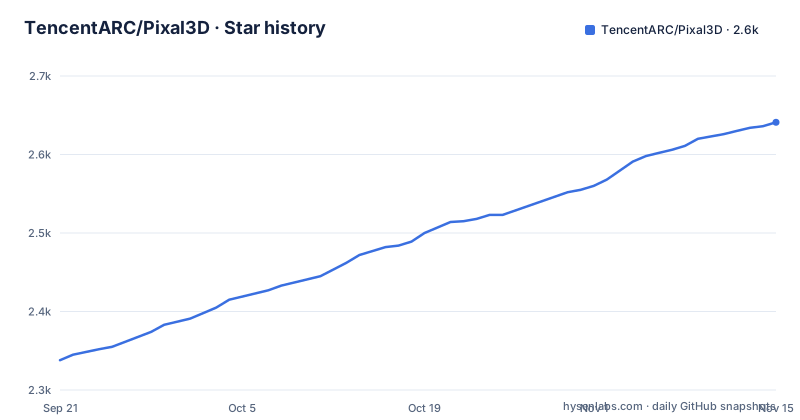
Star history
- TencentARC/Pixal3D2,641 ★ · +303
| Repository | 2026-09-21 | 2026-11-15 |
|---|---|---|
| TencentARC/Pixal3D | 2.3k | 2.6k |
303 Stars in the last 55 days, measured from the daily GitHub snapshot. Compare with other projects
Editorial analysis
A plain clone gets you a branch the readme never mentions
There is a table of branches near the top, and it lists two of them.
One is described as the latest version, an improved implementation on a newer backbone with better performance. The other is described as the paper version, the original implementation on a different backbone, corresponding to the results reported in the paper. There is a note underneath telling you to switch to the paper branch if you want to reproduce the paper's results.
The repository's default branch is neither of them. It is called something else.
So a person who clones the repository and follows the readme has landed on a third branch, which the readme's own table does not list. Every instruction in the document then applies to code they are not running.
The gap is easy to miss because the branch names look ordinary. A reader who assumed the default branch was the one labelled latest version would be right about the intention and wrong about the mechanics, and the only way to notice is to compare the table against the clone dialog.
There is a plausible reason for the arrangement, which is that a paper branch usually has to be frozen while the main line moves on, and freezing often means creating a new branch rather than renaming. But the table should name the default branch even so, because the default branch is what everyone lands on first.
The paper's numbers and the best code are two different backbones
The branch table says more than it appears to, because the two branches are not two versions of the same implementation.
The latest branch is built on one upstream backbone, a Microsoft project. The paper branch is built on a different one, from a different organisation. Those are two different model families with two different codebases underneath, so the two branches share the pipeline shape and very little else.
That has three consequences, and only the first is stated.
First, reproducing the paper means using the older backbone, which is the whole point of the paper branch and the reason the readme tells you to switch. The fidelity claims in the paper describe that branch.
Second, the headline claim, near-reconstruction-level fidelity with detailed geometry and physically based textures, is attached to a project whose recommended branch is not the one the paper measured. There is no metric in the readme for what near-reconstruction-level means, and no comparison figure for either branch.
Third, and unstated: a result on one backbone does not transfer to the other. Anyone citing the paper's quality alongside the recommended branch is citing two different systems, because that is what they are.
Installation depends on another project, a personal release, and a source build
Four steps, and only one of them is a normal install.
The first step tells you to follow the installation guide of a different project, a Microsoft repository, to set up the base environment. Nothing is installed by this repository in that step, and nothing is pinned. The base environment is a moving target owned by someone else, which is also why the framework itself is absent from this repository's own requirements file.
The second step is the one ordinary command:
pip install -r requirements.txtThe third builds a native attention library from source, with build isolation disabled, and the command contains two literal placeholder values. The readme asks you to replace them with the architecture and worker count suited to your machine. So the command as printed is a template, and copying it verbatim builds the wrong thing or fails.
The fourth installs a geometry library from a wheel hosted in a release asset on a personal repository, not from a package index. The URL is dated, which is good for reproducibility, and it means one of your four dependencies is a binary artefact under one person's account rather than something a package index mirrors or audits.
One dependency is unpinned and it is the background removal model on the inference path
The requirements file has fifteen entries. Thirteen are pinned to exact versions, down to the patch level, with hashes not involved but versions certainly fixed.
Two are not. One is the web demo library, which is arguably fine for a demo. The other is a model repository installed straight from a git URL, with no tag, no branch, and no version constraint of any kind.
That model matters more than an unpinned UI library. The multi-view documentation says that any view without an alpha channel is matted with the same background-removal model the single-image script uses. So a model that resolves to whatever is at the head of another organisation's default branch sits directly in the path of every inference run that has to guess a foreground.
The other optional acceleration is equally absent. The readme notes that if you do not have one particular attention library installed, you can select a built-in backend through an environment variable instead. That library is not in the requirements file either, and the fallback mechanism is an environment variable rather than a flag, which means it is easy to miss and easy to leave unset.
So the reproducibility picture has a hole in it in exactly the two places where a version change would alter output rather than merely break a build.
The camera file is where the effort goes, and a casual orbit will not match it
The multi-view input format is the most carefully documented part of the document, and every paragraph contains a constraint that can invalidate a run.
Views are never cropped or rescaled. The readme is explicit that the framing you provide has to be the framing the cameras describe, so a view that is not framed as the camera file claims will produce a reconstruction of the wrong thing rather than an error.
The camera file is a JSON document using the same convention that Blender-style training renders use, so a dataset file works as written. The world is Z-up, each camera looks down its own negative Z with its own positive Y as up, and the field of view can be overridden per frame.
Then the part that catches people. If your views are the usual orbit, four images every ninety degrees at eye level, the readme says to reuse the shipped example camera file as-is. The example encodes azimuths at zero, ninety, one hundred eighty, and two hundred seventy, zero elevation, and a twenty-degree field of view. Twenty degrees is a narrow lens. A phone held at arm's length photographs a considerably wider scene, so the framing from a casual orbit does not match the file even though the angles do.
There is also an ordering constraint. The first frame is the main view and should be the canonical front view, because every other view is placed relative to it, and the script warns when it is not.
Low-VRAM mode and resolution are independent, which is documented well
The inference script has two orthogonal switches, and the readme is clear that they are orthogonal.
Low-VRAM mode changes how models are loaded, loading them on demand. It also changes the default pipeline resolution, from the standard resolution down to a lower one. But the resolution flag is accepted in both modes, and the readme shows both directions: forcing the higher resolution while in low-VRAM mode, and forcing the lower one in standard mode.
So the pairing that appears by default is not a constraint, it is a default. Someone with enough memory and a slow GPU can get the low-resolution pipeline, and someone with a small card can request the high one at the cost of the memory the flag was meant to save.
The web demo takes the same two modes and picks its default resolution the same way, but changes it through the interface rather than a command-line flag, and notes that the choice can be overridden there. So the same setting is a flag on one entry point and a control on the other, which is a small asymmetry that a reader will discover rather than be told.
This part of the documentation is a good example of what the rest could be more like. It names the default, names the override, and shows both directions.
Search demand is for deployment formats this repository does not ship
The search terms attached to this project tell you what people arrive looking for.
Several of them ask for a workflow file for a popular node-based image generation interface, twice, once with the word workflow. Several more ask for a quantized format for local inference. One asks how this compares to the backbone project the recommended branch is built on. The rest are the ordinary discovery queries.
None of those things is in the repository. There is a hosted demo, a command-line script, a multi-view script, a training script, a web demo entry point, and a static page at the root. There is no node-graph integration, no quantized weights, and no published model in a local-inference format. The weights are hosted on a model hub and referenced by the readme rather than distributed here.
That is a normal division of labour for a research release, and the comparison query is a fair one to ask. But it does mean the project's search visibility is being spent on demand it does not serve, and that a reader arriving from a node-graph search will find a Python package and a Gradio page.
The project does carry a notice file alongside its licence, which is the conventional place for third-party attributions and is relevant here given how many external projects the installation depends on. The readme does not mention it.
Editorial conclusion
Clone the branch you actually want before anything else, because the default one is not the one the readme recommends and not the one the paper used. Two things to budget for. Installation depends on a second project's environment, plus a geometry library distributed as a release asset from a personal repository rather than from a package index, plus a source build of a native attention kernel with placeholder values you have to fill in. And the camera file is the part most likely to waste your afternoon: the views are never cropped or rescaled, the shipped example encodes a narrow twenty-degree lens at eye level, and every other view is placed relative to the first one, so an ordinary phone orbit will not match it without editing the camera file.
Frequently asked questions
What is TencentARC/Pixal3D?
An MIT licensed research project that generates a 3D asset from a single image, published at SIGGRAPH 2026. It is written in Python and the output is a GLB mesh. The stated approach is to lift pixel features into 3D by back-projection rather than injecting them loosely through attention.
Which Pixal3D branch should I clone?
The branch table names two. One is the latest version on a newer backbone; the other is the paper version on the original backbone, and the README says to switch to it to reproduce the paper's results. The repository's default branch is neither of the two listed.
How is Pixal3D installed?
In four steps: follow the installation guide of the upstream backbone project for the base environment, install the requirements file, build a native attention library from source with placeholder values you must replace, and install a geometry library from a wheel hosted in a release asset on a personal repository.
What does Pixal3D need for multi-view inference?
A directory of views plus a JSON file describing each view's camera, using a camera-to-world matrix and a horizontal field of view in radians. Views are never cropped or rescaled, the world is Z-up, and the first frame must be the canonical front view because the others are placed relative to it.
Does Pixal3D have a low-memory mode?
Yes. It loads models on demand and lowers the default pipeline resolution, and the resolution can be overridden in either direction with a flag. The web demo takes the same flag set but exposes the resolution through its interface instead of a command-line option.
Official sources
Add this badge to your README
If you maintain this project, the badge below links readers to this analysis and shows its maintenance status from the daily GitHub snapshot. Paste the markdown into your README; add ?metric=license or ?metric=stars to the image URL for a different field.

[](https://hysenlabs.com/projects/tencentarc-pixal3d)Star history chart for your README
[](https://hysenlabs.com/projects/tencentarc-pixal3d)Was this useful?