TencentDB Agent Memory's default branch is a feature branch, and its migration tool is titled v2 to v3
GitHub describes it as TencentDB Agent Memory is a team-level memory hub for AI Agents , turning conversations, docs, and code into four reusable memory assets (Chat Memory, Skill, LLM-Wiki, Code-Graph) that are governed, shared, and equipped across agents and frameworks.. The repository metadata lists TypeScript as its primary language. The metadata lists the NOASSERTION license. This article stays within the project description and details documented in the GitHub repository README.
At a glance
- What is it?
- TencentDB Agent Memory is a self-hosted memory hub for coding agents. It starts three services with one shell script, asks you to configure two separate sets of LLM parameters before anything runs, and turns conversations, documents, and code into four reusable assets that a whole team of agents can share. Integration is a base-URL swap rather than a plugin, which is its main convenience and its main unasked question.
- Who is it for?
- TencentDB Agent Memory suits a team running several coding agents against the same codebase that is tired of re-explaining context each session, and that is willing to run three services and two sets of model credentials locally. It is a poor fit if you need the default branch to match a release, since the default branch is a feature branch, and a poor fit if you cannot route model traffic through a proxy, because that is the entire integration mechanism.
- Can I use it commercially?
- Check first. The repository uses a licence we do not classify automatically, so read its LICENSE file before any commercial use.
- Is it still maintained?
- Yes. The repository last received commits 4 days ago.
- What is it written in?
- Mainly TypeScript, according to GitHub's language statistics.
Answers come from the project's GitHub data, last synced on November 14, 2026, and from our analysis. They are not legal advice.
Star history
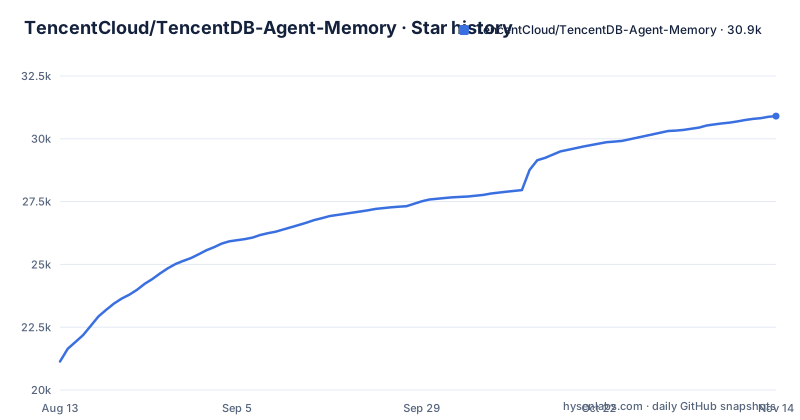
- TencentCloud/TencentDB-Agent-Memory30,902 ★ · +9,768
| Repository | 2026-08-13 | 2026-11-14 |
|---|---|---|
| TencentCloud/TencentDB-Agent-Memory | 21.1k | 30.9k |
9,768 Stars in the last 93 days, measured from the daily GitHub snapshot. Compare with other projects
Editorial analysis
The newest tag is a 1.x patch published after a 2.x beta
The release list and the default branch point in different directions. The recent releases are v2.0.2 on 2026-10-09, v2.0.3-beta.1 on 2026-10-13, and v2.0.3 on 2026-10-26, so the 2.x line now has stable patch releases. The default branch, however, is feat/server_team, a feature branch rather than main. The README frames the project as in motion, describing Team Memory Beta as evolving quickly and inviting you to install it and start exploring in minutes. The practical consequence is that a reader who installs a tag and a reader who clones the default branch can end up on different code.
The migration is described as v1 to v2 and the tool is titled v2 to v3
There is a versioning inconsistency in the upgrade path, and it is worth pinning down because data migrations are not something you want to run twice. The readme says that if you are already on an older release, in the v1.x or v0.x range, and want to bring existing data over to v2.0.0 and later, a migration tool is provided, and it points at a document titled Data Migration Tool with a v2 to v3 label, located under a scripts directory inside the MemoryCore component. So the prose describes a move from the old lines up to 2.0.0, while the tool that performs the move is named for a later jump. Either the target version in the prose is behind the tool, or the tool is named for the internal schema revision rather than the release. New installations are told they can skip the tool entirely, which means only upgraders meet this.
One shell script starts three services, and you configure two sets of credentials first
The install path is short and concrete, and it requires an edit before anything runs:
git clone https://github.com/TencentCloud/TencentDB-Agent-Memory.git
cd TencentDB-Agent-Memory/deploy/global-images
cp .env.example .env
$EDITOR .env       # Fill in two sets of LLM parameters (memory group + proxy group)
./start-all.sh     # Launch everything with one command; when finished, it prints a one-liner you can paste directly into Claude
Three services come up together, described as memory-core, memory-hub, and proxy, and the panel is at a fixed local port. The comment on the editor line is the real prerequisite: two separate sets of LLM parameters, one for the memory group and one for the proxy group, meaning two credential sets rather than one. The script's last act is to print a line you can paste into Claude, so the tool hands you the integration string rather than making you look it up. That is a good first-run experience, and it also means the two credential groups are the thing to get right before you start.
The proxy is the whole integration, and the readme does not say what it does with prompts
The integration story is one sentence: one proxy, unchanged protocol, zero-code integration, point the agent's base URL to the proxy and it is done, with no plugin, hook, or MCP server required. Named clients include DeepSeek Harness, Claude Code, Codex, CodeBuddy, WorkBuddy, Hermes, and OpenClaw, with a generic integration guide for anything else and an open invitation to send a pull request adding native support. The convenience is genuine and the trade is worth naming. If the only requirement is repointing a base URL, then the proxy sits in the path of every model request your agent makes, which means it sees prompts and completions. The readme describes the proxy's role as sharing memory and points to the install document for per-client configuration, so check how requests are logged, cached, or retained before routing traffic through it.
Chat memory is distilled up four layers, and nothing says what promotes a memory
Chat memory is described as retaining preferences, facts, decisions, and interaction history, with each agent automatically getting its own memory when it is created so you do not re-introduce yourself next time. The structure is a ladder: L0 Conversation becomes L1 Atom, becomes L2 Scenario, becomes L3 Persona, with raw conversations distilled layer by layer. That is a sensible compression scheme and it is lossy by construction. A constraint that mattered once, like a note not to refactor an old auth module because mobile still depends on it, is exactly the kind of detail that a summarisation ladder can drop, and the readme's own example of costly context is the case most at risk. Before relying on it, check what triggers promotion from one layer to the next, whether a human approves it, and whether anything is retained at the lower layers once distilled. Those are the questions that determine whether you can trust the persona layer as a summary of what actually happened.
Personal skills are private by default, and an extracted skill can carry execution steps
The skill asset is described as more than a prompt snippet: it has versions, resource files, trigger boundaries, execution steps, and validation rules, and agents can extract and manage reusable skills from conversations and tool calls once complex work is finished, then import them into the context of a designated agent when needed. Two properties of that design deserve attention. The first is governance, because personal skills are private by default and can be shared with the team after review, which is a real access boundary with a promotion step rather than a flat namespace. The second is capability, because a skill that carries trigger boundaries and execution steps is not inert text. It is something the system decided was worth doing, derived from work that already happened, and it can now be assigned to another agent. That is a supply-chain shape applied to behaviour rather than code, and the review step is the only thing standing between a private extraction and a team's shared automation.
Five readmes and four components, with the MongoDB backend off by default
The repository root has more entry points than one would hope. There are four components: MemoryCore, MemoryKnowledge, MemoryPanel, and MemoryProxy. There are four readme-shaped files, being the main one, a Chinese version, a docker one, and a deployment one, and three more documents exist in bilingual pairs, covering installation, the roadmap, and contributing. So there are several plausible documents to read and no single one that covers the system, and the complete installation documentation lives in a separate install document that the readme links. One configuration fact is stated plainly and is worth knowing before you plan the deployment: the MongoDB storage backend is experimental and off by default, with the install document carrying the details. So the default storage path is whatever ships enabled, and choosing MongoDB is an opt-in into something the project labels experimental.
Editorial conclusion
TencentDB Agent Memory suits a team running several coding agents against the same codebase that is tired of re-explaining context each session, and that is willing to run three services and two sets of model credentials locally. It is a poor fit if you need the default branch to match a release, since the default branch is a feature branch, and a poor fit if you cannot route model traffic through a proxy, because that is the entire integration mechanism. Before you commit, read the install document rather than the readme, decide whether experimental storage is something you want in the first deployment, and work out what your proxy does with prompts.
Frequently asked questions
What is TencentDB Agent Memory?
It is a team-level memory hub for AI agents. It turns conversations, documents, and code into four reusable memory assets, which are Chat Memory, Skill, LLM-Wiki, and Code-Graph, and it starts three services together: memory-core, memory-hub, and proxy.
How do I install TencentDB Agent Memory?
Clone the repository, change into the deploy/global-images directory, copy the example environment file to .env, fill in two sets of LLM parameters for the memory group and the proxy group, and run ./start-all.sh. The panel is then at http://localhost:8125.
How does TencentDB Agent Memory integrate with Claude Code?
By pointing the agent's base URL at the proxy, with an unchanged protocol and no plugin, hook, or MCP server required. The start script prints a one-liner you can paste directly into Claude once the services are up, and per-client configuration steps live in the install document.
What memory assets does TencentDB Agent Memory create?
Chat Memory retains preferences, facts, decisions, and interaction history, distilled from L0 Conversation through L1 Atom and L2 Scenario to L3 Persona. A Skill carries versions, resource files, trigger boundaries, execution steps, and validation rules. Wiki turns documents into structured pages with a link graph, and CodeGraph indexes code symbols, files, call relationships, and impact paths.
How do I migrate existing data to TencentDB Agent Memory v2?
The readme says users on the v1.x or v0.x releases can bring data over to v2.0.0 and later with a provided migration tool, and that new installations can skip it. Note that the tool it links to is titled for a v2 to v3 move, which does not match the target version named in the readme text.
What storage does TencentDB Agent Memory use by default?
Not MongoDB. The readme states that the MongoDB storage backend is experimental and off by default, with the full details in the install document. So selecting MongoDB is an opt-in into a path the project labels experimental.
Official sources
Where this project is recommended
Where developers are discussing it
Posts on Hacker News, dev.to and Lobsters that link to this repository, found by our scan of those communities. 0 in the last 30 days; newest first.
- Make Each Mistake Only Once: Team Memory in Practice with TencentDB Agent Memorydev.to · Oct 8, 2026 · 3 points · 3 comments
Add this badge to your README
If you maintain this project, the badge below links readers to this analysis and shows its maintenance status from the daily GitHub snapshot. Paste the markdown into your README; add ?metric=license or ?metric=stars to the image URL for a different field.

[](https://hysenlabs.com/projects/tencentcloud-tencentdb-agent-memory)Star history chart for your README
[](https://hysenlabs.com/projects/tencentcloud-tencentdb-agent-memory)Was this useful?