envd: a container dev environment whose pip install compiles a Go binary
🏕️ Reproducible development environment for humans and agents
At a glance
- What is it?
- This is TensorChord's tool for declaring an AI or machine-learning development environment in a small manifest and building it into an OCI image. The manifest is Python, the build runs on buildkit, and the pip package is a thin wrapper that shells out to make to produce the Go binary. That last detail decides whether you can install it on your laptop.
- Who is it for?
- Use envd when you want a development environment you can hand to a colleague or push to a registry as an image, because that is the design: one manifest, one build, an OCI artefact, and a context switch that runs the same command locally or on a cluster.
- Can I use it commercially?
- Yes. Apache-2.0 is a permissive licence: you can use, modify and sell software built on it, as long as you keep its copyright and licence notices.
- Is it still maintained?
- Yes. The repository last received commits 3 days ago.
- What is it written in?
- Mainly Go, according to GitHub's language statistics.
Answers come from the project's GitHub data, last synced on November 22, 2026, and from our analysis. They are not legal advice.
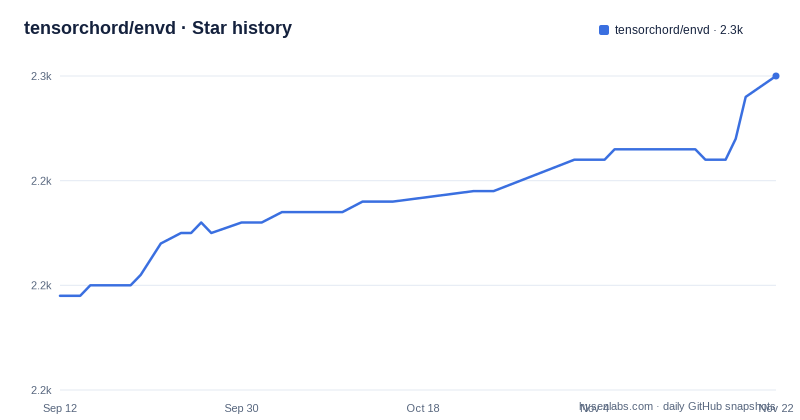
Star history
- tensorchord/envd2,250 ★ · +21
| Repository | 2026-09-12 | 2026-11-22 |
|---|---|---|
| tensorchord/envd | 2.2k | 2.3k |
21 Stars in the last 71 days, measured from the daily GitHub snapshot. Compare with other projects
Editorial analysis
pip install runs make and compiles the Go binary
The install story has a part that is easy to miss. Alongside the usual pip invocation:
pip install --upgrade envdthere is a setup.py that reads README.md, defines a custom extension named after the tool, and customises three setuptools commands: the extension build command, the source distribution command and the wheel command.
Inside it, a function checks whether bin/envd already exists. If it does not, it logs that envd was not found and that it will build from source, looks for a .GIT_TAG_INFO file, and if that file is present passes its contents as a git tag to make build-release. If the file is missing it warns and runs make build-release without a tag. Either way the result is asserted to be zero, with a failure message.
So installing the Python package compiles a Go binary during installation. That means make, a Go toolchain matching the version in go.mod, and network access to fetch modules, on the machine doing the pip install. A PyPI install of a tool written in Go is not the usual shape, and it is worth knowing before you put it in a requirements file.
The alternative the README offers is to download the release binary directly, and after either route you run envd bootstrap.
The manifest is Python, and the linter is told to ignore undefined names
An environment is declared in a file called build.envd, and the file is a Python function:
def build():
    base(dev=True)
    install.conda()
    install.python()
    install.python_packages(name = [
        "numpy",
    ])
    shell("fish")
None of base, install, shell or config is imported or defined. They are injected when the tool evaluates the file, which is why the file would fail every ordinary Python check.
The project handles that in its linter configuration, and the configuration is a good tell for how the tool works:
[tool.ruff]
target-version = "py312"
extend-include = ["*.envd"]
[tool.ruff.lint]
select = ["E", "F", "G", "B", "I", "SIM", "TID", "PL", "RUF"]
ignore = ["E501", "PLW2901", "F821"]
The extend-include is what pulls .envd files into linting at all, since they are not Python by extension. The ignored rule F821 is the undefined-name check, which is exactly the rule a manifest with injected names would trip. Line length is off too, since a manifest line of DSL calls is naturally long.
The language is not fixed. The README notes that Python is used as an example and points at an examples directory covering other languages, and that directory includes a basic example for R, one for Julia, and one named for a version one of the language layer.
Include a Git repository and the build depends on it
The reuse feature is a function called include, and it takes a repository URL:
envdlib = include("https://github.com/tensorchord/envdlib")

def build():
    base(dev=True)
    install.conda()
    install.python()
    envdlib.tensorboard(host_port=8888)
So a manifest can pull in a shared library of environment functions from a Git repository and call into it. The repository ships its own library, and the examples directory has a directory dedicated to this pattern.
The details block in the README shows what one of those shared functions looks like, and its signature is where the design decisions are:
def tensorboard(
    envd_port=6006,
    envd_dir="/home/envd/logs",
    host_port=0,
    host_dir="/tmp",
):
Two of those defaults are worth pausing on. A host port of zero means the tool picks a free port at run time, so the port an environment ends up on is not something the manifest fixes and a colleague cannot predict it. And the docstring warns that you need permission for the host directory, which is the kind of requirement that belongs in the documentation rather than in an error message.
The Go dependency list contains a general-purpose fetch library, which is the sort of thing that makes include work against arbitrary URLs.
Two binaries, an SSH daemon, and a base image on its own version line
The build produces two binaries, named envd and envd-sshd, and containers are named from the target list. That second binary is the clue to how an environment runs: there is an SSH daemon in the loop.
The example output from the first run makes the base image explicit:
[+] build envd environment 19.0s (47/47) FINISHED
 => CACHED [internal] setting pip cache mount permissions                                     0.0s
 => docker-image://docker.io/tensorchord/envd-sshd-from-scratch:v0.4.3                        2.3s
The base image is pulled from docker.io, it is a from-scratch SSH daemon image, and its version is 0.4.3 while the tool's own releases are in the 1.3 line. Two version lines, tracked separately, and the base image is the one that has to match the client's expectations.
The other line in that output is quieter and more interesting: a cached step called setting pip cache mount permissions. The caching is the reason envd is faster than a Dockerfile for Python work, and getting those mounts to exist with the right ownership is a step that has to be cached, retried and reported.
The Makefile disables cgo by default and forces bash as the shell, with a comment explaining that some environments do not link sh to bash.
The same two commands locally and on a cluster
The hybrid claim is made concrete with a context switch:
$ envd context use local
$ envd up

$ envd context use cluster
$ envd up
The command that builds and runs an environment is identical in both cases; only the context changes. The README points at a Kubernetes page for the cluster details.
That design has a consequence worth stating plainly. Because the environment is an OCI image, the local and the cluster path are the same path with a different destination for the artefact, which is what makes a team able to share an environment by pushing it to a registry such as Harbor or Docker Hub. The README names both as examples.
The build itself is delegated to buildkit, which brings remote builds and caching for pip indexes and apt. A remote build means the machine running envd need not be the machine doing the work, and the README frames that as the answer for a laptop with limited resources or a build machine with more performance.
One small operational detail is in the bootstrap section rather than in the concepts: the bootstrap command takes a docker.io mirror flag, and the example value given is a Shanghai Jiao Tong mirror. That is a useful default to know about, and a reminder that the default registry path assumes you can reach docker.io.
The dependency list says more than the feature list does
The Go module is where the real architecture is visible, and a few entries deserve naming.
The module is github.com/tensorchord/envd and it declares go 1.26.8, a patch-level language requirement rather than the usual minor-level one, which is stricter than most projects need.
The build side is heavy by design: the buildkit client, the Docker command line library, the containers image library, the Docker API and client modules, go-git, and a general-purpose fetch library. That set is what produces and moves OCI artefacts and resolves includes.
The runtime side is where the surprises are. A terminal UI library pair for the interactive front end, a file-sync engine as a direct dependency, an analytics client, a terminal emulator library, a pseudo-terminal package, and a scripting language implementation pinned to a dated commit. Several of these are vendored at specific commits rather than versions.
None of that is disqualifying, and most of it is explainable by a tool that runs remote containers, renders progress, and resolves a manifest at build time. But it does mean the dependency surface of a single binary here is close to what a small cloud service would carry.
Ownership declared twice, links checked by a linter
The top level of the repository tells you what the project considers its own infrastructure.
There are two ownership files, OWNERS and CODEOWNERS, which is the kind of duplication that comes from a migration between review systems and is usually harmless. There is a contributors configuration for the all-contributors acknowledgement, a code of conduct, an agent instructions file, a changelog and a licence.
Then there are the tools. A Go linter configuration, a pre-commit configuration, a release configuration for building binaries and images, a link-checker configuration for the documentation, and a typo checker configuration. Documentation links in a project like this rot quietly, and having a link checker is the difference between catching that and not.
Two directories are worth knowing for a contributor. There is a base-images directory, so the base images the build pulls are built from source in the same repository rather than only consumed. And there is a build.envd at the root, which means the project declares its own development environment with its own tool.
Alongside them are an end-to-end directory and a hack directory, and the Makefile notes that an end-to-end target exists but is not included in the default set.
Editorial conclusion
Use envd when you want a development environment you can hand to a colleague or push to a registry as an image, because that is the design: one manifest, one build, an OCI artefact, and a context switch that runs the same command locally or on a cluster. Do not use it as a lightweight convenience, since installing it from PyPI compiles the Go binary on the spot and needs make, a Go toolchain and network access, and the runtime depends on an SSH daemon base image that is versioned separately from the CLI. Before you commit, check the base image version the build pulls against your CLI version, decide whether you want the include mechanism fetching Git repositories at build time, and remember the manifest is Python that passes through a linter configured to ignore undefined names.
Frequently asked questions
How do I install envd?
With pip, using pip install --upgrade envd, or by downloading a release binary directly. Either way you then run envd bootstrap. The only stated requirement is Docker 20.10.0 or above, and the pip path compiles the Go binary through make if bin/envd is not already present.
What is a build.envd file?
A Python file that declares the environment, with a build function calling an injected set of helpers such as base, install, shell and config. It uses the .envd extension, is linted as Python with undefined names ignored, and other language versions exist for languages such as R and Julia.
Does envd work with Kubernetes?
Yes, through a context switch. envd context use local runs environments on the machine and envd context use cluster runs them in a cluster with the same envd up command, and the README points at a Kubernetes page for details.
Can I share an envd environment with my team?
Through the include function, which takes a Git repository URL and makes its environment functions callable from your manifest, or through the image, since the environment is built as an OCI-compatible image that can be pushed to a registry such as Harbor or Docker Hub.
Which base image does envd build on?
An SSH daemon image from scratch published as a from-scratch image on docker.io, versioned separately from the tool. The example build output pulls tensorchord/envd-sshd-from-scratch at version 0.4.3 while the tool's own releases are in the 1.3 line.
Official sources
Add this badge to your README
If you maintain this project, the badge below links readers to this analysis and shows its maintenance status from the daily GitHub snapshot. Paste the markdown into your README; add ?metric=license or ?metric=stars to the image URL for a different field.

[](https://hysenlabs.com/projects/tensorchord-envd)Star history chart for your README
[](https://hysenlabs.com/projects/tensorchord-envd)Was this useful?