tfenv: the version manager whose weak spot is your own PATH
Terraform version manager
At a glance
- What is it?
- A shell version manager for Terraform that resolves versions from an environment variable or a .terraform-version file, verifies downloads only when the right helper is installed, and parses required_version by reading only the first constraint.
- Who is it for?
- Pick tfenv when you want per project Terraform versions on macOS, Linux or git-bash and you want .terraform-version to be the single source of truth. Skip it when your runners have neither shasum nor keybase, because downloads then go unverified, or when your constraints carry real ranges, since only the first one is read.
- Can I use it commercially?
- Yes. MIT is a permissive licence: you can use, modify and sell software built on it, as long as you keep its copyright and licence notices.
- Is it still maintained?
- Yes. The repository last received commits 136 days ago.
- What is it written in?
- Mainly Shell, according to GitHub's language statistics.
Answers come from the project's GitHub data, last synced on November 14, 2026, and from our analysis. They are not legal advice.
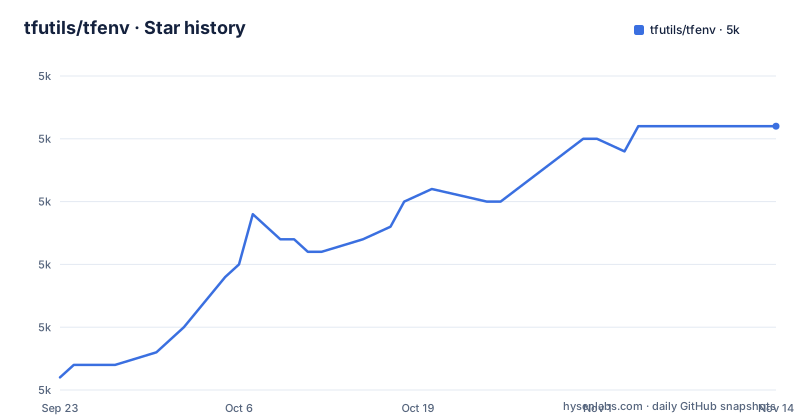
Star history
- tfutils/tfenv4,991 ★ · +20
| Repository | 2026-09-23 | 2026-11-14 |
|---|---|---|
| tfutils/tfenv | 5k | 5k |
20 Stars in the last 52 days, measured from the daily GitHub snapshot. Compare with other projects
Editorial analysis
Version resolution has two inputs and a fixed order
Run tfenv install with no argument and the version is resolved from TFENV_TERRAFORM_VERSION first, then from a .terraform-version file, with latest as the default when neither exists. TFENV_AUTO_INSTALL defaults to true, which means a plain terraform plan in a project whose declared version is missing can pull that version down for you. Turning it off takes one variable, and the argument forms cover the rest of the surface: an exact x.y.z Semver 2.0.0 string, latest, latest:<regex> handed to grep -e, latest-allowed, and min-required.
$ tfenv install
$ tfenv install 0.7.0
$ tfenv install latest
$ tfenv install latest:^0.8
$ tfenv install latest-allowed
$ tfenv install min-requiredTFENV_AUTO_INSTALL=false terraform planTFENV_ARCH=arm64 tfenv install 0.7.9TFENV_ARCH picks the build, TFENV_CURL_OUTPUT picks how loud it is
Two environment variables change what you get rather than which version you get. TFENV_ARCH is a string that defaults to amd64, and the default switches to arm64 for versions that have arm64 builds available when $(uname -m) matches aarch64* or arm64*, which is why the override exists at all. TFENV_CURL_OUTPUT is an integer that defaults to 2 and only changes the progress display: 2 passes -# to curl, 1 uses the curl default, and 0 passes -s to curl. On a CI runner that captures logs, 0 is the setting that keeps a version download quiet, and on an Apple Silicon laptop the uname match means an explicit amd64 override is the only way to ask for the older build.
latest-allowed reads one constraint, so a version ceiling is dropped
The two scanning modes are where the surprises live. tfenv does not parse semantic version ranges: it takes the first version it ever finds as the candidate and evaluates only the first constraint before any comma. So required_version = "<0.12.3, >= 0.10.0" detects 0.12.3, while required_version = "~> 0.10.0, <0.12.3" detects 0.10.8, described in the file as the latest 0.10.x release. The behaviour table is short, and its first row deserves a second reading.
| Constraint | Behaviour | Example | Resolves to | |------------|-----------|---------|-------------| | `>` or `>=` | Installs the latest available version | `">= 1.0.0"` | latest | | `<=` | Installs that exact version | `"<= 1.2.3"` | `1.2.3` | | `~>` | Installs the latest version matching the prefix | `"~> 1.2.0"` | latest `1.2.x` | | `=` or bare version | Installs that exact version | `"0.12.31"` or `"= 0.12.31"` | `0.12.31` |
Write >= 0.12, < 0.13 expecting the newest 0.12 release and only >= 0.12 is read, which resolves to the latest available version. There is no row for != in the table, and keeping the definition reasonable is left to you.
Verification depends on which helper sits in your PATH, and one trust gap stays open
If shasum is present in the path, tfenv verifies the download against the sha256 hash published by Hashicorp. If keybase is also available, it verifies the signature for those published hashes using the Hashicorp public key. With neither helper present, the README describes no check on the archive unless you opt into GnuPG. You can opt into GnuPG verification when keybase is missing by dropping a marker file into the install directory, which the README calls TFENV_INSTALL_DIR, for example ~/.tfenv or /usr/local/Cellar/tfenv/<version>:
echo 'trust-tfenv: yes' > ${TFENV_INSTALL_DIR}/use-gpgv
tfenv install
That trust-tfenv directive means verification uses a copy of the Hashicorp OpenPGP key found in the tfenv repository, and skipping it means the Hashicorp key must already sit in your default trusted keys. A second marker, ${TFENV_INSTALL_DIR}/use-gnupg, invokes the full gpg tool and shows web-of-trust status, with the explicit warning that a lack of trust path will not cause a validation failure.
The symlink route stops at the OS boundary, and Windows needs core.symlinks
Platform support is narrow and stated plainly: macOS in 64bit and Arm (Apple Silicon), Linux in 64bit and Arm, and Windows 64bit tested in git-bash with one condition, `git config --global core.symlinks true`. The symlink shortcut for bin/* is marked OSX/Linux Only!, so on Ubuntu or Debian, where touching /usr/local/bin might require sudo, the file points you at ${HOME}/bin or ${HOME}/.local/bin instead, and that directory joins the session PATH on the next login or after sourcing the profile.
mkdir -p ~/.local/bin/
. ~/.profile
ln -s ~/.tfenv/bin/* ~/.local/bin
which tfenvgit config --global core.symlinks trueThe consequence for a Windows user is that the git-bash path is the supported one, and a checkout with core.symlinks left off is outside what the file describes.
Package managers and a git clone leave you in different install directories
There are four documented ways in, and they are not equivalent. Homebrew takes `brew install tfenv`, the Arch User Repository takes `yay --sync tfenv`, and puppet module sergk-tfenv is used with a single include. The manual route clones the repository into a path of your choice, here ${HOME}/.tfenv, and then adds ~/.tfenv/bin to PATH in whichever shell file you use.
git clone --depth=1 https://github.com/tfutils/tfenv.git ~/.tfenvecho 'export PATH="$HOME/.tfenv/bin:$PATH"' >> ~/.bash_profileecho 'set -x PATH $HOME/.tfenv/bin $PATH' >> ~/.config/fish/config.fishThe install directory matters more than it looks, because the verification markers and the root that tfenv reads both resolve relative to it. TFENV_INSTALL_DIR is given as an example as ~/.tfenv or /usr/local/Cellar/tfenv/<version>, so a Homebrew install is not in the place a hand written marker file assumes.
The Dockerfile ships terraform as the entrypoint, with curl and no verifier
The container recipe is where the layout changes again. It starts from a bash image pinned by ARG BASH_VERSION=5, adds curl as the only runtime dependency, downloads the v3.2.2 tarball, moves bin/ into /usr/local/bin, lib/ and libexec/ into /usr/local/lib/tfenv, and drops the license file under /usr/local/share/licenses. Then the environment is rewritten.
ARG TFENV_VERSION=3.2.2
ENV TFENV_ROOT=/usr/local/lib/tfenv
ENV TFENV_CONFIG_DIR=/var/tfenv
VOLUME /var/tfenv
ENV TFENV_TERRAFORM_VERSION=latest
ENTRYPOINT ["/usr/local/bin/terraform"]
Two things follow for anyone running that image. The entrypoint is terraform rather than tfenv, so the version comes from TFENV_TERRAFORM_VERSION, which defaults to latest. And since curl is the only package the Dockerfile adds, shasum, keybase and gpg are not installed by it, which puts the downloads inside that image outside the verification path described above.
bin/, lib/, libexec/ and share/ split the scripts, and the newest tag is from April
The tree shows how the code is arranged: bin/, lib/, libexec/, share/, docs/, test/, plus CHANGELOG.md, AGENTS.md, SECURITY.md, .travis.yml, a Dockerfile and an MIT LICENSE, on the master branch. The three newest tags are v3.2.2 and v3.2.1, both published on 2026-04-28, and v3.2.0 on 2026-04-24, and the last push to the repository landed on 2026-07-01, so commits continued for a while after the last tag shipped. The table of contents also promises Upgrading, Uninstalling, Contributing, Security and License sections. Read CHANGELOG.md and docs/ in the checkout before automating either step.
Editorial conclusion
Pick tfenv when you want per project Terraform versions on macOS, Linux or git-bash and you want .terraform-version to be the single source of truth. Skip it when your runners have neither shasum nor keybase, because downloads then go unverified, or when your constraints carry real ranges, since only the first one is read. Before pinning a version, confirm which install directory your package manager chose, because that is where the use-gpgv and use-gnupg marker files have to sit.
Frequently asked questions
What is tfenv?
A Terraform version manager inspired by rbenv, written in shell under the MIT license. Its table of contents names install, use, uninstall, list, list-remote and pin as the commands, and the default branch is master.
How do I install tfenv on Windows?
Windows 64bit is supported and tested in git-bash, with one requirement: core.symlinks has to be enabled so the link based setup behaves. The ln -s route into /usr/local/bin is marked OSX/Linux only, so Windows users add ~/.tfenv/bin to PATH instead.
How do I switch Terraform versions with tfenv?
tfenv install with no argument takes the version from TFENV_TERRAFORM_VERSION first, then from a .terraform-version file, defaulting to latest, and TFENV_AUTO_INSTALL is true by default so a missing version is fetched when a command needs it. A project can carry its own .terraform-version file.
How do I install tfenv on ubuntu?
Clone it manually with `git clone --depth=1 https://github.com/tfutils/tfenv.git ~/.tfenv`, add ~/.tfenv/bin to PATH in ~/.bash_profile, and on Ubuntu or Debian prefer symlinks into ~/.local/bin with mkdir -p and . ~/.profile, since /usr/local/bin might require sudo.
What are the alternatives to tfenv?
The README positions tfenv as a Terraform version manager inspired by rbenv, and the install, use, list, pin, .terraform-version file and TFENV_TERRAFORM_VERSION mechanisms all belong to tfenv itself.
Official sources
Add this badge to your README
If you maintain this project, the badge below links readers to this analysis and shows its maintenance status from the daily GitHub snapshot. Paste the markdown into your README; add ?metric=license or ?metric=stars to the image URL for a different field.

[](https://hysenlabs.com/projects/tfutils-tfenv)Star history chart for your README
[](https://hysenlabs.com/projects/tfutils-tfenv)Was this useful?