AppImageLauncher intercepts AppImage opens so the desktop can update and remove them
Helper application for Linux distributions serving as a kind of "entry point" for running and integrating AppImages
At a glance
- What is it?
- AppImageLauncher is a C++ helper that sits between the desktop and any AppImage, prompting on first run to move the file and patch a desktop entry, then offering update and remove from the launcher menu. Installation is documented on the wiki rather than in the repository, and the packages are what the project would rather you used.
- Who is it for?
- AppImageLauncher fits a user who downloads AppImages one at a time and wants them in the menu with a working update and remove path, and it fits a distribution packager who can register a file association cleanly. It does not fit anyone who wants an unattended background daemon, an app store catalogue, or scripting beyond registering and unregistering images, because the CLI scope is integration and unintegration only.
- Can I use it commercially?
- Yes. MIT is a permissive licence: you can use, modify and sell software built on it, as long as you keep its copyright and licence notices.
- Is it still maintained?
- Yes. The repository last received commits 42 days ago.
- What is it written in?
- Mainly C++, according to GitHub's language statistics.
Answers come from the project's GitHub data, last synced on November 15, 2026, and from our analysis. They are not legal advice.
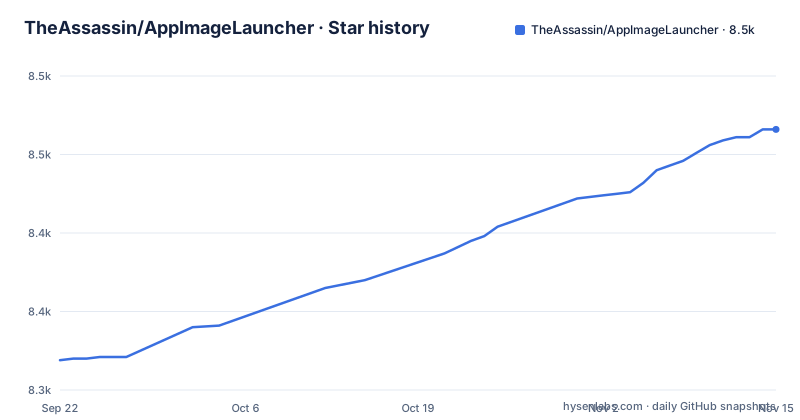
Star history
- TheAssassin/AppImageLauncher8,466 ★ · +147
| Repository | 2026-09-22 | 2026-11-15 |
|---|---|---|
| TheAssassin/AppImageLauncher | 8.3k | 8.5k |
147 Stars in the last 54 days, measured from the daily GitHub snapshot. Compare with other projects
Editorial analysis
It intercepts the open, then asks once
Every mechanism here hangs off one decision: AppImageLauncher registers itself as the handler that catches attempts to open an AppImage. Double-click a downloaded file that has never been integrated and the interception is what produces a dialog. That dialog offers two paths. Run the image once, which leaves the file exactly where it was, or move it to a predefined location and add it to the application menus and launchers. Nothing goes into a prefix in the traditional sense, which is why the project talks about desktop integration rather than installation.
The menu entry gains an Update and a Remove action
Integration is what pays for the interception later. Once an image lives in the central location and has a launcher entry, its context menu carries an Update entry that opens a small helper tool to apply updates, and a Remove entry that asks you to confirm. Confirm the removal and the desktop integration is undone and the file is deleted from the system. That pairing is the reason the project exists: its argument is that merely making files executable leaves AppImages scattered across personal folders, and that cleanup and removal need external software. The catch is that both actions are per-image operations reached through a menu, so a machine with a downloads folder full of unregistered images still needs one open per file before any of this applies.
Integration extracts and patches the desktop entry and icons
Underneath, integration is a file operation rather than a package format. AppImageLauncher and tools like it extract and patch the desktop entry and the related icons into the locations the desktop expects, following the freedesktop desktop entry and icon theme specifications. The AppImage itself stays a single self-contained executable, and nothing about that format changes. Coexistence is claimed too: the project says it plays well with other applications that manage AppImages, such as app stores, while depending on none of them and running standalone. For a distribution maintainer that means it can sit next to a store's own integration instead of fighting it.
The README hands installation to the wiki and prefers packages
No install command appears in the README. Installation and usage are pointed at the project wiki at https://github.com/TheAssassin/AppImageLauncher/wiki, and the repository root names no distribution packaging recipe, only a source tree: CMakeLists.txt, BUILD.md, cmake/, ci/, i18n/, resources/ and src/, plus a .gitmodules file that means a build expects submodules to be fetched. A preference is stated, though. Traditional packages are described as highly recommended when possible, because they provide many more features and a better overall experience. The next section explains what that trade means in practice. On a distribution where nobody packages it, the wiki is the only sanctioned route and the Lite edition is the fallback.
Lite integrates itself into the home directory with one command
From version 1.4.0 there is a Lite edition giving you everything you can get without root access, shipped as an AppImage so that a user can install it from a terminal. The command is one line, with the three dots standing in for the version in the filename you downloaded:
./appimagelauncher-lite...AppImage installRunning it integrates the tool itself in the user's home directory. No sudo, no system package, no admin rights. The trade is stated rather than hidden: traditional packages provide many more features and a much better overall experience, so Lite is for machines where installing a package is not an option, not the default choice. There is also no GUI installer, and the project points contributors at issue #243 if they want to build one.
ail-cli covers integration and unintegration, nothing else
Automation gets one small binary. The packages ship a CLI tool called `ail-cli`, described as providing basic operations in the terminal for use in scripts and automation. Its scope is stated precisely, and dated: as of February 2020, only integration and unintegration are supported, with more features planned. That sentence has not been refreshed since, so treat it as the documented floor rather than a description of what the binary does today. Anything you want to script beyond registering and unregistering images has to go through the desktop dialogs. For provisioning images across a fleet, or for a repository script that fetches a new AppImage and expects it registered, that is the practical ceiling of what this project offers in a terminal.
Against appimaged, a dialog instead of a background daemon
The alternative the project measures itself against is appimaged, the AppImage daemon. appimaged scans a predefined set of directories, including ~/Downloads and ~/.bin, makes recognized AppImages executable and performs desktop integration in the background without notifying the user in any way. AppImageLauncher takes the opposite position: intercept the open, ask once, act on the answer. Three reasons are given against the daemon, and they are concrete. Those scanning and monitoring operations produced a lot of file I/O and were rather inefficient. Many users dislike having no control over what happens to files in their downloads directory. And the approach opens attack vectors, which a recently discovered vulnerability in appimaged is cited as demonstrating.
Last push on 2026-03-09, newest tag still a 3.0.0 beta
Development state matters if you plan to package this. The repository is not archived and the last push was on 2026-10-04. Recent releases are v3.0.0-beta-3 from 2025-10-28, v3.0.0-beta-2 from 2025-10-18, and a rolling tag named continuous from 2026-10-04. The 3.x line is therefore still in beta. Licence terms are MIT, which is the short answer on redistribution for a distributor wrapping it into a package. A distribution testing the betas should know before it installs how it will restore the previous file association on every image it has touched.
Editorial conclusion
AppImageLauncher fits a user who downloads AppImages one at a time and wants them in the menu with a working update and remove path, and it fits a distribution packager who can register a file association cleanly. It does not fit anyone who wants an unattended background daemon, an app store catalogue, or scripting beyond registering and unregistering images, because the CLI scope is integration and unintegration only. Verify two things before you commit a machine to it: whether your distribution packages one of the 3.0.0 betas, whose newest tag is v3.0.0-beta-3 from 2025-10-28, and what happens on uninstall, which the wiki is the place to check.
Frequently asked questions
What is an AppImageLauncher?
It is a helper application for Linux distributions that acts as an entry point for running and integrating AppImages. It intercepts attempts to open an AppImage, offers to move it to a predefined location, and patches the desktop entry and icons so the image appears in the application menus.
how to install appimagelauncher
The README carries no install command and sends installation and usage to the project wiki. It does state a preference: traditional packages are highly recommended when possible because they provide many more features, with the Lite AppImage as the fallback for machines without root access.
how to use appimagelauncher
On the first execution of an AppImage that has not been integrated, a dialog asks whether to run the image once, or to move it to a predefined location and add it to the application menus and launchers. After integration the image's context menu carries Update and Remove entries.
Do I need to install AppImage?
Not in the traditional sense. AppImages are not installed, they remain single self-contained executable files, and integration works by extracting and patching the desktop entry and icons into the relevant locations. Double-clicking works without making the file executable first.
Official sources
Add this badge to your README
If you maintain this project, the badge below links readers to this analysis and shows its maintenance status from the daily GitHub snapshot. Paste the markdown into your README; add ?metric=license or ?metric=stars to the image URL for a different field.

[](https://hysenlabs.com/projects/theassassin-appimagelauncher)Star history chart for your README
[](https://hysenlabs.com/projects/theassassin-appimagelauncher)Was this useful?