UDPspeeder trades bandwidth for packet loss, and only touches UDP on its own
Project brief: A Tunnel which Improves your Network Quality on a High-latency Lossy Link by using Forward Error Correction, possible for All Traffics(TCP/UDP/ICMP).
At a glance
- What is it?
- A C++ tunnel that adds Reed-Solomon redundant packets to a lossy high-latency link, improves UDP by itself, reaches TCP only when paired with a UDP-based VPN, and reaches Windows only inside a virtual machine image.
- Who is it for?
- UDPspeeder earns its place when you control a Linux host on a link that actually loses UDP packets, and you are willing to spend bandwidth on redundancy. It is the wrong tool for TCP-only paths without a UDP-based VPN underneath it, for Windows or macOS hosts unless you accept running it in a virtual machine.
- Can I use it commercially?
- Yes. MIT is a permissive licence: you can use, modify and sell software built on it, as long as you keep its copyright and licence notices.
- Is it still maintained?
- Yes. The repository last received commits 107 days ago.
- What is it written in?
- Mainly C++, according to GitHub's language statistics.
Answers come from the project's GitHub data, last synced on November 14, 2026, and from our analysis. They are not legal advice.
Star history
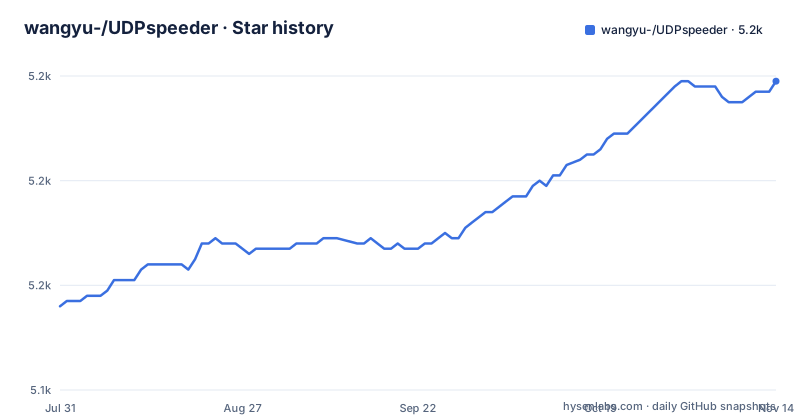
- wangyu-/UDPspeeder5,199 ★ · +43
| Repository | 2026-07-31 | 2026-11-14 |
|---|---|---|
| wangyu-/UDPspeeder | 5.2k | 5.2k |
43 Stars in the last 106 days, measured from the daily GitHub snapshot. Compare with other projects
Editorial analysis
Redundant packets are the price of the lower loss rate
The mechanism is Forward Error Correction, and it is bought with bandwidth rather than with latency. The FEC scheme is Reed-Solomon: adding t check symbols to the data lets the receiver detect any combination of up to t erroneous symbols, or correct up to floor(t/2) of them, and as an erasure code it can correct up to t known erasures. A sequence of b + 1 consecutive bit errors affects at most two symbols of size b, which is why the same code also works as a burst error corrector. How many check symbols to spend is left to the designer of the code.
In practice that number is the -f argument, and the documented example is deliberately modest.
# Run at server side:
./speederv2 -s -l0.0.0.0:4096 -r 127.0.0.1:7777  -f20:10 -k "passwd"
`-f20:10` means 10 redundant packets for every 20 original packets, so the doc's own starting point already adds half again to what you send. Raising the second number buys more correction headroom and costs proportionally more bandwidth on a link that is already the problem.
On its own it never touches TCP
Used alone, UDPspeeder improves only UDP connections. Everything else about it depends on what it is stacked with, and the docs confirm three specific pairings: OpenVPN, L2TP and ShadowVPN, all of them UDP-based.
The described arrangement is that your local network to your server is lossy, you establish a VPN connection to the server with UDPspeeder plus a UDP-based VPN, and you then reach the server over that VPN connection with better quality. Once a UDP-based VPN is carrying the traffic, the improvement covers any traffic, including TCP, UDP and ICMP.
Two companion projects are named for the cases this pairing does not solve. tinyfecVPN is a lightweight high-performance VPN with UDPspeeder's function built in, for anyone who would rather not assemble the pair. udp2raw can be used alongside UDPspeeder for better speed on some ISPs that apply UDP QoS, meaning UDP throttling.
The consequence for a reader is blunt: with a single process and no VPN, TCP traffic gets nothing.
The efficiency numbers come from one lossy link
The efficacy section rests on a single described condition: a link with 100ms latency and 10 percent packet loss in both directions. Two measurements are presented there, ping packet loss and scp copy speed, both as graphs rather than as tables of figures.
The claims built on that link are specific. With well-tuned parameters, the docs say you can reduce IP or UDP/ICMP packet loss to less than 0.01 percent, and beyond loss rate they claim a significant improvement in TCP latency and in TCP single-thread download speed. The TCP part only holds in the paired configuration described above.
What is not attached to any figure is a breakdown by loss rate, latency or redundancy setting, so there is no published answer to the question a reader actually has: how much FEC is enough for a 2 percent link versus a 20 percent one. Tuning is left as the reader's problem, with -f20:10 offered as the example rather than as a recommendation. The named-pipe interface described later exists because those parameters are expected to change while a tunnel runs.
Windows and macOS arrive as a 7.5mb virtual machine
The supported platform line is a Linux host, and the parenthetical covers desktop Linux, an Android phone or tablet, an OpenWRT router and a Raspberry PI. That range is the strength of the project: the platform list covers both a phone and a router.
Windows and macOS are handled by not being handled directly. The docs point at a 7.5mb lede-17.01.2-x86 virtual machine image hosted as a release asset of the udp2raw-tunnel repository, and the instruction is to run UDPspeeder inside it. So on those two systems you are running a Linux userland in a guest, which adds a network layer between your application and the tunnel and makes the guest image, not the host, the thing that must support the link.
For anyone evaluating this on a desktop, that is the practical shape of the decision: the router case is direct, the Windows and macOS case is a virtual machine, and the docs give no native build path for either.
Both ends have to agree on the key and the ratio
The two-process setup puts a server in front of the service that needs protecting. With a server at 44.55.66.77 and a service listening on UDP port 7777, the server side listens and forwards locally, and the client listens on its own port and points back at the server.
# Run at client side
./speederv2 -c -l0.0.0.0:3333  -r44.55.66.77:4096 -f20:10 -k "passwd"
Once that is running, connecting to UDP port 3333 on the client is equivalent to connecting to port 7777 on the server, with the connection boosted in between. `-k` enables simple XOR obfuscation, which should not be relied on for confidentiality or authentication. Use a separately authenticated, encrypted tunnel when security is required, and replace the example password. The option list states that common options must match on both sides.
The full option list in the docs stops partway through the -f,--fec line, so mtu, timeout, queue-len and mode appear as values you can set but not as options with documented defaults.
A named pipe retunes a tunnel that is already running
The advanced topic is a named pipe, which lets you change parameters on a live process instead of restarting it.
echo fec 19:9 > fifo.file
echo mtu 1100 > fifo.file
echo timeout 5 > fifo.file
echo queue-len 100 > fifo.file
echo mode 0 > fifo.file
Pass --fifo fifo.file at startup and each of those writes becomes a live change, which is how you react to a link that gets worse instead of committing to one FEC ratio forever. The five values shown cover redundancy, MTU, timeout, queue length and mode, and they are the practical core of the tunnelling surface.
Two things about the source layout are worth knowing before reading anything further. The default branch is branch_libev and the tree carries libev/ alongside my_ev.cpp, my_ev.h and my_ev_common.h, so the event loop is the libev library rather than something else. The same tree splits the work into fec_manager, delay_manager, fd_manager, packet, connection, log and misc units, with separate tunnel_client.cpp and tunnel_server.cpp, a crc32/ directory, both CMakeLists.txt and a makefile, and .clang-format at the root.
The last push landed on 2026-07-31, but the newest published release is still 20230206.0 from 2023-02-07, before that one came 20210116.0 in January 2021. The version banner inside the program is older still: it prints a git version and a build date of Aug 5 2018, so the string the binary prints about itself is not evidence of which build you are running.
Editorial conclusion
UDPspeeder earns its place when you control a Linux host on a link that actually loses UDP packets, and you are willing to spend bandwidth on redundancy. It is the wrong tool for TCP-only paths without a UDP-based VPN underneath it, for Windows or macOS hosts unless you accept running it in a virtual machine. Confirm your FEC ratio against measured loss before you deploy it.
Frequently asked questions
How do I fix UDP packet loss with UDPspeeder?
Run the tunnel on both ends with a FEC ratio, for example -f20:10, which sends 10 redundant packets for every 20 original packets. Redundancy is Reed-Solomon, so the receiver can correct up to floor(t/2) symbols, and the docs say well-tuned parameters can push packet loss below 0.01 percent. The cost is extra bandwidth.
Should I use UDP or TCP for my VPN with UDPspeeder?
UDP, because UDPspeeder only improves UDP when it runs alone. The pairings the docs confirm are UDP-based: OpenVPN, L2TP and ShadowVPN, and the improvement then covers TCP, UDP and ICMP traffic as well.
Is OpenVPN better over TCP or UDP?
With UDPspeeder in the path the UDP form is the one that gets the treatment, since OpenVPN is named as a confirmed UDP-based companion and TCP only benefits once that tunnel is carrying it. The docs also point to a configuration guide for pairing OpenVPN with UDPspeeder.
Is UDP or TCP better for gaming?
The docs make no gaming claim. What they do state is that UDPspeeder improves UDP connections alone, and that pairing it with a UDP-based VPN extends the improvement to TCP, UDP and ICMP. Performance claims are tied to a link with 100ms latency and 10 percent packet loss in both directions.
Official sources
Add this badge to your README
If you maintain this project, the badge below links readers to this analysis and shows its maintenance status from the daily GitHub snapshot. Paste the markdown into your README; add ?metric=license or ?metric=stars to the image URL for a different field.

[](https://hysenlabs.com/projects/wangyu-udpspeeder)Star history chart for your README
[](https://hysenlabs.com/projects/wangyu-udpspeeder)Was this useful?