Windows Terminal: One Codebase for the Modern Tabbed Shell and the Legacy Console Host
The new Windows Terminal and the original Windows console host, all in the same place!
At a glance
- What is it?
- Microsoft's terminal repository bundles the new Windows Terminal with the original conhost.exe and the shared components between them. This review covers what the project actually contains, how to install it, and where its dual-purpose design creates trade-offs for adopters.
- Who is it for?
- Adopt Windows Terminal if you manage Windows 10 2004 or later machines and want a modern, tabbed terminal with a single install path via winget or the Store. Skip it if you need to support older Windows builds or require a terminal that auto-updates without Store or winget infrastructure.
- Can I use it commercially?
- Yes. MIT is a permissive licence: you can use, modify and sell software built on it, as long as you keep its copyright and licence notices.
- Is it still maintained?
- Yes. The repository last received commits 2 days ago.
- What is it written in?
- Mainly C++, according to GitHub's language statistics.
Answers come from the project's GitHub data, last synced on November 13, 2026, and from our analysis. They are not legal advice.
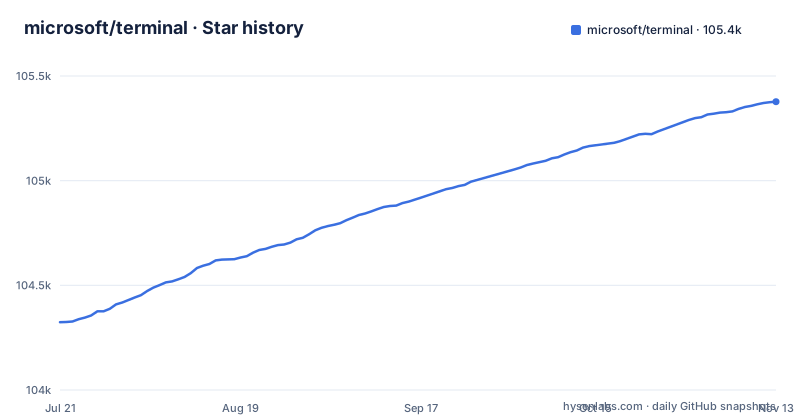
Star history
- microsoft/terminal105,377 ★ · +1,053
| Repository | 2026-07-21 | 2026-11-13 |
|---|---|---|
| microsoft/terminal | 104.3k | 105.4k |
1,053 Stars in the last 115 days, measured from the daily GitHub snapshot. Compare with other projects
Editorial analysis
One Repo, Two Products, and a Shared Core
The practical consequence is that changes to shared components can affect both the new terminal and the legacy host. A bug in the console API layer might surface in conhost.exe as well as in Windows Terminal. That coupling is a design decision, not an accident. The README's overview section calls out "Shared Components" as a distinct item, so the maintainers treat this as a deliberate architecture.
What Problem It Solves and Who It Serves
The repo also matters to people who maintain the legacy console. Because conhost.exe lives here, fixes to console behavior are developed in the same place as the new terminal. That is a specific benefit: if you file a bug about console rendering, the fix might land in both products. For developers, the problem solved is having a single, versioned source of truth for Windows command-line infrastructure.
How It Works: Architecture Visible in the Repo
What is clear is that the two products are not independent forks. They share code, which is why a single repository can produce both the stable Windows Terminal and the Preview builds. The release list shows a Preview version (v1.26.2734.0) alongside stable versions (v1.25.2733.0 and v1.24.12741.0). That is a concrete architectural fact: one codebase, two release channels.
Getting It Running: Install Paths and Commands
There is also a Canary channel, a nightly build from main. It comes as an App Installer distribution (Windows 11 only, with auto-updates) or a Portable ZIP (Windows 10 19041 and 11, no auto-updates). The Portable ZIP is a useful option for testing the latest code without installing anything, but it will not update itself. For an engineer evaluating the project, the Canary channel is the fastest way to see in-progress features, but it is explicitly the least stable offering.
Building from Source: Prerequisites and Commands
The README also has a section for running and debugging, plus coding guidance. That suggests the project has a defined developer workflow. The README has Prerequisites and Building the Code sections, with separate PowerShell and Cmd build paths. The build is likely heavy: a large C++ codebase will take time and disk space. If you only need the terminal as a user, the Store or winget is far simpler.
Limitations and Failure Modes
The dual-purpose repo is also a limitation for contributors. If you want to fix a bug in Windows Terminal, you have to understand the shared components and the console host. The codebase is larger and more complex than a terminal-only project. That is a barrier to entry, not a feature.
Alternatives: How They Differ
Another alternative is the Windows Terminal Preview channel, which is the same product with newer features. The difference is stability: Preview gets features earlier but has more bugs. The README positions Canary as even less stable. So within the Microsoft ecosystem, you have a spectrum of stability versus freshness. Outside that, you have terminals like Hyper, which is Electron-based and cross-platform, but it uses web technologies and has a different performance profile. For an engineer, the key difference is the integration level: Windows Terminal is the only terminal that shares code with conhost.exe, which means it is the closest to the system console.
Maintenance and Upgrade Cost
The license is MIT, which is permissive and allows commercial use, modification, and redistribution with attribution. That is a low-license-risk project. There are no copyleft obligations. However, the project depends on Windows-specific APIs and the Windows SDK, so it is not portable to other operating systems. The upgrade cost for users is tied to Windows updates: because the terminal requires Windows 10 2004 or later, upgrading the OS is a prerequisite for using the latest terminal. The repository is actively maintained, with recent releases in October 2026, so you can expect ongoing fixes and features. But the dual-product nature means that a change to the console host could introduce a regression in the terminal, and vice versa. That is a maintenance risk to consider if you rely on the terminal for daily work.
Editorial conclusion
Adopt Windows Terminal if you manage Windows 10 2004 or later machines and want a modern, tabbed terminal with a single install path via winget or the Store. Skip it if you need to support older Windows builds or require a terminal that auto-updates without Store or winget infrastructure. Before adopting, verify your Windows build number (19041 or later), confirm your winget client is at least version 1.6.2631 for dependency support, and check whether the manual MSIX install path requires the VC++ v14 Desktop Framework Package on older systems. The repository is not a standalone terminal; it also contains the legacy console host and shared components, so expect a larger codebase than a typical terminal project.
Frequently asked questions
What is a terminal in a computer?
In this repository the terminal is the Windows Terminal app, which ships in the same tree as conhost.exe, the original Windows console host, along with the components the two share. Windows Terminal is the newer front end, and the repository carries the source for both.
What is the terminal app used for?
Windows Terminal is the graphical shell for running command-line programs on Windows, and it requires Windows 10 2004, build 19041, or later. It is distributed through the Microsoft Store, winget, Chocolatey, Scoop, or a manual msixbundle download.
Is terminal good for coding?
The repository is a C++ codebase with samples/ directories showing how to consume the Windows Console APIs, including ConPTY, PixelShaders and ReadConsoleInputStream. For day to day use the deciding factor is update behaviour, since only the Microsoft Store and the Canary App Installer update automatically.
how to install terminal in windows
The Microsoft Store route is the preferred one and upgrades automatically. Otherwise install the Microsoft.WindowsTerminal package with winget, microsoft-windows-terminal with Chocolatey, or windows-terminal from Scoop's extras bucket. A manual msixbundle install does not update on its own.
how to use terminal in windows
The README points at learn.microsoft.com/windows/terminal, with a MicrosoftDocs/terminal repository for contributing to those docs and a MicrosoftDocs/Console-Docs repository for the Console API reference.
Official sources
Where developers are discussing it
Posts on Hacker News, dev.to and Lobsters that link to this repository, found by our scan of those communities. 1 in the last 30 days; newest first.
- Claude Code abuses WSL2 interop to just send clipboardHacker News · Oct 20, 2026 · 1 points · 0 comments
Add this badge to your README
If you maintain this project, the badge below links readers to this analysis and shows its maintenance status from the daily GitHub snapshot. Paste the markdown into your README; add ?metric=license or ?metric=stars to the image URL for a different field.

[](https://hysenlabs.com/projects/microsoft-terminal)Star history chart for your README
[](https://hysenlabs.com/projects/microsoft-terminal)Was this useful?