Simple Line Icons: CSS, Sass, Less, and webfont package review
Simple and Minimal Line Icons
At a glance
- What is it?
- Simple Line Icons packages a line-style webfont with CSS, Sass, and Less assets for web templates and interfaces. It suits projects that prefer font icons, but its README omits basic markup, accessibility guidance, and clear release documentation.
- Who is it for?
- Simple Line Icons fits developers who want a font-based icon set and can identify glyphs through the hosted cheat sheet. It is a poor choice when inline SVG, accessible components, or clearly documented releases are required.
- Can I use it commercially?
- Yes. MIT is a permissive licence: you can use, modify and sell software built on it, as long as you keep its copyright and licence notices.
- Is it still maintained?
- Activity is slowing. The repository last received commits 6 months ago.
- What is it written in?
- Mainly CSS, according to GitHub's language statistics.
Answers come from the project's GitHub data, last synced on November 7, 2026, and from our analysis. They are not legal advice.
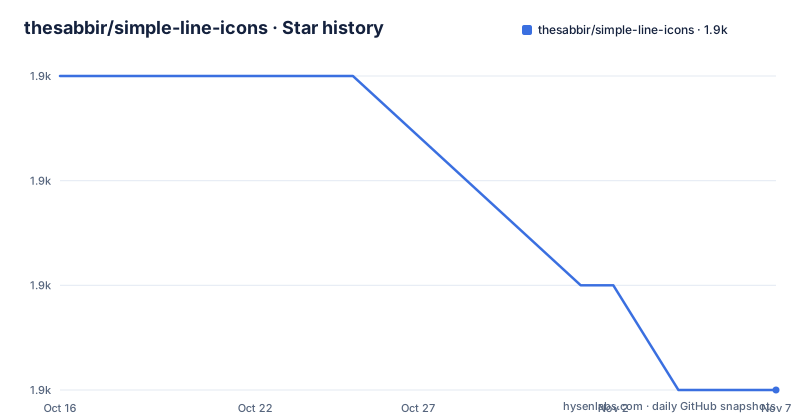
Star history
- thesabbir/simple-line-icons1,858 ★ · -3
| Repository | 2026-10-16 | 2026-11-07 |
|---|---|---|
| thesabbir/simple-line-icons | 1.9k | 1.9k |
-3 Stars in the last 22 days, measured from the daily GitHub snapshot. Compare with other projects
Editorial analysis
What Simple Line Icons adds to a web project
Simple Line Icons addresses the need for a consistent set of line-style glyphs in web templates, themes, and interfaces. Its users include front-end developers working with CSS, Sass, or Less, plus designers who can load the included webfont as a Creative Cloud library. The repository packages related assets together instead of requiring adopters to assemble font files and stylesheets independently.
The project is a webfont-based icon system. That design differs from an inline SVG component library. Based on the repository layout, the package contains font binaries under `fonts/`, stylesheets under `css/`, `scss/`, `less/`, and `dist/`, documentation under `docs/`, and build inputs under `src/`. The package entry declared by `package.json` is `dist/styles/simple-line-icons.css`.
This solves presentation work, but the README does not document accessible labels, decorative use, screen reader treatment, or a preferred SVG alternative. It also omits the HTML class-name syntax needed to render an individual icon. The hosted GitHub Pages cheat sheet is consequently part of using the package correctly, rather than merely a gallery.
How the distributed CSS and preprocessor assets are organized
The repository separates package delivery from stylesheet sources. `package.json` points package consumers at `dist/styles/simple-line-icons.css`, while `src/`, `scripts/`, `less/`, and `scss/` hold build-related files. The npm scripts use `node scripts/build` for both `test` and `build`. A completed build is followed by `cp -r dist/ docs/`, which copies distribution output into the documentation tree.
The README documents matching variables for LESS and Sass:
@simple-line-font-path     : "/path/to/font/files";
@simple-line-font-family   : "desired-name-font-family";
@simple-line-icon-prefix   : prefix-;
The Sass equivalent uses `$simple-line-font-path`, `$simple-line-font-family`, and `$simple-line-icon-prefix` with the same example values. These controls address three deployment concerns: where browsers load font files, the font family exposed by the stylesheet, and the prefix applied to generated icon rules. Changing the example path does not make copied font assets available. The configured font directory must exist at the requested location.
The package declares `less` as its dependency. The visible build command does not indicate a Sass compiler, even though the repository includes `scss/` and documents Sass customization. Those files support a Sass-oriented distribution, but the README does not describe a separate Sass compilation workflow for package adopters.
Installing the package and starting the first icon lookup
For npm-based projects, the README gives this installation command:
npm install simple-line-icons --saveIt adds `simple-line-icons` as a saved dependency. The README also documents this Bower command:
bower install simple-line-icons --saveBower is an available installation route, but the repository does not say that it should be introduced into a new toolchain. npm is the more direct choice for a JavaScript project because the manifest defines the package entry, scripts, and its `less` dependency.
The README does not provide a complete first-use example. It shows no HTML element, required class, icon name, or copied font path. Those details cannot be inferred safely from a project named after an icon set. The documented starting point after installation is the GitHub Pages cheat sheet, where a developer can identify the desired glyph and determine how it should be rendered.
For contributors working from a clone, `package.json` defines these package operations:
"scripts": {
  "test": "node scripts/build",
  "build": "node scripts/build",
  "postbuild": "cp -r dist/ docs/"
}
The README says that cloning or downloading is possible, but it does not give a separate contributor setup tutorial. Because the contents of `scripts/build` are not shown, its prerequisites and expected console output cannot be confirmed.
Font deployment, class changes, and practical failure points
Font deployment is the clearest integration constraint described by the README. The stylesheet needs font files at the path represented by `$simple-line-font-path` or `@simple-line-font-path`. A copied CSS file can fail to render icons when the `fonts/` directory is omitted, copied elsewhere, or served from a different URL. The web server must also allow browsers to retrieve the configured font files.
The font family and icon prefix require coordinated changes. Renaming the family affects how the generated CSS identifies the font. Changing the prefix can affect every generated icon class selector. The README lists these variables but does not explain whether changing the prefix also affects existing HTML or requires rebuilding output. This is a real documentation gap for a feature aimed at customization.
The README documents no fallback for a failed font request. It does not state what appears when a font file or glyph is missing, nor does it identify a CSS fallback stack. It also gives no guidance for icon sizing or alignment. Developers must inspect `dist/styles/simple-line-icons.css` and the cheat sheet instead of assuming that one variable controls the full deployment.
Font licensing also needs separate attention. The README explicitly permits the webfont in templates and themes sold on marketplaces such as ThemeForest. It separately states that CSS, SCSS, and LESS files are under the MIT License, while `package.json` marks the package `"license": "MIT"`. The README does not separately state the license for the font files. Distributors should inspect `LICENSE.md` rather than assume that every asset category has identical wording.
Maintenance signals, version ambiguity, and upgrade work
The repository is not archived, and its last push was on 2026-05-11. Repository activity does not establish that another release will follow. The listed recent releases are `2.5.4` from 2020-08-08, `2.5.2` from 2020-07-30, and `2.5.1` from 2020-07-30. By contrast, the current `package.json` declares version `2.5.5`.
That difference requires checking rather than inference. The README does not identify a `2.5.4` to `2.5.5` change list or describe the changes in version `2.5.5`. An adopter using a registry package or repository archive should confirm which files belong to that manifest version, especially if release provenance matters.
Upgrade work should be modest for projects that consume `dist/styles/simple-line-icons.css` without customization. Projects that changed LESS or Sass variables, copied icon classes into templates, or renamed the font family face a wider review because the README gives no compatibility or migration policy. It also does not say whether class names can change between package versions.
The MIT license permits reuse and modification under its conditions, but this review does not interpret legal duties. Teams distributing the font in templates, themes, or web applications should read `LICENSE.md` and confirm which files it covers.
Where the webfont model limits Simple Line Icons
Simple Line Icons uses a webfont and CSS class system. That model suits a project seeking a consistent visual collection with distributable font files and preprocessor stylesheets. A template that already standardizes on this package's font family, class selectors, and deployment layout can adopt it with limited integration code.
An inline SVG icon library follows a different approach. SVG icons appear as markup or components, and their paths remain available to browser and assistive technology features. No alternative package is named in the README, so a library-to-library comparison would be speculative. The architectural boundary is still clear: Simple Line Icons distributes glyphs through a font, while an SVG library carries individual icons as vector markup.
This distinction defines several cases where Simple Line Icons is the wrong tool. Choose an SVG-based system if individual icons must be inspectable, manipulated through DOM operations, or exposed as components with explicit text alternatives. Choose another source-driven icon package if recent releases, framework bindings, or current design exports are procurement requirements.
The project is also weak documentation for developers starting from scratch. Without a short HTML example, developers cannot derive the required classes and font setup from the README alone. A project that prefers fonts may still use Simple Line Icons, but adoption requires checking the visual catalog, distributed CSS, font paths, package contents, and license text.
Editorial conclusion
Simple Line Icons fits developers who want a font-based icon set and can identify glyphs through the hosted cheat sheet. It is a poor choice when inline SVG, accessible components, or clearly documented releases are required. Check `dist/styles/simple-line-icons.css`, font deployment, icon naming, `LICENSE.md`, and the difference between package version `2.5.5` and release `2.5.4` first.
Frequently asked questions
How do I install Simple Line Icons with npm?
The README documents `npm install simple-line-icons --save`. This installs the package and saves it as a project dependency.
Does Simple Line Icons support LESS and Sass customization?
Yes. The README documents LESS and SASS variables for the font path, font family, and icon prefix. It does not explain the full behavior of generated class names.
What is the latest documented Simple Line Icons release?
The release list identifies `2.5.4` on 2020-08-08 as the newest listed release. `package.json` declares version `2.5.5`, but the README does not document changes for that version.
Official sources
Add this badge to your README
If you maintain this project, the badge below links readers to this analysis and shows its maintenance status from the daily GitHub snapshot. Paste the markdown into your README; add ?metric=license or ?metric=stars to the image URL for a different field.

[](https://hysenlabs.com/projects/thesabbir-simple-line-icons)Star history chart for your README
[](https://hysenlabs.com/projects/thesabbir-simple-line-icons)Was this useful?