MemMesh: agent memory in one Rust binary, with the extraction step left to you
Persistent, self-improving memory for AI agents. Local-first Rust memory engine with MCP support.
At a glance
- What is it?
- The engine stores memories in a local SQLite or Postgres database and serves them over MCP to four named tools. Semantic search runs on a 130 MB local embedding model, but the knowledge graph extraction step is explicitly delegated to whatever model you bring, because the engine never makes an LLM call.
- Who is it for?
- This suits someone running an agent locally who wants durable memory without standing up a vector database, without a per-message extraction bill, and without memories leaving the machine. It is a poor fit if you want the prediction and graph reasoning layer, since that part lives in the hosted service rather than the open source engine, and a poor fit on a machine where a 130 MB model download is not acceptable, though there is a keyword fallback.
- Can I use it commercially?
- Yes. Apache-2.0 is a permissive licence: you can use, modify and sell software built on it, as long as you keep its copyright and licence notices.
- Is it still maintained?
- Yes. The repository last received commits 82 days ago.
- What is it written in?
- Mainly Rust, according to GitHub's language statistics.
Answers come from the project's GitHub data, last synced on November 15, 2026, and from our analysis. They are not legal advice.
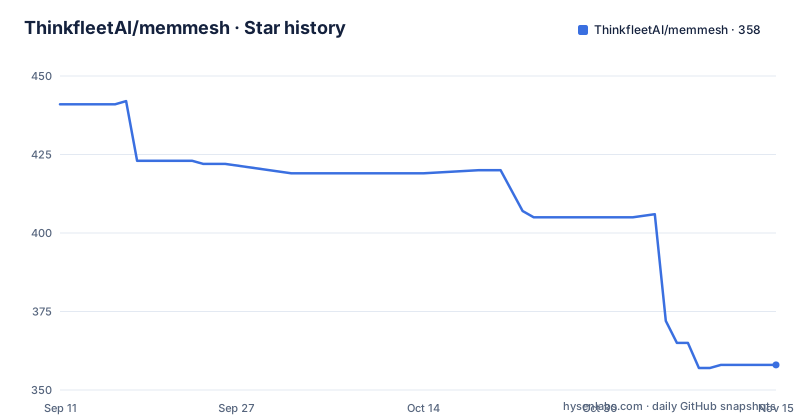
Star history
- ThinkfleetAI/memmesh358 ★ · -83
| Repository | 2026-09-11 | 2026-11-15 |
|---|---|---|
| ThinkfleetAI/memmesh | 441 | 358 |
-83 Stars in the last 65 days, measured from the daily GitHub snapshot. Compare with other projects
Editorial analysis
One install command patches four tool configs and leaves your other servers alone
Getting the binary is the least interesting step. A prebuilt download covers macOS and Linux and Windows:
# 1. Install a prebuilt binary — no Rust toolchain needed
curl -fsSL https://memmesh.ai/install.sh | sh          # macOS / Linux
# Windows (PowerShell):  irm https://memmesh.ai/install.ps1 | iex
# (or build from source: cargo build --release --bin memmesh)
The part with consequences is the second command, `memmesh install`, which detects each supported tool on the machine, merges an MCP server block into that tool's config, and drops a teaching skill in the matching location. The stated guarantee is that your other MCP servers are untouched, which is the difference between a merge and an overwrite.
The four targets and their paths are worth having in front of you before you run it, because they are four different config formats and two of them have no skill file at all:
| Tool | MCP config | Skill location | |---|---|---| | Claude Code | `~/.claude.json` | `~/.claude/skills/memmesh/SKILL.md` | | Cursor | `~/.cursor/mcp.json` | `~/.cursor/rules/memmesh/SKILL.md` | | Windsurf | `~/.codeium/windsurf/mcp_config.json` | *(MCP tool descriptions)* | | Codex CLI | `~/.codex/config.toml` | *(MCP tool descriptions)* |
You have to restart the host tool afterwards so it reloads its config. And there are flags for the situations where you would rather not do all of it: `--dry-run` to see the change, `--tool <id>` to target one tool and repeat it for several, `--mcp-only` to skip the skill, `--no-hooks` to skip the automatic capture hook, and `--force` to overwrite.
Semantic search costs 130 MB on first use, and you can turn it off entirely
The first time you run observe or search, the binary downloads a small local embedding model into its cache. The model is named, it is roughly 130 MB, and the download happens once with no API key and no data egress. Semantic search is on by default from that point.
That default is the whole argument of the project in one line. The comparison table the documentation leads with sets MemMesh against a typical agent memory stack, and the retrieval row is the one that matters: semantic and keyword hybrid using local embeddings, against a hosted vector store. Nothing to run, nothing to pay per query.
There is a switch, and it is a configuration value rather than a flag. Setting the embeddings provider to `none` in the config runs pure keyword plus recency search instead. That is a real option rather than a degraded mode, and it is the choice for a machine that should not hold a 130 MB model, or for a user who wants predictable behaviour over ranking quality.
The demonstration in the quickstart is designed to show why the semantic path exists. You store a statement that someone prefers pnpm over npm, then search for which package manager, with no words in common, and the memory comes back. A keyword index cannot answer that query; a local embedding model can, without the round trip.
The capture hooks send everything and let a regex decide what matters
The design bet is that you should not have to decide what is worth remembering. On Claude Code, the install wires two hooks, and they are named after the events they fire on.
`UserPromptSubmit` pipes every prompt to `memmesh observe`. The engine then runs its own heuristic filter and keeps only the substantive parts, meaning preferences, decisions, and facts, while dropping conversational filler. That filter is described as fully local with no LLM and no egress, and the dependency list backs it up: the workspace pulls in the regex crate under a comment naming it as the heuristic extraction mechanism.
`SessionStart` runs a search with a special output format and injects the results back into the context, so an agent opens already knowing what it learned. The format name, claude-context, is the same one you would pipe yourself.
The same pattern transfers to any host with pre-prompt or session hooks, including Codex and custom agents, by piping raw text into `memmesh observe --json` and reading the search output. So the automatic path is not Claude Code specific even though the shipped hooks are.
If you would rather call the memory tools yourself, the install flag `--no-hooks` skips the capture hook and the memory tools remain available by hand.
Bi-temporal storage and supersede are what keep a correction from erasing history
Two design choices in the storage layer are the reason this is not just a table with a similarity index on it.
The first is the time model. The comparison table names it bi-temporal and glosses it as the difference between when it happened and when you learned it. A flat timestamp cannot represent those separately, and the gap matters the moment you ask a question about what you believed on a particular date. The hosted layer exposes a point-in-time bi-temporal edge query as a tool, so the data model was built to answer those questions rather than to store an extra column.
The second is that deleting is not the only way to change a memory. `memory_supersede` records a correction and keeps the old item for provenance, and `memory_consolidate` collapses near-duplicate memories into a survivor as a non-destructive supersede. A deletion tool exists too, and its default is a soft delete described as recoverable, with a hard delete available when you want one.
Both destructive-looking operations have a dry run. The CLI shows `memmesh consolidate --dry-run` with the comment that it collapses near-duplicate memories non-destructively, and `migrate` is described as safe to repeat. A memory system that deletes the wrong thing has no undo, so the escape hatches are built into the default commands rather than hidden behind a flag.
There is also a small reinforcement effect worth knowing: `memory_recall` fetches by id and reinforces the item on access, which means what your agent actually uses tends to stay stronger.
Graph extraction is your model, your key, and your rate limit
The most honest line in the MCP tool list is the last entry. There are two tools for knowledge graph extraction, one to fetch what is pending and one to commit the result, and the description says the extraction is done by the client LLM, with your model, your key, and your rate limit, and that the engine never calls an LLM.
That is a split many tools would blur. Here the engine is the store and the queue, and the model call belongs to the host application, which is the only arrangement that keeps the no-API-calls claim true. If you do not run that step, you still have a working memory store with hybrid search; you just do not have the graph.
The other open source tools are more conventional. `memory_observe` is the primary write path, taking raw text and capturing what is substantive. `memory_save` upserts an item with a scope, a type, content, and an importance value. `memory_search` is the hybrid search filtered by scope, project, agent, user, or session. `memory_list` gives the most recent items in a scope, and `memory_stats` gives a total count.
Naming has one wrinkle. The tools are listed with the underscore form, and the documentation says the dotted form is accepted as a legacy alias. If you are writing against this, use the underscore form.
What sits behind the hosted service is a separate layer rather than a bigger engine: multi-hop reasoning over the graph, the point-in-time edge query, anticipatory retrieval by spreading activation, a full subject context bundle, and a forecasting tool described as calibrated and willing to abstain. The open source engine is called a complete, durable store, with the hosted mode adding the intelligence layer on top of the same data.
Twelve crates, and the dependency list is a description of the architecture
The workspace has twelve members, and the split is more informative than any single feature description. Core, embed, an embed server, storage, a server, the MCP layer, sync, audit, license, eval, the CLI, and desktop.
The dependencies read as a map of the same thing. An async runtime with all features enabled, plus the standard error handling pair. A database layer built on SQL with both SQLite and Postgres drivers, a Rustls TLS backend, migrations, and no default features, which is what lets the same code serve both the local file and a hosted database. A secrets vault built on ChaCha20Poly1305 with a keyring integration carrying the Apple, Secret Service, and Windows backends, plus a memory zeroing library, which is credential storage for a tool that holds your agents' private facts.
Then the boundary crossings. gRPC via tonic and prost, an HTTP stack with Axum described as being used by the desktop GUI, and an HTTP client described as being used by the sync engine to talk to a SaaS service. That last one is the only place in the dependency list where something leaves the machine, and it is the sync crate rather than the core.
The toolchain file pins the minimum Rust version at 1.78 and the workspace is edition 2021, and the package is marked as not published, so the crates are built from the repository rather than pulled from a registry.
Editorial conclusion
This suits someone running an agent locally who wants durable memory without standing up a vector database, without a per-message extraction bill, and without memories leaving the machine. It is a poor fit if you want the prediction and graph reasoning layer, since that part lives in the hosted service rather than the open source engine, and a poor fit on a machine where a 130 MB model download is not acceptable, though there is a keyword fallback. Before you install, check three things: that you accept `memmesh install` writing into four separate tool configurations, since it merges an MCP block into each and leaves your other servers untouched; whether you want the automatic capture hooks on, which pipe every prompt into the engine and rely on a regex filter to decide what counts as substantive; and where your database lives, since the default is a single file under a dot directory in your home and a sync engine is also in the crate list. The newest release is v0.1.2 from 2026-08-06 and the last push was 2026-08-25.
Frequently asked questions
What is MemMesh and how does it store agent memory?
It is a Rust memory engine that gives AI agents durable, typed, searchable memory from a single binary, using SQLite or Postgres. The database defaults to a file in a dot directory in your home, and the path can be overridden.
Does MemMesh send data to an API or call an LLM?
Not from the open source engine. Semantic search runs on a local embedding model, and the knowledge graph extraction tools are described as using the client LLM, your model, your key, and your rate limit, because the engine never calls an LLM itself.
How does MemMesh capture memories automatically in Claude Code?
The install wires two hooks. UserPromptSubmit pipes every prompt to memmesh observe, whose heuristic filter keeps substantive statements and drops filler, and SessionStart runs a search that injects relevant memories back into the new session context.
What is the difference between the open source MemMesh and hosted mode?
The open source engine is a complete durable memory store with hybrid search, supersede, consolidate, and soft delete. Hosted mode at memmesh.ai adds the intelligence layer on top of the same data: multi-hop graph reasoning, point-in-time edge query, anticipatory retrieval, context bundles, and calibrated prediction.
Can I run MemMesh search without a local embedding model?
Yes. Semantic search is on by default and the first use downloads a small local embedding model into the cache once, with no API key and no data egress. Setting the embeddings provider to none in the config runs pure keyword plus recency search instead.
Official sources
Add this badge to your README
If you maintain this project, the badge below links readers to this analysis and shows its maintenance status from the daily GitHub snapshot. Paste the markdown into your README; add ?metric=license or ?metric=stars to the image URL for a different field.

[](https://hysenlabs.com/projects/thinkfleetai-memmesh)Star history chart for your README
[](https://hysenlabs.com/projects/thinkfleetai-memmesh)Was this useful?