ThinkWatch Lite puts one local gateway in front of every AI client
Local gateway for Claude Code, Codex and other AI clients on macOS, Windows and Linux: switch upstreams without touching clients, keep API keys from relays, cut off malicious tool calls, trace every request.
At a glance
- What is it?
- ThinkWatch Lite is a Tauri desktop app that sits between Claude Code, Codex and similar clients and whichever upstream answers them. It redacts credentials on the way out, can cut an answer before its tool call runs, and records the cost and route of every request, but every guard starts switched off in Observe mode.
- Who is it for?
- Adopt ThinkWatch Lite if you juggle several AI clients and more than one upstream, or if a relay sits between you and the provider and you want credentials swapped before it reads them. Do not adopt it expecting a safety net on the first run: outbound redaction, prompt-injection refusal and tool-call cut-off all start in Observe and keep recording until you switch each one over.
- Can I use it commercially?
- Yes. MIT is a permissive licence: you can use, modify and sell software built on it, as long as you keep its copyright and licence notices.
- Is it still maintained?
- Yes. The repository last received commits 2 days ago.
- What is it written in?
- Mainly TypeScript, according to GitHub's language statistics.
Answers come from the project's GitHub data, last synced on November 7, 2026, and from our analysis. They are not legal advice.
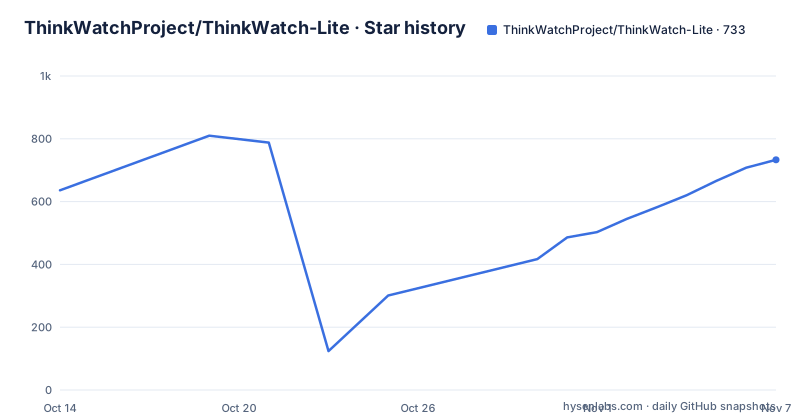
Star history
- ThinkWatchProject/ThinkWatch-Lite733 ★ · +97
| Repository | 2026-10-14 | 2026-11-07 |
|---|---|---|
| ThinkWatchProject/ThinkWatch-Lite | 636 | 733 |
97 Stars in the last 24 days, measured from the daily GitHub snapshot. Compare with other projects
Editorial analysis
One gateway address replaces a dozen client config files
ThinkWatch Lite sits between an AI client and whichever upstream answers it, and its first job is to take the client out of the routing business. Claude Code, Claude Desktop, Codex, opencode, Pi, oh-my-pi, Grok Build, Qwen Code, Hermes Agent, Zed, Aider and DeepSeek Harness get pointed at the local gateway in one step, which brings the automatic list to twelve clients. Cursor, Continue and Antigravity CLI ship with written instructions instead of an automatic rewrite. After that first connection, upstream and model changes happen in the gateway and no client file is opened again. Where it does edit a client, the change is previewed first, the original file is backed up, and a restore stays available. The claim on offer is narrow and testable: one edit point takes the place of fifteen places where a base URL or a key can go stale.
Every guard starts in Observe, so nothing blocks on day one
Each protection begins in Observe, a mode that only records, and is switched over one at a time. That sits awkwardly beside the headline claim that dangerous tool calls get cut off. On a fresh install nothing is cut: you get an audit trail, and blocking behaviour has to be enabled deliberately, guard by guard. What the guards do is worth separating, because the direction of traffic differs. Outbound redaction swaps API keys, private keys, JWTs, connection-string passwords, Chinese resident ID numbers and bank card numbers for placeholders before a request leaves the machine, so a relay never holds the real values. The content filter works on the same outbound path, deleting instructions hidden in invisible characters before departure and optionally refusing prompt injection. Answers coming back are handled by a third mechanism, tool-call inspection, which is described separately.
Tool calls are judged before the client can execute them
Tool-call inspection is the guard that reacts to what comes back. An answer carrying a tool call that downloads and runs code, sends out environment variables or credential files, reads private keys, or installs a startup item or scheduled job is cut off before the client can run it. The cut happens at the gateway, so the instruction never arrives on the machine where it would have done damage. The security log keeps the context for each event and names the key, the client, the model and the upstream of the request it belongs to. Outside that log, every request is traceable on its own terms: the rule it matched, each upstream it tried, any conversion between API formats, and how its cost was calculated. A finished request can be replayed against another upstream and the two answers set side by side, and the whole history is searchable, including the text of requests and answers.
Thirteen MCP panels against fifteen named clients
Past the request log, the app inventories the tooling around a client. It places the MCP servers of thirteen clients side by side, marks which of them are third-party, and scans client configuration, skills, hooks and project instructions for hidden characters, prompt injection, dangerous commands and permissions broader than the task needs. Those thirteen do not line up with the client list elsewhere on the same page. Twelve clients are redirected automatically and three more, Cursor, Continue and Antigravity CLI, arrive with instructions, which makes fifteen named clients, while the MCP panel is described as spanning thirteen. Nothing in the README explains the gap, so read the MCP view as a subset rather than assume it covers every client you have configured.
Install paths differ, and macOS Intel is missing
Install routes differ by platform, and the macOS row is narrower than the others. macOS 12 or later on Apple silicon takes a Homebrew cask; Windows 10 21H2 or later offers x64 and ARM64, as an installer or a portable zip; Linux covers x86_64 and aarch64 through a shell script or an AppImage. An Intel Mac has no entry at all.
brew install --cask thinkwatchproject/tap/thinkwatch-liteThe Linux route is one line, published with its pipe escaped for Markdown:
curl -fsSL https://github.com/ThinkWatchProject/ThinkWatch-Lite/releases/latest/download/install.sh \| shArtefacts are named per architecture, so an x64 machine and an ARM64 one do not share a file:
ThinkWatch-Lite-<version>-windows-x64-setup.exe
ThinkWatch-Lite-<version>-windows-arm64-setup.exe
ThinkWatch-Lite-<version>-linux-<arch>.AppImage
The app is not signed by Apple or Microsoft, so the first launch on either desktop needs an extra step, covered on the Install and update page at `thinkwat.ch/docs/lite/install` along with how updates arrive. The last push was on 2026-10-06. The interface is in English and Simplified Chinese, and the app updates itself.
This repository holds the app shell, not the gateway
The gateway proper, ThinkWatch Core, is a separate project bundled into the app, which explains why every dependency here is interface code: React 19, Tauri 2, recharts for the charts, cmdk and radix-ui for controls, and CodeMirror with its YAML language package for configuration views. The workspace is pnpm at [email protected], the package is marked private, and the version string 2026.10.7 is a calendar date rather than a sequence number. Two top-level files do not fit the shape of a single desktop package: `pnpm-workspace.yaml`, which sits oddly in a package marked private, and `skills-lock.json`, which has no matching source directory at the top level and no explanation. The scripts say what a contributor actually gets:
  "scripts": {
    "dev": "vite",
    "build": "tsc --noEmit && vite build",
    "typecheck": "tsc --noEmit && tsc --noEmit -p scripts/shots",
    "tauri": "tauri",
    "test": "vitest run",
    "shots": "bash scripts/shots/shots.sh"
  },
Running dev starts the Vite dev server for the interface alone, so a fresh checkout gives you a window rather than a proxy. Distribution runs through the cask, the Windows installers and the AppImage instead of a package registry, and the MIT licence is the one recorded for this repository, the app shell rather than the gateway. One more detail sits in the devDependencies: sharp is pinned at 0.35.4 without a caret while every other entry floats.
Upstreams are cross-checked against the ones serving the same model
Upstreams are audited against each other rather than trusted one at a time. For every model the gateway compares the upstreams serving it, and three mismatches get marked on the row in the upstream list: an answer that names a different model, reported input well above or below what the peers report, and low prompt-cache reads. Evidence and sample sizes sit behind a hover rather than in the list itself, so one lucky request will not by itself condemn a route, and a thin sample cannot clear one either. Routing rules cover model, tools, images and extended thinking. Failover is deliberately narrow: when an upstream fails before the answer has begun, the next one takes over, and each session stays pinned to one upstream so its prompt cache keeps hitting. Auxiliary traffic such as title generation can be answered locally and still appears in the ledger.
Unpriced requests are counted separately, not as zero
Cost reporting is where the project makes an explicit refusal. Amounts the gateway had to estimate are marked as estimates, and requests carrying no price at all are counted in their own group instead of being folded in as zero, which stops an unpriced upstream from looking free. The overview window compares the last seven days of tokens, cost and requests against the seven days before it, separates the estimated share of the cost, states how many requests went unpriced, draws a trend stacked by model with the periods that had failures marked, and ranks models by tokens and cost. Reading the totals is an exercise in checking the denominators first, because a headline figure that includes estimates and an unknown price band can move for reasons that have nothing to do with your usage. The per-request record carries how the number was calculated, so any single line can be audited back to the rule that produced it.
Editorial conclusion
Adopt ThinkWatch Lite if you juggle several AI clients and more than one upstream, or if a relay sits between you and the provider and you want credentials swapped before it reads them. Do not adopt it expecting a safety net on the first run: outbound redaction, prompt-injection refusal and tool-call cut-off all start in Observe and keep recording until you switch each one over. Before reading the totals, count how many requests the seven-day view lists without a price. On an Intel Mac, look for a build elsewhere first, because the install table has no row for it.
Frequently asked questions
What does ThinkWatch Lite actually put between my AI client and the provider?
A local gateway that converts between the Anthropic, OpenAI and Gemini API formats sits between them. Each client is pointed at it once, and upstreams or models can then be changed in the gateway without reopening client configuration.
Does ThinkWatch Lite strip my credentials before a relay sees a request?
Outbound redaction swaps API keys, private keys, JWTs, connection-string passwords, Chinese resident ID numbers and bank card numbers for placeholders before the request leaves the machine. That guard, like the others, starts in Observe and only records until you switch it over.
What happens when a relay answer carries a dangerous tool call?
Tool-call inspection cuts the answer off before the client can run it, covering tool calls that download and execute code, send out environment variables or credential files, read private keys, or install a startup item or scheduled job. The security log entry names the key, client, model and upstream of the request.
Can ThinkWatch Lite run on a Linux server instead of on my laptop?
The gateway can also run on a Linux server, and the app connects to it over an encrypted control channel. ThinkWatch Core ships inside the app for the local case, while Linux installers cover x86_64 and aarch64 through a shell script or an AppImage.
Is the ThinkWatch Lite app signed for macOS or Windows?
No. The app is not signed by Apple or Microsoft, so the first launch needs one extra step, and the Install and update page covers that along with how updates arrive. The macOS build is for Apple silicon only.
What does the ThinkWatch Lite repository build with?
It is a private pnpm workspace at [email protected] on React 19 and Tauri 2, with scripts for a Vite dev server, a type-checked build, vitest and a Tauri command. The README does not document a contributor build path beyond the platform installers.
Official sources
Add this badge to your README
If you maintain this project, the badge below links readers to this analysis and shows its maintenance status from the daily GitHub snapshot. Paste the markdown into your README; add ?metric=license or ?metric=stars to the image URL for a different field.

[](https://hysenlabs.com/projects/thinkwatchproject-thinkwatch-lite)Star history chart for your README
[](https://hysenlabs.com/projects/thinkwatchproject-thinkwatch-lite)Was this useful?