card-mod for Home Assistant: CSS Control for Lovelace Cards
🔹 Add CSS styles to (almost) any lovelace card
At a glance
- What is it?
- card-mod adds per-card CSS control to the Home Assistant frontend, including dashboard cards, themes, and some non-dashboard panels. Its main installation trade-off is the need to manage frontend module URLs without loading the resource twice.
- Who is it for?
- Home Assistant users who need card-specific or theme-controlled styling should adopt card-mod when they can maintain its frontend module URL and version cache correctly. Users who only need a small amount of fixed theme styling may prefer Home Assistant theme configuration alone.
- Can I use it commercially?
- Yes. MIT is a permissive licence: you can use, modify and sell software built on it, as long as you keep its copyright and licence notices.
- Is it still maintained?
- Yes. The repository last received commits 38 days ago.
- What is it written in?
- Mainly TypeScript, according to GitHub's language statistics.
Answers come from the project's GitHub data, last synced on November 7, 2026, and from our analysis. They are not legal advice.
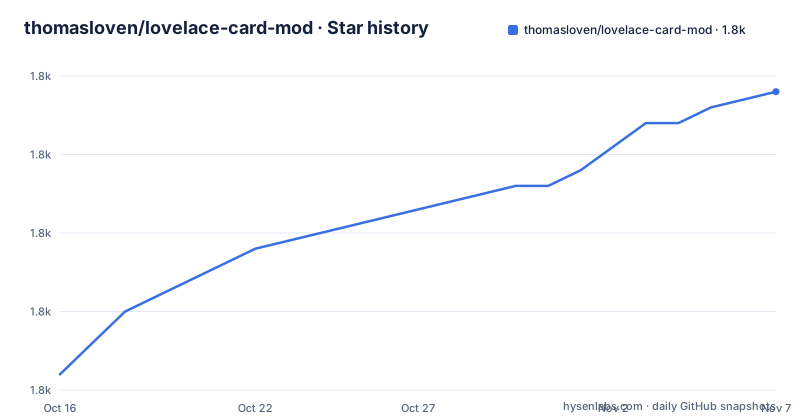
Star history
- thomasloven/lovelace-card-mod1,844 ★ · +18
| Repository | 2026-10-16 | 2026-11-07 |
|---|---|---|
| thomasloven/lovelace-card-mod | 1.8k | 1.8k |
18 Stars in the last 22 days, measured from the daily GitHub snapshot. Compare with other projects
Editorial analysis
Why card-mod targets Home Assistant card authors
card-mod solves a narrow frontend customization problem: applying CSS to Home Assistant cards through dashboard configuration instead of maintaining a separate stylesheet for every card. It is intended for users who edit Lovelace dashboards through the GUI or YAML and need visual changes such as text color, spacing, borders, or card-specific state rules.
The README describes card-mod as applicable to "various elements of the Home Assistant frontend," while the repository description is more ambitious: adding CSS styles to almost any Lovelace card. That distinction matters. Dashboard cards are the clear initial use case, but card-mod also extends to themes and some Home Assistant panels that are not Lovelace dashboards. It is a frontend extension, not a general-purpose CSS build system, and its documented installation is tied to Home Assistant resource management and frontend module loading.
The central benefit is scope at the card configuration level. A style can travel with a card's YAML rather than relying only on a global dashboard style. According to the quick-start example, adding a card_mod block changes text as the configuration is typed, which makes the editor useful for immediate visual feedback. The trade-off is that card-mod adds another moving part to the Home Assistant frontend. Its module URL must be registered correctly, and a mismatched or duplicate URL can cause two versions of card-mod to attempt the same patching work.
How card_mod styles reach Home Assistant cards
A card-mod configuration is attached to an individual Home Assistant card as YAML. The documented example places card_mod at the bottom of the card's raw configuration and uses a multiline style block:
card_mod:
  style: |
    ha-card {
      color: red;
    }
The style text is CSS applied to the card's generated frontend elements. In this example, the ha-card selector sets the card text color to red. The repository is primarily TypeScript, and its package metadata lists Lit as a runtime dependency. Based on the repository layout, the implementation is compiled into card-mod.js through Rollup rather than being a collection of manually copied CSS files. The npm build script delegates to `rollup -c`, while the watch script enables Rollup watch mode.
card-mod also participates in Home Assistant frontend patching. The README warns that beginning with version 4.2.0, card-mod checks whether `hui-card` has already been patched and can issue a browser console warning plus a Home Assistant notification if duplicate or conflicting versions are detected. One example is a card reporting that `hui-card` was already patched by an earlier version. This check makes resource loading more visible, but it also shows that installation order and URL ownership affect behavior beyond ordinary CSS loading.
Dashboard resource loading and frontend module loading are not identical in scope. The documentation says the Dashboard resource is required for card-mod to work on dashboards shown to CAST devices. By contrast, `frontend.extra_module_url` improves card-mod behavior on non-CAST devices and is required for styling panels outside Lovelace dashboards, including the sidebar in a theme for those panels.
Installing card-mod through HACS without duplicate loading
The documented installation path uses HACS. Open the Home Assistant Community Store, locate `thomasloven/lovelace-card-mod`, and install it there. HACS automatically adds a Dashboard Lovelace resource definition. The README says that this automatically managed resource should remain in place because it also helps HACS track updates.
For the preferred frontend module setup, locate the exact HACS resource URL under Settings > Dashboards, then open the three-dot menu and select "Resources". The URL contains a HACS cache tag that changes during updates, so it must be copied from the local Home Assistant instance rather than copied literally from the README. A typical documented shape is shown below, but the README explicitly labels the tag as an example:
frontend:
  extra_module_url:
    - /hacsfiles/lovelace-card-mod/card-mod.js?hacstag=12345678901
After changing `extra_module_url`, restart Home Assistant. Keep the HACS-managed Dashboard resource as it is, even after adding the frontend module. This avoids breaking HACS update tracking, while relying on the frontend module for the documented loading benefits. If YAML dashboard resources are enabled and CAST is not used, the README says a Dashboard resource URL is unnecessary and `extra_module_url` alone is sufficient.
The important distinction is between the two load paths. HACS maintains the Dashboard resource. The user maintains `frontend.extra_module_url`. Registering the same card-mod script twice can produce duplicate patch warnings or version conflicts.
A first card-mod style in the GUI editor
The shortest documented first use does not require editing YAML files directly. Open a card in Home Assistant's GUI editor, select "SHOW CODE EDITOR" at the bottom, and add a `card_mod` block. The following is the complete quick-start style from the README:
card_mod:
  style: |
    ha-card {
      color: red;
    }
The expected result is red card text while the style is entered. The README also says a brush icon appears near the editor controls, although that part of the quick-start text is truncated. That expected feedback gives users a direct way to confirm that the module has loaded and the card configuration is reaching the styling mechanism.
This approach is useful for a focused card change because the CSS remains adjacent to the card definition. It is less suitable when the same rule must affect many cards and must be centrally managed.
For developers changing card-mod itself, `package.json` defines a Rollup-based build and a watch mode. The repository is marked private in its package metadata, so the package entry describes the source project rather than presenting a documented npm package intended for general installation. End users are directed to HACS, not to an npm installation command.
Compatibility limits for Home Assistant and card-mod releases
card-mod is tightly coupled to Home Assistant frontend internals, so compatibility is more important than for a standalone CSS formatter. The README provides a version table covering the last three years. It maps Home Assistant 2026.2.0 and later to the current card-mod 4.2.0 compatibility line, Home Assistant 2025.11.0 to card-mod 4.1.0, Home Assistant 2025.1.0 to card-mod 3.4.4, and Home Assistant 2023.10.0 to card-mod 3.2.3.
The repository package version is 4.2.1, while the compatibility table names 4.2.0 as the current compatible release line. The release list also contains `v4.2.1`, dated 2026-02-08, and `v4.2.1-202604`, dated 2026-03-30. The README's warning about patching version mismatches makes release alignment particularly relevant: a later checking version may find that an earlier version already patched `hui-card`, while identical versions can indicate duplicate resource URLs.
The project is not archived, and its last push was on 2026-09-30. That is recent relative to the repository state, but it does not remove compatibility risk. Home Assistant updates can change frontend elements that card-mod patches. The README does not provide a general backward-compatibility policy beyond its table, nor does it document a rollback procedure in the available text.
Manual resource management versus HACS-managed installation
HACS is the documented default, but it is not the only installation approach described by the project. With HACS, the Home Assistant Community Store installs the plugin and manages the Dashboard resource automatically. This reduces manual setup for users who want update tracking and are comfortable allowing HACS to manage that resource.
For YAML-managed resources, the difference is direct control. The user supplies `frontend.extra_module_url` and may use a cache-busting suffix rather than relying on HACS for the resource entry. The README gives `...?v4.0.0` as an example of updating the suffix when card-mod changes. This approach is more appropriate when resources are already managed in YAML or when the user needs explicit control over the module path. It also moves responsibility for copying the correct URL, changing it after updates, restarting Home Assistant, and preventing duplicate entries onto the operator.
This is a difference in distribution and update ownership, not a difference in card-mod's core styling model. Both paths load the same project and use the same `card_mod` YAML concept. The CAST requirement is another boundary: the documentation says a Dashboard resource is needed on CAST devices even when `extra_module_url` is configured.
Operational costs, cache handling, and the MIT license
card-mod's operational cost is concentrated in frontend resource management rather than server-side configuration. An update through HACS can change the cache tag in the Dashboard resource URL. The README therefore requires manually updating `frontend.extra_module_url` to match. A stale module URL can load an old file, while adding both old and new paths can lead to duplicate patching warnings.
The browser and Home Assistant application cache can also retain an older frontend state. The README links to a cache-clearing guide and states that persistent duplicate-patching notifications may require clearing the Home Assistant Frontend application cache for the affected device. It also mentions a custom card-mod event for actioning that cache clearing, although the available excerpt does not show the event name or its configuration, so that feature cannot be reproduced safely from this material.
The repository is licensed under MIT. That permits use, modification, distribution, and inclusion in larger works subject to the license terms, but this review does not interpret those terms as legal advice. The package metadata states no separate warranty or support commitment.
Editorial conclusion
Home Assistant users who need card-specific or theme-controlled styling should adopt card-mod when they can maintain its frontend module URL and version cache correctly. Users who only need a small amount of fixed theme styling may prefer Home Assistant theme configuration alone. Before updating, verify the installed card-mod version against the Home Assistant compatibility table and keep the HACS-managed Dashboard resource in place when configuring `frontend.extra_module_url`.
Frequently asked questions
How do I install card-mod in Home Assistant?
Install it through HACS from `thomasloven/lovelace-card-mod`. HACS automatically adds a Dashboard resource, while the README recommends also adding the exact resource URL to `frontend.extra_module_url` for frontend module benefits.
How do I add CSS to a Home Assistant card with card-mod?
Open the card in the GUI editor, choose "SHOW CODE EDITOR", and add a `card_mod` block with a `style` value. The README uses an `ha-card` selector that sets `color: red` as the first example.
Why does card-mod report duplicate patching?
The most likely documented cause is registering card-mod more than once, such as through a mismatched Dashboard resource and `frontend.extra_module_url`, or loading two card-mod versions. The README recommends checking resource URLs, restarting after changes, and clearing the Home Assistant Frontend application cache if notifications persist.
Does card-mod work on CAST devices?
The README states that the Dashboard Lovelace resource is required for card-mod to work on dashboards shown to CAST devices. It also distinguishes this from `frontend.extra_module_url`, which benefits non-CAST devices and is needed for some non-dashboard panels.
Which card-mod version is compatible with my Home Assistant version?
The README includes a compatibility table. It lists Home Assistant 2026.2.0 with the current 4.2.0 line, 2025.11.0 with 4.1.0, 2025.1.0 with 3.4.4, and 2023.10.0 with 3.2.3.
Official sources
Add this badge to your README
If you maintain this project, the badge below links readers to this analysis and shows its maintenance status from the daily GitHub snapshot. Paste the markdown into your README; add ?metric=license or ?metric=stars to the image URL for a different field.

[](https://hysenlabs.com/projects/thomasloven-lovelace-card-mod)Star history chart for your README
[](https://hysenlabs.com/projects/thomasloven-lovelace-card-mod)Was this useful?