Doks: a documentation theme for the Thulite static site tooling
Everything you need to build a stellar documentation website. Fast, accessible, and easy to use.
At a glance
- What is it?
- A Hugo theme distributed as an npm package, with search, versioning, i18n and a companion CLI that scaffolds a new site from it.
- Who is it for?
- Doks is a good fit if you already accept Hugo as your static site generator and want documentation that looks finished on day one rather than after a month of CSS. Search, dark mode, versioning and i18n are all wired up, and the npm scaffold means the starting point is one command rather than a theme you configure by hand.
- Can I use it commercially?
- Yes. MIT is a permissive licence: you can use, modify and sell software built on it, as long as you keep its copyright and licence notices.
- Is it still maintained?
- Yes. The repository last received commits 13 days ago.
- What is it written in?
- Mainly HTML, according to GitHub's language statistics.
Answers come from the project's GitHub data, last synced on November 7, 2026, and from our analysis. They are not legal advice.
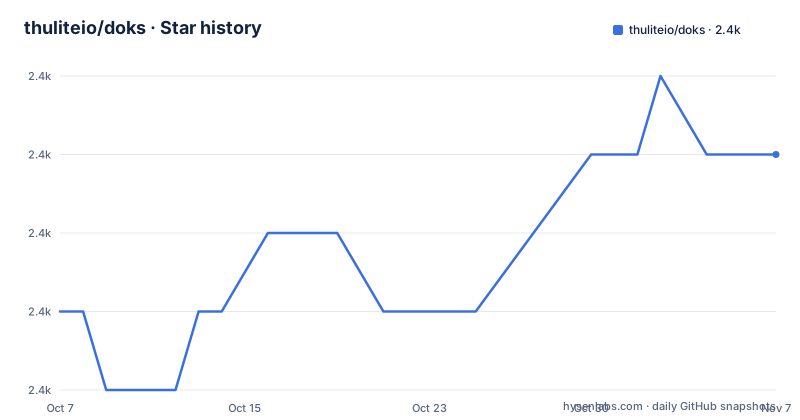
Star history
- thuliteio/doks2,365 ★ · +2
| Repository | 2026-10-07 | 2026-11-07 |
|---|---|---|
| thuliteio/doks | 2.4k | 2.4k |
2 Stars in the last 31 days, measured from the daily GitHub snapshot. Compare with other projects
Editorial analysis
A theme for a generator, not a generator itself
The first thing to get straight is what Doks is. The README's own one-line description is that it is a documentation theme for Thulite, and the repository description calls it everything you need to build a documentation website. Those are different claims and the narrower one is the accurate one.
Thulite is the static site layer underneath, and the requirements section makes that explicit. You need Node.js at the latest LTS version and Hugo at the latest extended version. The extended edition matters: Hugo's extended build includes the SCSS support that a theme like this needs, so a standard Hugo binary will not work.
GitHub reports the repository language as HTML, which is consistent with a Hugo theme whose work lives in `layouts/`. The tree confirms the shape: `layouts/` for templates, `assets/` for compiled assets and scripts, `static/` for files copied verbatim, `content/` for the site's own content, `config/` for configuration, and `images/`.
So Doks is a set of Hugo templates plus front-end dependencies. The site generator is Hugo, and the scaffolding tool is the `create-thulite` CLI. Understanding that split makes the rest of the repository make sense.
Scaffolding a site with one npm command
The recommended install is a single command:
npm create thulite@latest -- --template doksThe `create-thulite` CLI takes a template name and generates a site from it, which is why the theme has no install step of its own. You are not adding Doks as a dependency to an existing project; you are generating a project that already contains it.
Once the site exists, the day-to-day commands come from the theme's package manifest rather than from Hugo directly. The scripts are:
npm run dev
npm run build
npm run preview
The `dev` script runs `hugo server --disableFastRender --noHTTPCache`, which turns off Hugo's fast render mode and its HTTP cache. That looks like a downgrade until you know why: fast render can serve stale output when templates change, and the cache can hold onto assets that were rebuilt. For a theme under active development where you are editing templates, the slower reload is the trade you want.
The `build` script runs `hugo --minify --gc`, which minifies output and garbage collects the Hugo resource cache. The `preview` script uses Vite against an already-built `public` directory, so it checks the production output rather than a live dev server.
What the package manifest pins, and where the README is looser
The `package.json` is more informative than the README about what the theme actually is.
The theme itself is version 1.9.1, published as the `doks` package with an MIT license, and its description is literally `Doks theme`. Its runtime dependencies are all `@thulite`-scoped plus one icon set: `@thulite/doks-core` at `^1.9.3`, `thulite` at `^2.6.5`, `@thulite/images`, `@thulite/inline-svg`, `@thulite/seo`, and `@tabler/icons` at `^3.36.1`.
Two things follow from that list. First, the theme is a thin layer over `doks-core`, which is where most of the actual functionality lives. If you are customizing behavior, that is the package to read. Second, `doks-core` is pinned at a higher minor version than the theme itself, so the two are versioned somewhat independently.
The README says Node.js latest LTS. The manifest says something stricter:
  "engines": {
    "node": ">=24.13.0"
  }
Both statements are true at different levels of precision, and the manifest is what npm will enforce. Node 24 is the current LTS line, so in practice they agree today, but the manifest is the constraint that matters if you are pinning your toolchain or running on an older LTS.
The manifest also carries security-relevant overrides:
  "overrides": {
    "minimatch": "^10.2.2",
    "glob": "^13.0.6"
  }
Forcing `minimatch` and `glob` upward from the transitive versions is the standard fix for the prototype pollution and argument injection advisories that have hit the npm ecosystem repeatedly. Seeing them here suggests the maintainers are tracking those advisories rather than discovering them at audit time.
Features that are configuration rather than code
The README's feature list is short, and each item is a claim that there is something to configure rather than nothing to build.
The layout is described as minimal and responsive, with typography tuned for long-form content. Search is described as fully configurable and powered by FlexSearch, which is a client-side search index. That choice is the one with real consequences: a static site gets search without a server, at the cost of shipping the index to every visitor, and the index grows with your content. On a large documentation set that becomes a real tradeoff.
Dark mode and light mode toggling, syntax highlighting for code blocks and built-in blog pages are the ordinary items. The two that are more than styling are internationalization support and versioning support. Versioning in particular is the feature that is painful to retrofit, because it means the theme understands multiple content roots. If you are publishing docs for a library that ships breaking changes, having a working version switch from the start saves a migration later.
The demo is at doks.thulite.io, which is the fastest way to see how much opinionated styling the theme applies.
Version history that says a lot about the project's shape
The release history is three entries and each one tells you something.
v1.9.0, released 2026-02-20, is described only as `UX 2026` and points readers to a Doks v1.9 upgrade guide. A redesign framed as a single pull request, with a migration guide rather than a changelog, tells you the theme's visuals moved and that existing customizations may need work.
v1.8.2, from 2026-02-02, is a dependency bump for `create-thulite` at 2.0.2. That the theme and the scaffolding CLI are versioned separately, and that a theme release exists purely to track a CLI change, reinforces that these are two products.
v1.9.1, from 2026-02-24, covers a security fix, a Netlify fix, an update to Hugo v0.156.0 and dependency updates. Mentioning a specific Hugo version is the useful part: it means the theme tracks Hugo releases closely enough that a Hugo upgrade was something the maintainers had to react to.
The repository was last pushed on 2026-08-31, roughly six months after the newest release. The commits since then have not produced a new tag, so the default branch is ahead of what npm users get. If you depend on a fix, check whether it is on `main` before assuming the published version includes it.
What the repository does not tell you
A few things are absent from a 1,703-character README and worth looking for elsewhere.
There is no configuration reference. Themes like this usually expose dozens of parameters for colors, typography, navigation and the header, and none of them are listed here. That documentation lives at getdoks.org, which the README links under both Documentation and Support.
There is no customization guide. If you want to override a partial or change the search behavior, you are reading the layouts yourself or looking for community documentation. The `.changeset/` directory in the tree tells you the project uses Changesets for versioning, so commits land on `main` with changelog entries generated at release time, which is consistent with the release history's terseness.
There is also no stated browser support policy or accessibility claim, despite accessibility being part of the repository description. For a documentation site, that is the sort of thing you should verify yourself with a keyboard-only pass and a contrast check rather than take from the metadata.
The project is MIT licensed, consistent between the README's link and the `LICENSE` file in the tree. The README closes by pointing at a sponsorship page for Thulite itself, since the theme is maintained as part of a broader open source effort rather than as a standalone product.
Editorial conclusion
Doks is a good fit if you already accept Hugo as your static site generator and want documentation that looks finished on day one rather than after a month of CSS. Search, dark mode, versioning and i18n are all wired up, and the npm scaffold means the starting point is one command rather than a theme you configure by hand. The two things to check before committing are that your Node version satisfies the engine requirement in the package manifest and that you are comfortable with a theme whose dependency graph is managed by `@thulite/doks-core` rather than by you. Start with `npm create thulite@latest -- --template doks`, then read the configuration reference on getdoks.org, since the theme ships far more knobs than its README lists.
Frequently asked questions
What is Doks and what does it require?
Doks is a documentation theme for Thulite, a static site tool built on Hugo. You need Node.js at the latest LTS release and the extended edition of Hugo, not the standard build, because the theme relies on extended features.
How do I create a new site with the Doks theme?
Run `npm create thulite@latest -- --template doks`, which uses the create-thulite CLI to generate a site from the template. After that, `npm run dev` serves it locally with Hugo's fast render and HTTP cache disabled, and `npm run build` produces a minified production build.
Does Doks support documentation versioning and multiple languages?
Both are listed features, and versioning is the one that matters most, because retrofitting multiple content roots is painful. The README does not document how to configure either, so the guides on getdoks.org are where you will find the actual parameters.
Official sources
Add this badge to your README
If you maintain this project, the badge below links readers to this analysis and shows its maintenance status from the daily GitHub snapshot. Paste the markdown into your README; add ?metric=license or ?metric=stars to the image URL for a different field.

[](https://hysenlabs.com/projects/thuliteio-doks)Star history chart for your README
[](https://hysenlabs.com/projects/thuliteio-doks)Was this useful?