LiveWallpaperMacOS: video wallpapers on the macOS desktop, with Gatekeeper caveats
This is a Opensource Live wallpaper solution for MacOS
At a glance
- What is it?
- LiveWallpaperMacOS is an open source live wallpaper app for macOS 14 and later, installable from a Homebrew cask or built with CMake and Xcode, where the real constraints are the file naming rules, the missing lock screen video support and the quarantine attribute on the DMG build.
- Who is it for?
- Adopt LiveWallpaperMacOS if you are on macOS 14 or later and want a video on your desktop from files you already have, since the Homebrew cask avoids both the compile step and the Gatekeeper workaround, and the repository is not archived with a last push on 2026-09-30.
- Can I use it commercially?
- Check first. The repository uses a licence we do not classify automatically, so read its LICENSE file before any commercial use.
- Is it still maintained?
- Yes. The repository last received commits 8 days ago.
- What is it written in?
- Mainly Objective-C++, according to GitHub's language statistics.
Answers come from the project's GitHub data, last synced on November 7, 2026, and from our analysis. They are not legal advice.
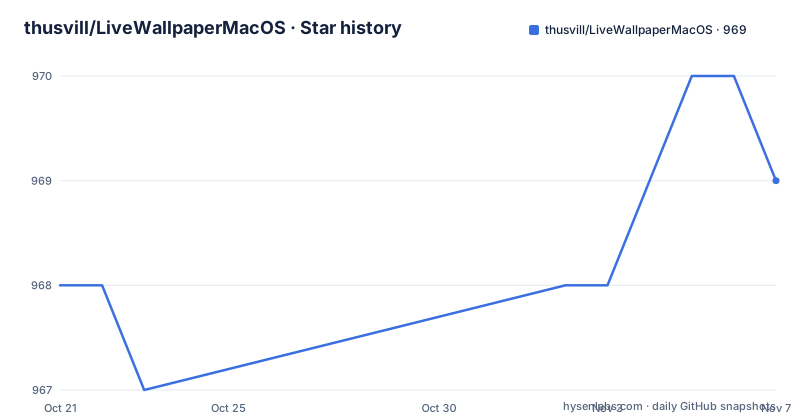
Star history
- thusvill/LiveWallpaperMacOS969 ★ · +1
| Repository | 2026-10-21 | 2026-11-07 |
|---|---|---|
| thusvill/LiveWallpaperMacOS | 968 | 969 |
1 Stars in the last 17 days, measured from the daily GitHub snapshot. Compare with other projects
Editorial analysis
A desktop that plays a video file instead of a still image
macOS wallpapers are static images, and LiveWallpaperMacOS exists to change that. The project describes itself as an open source live wallpaper application for MacOS 14+, and the README's own headline is LiveWallpaper App for MacOS 14+. The gallery section shows the application window, the settings panel and performance captures from the running app.
The use is narrow and immediately understandable: you have a video, typically a loop, and you want it playing behind your windows. The README's DMG section says the app's OpenInFinder button opens a folder where you can place wallpapers, which tells you the model is a folder of media files that the app renders, not a service that scrapes content from somewhere else.
The audience is therefore people who already have the video they want. There is no built in library, no account, no account based catalogue. The project supplies the renderer and the settings, and the media is yours.
The macOS 14 floor is the other fact worth stating up front, since it rules out anything older. The project publishes a Chinese translation of the README alongside the English one, and the Homebrew page and the project site are linked from the repository.
An Objective-C++ rendering core under a SwiftUI shell
The repository layout shows a hybrid codebase, and the two languages sit on opposite sides of a boundary.
The user facing side is Swift. ContentView.swift and LiveWallpaperApp.swift are the application shell and its views, and the Xcode project is LiveWallpaper.xcodeproj, with the asset catalogue in Assets.xcassets/ and the compiled asset bundle Assets.car at the root. Localisation lives in en.lproj/ and zh-Hans.lproj/.
The rendering side is Objective-C++. The files carrying the .mm extension are the substance of the app: LiveWallpaper.mm, DisplayObjc.mm, WallpaperEngine.mm and SaveSystem.mm, with matching headers, plus SharedConstants.h and DisplayObjc.h. The bridge between the two is explicit, in LiveWallpaper-Bridging-Header.h.
Two more directories explain where the work happens. wallpaperdaemon/ is the part that survives beyond the app's own window, which is what a desktop wallpaper has to do, and vendor/ plus the .gitmodules file suggest third party code is vendored rather than resolved at build time. The Info.plist is templated, through custom-Info.plist.in, which is how a bundle identifier and version get injected during the build.
The default branch of the repository is SwiftUI, but the source build instructions clone a branch named objectiveC. That single mismatch is the first thing to sort out before building, and it is easy to miss because the repository's landing branch is not the branch the README tells you to build.
Installing from Homebrew or compiling with CMake
There are two install paths, and the short one is a single terminal line. The README gives it as a Homebrew tap plus cask install:
brew tap thusvill/livewallpaper && brew install --cask livewallpaperThat path avoids both a compile and the quarantine problem described below, since a cask install does not go through a DMG downloaded in a browser.
The source path needs macOS 14 or later, git, Xcode and CMake. The README's command clones the objectiveC branch explicitly, creates a build directory, configures with CMake and builds with make using the core count reported by sysctl:
git clone --single-branch --branch objectiveC https://github.com/thusvill/LiveWallpaperMacOS.git && cd LiveWallpaperMacOS && mkdir -p build && cd build && cmake .. && make -j$(sysctl -n hw.ncpu)The single branch clone is deliberate and matches the branch point made above. If you clone without it you get the default branch, and the README's build steps are not written for that tree.
What you get from the build is an application bundle that you then install into your Applications folder, which is where the rest of the README's advice applies.
The DMG route needs the quarantine attribute removed
The README flags this as important. Installing the app from the DMG produces the message that LiveWallpaper.app is corrupted and cannot be opened, and the fix is to move the object to the recycle bin and take the quarantine attribute off the bundle:
xattr -d com.apple.quarantine /Applications/LiveWallpaper.appThe author's stated reason is that they do not want to pay Apple for open source apps, which is the honest explanation for why an unsigned or unnotarised build trips Gatekeeper. The README also says this solves the occupation issue.
The workaround is worth understanding rather than copying blindly. The quarantine attribute is what macOS sets on files downloaded from the internet, and it is what triggers the check. Removing it tells the system to trust the bundle because you have taken responsibility for it.
That is a decision with a cost. It asks you to run an application that macOS has not verified, and it asks you to do it with a command that disables a protection for that bundle specifically. If you would rather not do that, the Homebrew cask path exists and does not require it.
One dot in the filename, and only mp4 or mov
The media rules are short and are stated as notes rather than as an error message, so they are worth reading before you copy files into the folder.
First, the filename. The README says no dots should be contained in the file name, except the dot for the extension, and gives the pair of examples that make the rule concrete. A name like file.1920x1080.mp4 is marked as wrong because it contains more than one dot, while file-1920x1080.mp4 is marked as correct because it contains exactly one. In other words, the resolution belongs in the name with a hyphen, not with dots, if you want the app to pick the file up.
Second, the formats. The README states that support is currently for .mp4 and .mov. Nothing else is listed, and there is no mention of additional formats being on the way.
Third, the lock screen. The gallery is explicit that on the lock screen the wallpaper is a static image, and that LiveWallpaper currently does not support videos there. That is a behavioural difference between the desktop and the lock screen rather than a missing feature, so a person who wants motion in both places is looking at a different app.
Taken together, these three notes describe a media pipeline that is deliberately narrow. It wants a small set of formats with predictable names, and it does not attempt to be a general video player for the desktop.
Bug reports come from running the binary directly
The README asks for bugs to be posted with the result of running one specific command, the executable inside the installed app bundle:
/Applications/LiveWallpaper.app/Contents/MacOS/LiveWallpaperRunning the binary from a terminal rather than launching from the Finder is what produces output a maintainer can read. That is a small but useful convention, and it tells you something about where the project expects problems to show up: at the level of the process, not the window.
The same command is useful for anyone diagnosing a wallpaper that does not appear, and it costs nothing beyond knowing the path. It is also the only reproducible invocation the README documents, which is a hint that the settings UI is not where the diagnostic value is.
Support channels are the obvious ones: the repository's issue tracker and the project's Discord, both linked from the README.
Beta tagged releases and a licence GitHub cannot classify
The release history is short and moving. Version V2.4 was tagged on 2026-09-24 and is labelled V2.4-beta, V2.3 dates from 2026-04-15, and V2.2 from 2026-03-25. The repository is not archived, and the last push was on 2026-09-30, a few days after the newest tag.
So the current release line is a beta. For an app whose main job is to render a video on the desktop that is a lower risk than it would be for infrastructure software, but it does mean you are running the newest untagged state by default.
The licence is the more unusual item. The project's licence field records a custom licence that GitHub cannot classify, and the README simply points at the LICENSE file for details. There is no standard SPDX identifier attached to it, which means automated tooling that checks licences across a dependency list will not be able to tell you what it is, and you have to read the file.
That is also the honest limit of what can be said here. The README characterises the project as open source and the licence file exists in the repository root, but the terms themselves are only in that file, and whether they suit your use is a question for whoever handles licensing where you work.
Editorial conclusion
Adopt LiveWallpaperMacOS if you are on macOS 14 or later and want a video on your desktop from files you already have, since the Homebrew cask avoids both the compile step and the Gatekeeper workaround, and the repository is not archived with a last push on 2026-09-30. Do not adopt it if you need moving video on the lock screen, which the gallery notes is a static image today, or if your wallpapers are named with several dots, or if you need a licence with a standard identifier since the project uses a custom one in its LICENSE file. Before you install, verify two things: that your filenames contain exactly one dot, the extension, and that your files are .mp4 or .mov, since those are the only formats listed as supported.
Frequently asked questions
How do I install LiveWallpaperMacOS on macOS?
The README gives a Homebrew cask line, brew tap thusvill/livewallpaper && brew install --cask livewallpaper, or a source build that needs macOS 14 or later, git, Xcode and CMake. The source build clones the objectiveC branch rather than the default branch.
Which video formats does LiveWallpaperMacOS support?
The README states that support is currently for .mp4 and .mov. It also notes that no dots should appear in the file name except the dot for the extension, so file-1920x1080.mp4 is acceptable while file.1920x1080.mp4 is not.
Why does macOS say LiveWallpaper.app is corrupted and cannot be opened?
The README attributes this to Gatekeeper and provides the fix xattr -d com.apple.quarantine /Applications/LiveWallpaper.app, explaining that the author does not want to pay Apple for open source apps. Installing through the Homebrew cask avoids the DMG quarantine step.
Does LiveWallpaperMacOS play video on the lock screen?
No. The gallery notes that the lock screen shows a static image and that LiveWallpaper does not support videos on the lock screen, so the live behaviour applies to the desktop only.
How should I report a bug in LiveWallpaperMacOS?
The README asks for the result of running /Applications/LiveWallpaper.app/Contents/MacOS/LiveWallpaper, since running the binary directly produces output that can be attached to an issue.
Official sources
Add this badge to your README
If you maintain this project, the badge below links readers to this analysis and shows its maintenance status from the daily GitHub snapshot. Paste the markdown into your README; add ?metric=license or ?metric=stars to the image URL for a different field.

[](https://hysenlabs.com/projects/thusvill-livewallpapermacos)Star history chart for your README
[](https://hysenlabs.com/projects/thusvill-livewallpapermacos)Was this useful?