J-Space has three version names and an alias named after something else
J-Space Cognition Suite V3.7 -- AI cognitive-enhancement skills based on Anthropic's J-space global workspace research. Bilibili: Tiger380 (UID 3494375382321675).
At a glance
- What is it?
- J-Space is a skill package you copy into an agent host: thirteen modules, a control script, and a ledger that turns long-running engineering tasks into recorded, checkable steps. It is written to be auditable rather than impressive, and the file says so, including a jab at toy demonstrations and an explicit warning that its own suitability for production is a design goal rather than a promise. The packaging is less tidy: the repository name, the tags and the readme title each carry a different version.
- Who is it for?
- J-Space fits someone running an agent host that loads skills from a directory and who wants long engineering tasks to leave behind recorded evidence rather than a plausible summary. Two things to check before you install it.
- Can I use it commercially?
- Yes. Apache-2.0 is a permissive licence: you can use, modify and sell software built on it, as long as you keep its copyright and licence notices.
- Is it still maintained?
- Yes. The repository last received commits 62 days ago.
- What is it written in?
- Mainly Python, according to GitHub's language statistics.
Answers come from the project's GitHub data, last synced on November 15, 2026, and from our analysis. They are not legal advice.
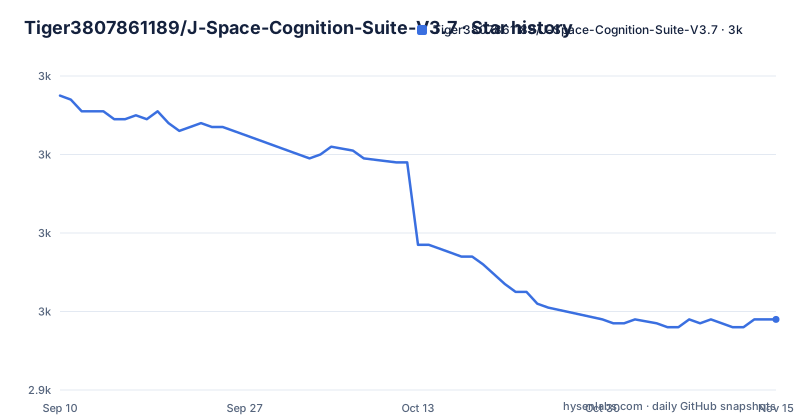
Star history
- Tiger3807861189/J-Space-Cognition-Suite-V3.72,958 ★ · -57
| Repository | 2026-09-10 | 2026-11-15 |
|---|---|---|
| Tiger3807861189/J-Space-Cognition-Suite-V3.7 | 3k | 3k |
-57 Stars in the last 66 days, measured from the daily GitHub snapshot. Compare with other projects
Editorial analysis
Three version names for one suite
The repository is named with a three-part version in it. The tags are a three-part version and then a separate one-letter-prefixed version. The readme title is the prefixed one.
So the same artifact is called three things: a numeric line in the repository address, a numeric tag, and a prefixed tag. The numeric tag is the older one, dated earlier in September 2026, and the prefixed tag is the newer one, published in the same minute as the last commit to the branch.
That ordering has a practical consequence. A version sort puts the prefixed tag first, because it sorts before a letter, so tooling that assumes the newest tag is the highest one will pick the older release. And anyone who bookmarked the repository during the numeric line has to notice that the project changed its version scheme without changing its address.
The naming is not the only identity wrinkle. The repository description attributes the approach to a named company's research about a global workspace, and the readme itself does not repeat that attribution anywhere in its opening. What the readme claims is narrower: that the suite is an inference-time workspace and control suite for complex reasoning, repository engineering, coordinated agents and authorised security analysis.
Installing is a directory copy into a location the host decides
There is no installer. Step one is to copy a directory into your host's skills directory, and the file spends most of that step explaining what it cannot tell you.
It cannot tell you where the directory goes, because the location comes from the host's own configuration and no single path or invocation syntax applies to every host. It cannot tell you how to select the skill, because some hosts discover skills only at startup and need a reload, and the dollar-slash invocation syntax works only where the host documents it. Otherwise the instruction is to ask the host to read the installed file explicitly.
What it does tell you is the shape. Keep the entry file, the modules directory, the references directory and the scripts directory together, and avoid ending up with a doubled nested directory from unpacking an archive inside the target. Copy the licence and the third party notices alongside when you redistribute the skill standalone. And use an empty destination, because mixing two installs into one directory is the failure mode nobody warns you about.
Then there is a verification step, which runs a script from the installed tree with your own interpreter:
<python-command> <skill-root>/scripts/verify_suite.pyThe file gives that form with placeholders rather than a real command, because the interpreter differs: a plain one on most systems, and a launcher on Windows.
Four levels, and an alias named after something else
The suite asks you to pick a level before it does anything, and there are four of them in a table with two columns, what the level is for and what control it applies.
The lowest is for an answer you can check at a glance, and its control is a fast pass with no persistent setup at all. The second is for a bounded deliverable with a few dependent steps, with a full pass, selected modules and an audit of the deliverable. The third is for multi-file, multi-stage or persistent work, and it brings a loop, shared state, a source refresh and evidence checks. The fourth is for difficult integrations or competing approaches that would benefit from a team, adding bounded agents, a second consideration and an independent review.
Then there is the alias, and it is the detail that made me look twice. A level called media is accepted as a synonym for the second level. Nothing explains why, and media is not an abbreviation of the word it stands in for.
Two rules accompany the levels. Raise the level when the uncertainty or the dependencies of the task warrant it, rather than starting high out of caution. And if the host has no agents, record that limitation and fall back to sequential checks rather than pretending the coordination happened. The second rule is the same principle as the rest of the file: the record of what you did has to be true, including the parts that went badly.
Two ledgers that must not be used together
The tutorial for the second level introduces a lightweight mechanism, and then tells you not to mix it with the strict one.
The lightweight mechanism is a small script with three subcommands in the example: one to record a goal and a next step, one to open a question and say what would settle it, and one that takes stock of the seams between them. Later you record the actual observation and close an item by reference to how you observed it, write the answer to a file, and run a ship command on that file.
The ship command audits text heuristically. The file is careful about what that means: findings are advisory, unreadable or oversized input is rejected outright, and it does not prove anything about the behaviour of the code. It also says not to maintain this ledger alongside the stricter controller for the same task, which is a real constraint rather than a style note, because two evidence systems writing to the same task directory is how you end up with two disagreeing accounts of the same work.
The stricter path is the other half of the file: a control script with subcommands for initialising, reading sources, creating, syncing and viewing a map, passing a work gate, emitting a checkpoint pulse, and reporting per agent and per round with evidence and completion files attached.
No pip dependencies, and Python optional at half the levels
The suite states that it has no pip dependencies and no background service. Everything is standard library Python plus the host's own tools and agents, and the quick start says as much before it lists the interpreter it needs.
That constraint is why the persistence works the way it does. The scripts persist state, reread the actual source text, detect stale maps and stale evidence, and return a blocking result when a required condition is missing. None of that needs a library, but all of it does need discipline about file layout, which is why the install step is so insistent about directory structure.
Python is only required for part of it. The quick start says Python 3.10 or later is needed for the executable controllers and for validation, and that the lower two levels can use the documented prose fallback instead. So a host that cannot run scripts can still use roughly half the suite, and the file says so rather than implying a hard requirement.
The host is expected to supply everything else. The file is explicit that installing the files does not register hooks, does not launch agents, and does not grant tool access. That sentence is doing a lot of work, because most of what a suite like this claims to do would require exactly those three things.
The file tells you not to fabricate evidence
Two passages in the tutorial are about honesty rather than about mechanics, and they are the reason to read this file at all.
The first is a warning attached to the tutorial itself: the example artifact names refer to files you create from actual work and checks, and you should not create empty or fabricated evidence just to pass a gate. That is written for the person about to be graded by an automated check, and it is the correct place for it.
The second is the intended-use note. The suite says it is designed for real engineering and production-oriented projects with contracts, dependencies, verification and recovery needs, and that it is not aimed at toy demonstrations such as a pelican riding a bicycle. The phrasing is pointed at a specific genre of demonstration.
And then the sentence that gives the whole thing its honest shape: its suitability for serious work is a design focus, not a guarantee that any untested deployment is production-ready. So the file's own claim is that it is built for production work and that you have not verified yours.
Given that the top level also carries a citation file, an archiving identifier and a third party notices document, this is laid out as a research artifact rather than a weekend script, and the honesty about its limits is consistent with that.
A citation file, an archive identifier, and a channel in the description
The repository layout is the last thing worth describing, because it explains what kind of thing this is.
At the top there is a citation file, a licence, a third party notices document, a contribution guide, and two readmes, one English and one Simplified Chinese. Inside there is the skill directory and a tests directory.
The citation file and the archiving badge say this is meant to be cited and deposited rather than merely cloned. The third party notices document says the author tracked where the parts came from. The tests directory says the scripts are covered by something.
The repository description is where the tone shifts. Alongside the summary it carries a link to a video account, with a numeric user identifier and a profile address. That is the only promotional element in the whole project, and it is in the metadata rather than in either readme.
Which is a reasonable place for it, and also a slightly odd one: a suite that spends its documentation explaining that you should not create evidence to pass a gate has a repository description that ends with a channel link.
Editorial conclusion
J-Space fits someone running an agent host that loads skills from a directory and who wants long engineering tasks to leave behind recorded evidence rather than a plausible summary. Two things to check before you install it. Work out what your host actually calls a skill, because the file is explicit that there is no universal location or invocation syntax and that some hosts only discover skills at startup. And pick one mechanism, not two, because the suite ships a lightweight ledger and a stricter controller, and the file says explicitly not to maintain both for the same task.
Frequently asked questions
What is J space?
The phrase almost always means something from spatial psychology, where a stimulus is mentally rotated between two orientations, or the same two letters from a board game. This repository is neither: it is an agent skill suite of thirteen modules with a control script and a task ledger, packaged with a citation file and an archiving identifier.
What is the J-Space Cognition Suite used for?
It is an inference-time workspace and control suite for complex reasoning, repository engineering, coordinated agents and authorised security analysis. You install one skill, load the modules a task needs, and the scripts persist state, reread the source text, flag stale maps and evidence, and block when a required condition is missing.
How do I install the J-Space skill?
By copying its directory into your host's skills directory. The file says the location and the selection syntax come from the host's own configuration and that no universal path or invocation applies, that some hosts only discover skills at startup and need a reload, and that the entry file, modules, references and scripts must be kept together in an empty destination.
Does the J-Space suite need pip packages or a running service?
Neither, per the file. Everything is standard library Python plus the host's own tools and agents, with no pip dependencies and no background service. Python 3.10 or later is needed only for the executable controllers and validation; the two lower levels can use the documented prose fallback.
What are the operating levels in J-Space?
Four, in a table pairing each with its control: a fast pass with no persistent setup, a full pass with selected modules and a delivery audit, a loop with shared state and evidence checks, and a loop plus bounded agents, a second consideration and independent review. A fifth name is accepted as an alias for the second level.
Official sources
Add this badge to your README
If you maintain this project, the badge below links readers to this analysis and shows its maintenance status from the daily GitHub snapshot. Paste the markdown into your README; add ?metric=license or ?metric=stars to the image URL for a different field.

[](https://hysenlabs.com/projects/tiger3807861189-j-space-cognition-suite-v3-7)Star history chart for your README
[](https://hysenlabs.com/projects/tiger3807861189-j-space-cognition-suite-v3-7)Was this useful?