autoharness resolves a bare python3, and a stale one on your PATH turns every hook off
Autoharness — a self-learning skill layer for Claude Code — distills skills from your real sessions, updates them as you work, and prunes the ones that stop getting used. No daemon, no benchmark.
At a glance
- What is it?
- A Claude Code plugin that distils skills from your own sessions: zero third-party dependencies, a Python 3.11 floor resolved through a bare python3 on your PATH, an MCP server whose allowlisted name only resolves inside the plugin context, and a validation metric whose denominator the system controls.
- Who is it for?
- autoharness fits someone already working in Claude Code who has a pattern worth writing down and wants the writing down to happen automatically, and the containment is the strongest part of the design: it only ever modifies skills it authored itself, marked in the file, and a merge records which skill absorbed which so a consolidated skill is not reaped as unused. Three things to check before you rely on it.
- Can I use it commercially?
- Yes. MIT is a permissive licence: you can use, modify and sell software built on it, as long as you keep its copyright and licence notices.
- Is it still maintained?
- Yes. The repository last received commits 3 days ago.
- What is it written in?
- Mainly Python, according to GitHub's language statistics.
Answers come from the project's GitHub data, last synced on November 15, 2026, and from our analysis. They are not legal advice.
Star history
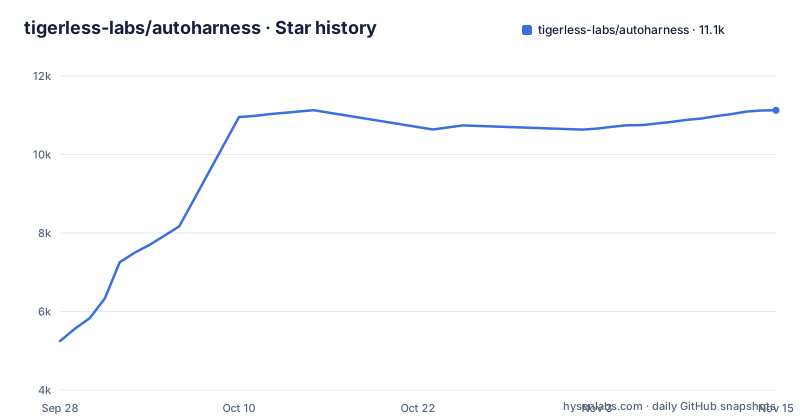
- tigerless-labs/autoharness11,126 ★ · +5,881
| Repository | 2026-09-28 | 2026-11-15 |
|---|---|---|
| tigerless-labs/autoharness | 5.2k | 11.1k |
5,881 Stars in the last 48 days, measured from the daily GitHub snapshot. Compare with other projects
Editorial analysis
A stale python3 on your PATH turns every hook off
The install section leads with a requirement that is stated more carefully than most, and the care is warranted.
The plugin needs Python 3.11 or newer, resolved as the bare command `python3` on your PATH. It is not launched through a pinned interpreter, a virtual environment or a version manager, and the project has zero third-party dependencies so there is nothing to install.
The consequence is spelled out with a concrete example. The hooks resolve `python3` and nothing more, so if an older interpreter appears earlier on the PATH, every hook is off for that session. The example given is a stock macOS install, where the developer tools bundle puts a 3.9 series interpreter at a fixed system path ahead of whatever else is installed. The plugin prints a message to the error stream saying so.
That is a good failure message and a bad failure mode. The only signal documented is a line on stderr, a stream a user has to know to look at. A user who installs the plugin, runs it for a week and sees no learned skills will most likely conclude the feature does not work rather than that a specific interpreter is shadowing another one.
The mitigation is a single check before installing, and it is not spelled out as a step. Compare what the bare command resolves to against the version the plugin needs.
Once the interpreter is right, installation happens inside the host's own input box rather than in a terminal, as two plugin commands naming the marketplace and then the plugin within it:
/plugin marketplace add tigerless-labs/autoharness
/plugin install autoharness@autoharness
A third command reloads the plugins, or the host is restarted.
The only number in the README is cited from another project
The README's opening cites one performance figure, and it is not this project's measurement.
The claim is that the same model with a different harness goes from 42 percent to 78 percent on a benchmark, and the figure is followed by a link to an external paper. The README also names an essay about the relationship between model scale and the surrounding harness, and attributes much of the gain to the harness rather than the model.
So the headline is borrowed: a published result on a benchmark this project does not run, attributed to someone else's work, offered as motivation for the approach rather than as evidence for the implementation.
That framing is consistent with the project's stated position, which is that it validates in use rather than on a benchmark. The description says there is no daemon and no benchmark, and the feature table says a skill survives by being adhered to in later turns rather than by a held-out score, with no oracle on the active path and no tokens spent on a dedicated evaluation.
The tension is real but mild. A project that refuses to build a benchmark is not obliged to have a number, and citing a neighbouring result as a thesis is a normal thing to do. It does mean a reader who takes the 42 to 78 range as a claim about this plugin is reading it the wrong way, and the README's feature table describes no measurement of the plugin's own effect.
The survival metric has a denominator the system controls
The one measurement the project does make is worth reading closely, because the definition decides what the number means.
A skill is kept if it is adhered to in later turns, and adherence is defined as loads over the requests it was available for. So the rate is loads divided by opportunities, and opportunities are determined by whether the index surfaced the skill in the first place.
That index is injected by the plugin. Every session opens with a grouped index of the skills the plugin wrote, added on top of the host's own recall, which the README says is left exactly as it was.
So the plugin decides both terms of its own survival metric. A skill that is not surfaced cannot be loaded, and a skill that is surfaced on every request gets a large denominator whether or not anyone wants it. The metric rewards being offered, and the mechanism that offers is the mechanism under test.
The evidence trail is better than the score. Every creation and update logs its scenario and decision to a per-skill ledger, described as the raw material for building a benchmark from real usage later.
The MCP tool name only resolves inside the plugin context
The integration notes describe a naming problem that has one working answer, and it is not the one a developer would try first.
The server is registered in the MCP configuration under a short name. The agent definitions, however, reference the fully qualified form of that name with the plugin namespace baked in. The plugin runtime builds the qualified name by combining the plugin name from the plugin manifest with the server key from the MCP configuration, which are autoharness and stage_skill, giving mcp__plugin_autoharness_stage_skill__stage_skill.
If you run the tool outside the plugin context, for example by registering the server by hand, the tool becomes available under the short, unqualified name. The agent allowlists still reference the qualified one. So the tool is present and the agent is not permitted to call it.
The README's instruction is therefore not a preference but a requirement: always install as a plugin so that both names match. That is a reasonable constraint given how the host namespaces plugin-provided tools, and it is documented in more detail than most plugin projects manage.
There is a second detail in the same paragraph: the server is declared in the manifest, not in a root `.mcp.json`, because the plugin root is the repo root, and a `.mcp.json` there would also be this checkout's project config, which outranks the plugin's same-command server and leaves the reflector without its tool in sessions inside the repo.
Two update commands, an order that matters, and a restart
The update path is three steps and the first two are order-dependent for a specific reason.
The first command refreshes the marketplace catalog by name. The second updates the plugin by its full id, which is the plugin name and the marketplace name joined by an at sign. The third is to restart the host application, because the installed copy is a cached copy and a version bump is a fresh copy rather than a hot reload.
The README explains why the refresh comes first: without it the update command checks a stale local catalog and may report that the plugin is already at the latest version even when a newer release has shipped. So the failure mode of getting the order wrong is a false negative that looks like success.
Auto-update is off by default for third-party marketplaces and has to be enabled once through a settings screen, so the default experience is manual. What the host caches is the version string in the plugin manifest, and the README is explicit that a release reaches users only when that field is bumped.
The two commands are run from a terminal rather than typed into the host input box, which is the one place this project breaks from the pattern it set during install:
claude plugin marketplace update autoharness
claude plugin update autoharness@autoharness
The repository has no published releases, which is consistent with that: the manifest field is the version of record, not a tag.
One default is explicitly marked as temporary
The configuration is a set of AUTOHARNESS_* environment variables with built-in defaults, grouped into placement (which layers it manages) and cadence (when it learns). The README says there is nothing to configure unless you want to change the pace.
The reflection cadence counts tool calls, not turns, and defaults to fifty. That is a deliberate choice about what counts as work, and it has a consequence worth naming, since a long session that accomplishes a lot without many tool calls will not reflect at all.
The other variables visible in the README cover placement: AUTOHARNESS_DISABLE_GLOBAL (default 0) switches to a project-only deployment, and AUTOHARNESS_GLOBAL_ROOT (unset by default) replaces ~/.claude as the global layer's root.
Uninstalling leaves the skills, and a marker is how you tell them apart
The uninstall section is candid about what removal does and does not do, which is more than most plugin documentation manages.
There are two commands: one to uninstall the plugin and one to remove the marketplace. Neither deletes anything the plugin wrote. The skills it created and its own state live outside the plugin directory and stay on disk.
There is a documented cleanup path, and it names three locations. A global state directory in the user's home configuration area, a per-project state directory inside a repository, and the skills themselves under the skills directory of the same place.
The containment story is the part that makes that acceptable. The plugin touches only skills it generated, everything else is left alone, and each self-authored skill carries a marker in its ledger, which is how a user tells which files to delete and which are theirs. Your own skills are described as never being touched.
Merging has its own record. A merge records which skill absorbed which, so a skill that was folded into another is not later reaped for lack of use. Without that record, a merge would be mistaken for a death.
Editorial conclusion
autoharness fits someone already working in Claude Code who has a pattern worth writing down and wants the writing down to happen automatically, and the containment is the strongest part of the design: it only ever modifies skills it authored itself, marked in the file, and a merge records which skill absorbed which so a consolidated skill is not reaped as unused. Three things to check before you rely on it. Confirm the interpreter first, because a 3.11 or newer `python3` has to be what resolves on your PATH and the failure mode is silence plus a line on the error stream. Install it as a plugin, since the agent allowlists reference a namespaced tool name that does not resolve outside that context. And read the validation definition, because a skill survives on how often it is loaded relative to how often it was available, and the system is what surfaces it.
Frequently asked questions
What is AutoHarness and how does it work?
In this repository it is a plugin for a coding agent that distils skills from your own sessions, folds same-scenario skills into one, updates them as you use them, and prunes ones that stop being used. It has zero third-party dependencies, runs entirely as Python, and only ever modifies skills it wrote itself, marked in the file.
Why is my AutoHarness plugin not learning anything?
Check what the bare command python3 resolves to. The hooks resolve that name and nothing else, so an interpreter older than 3.11 appearing earlier on your PATH turns every hook off for the session, and the only signal is a message on the error stream. A stock macOS install ships a 3.9 series interpreter at a fixed system path.
Can I run the AutoHarness MCP server outside the plugin?
Not usefully. The server is registered under a short name while the agent allowlists reference the plugin-namespaced form, so outside the plugin context the tool appears under a name the agent is not allowed to call. The README says to always install it as a plugin so both names match.
How do I update or uninstall AutoHarness?
Update with two commands in order, refreshing the marketplace catalog before updating the plugin by its full plugin and marketplace id, then restart the host because a version bump is a fresh cached copy. Uninstall stops it running but leaves the skills and its state on disk, with a documented cleanup path and a marker on each self-authored skill.
Where does the 42 to 78 percent figure in the AutoHarness README come from?
It is a cited result from another project, on the same model with a different harness, linked to an external paper. The plugin states that it validates in use rather than on a benchmark and spends no tokens on a dedicated evaluation, so the figure is not a measurement of this plugin.
Official sources
Add this badge to your README
If you maintain this project, the badge below links readers to this analysis and shows its maintenance status from the daily GitHub snapshot. Paste the markdown into your README; add ?metric=license or ?metric=stars to the image URL for a different field.

[](https://hysenlabs.com/projects/tigerless-labs-autoharness)Star history chart for your README
[](https://hysenlabs.com/projects/tigerless-labs-autoharness)Was this useful?