LLM Hub: thirteen on-device tools and one Android-only agent path
Local LLM, image&video&music generator, vibecode like cursor with local models on your phone
At a glance
- What is it?
- LLM Hub folds chat, image, video and music generation into a single mobile app for Android and iOS. The telling details are where the two platforms diverge: shell access runs through Termux on Android alone, the privacy promise has to be read next to web search and hosted MCP tools, and the desktop version exists only as a roadmap.
- Who is it for?
- Adopt LLM Hub if you want a local model on a phone and can live with a feature set that changes shape between Android and iOS. Skip it if you need a build you can reproduce from a clean checkout, a shell agent on iOS, or a named licence grant.
- Can I use it commercially?
- Check first. The repository uses a licence we do not classify automatically, so read its LICENSE file before any commercial use.
- Is it still maintained?
- Yes. The repository last received commits 3 days ago.
- What is it written in?
- Mainly C++, according to GitHub's language statistics.
Answers come from the project's GitHub data, last synced on November 15, 2026, and from our analysis. They are not legal advice.
Star history
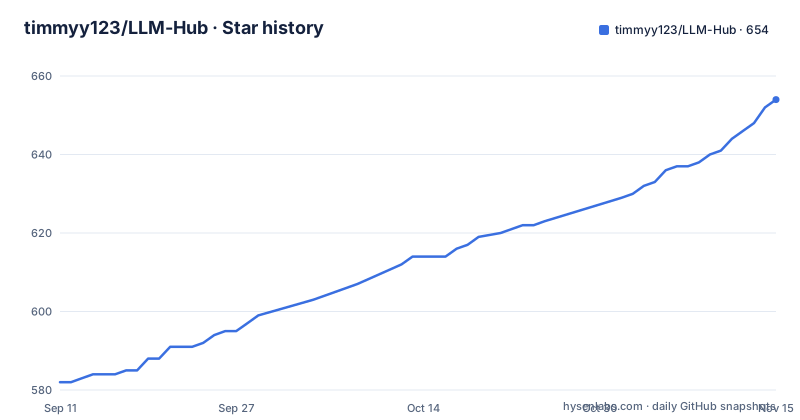
- timmyy123/LLM-Hub654 ★ · +72
| Repository | 2026-09-11 | 2026-11-15 |
|---|---|---|
| timmyy123/LLM-Hub | 582 | 654 |
72 Stars in the last 65 days, measured from the daily GitHub snapshot. Compare with other projects
Editorial analysis
The Android agent borrows Termux, and iOS has no counterpart
The AI Agent can draft shell and CLI commands for a Termux environment and hand them over through the `RUN_COMMAND_SERVICE` intent interface. The demo asset at the repository root is `android_agent_termux_demo.gif`, captioned as an agent listing files with `ls` and streaming live terminal output on Android. Three layers wrap that path. A pre-execution editor lets a person inspect and change a generated command before it runs. A dark monospace container formats and streams `stdout` and `stderr` as they arrive. An auto-correction loop feeds the error log back into the model when a command fails on permissions or syntax, then asks for a fixed command.
What is missing is the platform label. Every other row in the thirteen-entry tool table names a platform when the two differ, so the absent iOS counterpart reads as a boundary rather than loose wording. The device function calling that sits beside the terminal path, interactive OpenStreetMap views, calendar and alarm handling, a flashlight toggle, SMS and email composition, SHA-256 and MD5 hashing and arithmetic, is described without platform limits.
On-device inference, hosted tools, and one approval gate between them
The privacy section promises 100% on-device processing, says no internet is required for inference, and adds zero data collection, no accounts and no tracking. Elsewhere the chat row carries web search, model downloads come straight from HuggingFace, and MCP servers can expose filesystem, search, document, memory or custom hosted tools. The documentation never reconciles those two sets of claims.
The single stated boundary is procedural rather than architectural: MCP calls require user approval before execution. That approval step is the only thing standing between a hosted tool and the device, and it is described for MCP alone. Web search shares the same chat surface as the local model with no approval gate named for it. A reader who takes the privacy list as a network guarantee has to work out the difference themselves. The Scam Detector, which analyses messages and images for phishing with a risk assessment, runs in the same offline frame as the Transcriber, which is the more coherent pairing.
Generation backends that do not line up across the two platforms
Image generation uses Stable Diffusion 1.5 from text prompts with a swipeable gallery. Video generation names Stable Video Diffusion and then says iOS. Upscale promises up to 4x through RealESRGAN and UltraSharp with NPU acceleration. Music splits cleanly: SoundGen on Android, Magenta Realtime 2 on iOS. Transcription runs on-device Whisper models on Android through WhisperKit with TFLite and QNN NPU, and whisper.cpp on iOS.
The technology section adds more asymmetry than the table admits. Draw Things MediaGenerationKit handles image and video on iOS while Qualcomm QNN covers Android, Kokoro text-to-speech models are named for Android with no iOS counterpart, and the Apple Foundation Model sits among the iOS pieces. Only one row, Translator, states a platform-neutral scope: text, images through OCR and audio across more than 50 languages, offline.
Model import is by extension, and the extension list is the contract
Custom models come in as `.task`, `.litertlm`, `qnn`, `.mnn` or `.gguf`, and the route to add one is Settings, then Download Models, then Download or Import a model. GGUF inference on Android arrives through the Qualcomm GenieX SDK, and the acknowledgment section credits GenieX for GGUF model inference support with the credit shown in the in-app About screen. iOS travels a different road: the Run Anywhere SDK carries the model runtime and LLM execution, with Llama.cpp running there, and MediaPipe and LiteRT appear in the shared runtime list.
The literal formatting in that import list is worth noting. Five extensions, four written with a leading dot and `qnn` written without one. Trivial in isolation, but it points at a hand-assembled list rather than a validated parser, and the format you can actually load is the real compatibility surface for a local-first app. Android is Kotlin with Jetpack Compose on Material 3; iOS is Swift with SwiftUI.
Seventeen interface languages, over fifty translation languages, PCTF undefined
The advanced capabilities list 17 language interfaces, while the Translator advertises 50+ languages for text, images and audio. Those are different promises wearing one word: how many localizations the interface ships, and how many languages the translation tool claims. Neither figure comes with a list you can check.
Then there is creAItor, the persona editor, described in a single line as designing custom AI personas with specialized system prompts in PCTF. The acronym is never expanded, never given a schema, and never shown in a file. The repository root holds `android/`, `ios/` and `scripts/` as its only source directories, so there is no obvious place a format definition is hiding. Anyone planning to version personas as files has nothing concrete to follow, and the same gap applies to the AI Error Auto-Correction Loop, whose trigger conditions are described only in prose.
The desktop story is roadmap, and the release tags are iOS only
Windows and macOS native apps are announced as coming, with advanced cursor integration and Claude Code-like capabilities promised for the desktop build. The roadmap underneath spells out an Advanced Vibe Coder with desktop IDE integration and cursor control, an OpenClaw-like agent framework for multi-step tasks, and advanced media generation aiming for ComfyUI and Draw Things feature parity with extended controls. None of that has shipped. On the phone today, Vibe Coder takes an app idea and renders a live HTML and JS preview, and the screenshot caption for that demo names a Gemma 4 model running on an iPhone.
The release history points the same way. All three tags carry iOS in their names, all three are the same SDK version, `ios-sdk-v0.19.7-patched-v16`, `-v15` and `-v14`, and two of them landed on 2026-05-20 nine minutes apart. The newest is dated 2026-06-03. The last push to the repository is 2026-09-28, and the repository is not archived.
A licence the metadata cannot name, and a root that mixes releases with scratch work
Repository metadata records the licence as NOASSERTION, while a LICENSE file sits at the top level and the README calls the app open-source and fully transparent. No document in the repository names which licence it is, so no grant should be assumed from that wording. Download paths are concrete: the Google Play listing under `com.llmhub.llmhub` and the Australian App Store listing.
The root directory holds 35 entries and mixes release material with working files. Nine are demo media, including `Untitled Project 1.mp4` and `WhatsApp Video 2026-07-31 at 01.44.43.mp4`. Six are Python maintenance scripts: `fix_pkg.py`, `revert_patches.py`, `update_ios_models.py`, `update_ios_sizes.py`, `update_premium_titles.py` and `update_translations.py`. Alongside them sit a PowerShell launcher, `start_llm_hub.ps1`, a `.swift-version` marker, a `swiftly-.tar.gz` archive, `gitlog.txt`, a `thoughts/` folder, two Swift test files named `tests.swift` and `test_lag.swift`, and editor and build leftovers in `.idea/`, `.gradle/` and `.DS_Store`. Quick Start offers building from source as one of three routes, yet no build command appears anywhere in the text, so that route cannot be checked against the documentation.
Editorial conclusion
Adopt LLM Hub if you want a local model on a phone and can live with a feature set that changes shape between Android and iOS. Skip it if you need a build you can reproduce from a clean checkout, a shell agent on iOS, or a named licence grant. Before committing, check the model import extensions against the format you already own, read the privacy claims next to the web search and MCP features, and confirm from the LICENSE file what the metadata leaves as NOASSERTION.
Frequently asked questions
What can LLM Hub do on a phone?
LLM Hub covers chat, image generation, video generation and music generation on Android and iOS with inference on the device, plus a Writing Aid, Translator, Transcriber, Scam Detector, Image Upscale, Vibe Coder, creAItor persona editor and VibeVoice. The app requires no account and the documentation claims no tracking.
Does LLM Hub work without an internet connection?
The privacy section states 100% on-device processing and says no internet is required for inference. The same document puts web search inside the chat feature, offers direct downloads from HuggingFace, and allows MCP servers exposing custom hosted tools, so the offline claim is scoped to inference rather than to the whole app.
Can the LLM Hub agent run shell commands on iOS?
Only Android is named for shell access. Termux command generation targets the Termux environment through the `RUN_COMMAND_SERVICE` intent interface, with a pre-execution editor and an error auto-correction loop on top. No iOS equivalent appears in the tool table.
Which model formats can LLM Hub import?
Custom models are imported as `.task`, `.litertlm`, `qnn`, `.mnn` or `.gguf` through Settings, then Download Models, then Download or Import a model. GGUF inference on Android comes from the Qualcomm GenieX SDK, while iOS uses the Run Anywhere SDK with Llama.cpp.
Is LLM Hub available for Windows or macOS yet?
Not at present. The README marks Windows and macOS native apps as coming and places desktop IDE integration, cursor control and Claude Code-like capabilities on the roadmap. The shipping downloads are the Google Play listing and the Australian App Store listing.
Official sources
Add this badge to your README
If you maintain this project, the badge below links readers to this analysis and shows its maintenance status from the daily GitHub snapshot. Paste the markdown into your README; add ?metric=license or ?metric=stars to the image URL for a different field.

[](https://hysenlabs.com/projects/timmyy123-llm-hub)Star history chart for your README
[](https://hysenlabs.com/projects/timmyy123-llm-hub)Was this useful?