poznote runs as one PHP container over one SQLite file, and every install starts with the credentials printed on the page
Powerful note-taking without the hassle.
At a glance
- What is it?
- A self-hosted note application shipped as two images: nginx plus PHP-FPM over a SQLite file, with an MCP server beside it. The documentation is an index that points at the marketing site, two of the six install routes are maintained by other people, and the default login pair is published.
- Who is it for?
- poznote fits someone who wants a private notes database they can back up by copying a directory, and the one-container shape is the reason it is easy to justify. Change the default credentials before it is reachable from anywhere, because the page publishes them and every install route starts from them, including the Proxmox path which states the credentials are the same as any other install.
- Can I use it commercially?
- Yes. MIT is a permissive licence: you can use, modify and sell software built on it, as long as you keep its copyright and licence notices.
- Is it still maintained?
- Yes. The repository last received commits 2 days ago.
- What is it written in?
- Mainly PHP, according to GitHub's language statistics.
Answers come from the project's GitHub data, last synced on November 14, 2026, and from our analysis. They are not legal advice.
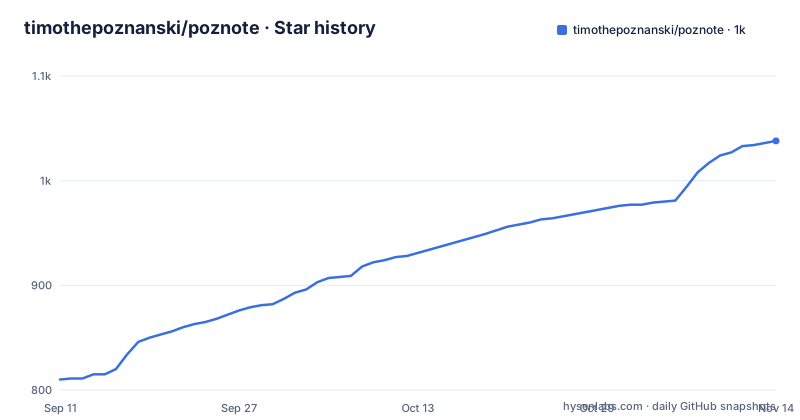
Star history
- timothepoznanski/poznote1,038 ★ · +228
| Repository | 2026-09-11 | 2026-11-14 |
|---|---|---|
| timothepoznanski/poznote | 810 | 1k |
228 Stars in the last 64 days, measured from the daily GitHub snapshot. Compare with other projects
Editorial analysis
Every install starts with the credentials printed on the page
The demo section of the page is two lines. Login: poznote. Password: poznote. Those are the credentials for the hosted demo, and the Proxmox section then makes clear they are not only for the demo: it says the instance answers with the same default credentials as any other install.
So the first-run state of a self-hosted deployment is a username and password that appear in a public README, and nothing on the page says the application forces a change on first boot or refuses to serve until it happens. What the page does offer is the machinery to fix it later: the table of contents carries separate entries for Authentication and for App Passwords, plus Personalization, Multi-users and an Activity Log. So the answer to the concern exists, it just is not enforced at the door.
This is the ordinary shape of self-hosted software, and it is not a reason not to run it. It is a reason to change the password as the first action after `docker compose up -d` rather than as the first action after something goes wrong, and to check whether the instance is exposed before you have.
The rest of the surface that matters for a notes application is long. Snapshots, Git Synchronization, S3 Attachment Storage, S3 Backups, Backup / Export, Restore / Import, Offline, Webhooks, Transcription, an MCP Server, a Chrome Extension, an Android share target, and an AI Assistant.
One container, one SQLite file, four PHP extensions
The deployment unit is a single container and the database is a file inside it. The compose service runs the image `ghcr.io/timothepoznanski/poznote:6`, mounts one volume at `./data`, and points the application at a path inside it:
SQLITE_DATABASE: /var/www/html/data/database/poznote.dbThere is no database service in the compose file at all. That is the whole storage story, and it is the design decision that makes this kind of application easy to run and easy to back up.
The image is built from `php:8.4-fpm-alpine3.23`, with nginx, supervisor and the PHP extensions assembled in one build stage. Four extensions are compiled: `pdo`, `pdo_sqlite`, `zip` and `curl`, plus opcache. Two things follow from that list. There is no MySQL or PostgreSQL driver, which is consistent with the compose file exposing only `SQLITE_DATABASE`, so a move to a server database is not a configuration change. And there is no image extension such as gd or Imagick, so anything thumbnail-shaped in a self-hosted install is doing it without a compiled image library.
One process group is doing more than it looks like. The base stage installs supervisor, and the notes about the rootless variant name what it supervises: nginx, php-fpm, supervisord itself, and a reminder-email worker. So mail reminders are part of the default image rather than an add-on.
Two of the six install routes are maintained by other people
There are six ways in, and the page credits two of them to third parties rather than to the project.
The Proxmox VE route is a single command that runs an unprivileged Debian 13 LXC created by the community scripts project, with no Docker involved:
bash -c "$(curl -fsSL https://raw.githubusercontent.com/community-scripts/ProxmoxVE/main/ct/poznote.sh)"That container gets 1 vCPU, 512 MB of RAM and a 4 GB disk by default, and serves Poznote from nginx and PHP inside it. The page says plainly that the script is written and maintained by the community and not by Poznote, and that to update later you run `update` in the container console rather than pulling an image.
The Kubernetes route is a Helm chart from a third-party index:
helm repo add helmforge https://repo.helmforge.dev
helm repo update
helm install poznote helmforge/poznote --namespace poznote --create-namespace
The chart is likewise credited to the HelmForge community. Worth being plain about what that means operationally: this route asks you to add a chart repository you do not control to your cluster's search path, and the chart, its values, its probes and its security context are somebody else's work product on your production cluster.
The other three routes, Windows, Linux and macOS, are the ordinary Compose path, and they differ from each other only in which editor opens the environment file.
Three different internal ports depending on which image or route you use
The compose file publishes a host port of your choosing onto container port 80. That is the tidy case, and it stops being tidy the moment you use one of the other shapes.
The Dockerfile builds two final images from one shared base stage, and the difference between them is stated at the top of the file. The default image runs as root with nginx on port 80, and it is what a plain `docker build .` and the compose file use. The rootless image, built with an explicit target and used by `docker-compose.rootless.yml`, runs the whole container as an unprivileged user, nginx, php-fpm, supervisord and the reminder-email worker alike, at uid and gid 1000, and nginx listens on 8080 because unprivileged ports are the only ones available to it. That variant exists for runtimes and policies that forbid root inside the container, and the file names the specific cases: restricted Kubernetes PodSecurityStandard, `docker run --user`, rootless Podman.
The Proxmox container adds a third number, answering on 8040.
So a host port, a container port and the address you browse are three different values in every non-default configuration, and the compose file only fixes the first. The comments in the Dockerfile are unusually good on this point, explaining that everything the two variants share lives in the base stage so it is updated once, and that only user creation, a couple of config lines, ownership and the exposed port are repeated.
That port split is also why the healthcheck behaves the way it does, which is the next thing worth reading.
POZNOTE_LISTEN_PORT can be set wrong and the healthcheck will not notice
The compose file exposes three tuning variables, each defaulting to empty so that unset means the image default, with the default written in the comment beside it: ten simultaneous PHP requests, a 512 MB memory limit per request, and port 80 for nginx. They are deliberately optional overrides rather than required settings.
The third one has a documented failure mode, stated in the healthcheck comment:
      # Port read from the nginx config rather than POZNOTE_LISTEN_PORT, so an
      # invalid value (ignored by the init script) does not fail the check
So the healthcheck deliberately reads the listening port back out of the nginx configuration file instead of trusting the environment variable, because a bad value in that variable is silently ignored by the init script. The healthcheck then probes `/api/health` on whichever port nginx actually bound, every 30 seconds, with a 10 second timeout, three retries and a 10 second start period.
Read the other way, that comment is a warning. A typo in `POZNOTE_LISTEN_PORT` produces no error, no failed healthcheck and no log line; the container starts happily on port 80 and the published host port goes nowhere. It is the right design for keeping the healthcheck honest, and it is also an admission that the variable cannot be trusted as a control surface. If you need a non-default internal port, confirm it in the nginx config rather than from the environment.
Opting into beta is a text edit to a version pin in the compose file
Beta releases are handled with a comment at the top of the compose file rather than a separate branch or a channel flag. To try new features before a stable release, replace the `:6` tag on both images with `:latest-and-beta`, which always points at the newest version whether beta or stable, then run `docker compose pull` and `docker compose up -d`.
There are two images to edit, the webserver and the MCP server, so the edit has to be made in both places or the two halves drift apart. And the channel is selected by hand-editing a version pin in a YAML file you downloaded with `curl`, which means the selection is easy to forget you made and hard to see later from inside the running container.
How often that matters is visible in the release list. Three releases span about a day: a stable 6.105.0 late on 2026-10-01, a 6.105.1-beta just after midnight, and a 6.106.0-beta the following night. Two betas in two days is an active beta channel rather than an occasional one, and the version numbering sits alongside the `:6` tag on both images, so the floating tag is the coarse control and the release number is the fine one.
The compose file also carries a line at the top instructing anyone updating an existing install to follow the update instructions on the page, which is a reasonable admission that pulling a newer tag into an existing volume is not always the whole procedure.
The repository README is an index and the documentation lives on the marketing site
The table of contents has twenty-six entries, and the body of the page covers one of them. Everything from Access and Change Settings through to API Documentation and Tech Stack is a link, and the links point at `poznote.com`. Feature descriptions go to a features page there, screenshots to a screenshots page there, and the list of hosting providers to a hosting page there too.
So the repository is an index that points outward, and the seven language versions of it live under `docs/` as `README.fr.md`, `README.de.md`, `README.es.md`, `README.pt.md`, `README.ru.md` and `README.zh-cn.md` beside the English one. Translating the index is cheap; translating the thing it points at is not, and that is the trade here.
What the repository does contain is engineering material. The tree carries three compose files, for the default, rootless and development paths, a `Dockerfile`, a `.env.template`, a `docker/` directory holding the nginx, php-fpm and php configuration the comments refer to, an `mcp-server/` directory, a `poznote-url-saver/` directory that is the Chrome extension, `tests/`, `tools/`, `build/`, and static analysis configuration: three PHPStan files including a baseline, so there are accepted findings on record, plus an `.oxlintrc.json` for the JavaScript side. Two linters, one baseline, and no single test story told on the front page.
The licence file in the root is spelled `LICENCE`, while the licence recorded for the repository is MIT.
Editorial conclusion
poznote fits someone who wants a private notes database they can back up by copying a directory, and the one-container shape is the reason it is easy to justify. Change the default credentials before it is reachable from anywhere, because the page publishes them and every install route starts from them, including the Proxmox path which states the credentials are the same as any other install. Two other things to settle before you trust it with notes you care about. The repository README is an index rather than documentation, so the behaviour you are buying is documented on a separate marketing site you may not control or archive. And two of the six install routes, Proxmox and Helm, are maintained outside the project, which for the Helm route means adding a third-party chart repository to your cluster. The last commit is dated 2026-10-02 and the release line is moving daily.
Frequently asked questions
What are the default credentials for poznote?
The demo on the page is documented as login poznote and password poznote, and the Proxmox section states the instance answers with the same default credentials as any other install. The page's own table of contents carries separate Authentication and App Passwords sections, so changing them is a documented step, but no first-run enforcement is described.
Does poznote need a separate database server?
No. The compose file mounts one volume at `./data` and sets `SQLITE_DATABASE` to `/var/www/html/data/database/poznote.db`, with no database service defined. The image is built from `php:8.4-fpm-alpine3.23` and compiles only pdo, pdo_sqlite, zip and curl, so there is no MySQL or PostgreSQL driver to switch to.
How do I install poznote on Proxmox?
With the community scripts project, which creates an unprivileged Debian 13 LXC with no Docker involved, defaulting to 1 vCPU, 512 MB of RAM and a 4 GB disk, serving Poznote from nginx and PHP on port 8040. The command is `bash -c "$(curl -fsSL https://raw.githubusercontent.com/community-scripts/ProxmoxVE/main/ct/poznote.sh)"`, and you update later by running `update` in the container console. The script is maintained by the community, not by Poznote.
How do I get poznote beta releases through Docker Compose?
Replace the `:6` tag on both images in the compose file with `:latest-and-beta`, which points at the newest version whether beta or stable, then run `docker compose pull` and `docker compose up -d`. There are two images to edit, the webserver and the MCP server, and the channel is a hand-edited version pin rather than a setting.
Can I run poznote without root inside the container?
Yes, there is a rootless image built with an explicit Docker target and used by `docker-compose.rootless.yml`. It runs nginx, php-fpm, supervisord and the reminder-email worker as an unprivileged user at uid and gid 1000, and nginx listens on 8080 rather than 80. The Dockerfile points at restricted Kubernetes PodSecurityStandard, `docker run --user` and rootless Podman as the cases it is for.
Official sources
Add this badge to your README
If you maintain this project, the badge below links readers to this analysis and shows its maintenance status from the daily GitHub snapshot. Paste the markdown into your README; add ?metric=license or ?metric=stars to the image URL for a different field.

[](https://hysenlabs.com/projects/timothepoznanski-poznote)Star history chart for your README
[](https://hysenlabs.com/projects/timothepoznanski-poznote)Was this useful?