BigSet ships from a personal npm scope while its own links point at another repository
Open-source BigSet — self-hostable live datasets populated by TinyFish web agents
At a glance
- What is it?
- An AGPL-3.0 tool that turns a sentence into a researched, deduplicated, periodically refreshed dataset. What is worth reading first is the plumbing: a global npm install from a personal scope, a CLI that downloads a release artifact, four local processes, and two metered third-party APIs behind the word self-hostable.
- Who is it for?
- BigSet is worth trying on a topic you already know the answer to, because the failure mode of a research agent is a confidently wrong table rather than an error, and only you can tell.
- Can I use it commercially?
- Yes, with strict conditions. AGPL-3.0 is a network copyleft licence: if people use a modified version over a network, for example as a hosted service, you must offer them its source code under the same licence.
- Is it still maintained?
- Yes. The repository last received commits 2 days ago.
- What is it written in?
- Mainly TypeScript, according to GitHub's language statistics.
Answers come from the project's GitHub data, last synced on November 22, 2026, and from our analysis. They are not legal advice.
Star history
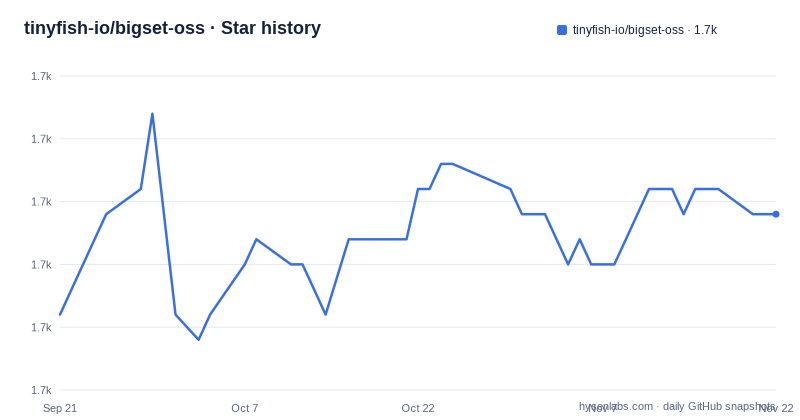
- tinyfish-io/bigset-oss1,707 ★ · +4
| Repository | 2026-09-21 | 2026-11-22 |
|---|---|---|
| tinyfish-io/bigset-oss | 1.7k | 1.7k |
4 Stars in the last 62 days, measured from the daily GitHub snapshot. Compare with other projects
Editorial analysis
The install comes from a personal scope and the links point elsewhere
Three different names describe the same thing. The repository is `tinyfish-io/bigset-oss`, the npm package you install is `@adamexu/bigset`, and every link in the README points at a third path, `tinyfish-io/bigset`, including the stars badge, the license link and the issues link. So the documentation you are reading lives under one name, the artifact you run comes from a personal npm scope, and the issue tracker and licence the README points you to are on a repository that is not this one. Nothing here says the three are the same organisation or a mistake; the npm scope has an individual handle, the repository is under a company, and the internal links use neither. The install command itself is short:
npm install --global @adamexu/bigset
bigset
Before running anything with global scope, read the package you are installing, and follow the issues link to the repository that actually receives them.
The CLI downloads a release, and the newest release is four months old
The command does not build anything from source. As described, it downloads the current local BigSet release, starts four processes, and prints the app URL, with the first run caching release files under `~/.bigset` and later runs designed to take seconds. There is a `--force` flag to redownload the latest cached release, and `--home` to point the cache somewhere else. Which means the code you run is a release artifact fetched by the package, and the release trail is short and old: v0.1.1 on 2026-06-09, v0.1.2 the same evening, v0.1.3 on 2026-06-10. The repository itself was pushed to on 2026-10-01. So a fresh install gives you the June state of a project that has had four months of commits behind it, and `--force` will not change that, since it redownloads the same release. This is also why the version numbers are still in the 0.1 range while the page calls the tool experimental.
Self-hostable covers the app, not the two metered APIs behind it
The repository description calls BigSet self-hostable, and the application is, since it runs on your machine. The research it performs is not. First launch walks you through two services: TinyFish for web search and page fetching, and OpenRouter for the LLM calls that do schema inference and drive the agents. Both keys are fetched from their own dashboards, and the page says local API keys are stored in your OS keychain. So every dataset costs money on two external accounts, and a dataset that is not publicly reachable on the open web is simply out of scope, stated plainly in the same list that says the tool works best where public data exists. What you host is the app, the database and the four local processes. What you rent is the search, the page fetching and the model.
Four local processes start, and one of them is a credential bridge
Running `bigset` starts Convex, the backend, the frontend and the local credential bridge, then tells you to open 127.0.0.1:3500. Four processes for one page of tables is a lot of moving parts to hold on a laptop, and the ports are adjustable, since `--app-port 4500 --backend-port 4501` moves the app and the backend while the create command also accepts `--backend-port`. What each process owns is not spelled out, but the names line up with the security story: the frontend serves the UI, Convex and the backend hold the data, and the credential bridge is the piece that reaches the OS keychain to read the two API keys you pasted at setup. That bridge is a local process holding the keys to a paid account, and nothing in the visible documentation describes who may talk to it or how it is authenticated. There is a `docker-compose.dev.yml` at the root for development, while the user path is told no Docker is needed.
Verification and deduplication get one clause each
The pipeline is described in six steps, and step four is where the quality lives: sub-agents fan out in parallel, each investigates a single entity, fetches real data, and inserts a verified row. Verified against what is never specified. The opening paragraph adds that findings are verified against real sources and deduplicated, again with no criteria: no rule for what counts as two entities being the same, no record of a claim that failed verification, no way to see which source a cell came from. The data model implies an answer, since schema inference is said to choose primary keys, but nothing tells you whether a row is dropped, kept with a flag, or left with an empty cell. Combined with `--rows <n>` being a maximum rather than a target, a dataset can come back short of the row count you asked for with no indication that it stopped early.
The fastest cadence means 48 research runs a day
Refresh is a first-class feature, and the choices are `manual`, `30m`, `6h`, `12h`, `daily` and `weekly`. A 30 minute cadence is therefore up to 48 full population runs in 24 hours, and every one of those is a fresh fan-out: an orchestrator searching for entities, then one sub-agent per entity fetching pages, then schema inference and the model calls behind them, all metered on the two keys you supplied. The page gives a time estimate for a single run, 2 to 5 minutes, and nothing at all about cost, so a dataset left on the shortest cadence with a generous row cap spends money continuously in the background while you sleep. The honest reading is that cadence is a data freshness dial and a spending dial at the same time, and that the tool has no way to tell you which of the two you are turning.
A Python bootstrap in a TypeScript repository
The build surface at the root is one Makefile with three phony targets, and its dependency installer is `pip`. `init` depends on `setup-pre-commit` and `check-trufflehog`, then runs `pip install pre-commit` and `pre-commit install`. The trufflehog check refuses to continue when the binary is missing and prints its install options, one of which is a curl command piped into a shell targeting `/usr/local/bin`, while the macOS option is a `brew install`. In a TypeScript project, that pulls a Python interpreter into the developer path for a hook runner. The pre-commit step is also one-way: if `.pre-commit-config.yaml` is absent it copies a template from `.github/config/` into place, and if the file exists it does nothing, so later fixes to that template never reach anyone who ran the target once. Above the targets, `include $(wildcard makefiles/*)` pulls in shared fragments from a `makefiles/` directory whose contents are not shown in the file listing.
Downloadable, not queryable, and experimental three times over
The limitations section is more useful than the pitch. Datasets are downloadable, not queryable: you browse them in the UI and export CSV or XLSX, and SQL query support is on the roadmap, which means any analysis beyond sorting a spreadsheet happens after the export. Generation takes 2 to 5 minutes because the agents are doing real research, not instant lookup. Schema inference is not always perfect and some topics work better than others. And data behind logins or paywalls cannot be reached. The experimental label appears three times on the page, in a warning block that says it works, sometimes surprisingly well, but expect rough edges, and again in the list of things to know. Read together with the version numbers, that is a coherent picture: a 0.1 tool that does one unusual thing, whose failure is a plausible-looking table rather than an error message.
Editorial conclusion
BigSet is worth trying on a topic you already know the answer to, because the failure mode of a research agent is a confidently wrong table rather than an error, and only you can tell. The labels to read before the first run: self-hostable covers the application, not the data sources or the model calls, both of which are metered third-party APIs; the CLI runs whatever release artifact it downloads, which is v0.1.3 from June 2026 while the repository has moved since; and the npm package comes from a personal scope whose identity does not match the repository that documents it. Set a low row cap and the longest cadence until you trust the verification, since the documentation explains how the agents work but never how a claim gets rejected. Then check the monthly bill on both keys, because a 30 minute cadence is 48 full research runs a day.
Frequently asked questions
How do I install and start BigSet?
You need Node.js 22 or newer with npm, no Docker required. Run `npm install --global @adamexu/bigset` and then `bigset`, which downloads the current local release, caches it under `~/.bigset`, starts Convex, the backend, the frontend and a credential bridge, and asks you to open 127.0.0.1:3500. `npx @adamexu/bigset` runs it once without a global install.
Which API keys does BigSet need and what are they used for?
Two. A TinyFish key covers web search and page fetching, and an OpenRouter key covers the LLM calls used for schema inference and the agents. Both are requested during first launch, and the page says local API keys are stored in your OS keychain, which is what the local credential bridge process reads.
Can BigSet refresh a dataset on a schedule?
Yes, through the `--cadence` flag on create, which takes manual, 30m, 6h, 12h, daily or weekly, after which the agents re-run on their own with no manual re-runs. Each refresh is a fresh population run, so the shortest cadence means 48 runs a day, and the tool states no cost. Datasets are downloadable rather than queryable, with SQL support on the roadmap, and anything behind a login or paywall is out of reach.
Official sources
Add this badge to your README
If you maintain this project, the badge below links readers to this analysis and shows its maintenance status from the daily GitHub snapshot. Paste the markdown into your README; add ?metric=license or ?metric=stars to the image URL for a different field.

[](https://hysenlabs.com/projects/tinyfish-io-bigset-oss)Star history chart for your README
[](https://hysenlabs.com/projects/tinyfish-io-bigset-oss)Was this useful?