RustScan: a fast port scanner that hands results to Nmap
🤖 The Modern Port Scanner 🤖
At a glance
- What is it?
- RustScan scans all 65,535 TCP ports quickly, then pipes open ports into Nmap for service detection. Here is how it installs, how the scripting engine works, and where the design breaks down.
- Who is it for?
- Adopt RustScan if you already run Nmap and want the full port range covered in one pass instead of a slow top-1000 sweep; the piping behaviour means your existing Nmap scripts and service detection still apply. Do not adopt it if you need a quiet, evasion-oriented scan or a pure-Rust dependency chain, because the Nmap handoff and the GPL-3.0 licence both constrain that.
- Can I use it commercially?
- Yes, with conditions. GPL-3.0 is a copyleft licence: if you distribute software that includes it, you must release that software's source code under the same licence. Running it internally without distributing it does not trigger that obligation.
- Is it still maintained?
- Yes. The repository last received commits 10 days ago.
- What is it written in?
- Mainly Rust, according to GitHub's language statistics.
Answers come from the project's GitHub data, last synced on November 14, 2026, and from our analysis. They are not legal advice.
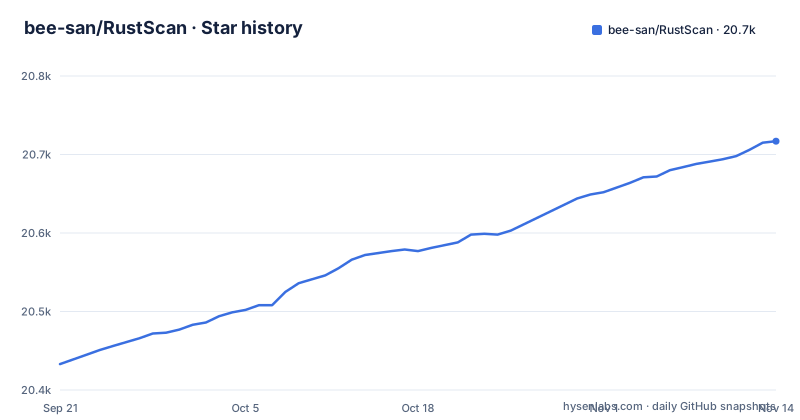
Star history
- bee-san/RustScan20,717 ★ · +284
| Repository | 2026-09-21 | 2026-11-14 |
|---|---|---|
| bee-san/RustScan | 20.4k | 20.7k |
284 Stars in the last 54 days, measured from the daily GitHub snapshot. Compare with other projects
Editorial analysis
What RustScan is for, and who actually needs it
A default Nmap run against a single host checks a curated list of common ports. Covering all 65,535 TCP ports with Nmap's service detection enabled is slow enough that most people avoid it during reconnaissance. RustScan exists to split that job in two: sweep the whole port range as fast as possible, then hand only the open ports to Nmap.
The README states the goal plainly: find ports quickly, three seconds at its fastest, and run scripts through a scripting engine that supports Python, Lua and Shell. That framing tells you who it is for. It is a reconnaissance tool for penetration testers, CTF players and administrators who need to know what is listening before they decide what to attack or audit. It is not a vulnerability scanner, and it does not replace Nmap's service and version detection; it feeds it.
The primary language is Rust, and the licence is GPL-3.0-only according to Cargo.toml. That matters if you plan to redistribute a modified binary inside a commercial product, which is a different conversation from running the tool internally.
The two-stage design: fast sweep, then Nmap does the real work
The architecture visible in the repository is a thin, focused scanner plus a handoff. Cargo.toml lists tokio and futures, which is consistent with the asynchronous connection attempts the tool is built around, and hickory-resolver with DNS-over-Rustls for name resolution. The rlimit crate appears as a dependency, which is the direct link to the ulimit question users keep asking: opening thousands of sockets at once runs into the operating system's file descriptor limit, and the tool has to raise or work within it.
The README describes the handoff as automatic: open ports are piped into Nmap. If you want something other than Nmap, the scripting engine is the escape hatch. The README gives the example of running smb-enum when SMB is found open, and says scripts can be written in Python, Lua or Shell.
One design claim deserves scrutiny. The README describes Adaptive Learning as features that learn about the environment and how you use RustScan, adding that it uses basic maths rather than machine learning. That is honest marketing, but it is also vague: the README itself says the list of features under that umbrella constantly changes and points to the wiki for details. Do not treat "adaptive" as a guarantee of anything specific.
Installing RustScan and running a first scan
The README says the project only officially supports Cargo installations, while preferring that you use a package manager because those builds are tested for your system. Both routes are documented.
If you have a Rust toolchain, the supported install is one command:
cargo install rustscanOn macOS the README shows Homebrew, and on Arch it shows pacman:
brew install rustscanpacman -S rustscanThe README also points to prebuilt binaries on the releases page, and notes that RustScan is packaged in many distributions, linking to a Repology page that tracks which ones. For Kali and Debian, the packaging status page is the place to confirm availability rather than assuming a package name.
Once installed, the basic invocation is to point it at a target. The README does not reproduce the full flag list, so check `rustscan --help` for the exact syntax your build exposes. What you should expect after a run is a list of open ports and, because automatic Nmap piping is enabled, the Nmap stage following it. If the scan stalls or errors on a large target set, the ulimit on your shell is the first thing to check, since the tool depends on the rlimit crate to manage socket limits.
Where RustScan is the wrong tool
The speed claim and the Nmap dependency pull in opposite directions. RustScan's whole pitch is that it finishes the port sweep in seconds, and the README notes that a slower scan is possible if you need stealth. But a scan that opens connections as aggressively as this one does is not a stealthy scan by nature, and the README does not document evasion techniques such as fragmentation or decoy traffic. If your engagement requires you to stay below an IDS threshold, this is not the tool for that job; the README's own framing of speed as the guarantee tells you which side of the trade-off the project chose.
The second limitation is architectural. Because results are piped into Nmap, you inherit Nmap's behaviour, its configuration and its presence on the host. The Debian package metadata in Cargo.toml declares nmap as a dependency, which confirms the coupling. If Nmap is not installed or is an old build, the second stage either fails or produces less than you expect. The README does not document rollback or what happens to partial results when the Nmap stage fails.
Third, the documentation is uneven. The README links out to a wiki, an installation guide, two usage guides and a config file page, but the README body itself does not enumerate flags, output formats or error conditions. You will be reading external pages, and the repository's own README will not answer detailed operational questions.
RustScan vs Nmap: the actual difference in approach
The comparison people search for is RustScan vs Nmap, and the honest answer is that they are not competitors in the same category. Nmap is a complete scanning framework: host discovery, port scanning, service and version detection, OS fingerprinting, and the NSE scripting engine. RustScan is a port sweep with a handoff.
The difference in approach is where the work happens. Nmap, run with service detection across the full port range, interleaves connection attempts with probes, which is why it is thorough and slow. RustScan separates the phases: a fast asynchronous sweep finds what is open, then Nmap is invoked against that narrower set. You get the full range covered without paying Nmap's per-port cost on 65,000 closed ports.
If you only ever scan the top 1,000 ports, or you need Nmap's OS detection and NSE library as a single integrated run, adding RustScan in front buys you little and adds a dependency. If you routinely want the full range and then service detection on what is actually open, the split is the point. The scripting engine also covers a case Nmap handles differently: instead of NSE's Lua-only model, RustScan's README says scripts can be written in Python, Lua or Shell, which lowers the barrier for people who already have Python tooling.
Maintenance, release cadence and the GPL-3.0 licence
The repository is not archived, and the last push was on 2026-10-20. That is recent activity, and the release history supports a project that still ships: version 2.4.1 was tagged on 2025-02-23, 2.3.0 on 2024-07-08, and a 2.2.4 release candidate on 2024-05-18. The gap between 2.3.0 and 2.4.1 is roughly seven months, so expect infrequent but real releases rather than a constant stream.
Upgrade cost is low for the binary itself. The justfile defines a release task that runs the test suite first, and the test task chains cargo test, clippy with warnings denied, a formatting check and a documentation build. The Makefile builds Linux and macOS artifacts with cross and produces SHA-256 checksums. None of that affects you as a consumer.
The licence is GPL-3.0-only, stated in Cargo.toml. Running RustScan internally, including as part of a paid engagement, is the ordinary use case and is not what the licence restricts. What the licence does affect is redistribution: if you ship a modified RustScan inside your own product, the GPL's copyleft terms apply to that distribution. This is a description of the licence identifier, not legal advice; if you plan to embed or rebrand the tool, talk to someone qualified.
Editorial conclusion
Adopt RustScan if you already run Nmap and want the full port range covered in one pass instead of a slow top-1000 sweep; the piping behaviour means your existing Nmap scripts and service detection still apply. Do not adopt it if you need a quiet, evasion-oriented scan or a pure-Rust dependency chain, because the Nmap handoff and the GPL-3.0 licence both constrain that. Before rolling it out, check the ulimit on the scanning host and confirm the Nmap binary the package metadata declares as a dependency is actually present and recent enough for your scripts.
Frequently asked questions
What is RustScan?
RustScan is a port scanner written in Rust, described in its README as the modern port scanner. It finds open ports quickly and automatically pipes them into Nmap for further analysis.
Does RustScan use Nmap?
Yes. The README states that RustScan automatically pipes ports into Nmap, and the Debian package metadata in Cargo.toml declares nmap as a dependency.
How do I install RustScan?
The README says only Cargo installations are officially supported, using cargo install rustscan, but it prefers package managers because those builds are tested for your system. It shows brew install rustscan on macOS and pacman -S rustscan on Arch, and points to the releases page for binaries.
How do I use RustScan?
Point it at a target and it sweeps ports, then hands the open ones to Nmap. The README links to separate basic usage and advanced usage guides, and does not list the flags inline, so run rustscan --help for the syntax your build exposes.
How do I install RustScan on Ubuntu?
The README does not give a distro-specific command for Ubuntu. It says RustScan is packaged in many repositories tracked on a Repology page, that Cargo installs via cargo install rustscan are the only officially supported route, and that prebuilt binaries are on the releases page.
What is ulimit in RustScan?
It refers to the operating system limit on open file descriptors, which a fast full-range scan can exhaust. Cargo.toml lists the rlimit crate as a dependency, which is how the tool manages that limit.
Official sources
Add this badge to your README
If you maintain this project, the badge below links readers to this analysis and shows its maintenance status from the daily GitHub snapshot. Paste the markdown into your README; add ?metric=license or ?metric=stars to the image URL for a different field.

[](https://hysenlabs.com/projects/bee-san-rustscan)Star history chart for your README
[](https://hysenlabs.com/projects/bee-san-rustscan)Was this useful?