TiXL: realtime motion graphics where the graph, the keyframes and the shader meet
TiXL is an open source software to create realtime motion graphics.
At a glance
- What is it?
- TiXL is a C# toolkit for realtime motion graphics that puts graph-based procedural generation and linear keyframe editing in one editor, and ships a Windows executable you can download. Version 4 is what the project itself calls an ongoing development, so the release notes matter more here than the feature list.
- Who is it for?
- TiXL fits an artist or technical artist who wants audio-reactive and parameter-driven visuals in a single editor and is willing to read the wiki, since the README is 230 words and delegates almost everything to it. It is the wrong choice if you need a documented install command, a stated minimum GPU, or a clear answer on what is safe to ship inside a commercial title.
- Can I use it commercially?
- Yes. MIT is a permissive licence: you can use, modify and sell software built on it, as long as you keep its copyright and licence notices.
- Is it still maintained?
- Yes. The repository last received commits 1 day ago.
- What is it written in?
- Mainly C#, according to GitHub's language statistics.
Answers come from the project's GitHub data, last synced on November 15, 2026, and from our analysis. They are not legal advice.
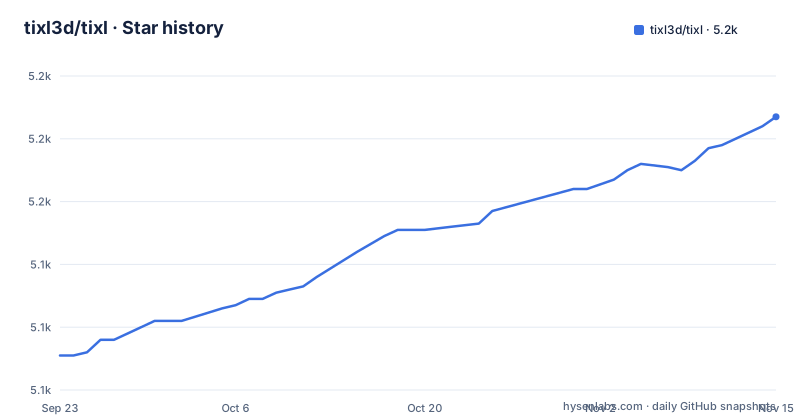
Star history
- tixl3d/tixl5,187 ★ · +76
| Repository | 2026-09-23 | 2026-11-15 |
|---|---|---|
| tixl3d/tixl | 5.1k | 5.2k |
76 Stars in the last 53 days, measured from the daily GitHub snapshot. Compare with other projects
Editorial analysis
Version 4 is described as ongoing development, not a finished product
The README is explicit that TiXL version 4 is "an ongoing development" and that it is "stable enough to produce high-end visuals". Both halves of that sentence matter. The first tells you the project is still moving under you; the second tells you it already runs at a professional level.
The release list backs that up. v4.4.0.2 landed on 2026-10-18, v4.4.0.3 on 2026-10-21, and v4.4.0.4 on 2026-10-29. Three patch-level tags within two weeks is what a stabilization pass looks like rather than a feature drop.
The last push to the repository was on 2026-11-01 and it is not archived. Anyone budgeting time for a TiXL-based show should plan around the patch cadence rather than around a single feature-delivery date.
The graph editor is the middle layer between shader code and a timeline
TiXL describes itself as aiming at a specific overlap: realtime rendering, graph-based procedural content generation, and linear keyframe animation and editing, held in one tool rather than three.
That choice is what separates it from a plain node editor. A graph gives you parameters you can explore with advanced interfaces while you work, and the same graph can be driven by automation so a value that would be tedious to keyframe is computed instead. The README names audio-reactive VJ content as the first use case, which is the case where you want both: a structure that responds to sound and a timeline for the parts that should stay still.
For a technical artist the same editor opens up underneath. Fragment and compute shader development, midi controllers, sensors, and sources like OSC or Spout are all listed as inputs, so the graph is a place where hardware and code feed parameters rather than a place where you wire up render passes.
OSC, Spout and midi are the named doors into the graph
The input list is short and specific, which makes it useful. OSC and Spout cover the two standard routes for driving parameters from another application: a network message protocol and a shared-surface video texture. A midi controller covers hardware faders, and sensors cover anything with an axis or a trigger.
The output side of the README is thinner. It names color correction, scopes and tone mapping as features, and says small standalone executables can be exported. It does not name a rendering API, a codec, or a maximum output resolution, so anyone planning a live show has to find those answers in the wiki rather than here.
One consequence is worth naming. If your production depends on Spout as an input, check whether the Spout path exists in the build you download, because the README treats it as a capability of the toolkit and says nothing about which release introduced it or which platforms carry it.
The README has no install command, only a wiki page
Installation is one line in the README, and it is a link to the project's own installation guide on the wiki. There is no package manager entry, no build command, and no prerequisites list.
The path that does exist is the release download. The README links a `.exe` asset under the v4.1.1 release tag, which tells you two things: builds are distributed as Windows executables rather than through a package index, and that link is not kept current with the tags at the top of the release list. The releases page itself is where a current build lives.
Because the repository is a C# solution with `t3.sln`, `global.json` and `Directory.Build.props`, building from source is possible in principle. The README does not document what the pinned SDK in `global.json` resolves to or what the build expects, so treat a source build as undocumented rather than as a documented path.
Sentry credentials arrive as .env.example with two required scopes
One file in the repository root documents the maintainer's own tooling precisely enough to be worth reading. `.env.example` asks you to copy it to `.env`, which is gitignored, and to fill in a Sentry API token:
SENTRY_AUTH_TOKEN=
SENTRY_ORG=tooll
SENTRY_PROJECT=tooll3
The comments above it name the two scopes the token needs. `event:read` is described as always needed, for listing issues and fetching event details. `event:write` is needed only by `Scripts/sentry-issues.ps1 -Resolve`, which marks issues resolved. The file also warns that Sentry will not let you add scopes to a token after it is created, so an existing token without `event:write` has to be replaced rather than extended.
This is the only configuration the repository states outright, and it is the maintainer's error reporting, not an application setting you need in order to run TiXL. It tells you more about the project's development loop than about how to use the editor.
Player, Editor, Core and a Spikes folder split the solution
The solution layout explains how the tool is put together. `Core/` holds the engine-side code, `Editor/` the editing surface, and `Player/` the standalone runtime that exported executables presumably come from. `Operators/` sits alongside them.
Around those sit service layers with telling names: `VideoServices/`, `IoServices/`, `Serialization/`, `Logging/`, `Resources/` and `EditorResources/`. Two UI directories, `MsForms/` and `ImguiWindows/`, sit next to `SystemUi/`, so the interface is not built on a single toolkit.
The rest of the root tells you what a working setup costs. `Spikes/` is a scratch area, `Tests/`, `Core.Tests/` and `VideoServices.Tests/` hold automated tests, and `SilkWindows/`, `SilkWindowTest/` and `Windows/` cover windowing. `Dependencies/`, `Vendor/` and `ProjectUpdater/` also sit at the root.
What the README leaves open: platform, GPU and vendor licensing
Three gaps are worth naming before anyone commits time.
Platform support is unstated. The homepage, the repository and the linked `.exe` all point one way, and the file layout leans Windows, but the README never says Windows only and never says anything else. Readers searching for this toolkit on Linux or macOS will find nothing here that settles the question.
Hardware requirements are absent entirely. No minimum GPU, no graphics API, no frame rate expectation. For a realtime tool that is the first thing an artist needs.
And the licence, while the repository states MIT in `LICENSE.txt`, may not cover whatever sits in `Vendor/`. Checked-in dependencies under a vendor directory are exactly where a GPL or non-commercial clause hides, so a commercial release built from this code needs that read before shipping.
Editorial conclusion
TiXL fits an artist or technical artist who wants audio-reactive and parameter-driven visuals in a single editor and is willing to read the wiki, since the README is 230 words and delegates almost everything to it. It is the wrong choice if you need a documented install command, a stated minimum GPU, or a clear answer on what is safe to ship inside a commercial title. Verify first what the latest v4.4.0.4 release actually changes relative to v4.4.0.3, and check the licensing of anything under `Vendor/` before you redistribute a build.
Frequently asked questions
What is TiXL software?
It is an open source toolkit for creating realtime motion graphics, aimed at the space between realtime rendering, graph-based procedural content generation, and linear keyframe animation and editing. The README positions it for artists building audio-reactive VJ content as well as technical artists writing fragment and compute shaders.
How do I install TiXL?
The README gives no install command and points instead at the project's installation guide on the GitHub wiki. Builds are distributed as downloadable Windows executables through the releases page rather than through a package manager.
Is TiXL version 4 ready for production use?
The README calls version 4 an ongoing development and says it is stable enough to produce high-end visuals, carrying color correction, scopes, tone mapping and standalone executable export. Releases move quickly: v4.4.0.2, v4.4.0.3 and v4.4.0.4 landed between 2026-10-18 and 2026-10-29.
Official sources
Add this badge to your README
If you maintain this project, the badge below links readers to this analysis and shows its maintenance status from the daily GitHub snapshot. Paste the markdown into your README; add ?metric=license or ?metric=stars to the image URL for a different field.

[](https://hysenlabs.com/projects/tixl3d-tixl)Star history chart for your README
[](https://hysenlabs.com/projects/tixl3d-tixl)Was this useful?