mac-computer-use: Accessibility, native input, and CDP for a local agent
Enable any LLM to control your computer with cross-platform support, featuring 3D modeling examples and live demos.
At a glance
- What is it?
- mac-computer-use is an Agent Skills package that gives a local LLM hands on a Mac through Accessibility controls, native input, and Chrome DevTools Protocol, wrapped in a verification contract that refuses to replay unconfirmed actions. Every prerequisite it lists is macOS specific, which sits awkwardly next to the cross-platform framing in its repository description.
- Who is it for?
- Adopt mac-computer-use if you work on a Mac, run a coding agent locally, and want that agent to act on real windows with a refusal path built into the tools. Skip it for Windows or Linux work, for unattended overnight jobs, and for any screen you cannot afford to have clicked while you type.
- Can I use it commercially?
- Yes. MIT is a permissive licence: you can use, modify and sell software built on it, as long as you keep its copyright and licence notices.
- Is it still maintained?
- Yes. The repository last received commits 45 days ago.
- What is it written in?
- Mainly JavaScript, according to GitHub's language statistics.
Answers come from the project's GitHub data, last synced on October 25, 2026, and from our analysis. They are not legal advice.
Star history
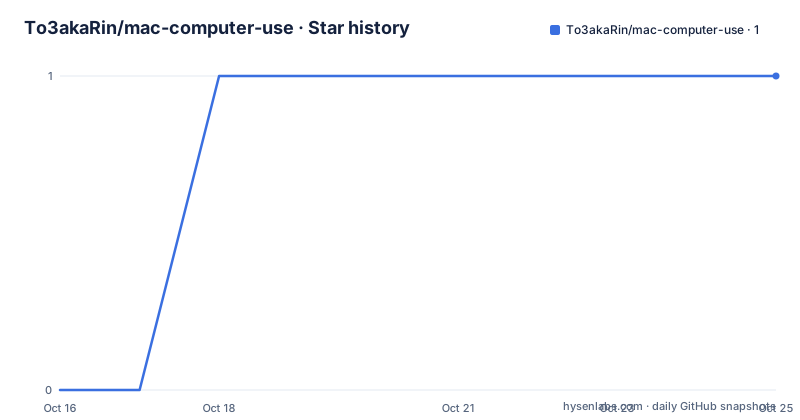
- To3akaRin/mac-computer-use1 ★ · +1
| Repository | 2026-10-16 | 2026-10-25 |
|---|---|---|
| To3akaRin/mac-computer-use | 0 | 1 |
1 Stars in the last 9 days, measured from the daily GitHub snapshot. Compare with other projects
Editorial analysis
Three channels: Accessibility, native input, and CDP
The package turns a desktop task into an agent workflow by joining three access channels that macOS already offers. Native windows are read through Accessibility controls, input travels either as native events or as Chromium renderer events, and every command comes back as structured JSON naming the target, the channel, the status, and the evidence attached to it. Nothing leaves the machine: the control tools need no hosted backend, no database, and no separate API key, because they sit directly on system-native frameworks.
What the skill supplies is execution, not judgement. The task examples given in the README exist for an agent to plan around, and what actually gets completed depends on the target application's controls, interfaces, permissions, and the tools the runtime already has. Reasoning and orchestration stay on the agent side of that line.
Most of the engineering therefore goes into refusing actions rather than performing them. Capabilities cluster around observation and targeting: listing windows, processes, titles, and geometry; reading AX controls and CDP page structure; inspecting application bundles, scripting dictionaries, URL schemes, and candidate debugging ports.
Installing the full skill directory with npx skills add
The supported path runs the Skills CLI against the repository slug, which copies the complete skill package into the agent's skills directory:
npx skills add To3akaRin/mac-computer-useThe agent then needs a Mac with macOS 14+ and Swift 6 Command Line Tools, and the CDP commands add one further prerequisite, Node.js 22.4+. There is no build step for a hosted service, because there is no service anywhere in the design.
A manual route exists for anyone who would rather see what lands on disk before it lands there. The repository ships an installer that takes an explicit directory, and it carries a dry-run flag:
sh scripts/install.sh --skills-dir "/path/to/your/skills" --dry-run
sh scripts/install.sh --skills-dir "/path/to/your/skills"
Two details in that step decide whether a later run works. The installer copies the full `mac-computer-use/` directory and refuses to overwrite an existing installation, so a second attempt needs the previous copy cleared by hand. Copying `SKILL.md` on its own is not enough, since the accompanying source files and scripts have to travel with it.
Foreground input waits for two seconds of user silence
Any action that takes over the front of the screen is gated on the human at the keyboard. A foreground action needs at least 2 seconds of user inactivity before it starts, waits at most 15 seconds for the target to settle, and holds a session lock so two runs cannot fight over the same focus. Type anything and the action is interrupted.
The rest of the design pushes work away from the foreground instead. Background channels are preferred, the target's current state is checked before anything visible happens, and focus is restored afterwards when it is safe to do so. For a model reasoning about a screenshot captured earlier, that ordering matters, because the window it is looking at may already have been closed, moved, or re-laid-out by the person using the machine.
None of this is advisory text. The 2 second floor, the 15 second ceiling, and the lock live inside the tools rather than in a system prompt the model can decide to wave away, and that is the practical difference between a packaged skill and a paragraph of instructions.
Dry-run previews and the unknown status that blocks replay
Every write command accepts `--dry-run`, which checks parameters and available preconditions without typing, clicking, or restarting an application. Cheap enough to run before each state change instead of once per session.
Targeting rules are deliberately unforgiving. Ambiguous elements, stale references, and unspecified coordinate units are rejected rather than guessed at, and logical points, normalized coordinates, and screenshot pixels stay distinct so a model cannot hand a screenshot pixel to a command expecting a logical point. Snapshots that have gone stale, or whose windows have since changed, do not survive the check either.
Verification is where this parts company with a click macro. After a write, the value is read back or checked with a read-only assertion, and those CDP waits and assertions reject side effects, so a check cannot quietly repeat the action it is checking. When the outcome cannot be confirmed, the result comes back as `unknown`, and the rule attached to that status is blunt: do not replay it through another channel.
The README states the reason directly. Dispatching a click is not the same as completing a business operation, and correct text sitting in a field does not mean the underlying task finished. That sentence is the honest boundary of the whole package, and it arrives only after eight capability rows have already promised a great deal.
The 3,388-triangle exhibit and what it leaves unverified
The repository leads with a worked example: a central exhibition space reconstructed from reference photos, rotatable in a browser, and produced in 12 minutes without anyone touching the mouse. Numbers attached to it are concrete. 3,388 triangles, 117 meshes, and a single GLB file of approximately 218 KiB, with an editable Blender source file included.
Read the qualifiers sitting next to those numbers and the claim narrows fast. Dimensions were estimated from the reference photos rather than measured, the animation was recorded from the model viewer rather than from an agent run, and the workflow image at the top of the README carries an illustrative label beside a separate static preview. Provenance and recording notes live in a Chinese-language file under `docs/`, which is where a reader who wants to check the claim is pointed.
That is a fair way to present a demo, but it is worth being precise about what was demonstrated. A single 3D asset is a forgiving target, with a handful of well separated controls, a viewport that accepts orbit gestures, and an output that can be inspected by eye without a formal check. Deployments and form submissions have none of those properties, which is why every task example in the README pairs the request with a verification clause.
A Mac-only package whose description advertises cross-platform support
The repository description opens with cross-platform support, and each stated prerequisite is macOS specific: macOS 14+, Swift 6 Command Line Tools, ScreenCaptureKit for capturing windows, and Accessibility controls for reading and writing values. Node.js 22.4+ is required only for the CDP commands, and that runtime sits alongside the native half rather than replacing it.
The cross-platform claim is real, just not at the operating system layer. Built on the open Agent Skills standard, the package works with runtimes able to read the full skill package and execute commands on your Mac, so one skill can be loaded by different agents instead of rewritten per tool. Topic tags say as much from the outside: agent-skills, cdp, codex, computer-use, macos, and swift. The language mix follows the same split, with JavaScript as the primary language carrying the CDP client, `Package.swift` and `Sources/` carrying the native side, and zero runtime npm dependencies for the client while Node is still required underneath it.
Published under the MIT licence, the repository is not archived and the last push to main was on 2026-09-24.
Tests read CHROME_BINARY from the process environment
`package.json` is marked private, carries no dependencies block, and exposes two scripts:
"test": "node --test tests/cdp.test.mjs tests/launcher.test.mjs tests/install.test.mjs",
"test:cdp-live": "node tests/cdp-live.mjs"
The first runs three offline suites, one each for the CDP client, the launcher, and the installer. Only the second needs a browser, and the repository configures that with an example environment file:
# 可选:真实 CDP 测试使用的 Chromium 可执行路径。
# 测试脚本从进程环境读取,不自动加载本文件。
CHROME_BINARY=/Applications/Google Chrome.app/Contents/MacOS/Google Chrome
The second comment line is the detail worth keeping, since the script reads the variable from the process environment and never loads that file by itself. Point the live suite at the wrong Chromium, or at none, and the failure tells you nothing about the code under test. Chrome is only the example written down; nothing in the shipped configuration binds the suite to that one binary.
The top-level layout also splits documentation by audience. `SKILL.md` is the contract an agent reads, while `API.md`, `CONTEXT.md`, `DESIGN.md`, `PRODUCT.md`, `CONTRIBUTING.md`, the `agents/` directory, and the `references/` folder hold the reasoning behind it, including a runtime setup guide the README links in Chinese.
Editorial conclusion
Adopt mac-computer-use if you work on a Mac, run a coding agent locally, and want that agent to act on real windows with a refusal path built into the tools. Skip it for Windows or Linux work, for unattended overnight jobs, and for any screen you cannot afford to have clicked while you type. Before the first real task, run scripts/install.sh with --dry-run, confirm the whole mac-computer-use/ directory landed beside its scripts, and rehearse one --dry-run write against a throwaway application first.
Frequently asked questions
What does mac-computer-use need before it will drive a Mac?
A Mac with macOS 14+ and Swift 6 Command Line Tools. The CDP commands add Node.js 22.4+, and the agent runtime and model carry their own requirements on top of those three.
How do I install mac-computer-use without breaking an existing copy?
Run the bundled installer with the `--skills-dir` flag and let it copy the whole `mac-computer-use/` directory, since `SKILL.md` on its own is not enough. It refuses to overwrite an existing installation, so a repeat run needs the previous copy removed first.
Does mac-computer-use send my screen to a hosted service?
No. The control tools need no hosted backend, no database, and no separate API key, and they run locally on system-native frameworks. Only your agent runtime and model have their own outside requirements.
What happens when mac-computer-use cannot confirm that an action worked?
An unconfirmed write returns `unknown`, and the documented rule is not to replay it through another channel. Ambiguous elements, stale references, and unspecified coordinate units are rejected before a write is ever dispatched.
How do I run the mac-computer-use test suite?
The `test` script in `package.json` runs `tests/cdp.test.mjs`, `tests/launcher.test.mjs`, and `tests/install.test.mjs` with node --test. A second script, `test:cdp-live`, drives a real Chromium instance and reads `CHROME_BINARY` from the process environment.
Can mac-computer-use run on Windows or Linux?
Not as described. Every prerequisite it names is macOS specific: macOS 14+, Swift 6 Command Line Tools, ScreenCaptureKit, and Accessibility controls. The cross-platform part is the Agent Skills package format, which lets different agent runtimes load one skill.
Official sources
Add this badge to your README
If you maintain this project, the badge below links readers to this analysis and shows its maintenance status from the daily GitHub snapshot. Paste the markdown into your README; add ?metric=license or ?metric=stars to the image URL for a different field.

[](https://hysenlabs.com/projects/to3akarin-mac-computer-use)Star history chart for your README
[](https://hysenlabs.com/projects/to3akarin-mac-computer-use)Was this useful?