nub packs node, npm, tsx and nvm into one Rust CLI
The fast all-in-one Node.js toolkit. Script runner, nub run A drop-in for npm run and pnpm run.
At a glance
- What is it?
- nub is a Rust binary that runs TypeScript files, package scripts, one-off tools, installs and Node version management on top of stock node, without replacing the runtime. The bet is that the DX gap is tooling, not a new runtime.
- Who is it for?
- Adopt nub if your team runs TypeScript every day and is tired of stitching together tsx, dotenv-cli and a version manager. Do not adopt it if your pipeline needs a runtime that is not Node, or if a polyfilled API has to behave exactly like the native one it stands in for.
- Can I use it commercially?
- Yes. MIT is a permissive licence: you can use, modify and sell software built on it, as long as you keep its copyright and licence notices.
- Is it still maintained?
- Yes. The repository last received commits 1 day ago.
- What is it written in?
- Mainly Rust, according to GitHub's language statistics.
Answers come from the project's GitHub data, last synced on November 14, 2026, and from our analysis. They are not legal advice.
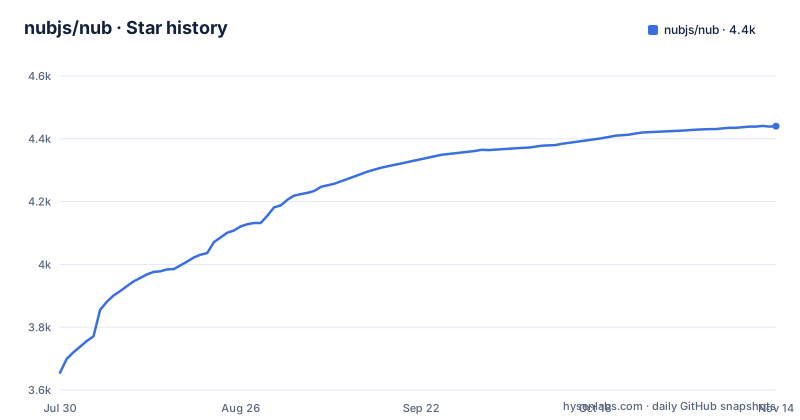
Star history
- nubjs/nub4,440 ★ · +785
| Repository | 2026-07-30 | 2026-11-14 |
|---|---|---|
| nubjs/nub | 3.7k | 4.4k |
785 Stars in the last 107 days, measured from the daily GitHub snapshot. Compare with other projects
Editorial analysis
The pile of four CLIs that nub tries to collapse
Most TypeScript services carry the same four tools and none of them are the runtime. A loader such as tsx or ts-node starts the file. A separate dotenv-cli loads environment variables because stock node does not. A package manager installs and runs scripts. A version manager such as nvm, fnm or volta pins the Node version. Each adds a flag to remember and a version to keep in sync.
nub takes the opposite position. Its README states the goal as "A Bun-like DX on top of stock `node`, written in Rust", and the substitution table spells out the intent: `nub <file>` replaces `node`, `tsx`, `ts-node` and `dotenv-cli`; `nub run` replaces `npm run` and `pnpm run`; `nubx` replaces `npx`; `nub node` replaces `nvm`, `fnm`, `n` and `volta`; `nub pm` replaces `corepack`. The audience is the engineer whose day is running files and scripts against Node, not writing a new runtime.
That framing matters for what nub will not do. There is no new runtime and no vendor-specific API surface, which means code written for nub still runs under plain node once transpiled.
oxc compiled into the binary, hooked in with module.registerHooks
The interesting part is not the command table but how TypeScript reaches Node at all. nub is a Cargo workspace of crates including nub-cli, nub-core, nub-data-formats, nub-json-guard, nub-cache-key and nub-tsconfig, and it embeds the oxc transformer as an N-API addon inside the Node process rather than shelling out to a separate transpiler. Three Node extension surfaces do the work: `--import` and `--require` to preload the runtime, `module.registerHooks()` for transpilation and resolution, and the N-API addon for parsing and transformation.
The root package.json explains the tight coupling this creates. `@oxc-project/runtime` is pinned to an exact version with no caret and must match the oxc version compiled into `crates/nub-native`, because it supplies the helpers emitted by the transpile step, such as `usingCtx` for down-leveling the `using` keyword. The transformer and parser moved in-process into the native crate, so oxc-transform and oxc-parser are no longer npm dependencies at all.
Read the Wasm import list and the API table together and one design choice becomes clear. `Temporal` is polyfilled below Node 26 and native above it; `URLPattern`, `RegExp.escape`, `Error.isError`, `Promise.try` and `Float16Array` switch at Node 24; `WebSocket` is unflagged from Node 20.10 and native from 22; `node:sqlite` is unflagged from 22.5 and native from 22.13. nub removes the flags, but where a native implementation does not exist yet you get a polyfill, not Node's behaviour.
Where nub reads the Node version your project expects
Running a file with nub can trigger an install before your code executes. nub resolves the Node version the project expects from a fixed list, highest precedence first: the `NODE_EXECUTABLE` environment variable as an override, then `package.json#devEngines`, then `.node-version`, then `.nvmrc`, then `package.json#engines`. The resolved runtime is installed and then used for your file with nub's augmentations applied on top.
The README shows the whole flow, including the download time, with a project that has a `.node-version` file containing 26. The line nub prints names both the resolved version and the source it came from, so when several machines disagree about Node you have a line in the terminal to point at. This is the part of nub that most changes day-to-day behaviour, and also the part most will surprise somebody on a metered connection, since the first run pays for a toolchain download.
The repository's own root package.json declares engines of Node 22.15.0 or newer.
Installing the binary and running a .ts file end to end
Seven install routes are documented, and they differ in what they cost you later. On macOS and Linux the shell script is one line:
curl -fsSL https://nubjs.com/install.sh | bashHomebrew, Nix flakes and mise are the alternatives, and npm is also offered:
brew install nub
nix run github:nubjs/nub
npm install -g @nubjs/nub
If you previously installed the project from a tap, the README is explicit that a plain reinstall is not enough:
brew uninstall nubjs/tap/nub && brew untap nubjs/tap && brew install nubWith the binary on PATH, the shortest useful run is a TypeScript entry file, no build step and no loader flag:
nub index.tsFor a server that needs restart-on-change, the same path works with watch mode:
nub watch src/server.tsFor CI, nub ships its own action and the README shows the swap. It is described as one-to-one compatible with the Node setup action:
- uses: nubjs/setup-nub@v0Note what you do not install. No tsx, no ts-node, no dotenv-cli, no nvm. `.env*` files load automatically, and `.yaml`, `.toml`, `.jsonc`, `.json5` and `.txt` gain built-in loaders, so a script reading a TOML config needs no dependency at all.
Watch mode watches off-graph files too, which nodemon will not
Most restart tools want a glob list. nub documents none, and the reason is that it derives restarts from the resolved dependency graph instead. On top of that graph it watches a small set of files that sit outside the graph but still invalidate a run: `.env*`, the `tsconfig.json` extends chain, and `package.json`. Change a value in an inherited tsconfig base and the process restarts.
The engine underneath is Node's own `--watch`, with output preserved by default, and `nub --watch app.ts` is documented as the same path as `nub watch`. That reuse is a real constraint. Anything Node's watcher cannot see, a file reached through a runtime construct nub cannot trace statically, will not trigger a restart. If your server reads a template directory or a fixture set at request time, nub will not know those files matter.
The same reasoning applies to the loader set. Extensionless imports and `tsconfig.json#paths` resolution work because nub owns resolution through its hooks. A dependency published only as CommonJS and loaded by an unusual specifier is the sort of case where tsx has years of scar tissue and nub does not.
The addon must unwind panics or it kills your Node process
The Cargo.toml carries a comment that explains a build split most users will never see but that predicts real behaviour. `panic` is profile-global inside a Cargo workspace, and nub wants two opposite settings. The nub CLI binary wants `panic = "abort"` to shed unwind metadata and shrink the binary, because it only ever calls `process::exit`. The `nub-native` cdylib is loaded into your Node process through napi, and it needs the opposite setting, because an abort would take down the host Node process instead of surfacing a JavaScript error.
So `crates/nub-native` is its own workspace with its own build profile, and it must be compiled from inside the crate with cargo, not from the workspace root, since cargo discovers `.cargo/config.toml` by walking up from the working directory. That is a build-from-source cost, not a runtime one.
The vendored aube package manager sits under `vendor/` and is excluded from the workspace for a different reason: cargo auto-adopts path dependencies as members, which would collide with aube's own workspace root. Repository size and a multi-workspace build are the price of shipping a package manager inside the same tree. The pragmatic limitation for an adopter is narrower and blunter. nub polyfills and unflags against moving Node versions, so behaviour that differs across Node versions is possible even though the command surface looks identical. Pin your Node version in a file and check it in.
Where nub sits against Bun and against plain npm scripts
Bun replaces Node. nub sits on top of it, and the README is careful about what that means: no new runtime, no vendor-specific API surface, no lock-in.
The other comparison is against doing nothing, which is a real option with a real cost. Plain `npm run` works everywhere and needs no binary on a new machine. nub earns its place when the setup cost repeats: a loader flag, an env loader wrapper, a version manager activation line in every shell profile, and a CI action that has to install all of it. `nub <file>` replaces the loader and env wrapper, `nub node` the version manager, and `nubjs/setup-nub` the CI setup action. The README claims multipliers over pnpm run and pnpm install, and those are the project's own numbers rather than measurements from an independent run, so treat them as marketing until you time your own scripts.
Editorial conclusion
Adopt nub if your team runs TypeScript every day and is tired of stitching together tsx, dotenv-cli and a version manager. Do not adopt it if your pipeline needs a runtime that is not Node, or if a polyfilled API has to behave exactly like the native one it stands in for. Verify first how your largest entry file behaves under nub watch, because the dependency graph nub derives from it decides when your process restarts, and files reached only at request time are invisible to that graph. Pin the Node version in a checked-in file before the first shared run, so the resolved version reported on every machine matches the one CI installs.
Frequently asked questions
Does nub replace the Node.js runtime?
No. nub augments stock `node`, and the README frames it as "A Bun-like DX on top of stock `node`, written in Rust". Your files still execute on a real Node release, one that nub resolves and installs for you.
How does nub run TypeScript without tsx or ts-node?
It preloads through `--import` and `--require`, registers transpilation and resolution through `module.registerHooks()`, and embeds oxc as an N-API native addon inside the Node process. TypeScript features such as `enum`, `namespace`, JSX and decorators run without a build step.
Which Node version does nub use for my project?
It resolves one from `NODE_EXECUTABLE`, then `package.json#devEngines`, then `.node-version`, then `.nvmrc`, then `package.json#engines`, and installs that version if it is missing. The terminal reports the resolved version and its source.
Does nub install dependencies and pin a Node version like nvm?
Yes, both. `nub install` replaces `npm` and `pnpm`, `nub node install 26` handles version management where nvm, fnm, n and volta would be used, and `nub pm shim` provides Corepack-style shims.
What happens to env files and YAML or TOML imports under nub?
`.env*` files load automatically with Next.js and Vite parity, and built-in loaders cover `.yaml`, `.toml`, `.jsonc`, `.json5` and `.txt`. That removes the separate dotenv-cli dependency.
Can nub replace actions/setup-node in GitHub Actions?
The README points to `nubjs/setup-nub` in place of `actions/setup-node` and describes it as one-to-one compatible. The workflow line changes from `uses: actions/setup-node@v4` to `uses: nubjs/setup-nub@v0`.
Official sources
Add this badge to your README
If you maintain this project, the badge below links readers to this analysis and shows its maintenance status from the daily GitHub snapshot. Paste the markdown into your README; add ?metric=license or ?metric=stars to the image URL for a different field.

[](https://hysenlabs.com/projects/nubjs-nub)Star history chart for your README
[](https://hysenlabs.com/projects/nubjs-nub)Was this useful?