uosc installs by piping a script from HEAD and warns that its archive trips antivirus tools
Feature-rich minimalist proximity-based UI for MPV player.
At a glance
- What is it?
- An LGPL-2.1 proximity-based user interface for the MPV player, written in Lua, with a Go utility binary alongside it that depends on the Kubernetes API machinery library. Both one-line installers pipe a script fetched from the default branch into a shell, the Linux installer picks its config location by first match in a fixed list, and the readme states that the downloaded archive may be reported as malicious by some antivirus products.
- Who is it for?
- uosc is the right choice if you play video in MPV and want an interface that gets out of the way, because the proximity model is the whole design and nothing reappears until the cursor comes close, with the menus searchable by typing and the timeline collapsing when you are not touching it. Three things to know before you install.
- Can I use it commercially?
- Yes, with conditions. LGPL-2.1 is a weak copyleft licence: you can use it inside commercial and closed-source software, but if you distribute changes to its own files, you must publish those changes under the same licence.
- Is it still maintained?
- Yes. The repository received new commits within the last day.
- What is it written in?
- Mainly Lua, according to GitHub's language statistics.
Answers come from the project's GitHub data, last synced on November 24, 2026, and from our analysis. They are not legal advice.
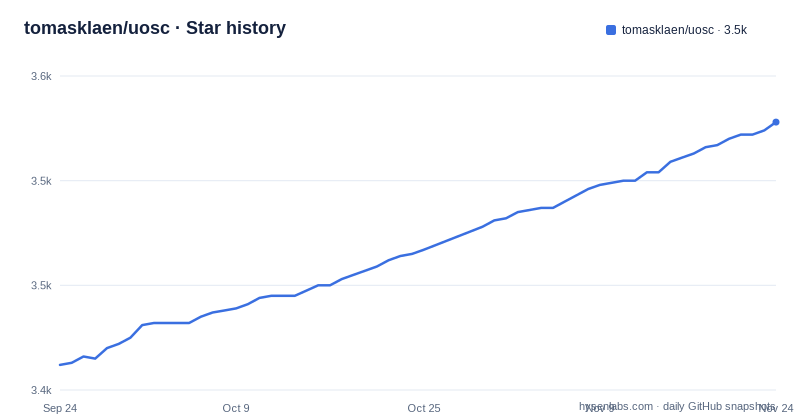
Star history
- tomasklaen/uosc3,528 ★ · +116
| Repository | 2026-09-24 | 2026-11-24 |
|---|---|---|
| tomasklaen/uosc | 3.4k | 3.5k |
116 Stars in the last 61 days, measured from the daily GitHub snapshot. Compare with other projects
Editorial analysis
Both installers pipe a script from the default branch into a shell
There are four install routes and two of them execute remote code directly. On Linux and macOS it is one line:
/bin/bash -c "$(curl -fsSL https://raw.githubusercontent.com/tomasklaen/uosc/HEAD/installers/unix.sh)"On Windows the equivalent fetches a PowerShell script and pipes it to the interpreter, with a note that loosening the execution policy for the current user may be needed the first time. Both URLs point at the default branch rather than at a tag, so the script that runs is whatever is committed there at the moment you run it, and neither is pinned to a release. That is a common convenience pattern and it is also the one place where installing this interface hands a shell to a moving target. The two remaining routes avoid it entirely: download the archive and the default configuration file from the releases page and extract them into the MPV configuration directory yourself.
The readme warns the archive may be reported as malicious
One note attached to the Windows installer says the downloaded archive might trigger false positives in some antivirus products, and the note points at a section further down that explains why. That is worth reading rather than skipping, because it is the kind of thing that otherwise looks like a warning sign. What the project ships is a script that downloads and extracts files into a player's configuration directory and, on Windows, a compiled helper binary that goes with it. Behaviour of that shape resembles what malware does, and signature-based scanners work on shape. The readme does not attempt to argue the point in the install section itself, which means a reader who stops there meets an unexplained warning about a malicious archive at the exact moment they are deciding whether to trust the download.
The Linux config location is chosen by first match
On Linux the installer tries to detect which package manager's configuration layout you are using, and the order it tries is a fixed list with a flatpak directory first, then two snap layouts, then the conventional dot-directory last. The instruction for anyone who wants a different location is to make sure the ones above it do not exist. That is the whole mechanism: there is no flag and no prompt, the first directory that exists wins. So a stale snap installation left over from a year ago, or an empty directory someone created by hand, silently redirects the install somewhere the user is not looking, and the symptom is a configuration file that is not where they expect. Removing or renaming the directories above your intended location is the fix.
The UI renders at the video's frame rate and the fix costs CPU
There is a troubleshooting entry for a UI that feels sluggish during playback, with a suggested configuration change and an honest explanation of why it works:
video-sync=display-resampleThe readme's own account is that performance is a top priority, and that the interface can still feel slow because its rendering frequency is chained to the video's frame rate. Pausing the video switches the refresh rate closer to the monitor's, and the interface then feels smoother, which is the way to test the diagnosis. The cause is attributed to a limitation in the player rather than to the interface, and the fix is described as helping a bit at the cost of some extra processor and graphics load. That is the shape of the trade: you cannot have both the frames the video declares and an interface that updates independently, on this player, at present.
The Go helper binary depends on the Kubernetes API machinery
The project is written in Lua, and next to it there is a small Go program that has to be built. The build instruction is a single script invocation, it builds for each platform, and it needs a Go toolchain; the source lives under a directory named after the binary. What that Go module requires is where it gets interesting. Alongside a clipboard library, a browser-opening library and an experimental standard library package, it depends on the API machinery library from the Kubernetes project at a pinned version. For a media player's helper that is a very large dependency to carry, and it is the kind of thing that shows up in a build log, in a binary size, and in a supply chain review. The module path itself is a bare name with no host in front of it, so it exists only to build that one binary and cannot be fetched as a dependency by anyone else.
The newest release has no title and sits eleven months after the one before
Three releases are visible: 5.11.0 in August 2025, 5.12.0 in September of that year, and 5.13.0 in August 2026. Two things stand out. The gap between the last two is about eleven months, and the release after an eleven-month gap is a minor version rather than a patch, which means either a feature release after a long gap or a version scheme that does not track urgency. Second, the middle release has a title and the newest one does not, which is the signature of an automated release that took its name from the tag while the earlier one was written by hand. The tags carry no prefix and the version has three components, so anything matching tags by pattern needs to expect a bare number. The default branch was pushed on 2026-08-30.
The holding-alt behaviour is described as a guideline
The navigation section is thorough, which makes its one hedge stand out. Menus have their own bindings for moving and deleting items, and there is a documented interaction where pressing a key edits a search string while the menu is filtering, with a modified press running the menu's action instead. The exception is stated in parentheses: holding a modifier while activating an item is supposed to stop the menu closing, and the readme immediately says this is a guideline and that not all menus behave that way. Small inconsistencies like this are normal in a project with this many menus, and saying so is better than documenting a behaviour that does not hold. It does mean the keyboard model has to be learned by doing rather than read once.
Configuration is one commented file with every default in it
Every option is documented in a single configuration file that ships with the project, containing all options, their default values and their documentation, and it is available both from the repository and as a download from the releases page. The manual install route asks you to extract that file separately into the options subdirectory of the MPV configuration directory, which means the defaults are a file you can read before you have installed anything. The one integration point with the player itself is the font: the interface follows whatever font the player is configured to use, so it inherits that setting rather than defining its own. Two optional tweaks to the player's own configuration are suggested, both of which disable a feature the interface draws itself.
Editorial conclusion
uosc is the right choice if you play video in MPV and want an interface that gets out of the way, because the proximity model is the whole design and nothing reappears until the cursor comes close, with the menus searchable by typing and the timeline collapsing when you are not touching it. Three things to know before you install. Both one-line installers fetch a script from the default branch and run it, so the code you execute is whatever is on that branch at that moment rather than a tagged release, and on Windows the readme warns the archive itself may be flagged by antivirus tools. On Linux the installer chooses a configuration directory by taking the first one that exists from a fixed list, so a leftover snap directory will silently redirect your install. And the sluggish-UI fix costs CPU, because the UI renders at the video's frame rate and the suggested change resamples display timing.
Frequently asked questions
What player version does uosc need?
MPV 0.33 or newer. It is a Lua script for that player rather than a fork of it, so it is installed into the player's configuration directory.
How do I install uosc without running a remote script?
Download the archive and the configuration file from the releases page and extract them into the MPV config directory, with the configuration file going into the script-opts subdirectory. That route needs nothing beyond the player itself.
Why does antivirus software flag the uosc download?
The readme states that the downloaded archive might trigger false positives in some antivirus products, and links to a section explaining why. The install shape, a script that downloads and extracts into a config directory, resembles what malware does, and scanners work on shape.
Why does the uosc interface feel sluggish during playback?
Its rendering frequency is chained to the video's frame rate, so it is a property of the player rather than the interface. Pausing makes it feel smoother, and a configuration change resampling display timing helps a bit at the cost of extra processor and graphics load.
Where are uosc's options documented?
In one configuration file that contains every option with its default value and documentation. It lives in the repository and is also downloadable from the releases page, and the interface follows the player's own font setting rather than defining one.
Official sources
Add this badge to your README
If you maintain this project, the badge below links readers to this analysis and shows its maintenance status from the daily GitHub snapshot. Paste the markdown into your README; add ?metric=license or ?metric=stars to the image URL for a different field.

[](https://hysenlabs.com/projects/tomasklaen-uosc)Star history chart for your README
[](https://hysenlabs.com/projects/tomasklaen-uosc)Was this useful?