GameNative runs your own Steam library on Android, and the configs come from strangers
Native PC gaming with Steam, Epic, GOG and Amazon integrations on Android.
At a glance
- What is it?
- utkarshdalal/GameNative is a Kotlin app that runs PC games you own from Steam, Epic, GOG and Amazon on Android without streaming, with cloud saves between phone and PC. It ships as a sideloaded APK, keeps mandatory analytics, and routes every support request to Discord.
- Who is it for?
- GameNative answers a real need for someone holding an Android handheld and a shelf of older PC titles, and it answers it badly for anyone who needs a compatibility guarantee, a public bug tracker, or telemetry they can switch off. The community config model means the binary you install is only half of what runs a given game.
- Can I use it commercially?
- Yes, with conditions. GPL-3.0 is a copyleft licence: if you distribute software that includes it, you must release that software's source code under the same licence. Running it internally without distributing it does not trigger that obligation.
- Is it still maintained?
- Yes. The repository received new commits within the last day.
- What is it written in?
- Mainly Kotlin, according to GitHub's language statistics.
Answers come from the project's GitHub data, last synced on November 13, 2026, and from our analysis. They are not legal advice.
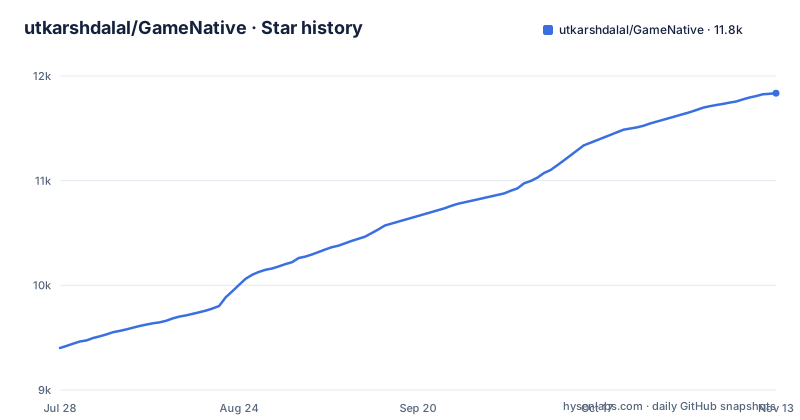
Star history
- utkarshdalal/GameNative11,836 ★ · +2,435
| Repository | 2026-07-28 | 2026-11-13 |
|---|---|---|
| utkarshdalal/GameNative | 9.4k | 11.8k |
2,435 Stars in the last 108 days, measured from the daily GitHub snapshot. Compare with other projects
Editorial analysis
Not every game runs, and the repair arrives from other players
The page states its own limit before the feature list. It is still early, not every game runs yet, and some titles need tweaking to play well. The repair path is worth reading closely because it defines the project's real dependency: the community is described as constantly finding and sharing configs that work, and those configs are applied automatically. So the app's behaviour on a given game is set by data contributed by strangers rather than by a support team, which helps when a config exists and hurts when one does not. The compatibility page at gamenative.app/compatibility shows whether anyone has tried running your game successfully.
Two download links, and the quick start points at a moving channel
There are two download routes on the page and they are not the same artifact. The Download badge at the top resolves to a pinned release file, gamenative-v1.3.0.apk on GitHub Releases. The How to use section links to downloads.gamenative.app/releases/1.3.0/gamenative-v1.3.0.apk, the same v1.3.0 build from a different host. The release history shows a newer v1.4.0-prerelease from 2026-10-22, so both README links point at an older build than the newest listed release. No app store is named anywhere on the page, so installation means sideloading an APK yourself.
Issues close automatically, so Discord carries every support request
Support policy here is blunt. The fastest route named is the Discord server, described as 35k+ strong with someone usually around, and the page asks you not to open issues on GitHub because they are closed automatically. That is a deliberate trade with a cost to weigh before installing. The archive of solved problems therefore stays in Discord chat history rather than in a ticket tracker. Contributors are routed the same way: the stated path is to message for access to the #development channel, with the live task list on an external Trello board. The project's institutional memory therefore lives largely in a chat server that anyone can leave.
Launch, exit, FPS and container config are collected with no switch
The analytics section splits its list in two, and only one side is optional. Game launch, close and exit events are always collected, with the payload spelled out as game name, store, session length, average FPS, and container config. Install, cancel and uninstall events are also always collected. The optional set, switchable under Settings, then Info, then Usage Analytics, covers feature usage such as the on-screen keyboard, controller, HUD and control editor, plus login success and failure events, recommendation interactions, app lifecycle events, and cloud sync events. The stated reason for the mandatory half is compatibility work, since it is how the project decides which games work and which configs to push. PostHog does the collection and no names, emails, IPs or device identifiers are claimed to be gathered, but a reader who wants no telemetry has no switch over the part that identifies your library and measures your device.
The optional SteamGridDB key controls artwork and nothing else
Contributors who want to build the project get exactly one configuration instruction, and it is optional. To pull game artwork for custom games you add your key to local.properties:
STEAMGRIDDB_API_KEY=your_api_key_hereThe key comes from the SteamGridDB preferences page, and the stated consequence of leaving it out is narrow: everything still works, it just will not fetch images. That is a clean split, since artwork is optional and function is not gated by it. The page does not discuss the reverse case, where a contributor does add a personal key, so a community build and a local build can differ in the artwork shown for a custom game, which matters when you compare screenshots or file a report against a title with no box art. Build instructions otherwise stop at building it like any normal Android Studio project and asking on Discord if you get stuck, with no gradle flags, no SDK version, and no toolchain pinned on the page.
A keystore entry, a Lineage artifact, and a submodule sit in the root
The top-level inventory reveals more about the build than the prose does. Alongside the ordinary Android project files, build.gradle.kts, settings.gradle.kts, gradle.properties, gradlew and gradlew.bat, the root holds an entry named keystore, a file named prod-debug.lineage, a .gitmodules file, and directories called keyvalues, tools, docs, and ubuntufs. The two unexplained names deserve attention from anyone auditing the source. A keystore entry kept in the repository root is not where release signing material belongs, and a prod-debug.lineage file suggests a build output stored alongside sources. Neither is explained on the page, so read both yourself before deciding what you are installing.
Cloud saves are promised with no storage named and no conflict rule
Cloud saves lead the pitch: stop on your PC and keep going on your phone, with saves carrying over between the two. Nothing beyond that is documented. The page does not name a storage service, does not say whether a save is uploaded whole or diffed, does not describe what happens when PC and phone write the same save at once, and does not list which titles sync at all. For a game where the save file is the only thing you own inside the executable, that silence is the line between a backup and a corrupted profile. Store access is the other half of the promise, since you log in to a Steam account and the feature list adds Steam DLC, workshop and branch support, so an account session stays live inside the app for the whole session. The repository is not archived, its last push is dated 2026-11-02, and the newest listed release is v1.4.0-prerelease from 2026-10-22, after v1.3.0 on 2026-10-14, so expect the save layer to keep changing under you.
Editorial conclusion
GameNative answers a real need for someone holding an Android handheld and a shelf of older PC titles, and it answers it badly for anyone who needs a compatibility guarantee, a public bug tracker, or telemetry they can switch off. The community config model means the binary you install is only half of what runs a given game. Before you commit, check three things: whether your specific title is listed as working on the compatibility page, which release you are installing, since the README links v1.3.0 while the newest listed release is v1.4.0-prerelease, and whether the mandatory launch events are acceptable to you.
Frequently asked questions
Is GameNative safe to use?
The code is published under GPL 3.0 with a THIRD_PARTY_NOTICES file covering attributions, copyleft source offers, and third-party or proprietary components bundled in the app. Analytics run through PostHog for anonymous events, and the page states no names, emails, IPs or device identifiers are collected, though game name, store, session length, average FPS and container config are always recorded. Installation is a sideloaded APK, and the project asks you not to open GitHub issues.
how to install gamenative on android
Download the latest release, install the APK on your Android device, log in to your Steam account, install your game, and hit play. The README names two download links, both pointing at gamenative-v1.3.0.apk, one on GitHub Releases and one on downloads.gamenative.app. Because no app store is named, this is a sideload rather than a store install.
Where does GameNative install games?
The page does not say where files land on the device. It says you log in to your Steam account and install your game from there, and the described flow never names a directory or a storage path. The root of the repository does contain a keyvalues directory and an ubuntufs directory, but the README does not connect either to where your installed games sit on the phone.
how to use gamenative
Play games you own from Steam, Epic, GOG and Amazon, and let known community configs be applied automatically so many titles work without tweaking. Controller and touch input are supported through a custom control editor and an on-screen HUD, and Steam DLC, workshop and branch support is included. You can check whether a title has been tried successfully at gamenative.app/compatibility before you install it.
how to use gamenative offline
The page documents no offline path. Every documented step depends on a signed-in store account, beginning with logging in to Steam, and the app is described as syncing saves to the cloud between your PC and your phone. Cloud sync events are also listed among the optional analytics switches, which implies sync is a live network feature rather than a local one.
Official sources
Add this badge to your README
If you maintain this project, the badge below links readers to this analysis and shows its maintenance status from the daily GitHub snapshot. Paste the markdown into your README; add ?metric=license or ?metric=stars to the image URL for a different field.

[](https://hysenlabs.com/projects/utkarshdalal-gamenative)Star history chart for your README
[](https://hysenlabs.com/projects/utkarshdalal-gamenative)Was this useful?