PDFsam Basic bundles its own JDK and keeps its tweaks on the wiki
PDFsam, a desktop application to split, merge, mix, rotate PDF files and extract pages
At a glance
- What is it?
- PDFsam Basic is the AGPL-3.0 edition behind pdfsam.org: a JavaFX desktop window for extracting, splitting, merging, mixing and rotating PDF pages, carrying a jlinked runtime since version 4 and documenting almost none of how it is built or tuned.
- Who is it for?
- PDFsam Basic suits a person who opens PDFs by hand a few times a week and wants a desktop window with no separate Java setup. It does not suit a pipeline: there is no documented batch mode, and the list of properties that change behavior lives on a wiki page rather than in the README.
- Can I use it commercially?
- Yes, with strict conditions. AGPL-3.0 is a network copyleft licence: if people use a modified version over a network, for example as a hosted service, you must offer them its source code under the same licence.
- Is it still maintained?
- Yes. The repository last received commits 10 days ago.
- What is it written in?
- Mainly Java, according to GitHub's language statistics.
Answers come from the project's GitHub data, last synced on November 14, 2026, and from our analysis. They are not legal advice.
Star history
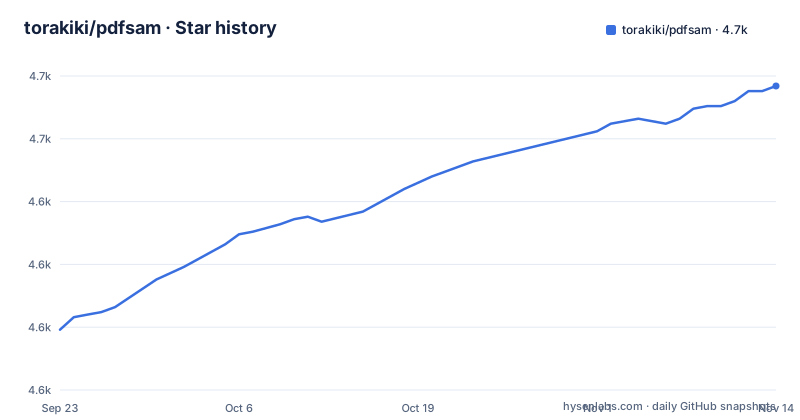
- torakiki/pdfsam4,671 ★ · +97
| Repository | 2026-09-23 | 2026-11-14 |
|---|---|---|
| torakiki/pdfsam | 4.6k | 4.7k |
97 Stars in the last 52 days, measured from the daily GitHub snapshot. Compare with other projects
Editorial analysis
Five page operations, and no command that starts any of them
Five things are named as the job of the program: extract pages, split, merge, mix and rotate. That is the entire feature list, and it belongs to one edition. The README calls this repository the official SCM repository for PDFsam Basic, a free and open source multi-platform application written in JavaFX. The README itself documents no command line, headless switch or batch entry point; for tuning it only links a wiki list of properties and arguments that can tweak PDFsam behavior, so check that list before planning an unattended job.
Since version 4 the jlinked JDK travels inside the application
Version 4 changed the deployment story. Since then PDFsam Basic ships as a self-contained application that bundles a jlinked JDK, so there is no separate Java runtime to arrange on the target machine. Version 3, by contrast, required a Java Runtime Environment 8 with JavaFX installed before it would run at all. Two details of the current scheme are missing from the README and both matter when you package the tool for other people: the JDK version inside the jlink image is never named, and the supported operating systems are not listed beyond the phrase multi-platform. Ask on the official site for the exact package formats and processor architectures before you promise a build to somebody else.
AGPL-3.0 on the current line, GPLv2 on the older builds
The license moved along with the major version. Since version 3 PDFsam Basic is open source under the GNU Affero General Public License, while the releases before it were released under GPLv2. That is a practical detail when you audit a machine: an old version 2 installer sitting on a shared workstation and a current v6.0.9 build carry different license text, and any review of your own product will run into the AGPL terms on code derived from the newer source. The README restates no obligations and grants no exception for shipping PDFsam Basic inside a larger closed tool, so read the AGPL text in the LICENSE file before you embed anything.
Thirteen modules under one pom.xml, with no module map
The top level is split into thirteen directories that read like a layer breakdown: pdfsam-basic, pdfsam-core, pdfsam-gui, pdfsam-ui-components, pdfsam-themes, pdfsam-fonts, pdfsam-i18n, pdfsam-model, pdfsam-persistence, pdfsam-service, pdfsam-tools, pdfsam-docs and pdfsam-test, with a single pom.xml above them. Not one of those responsibilities is written down, and there is no module map, no dependency diagram and no note about which module holds the merge code and which holds page extraction. A contributor has to infer the layering from directory names and then read compiler output to find the class behind the operation they want to change.
A clone gives you source and a pom.xml, never an installer
Nothing in this repository is a packaged application. A fresh copy is a source tree, a build descriptor and documentation folders, so the first thing you can do with it is read rather than run. The README sends you to pdfsam.org for the official site and to a Build-and-run guide on the project wiki for the build steps themselves, which puts the instructions that matter outside version control. That arrangement costs something: a wiki page can describe a build that no longer matches the tagged source, and nothing here tells you which of the two you are reading.
The top level of a clone looks like this:
.github/
.gitignore
CONTRIBUTING.md
LICENSE
README.md
pdfsam-basic/
pdfsam-core/
pdfsam-docs/
pdfsam-fonts/
pdfsam-gui/
pdfsam-i18n/
pdfsam-model/
pdfsam-persistence/
pdfsam-service/
pdfsam-test/
pdfsam-themes/
pdfsam-tools/
pdfsam-ui-components/
pom.xml
publiccode.yml
There is no shell script, no installer script and no launch command in that list, which is the shortest way to see that first run happens on the official site rather than in this tree.
Behavior tweaks live on a wiki page, not in the repository
One line carries more operational weight than its length suggests: a list of properties and arguments that can tweak PDFsam behavior sits on the wiki under Properties-and-arguments. Property names, accepted values and defaults are not listed in the README itself. The build instructions live on a wiki page for the same reason. If you need the same behavior on several machines, record the properties you set by hand, because the README does not list them.
Translations still point at the version 3 Launchpad project
Localization is handled off this host as well. The README points translators at translations.launchpad.net/pdfsam/pdfsam-v3, a project named for version 3, while the newest tags in the repository are v6.0.9 on 2026-10-30, v6.0.6 on 2026-10-02 and v6.0.5 on 2026-08-05. Nothing in the tree says which string sets the current line ships or how many languages are finished. For an Italian or German team that needs a localized window, the honest reading is that translation coverage for version 6 is undocumented here, so confirm the language list on the official site before scheduling the rollout around it.
Editorial conclusion
PDFsam Basic suits a person who opens PDFs by hand a few times a week and wants a desktop window with no separate Java setup. It does not suit a pipeline: there is no documented batch mode, and the list of properties that change behavior lives on a wiki page rather than in the README. Before committing, read the LICENSE file for the exact version you install, confirm the package formats on pdfsam.org, and check the Build-and-run wiki page against the tag you cloned.
Frequently asked questions
Is PDFsam legit and safe?
The source is published under the GNU Affero General Public License, and the last push to the repository was on 2026-10-30, the same day as tag v6.0.9. The README gives no checksums and no signatures, so check where a binary came from before running one you did not build yourself.
Is PDFsam free?
Yes. PDFsam Basic is described as free and open source software, licensed under the GNU Affero General Public License since version 3. Releases from before version 3 were released under GPLv2, so the license text on an older copy differs from the one on current source.
What is PDFsam used for?
For five operations on PDF files: extracting pages, splitting, merging, mixing and rotating. It is a JavaFX desktop application, and the README documents no command line or scripting entry point, so all five are reached through the window.
what is pdfsam basic
PDFsam Basic is the edition this repository builds. It is presented as a free and open source multi-platform application for extracting, splitting, merging, mixing and rotating pages, written in Java with JavaFX, self-contained since version 4 and licensed under AGPL-3.0.
how to install pdfsam
Since version 4 the application is self-contained and bundles a jlinked JDK, so no separate Java runtime is needed. Version 3 required a Java Runtime Environment 8 with JavaFX installed. The README sends you to pdfsam.org for downloads and to the Build-and-run wiki page for building from source.
how to use pdfsam merge
The README does not walk through the merge dialog. It points to the documentation at pdfsam.org/documentation/ and to the FAQ at pdfsam.org/faq/, and it lists merge beside extract, split, mix and rotate as the five things the application does.
Official sources
Add this badge to your README
If you maintain this project, the badge below links readers to this analysis and shows its maintenance status from the daily GitHub snapshot. Paste the markdown into your README; add ?metric=license or ?metric=stars to the image URL for a different field.

[](https://hysenlabs.com/projects/torakiki-pdfsam)Star history chart for your README
[](https://hysenlabs.com/projects/torakiki-pdfsam)Was this useful?