tsl (torch-spatiotemporal): a PyTorch and PyG library for spatiotemporal graph forecasting whose last GitHub release is from 2024
tsl: a PyTorch library for processing spatiotemporal data.
At a glance
- What is it?
- TorchSpatiotemporal/tsl is an MIT-licensed Python library for neural spatiotemporal data processing, with a focus on graph neural networks, built on PyTorch, PyG and PyTorch Lightning. The main branch is active, but the newest GitHub release is v0.9.5 from July 2024.
- Who is it for?
- tsl is a good base for researchers building graph neural networks on sensor-style time series, with datasets, forecasting and imputation examples and Hydra-managed experiments. It is a weaker choice if you need a recent tagged release, or if your environment pins PyTorch 2.13 or newer, NumPy 3 or pandas 3.
- Can I use it commercially?
- Yes. MIT is a permissive licence: you can use, modify and sell software built on it, as long as you keep its copyright and licence notices.
- Is it still maintained?
- Yes. The repository last received commits 3 days ago.
- What is it written in?
- Mainly Python, according to GitHub's language statistics.
Answers come from the project's GitHub data, last synced on November 25, 2026, and from our analysis. They are not legal advice.
Star history
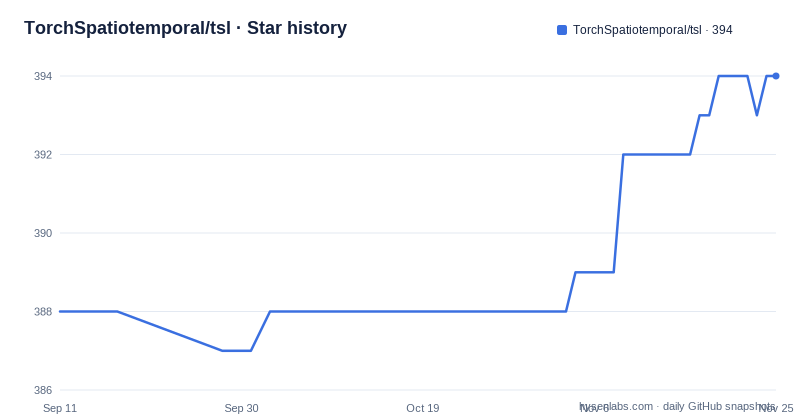
- TorchSpatiotemporal/tsl394 ★ · +6
| Repository | 2026-09-11 | 2026-11-25 |
|---|---|---|
| TorchSpatiotemporal/tsl | 388 | 394 |
6 Stars in the last 75 days, measured from the daily GitHub snapshot. Compare with other projects
Editorial analysis
The newest GitHub release is v0.9.5 from July 2024, while main was pushed to in October 2026
The release list shows v0.9.5 on 2024-07-18, v0.9.4 on 2023-08-18 and v0.9.3 on 2023-06-01. The last push to the repository was on 2026-10-26 and it is not archived. So development continues on main, but no tag has followed v0.9.5.
The result is a gap you should close deliberately. The README describes dependency ranges that name PyTorch 2.2 up to but excluding 2.13 and Python 3.10 or newer, and the pyproject classifiers list Python 3.10 to 3.14 and a Production/Stable status. Those statements describe the current source. Whether the version on PyPI matches them is something to check with pip before assuming the README applies to your install.
The recommended install is uv with a torch backend chosen for you
For local development, the README recommends uv:
uv venv --python 3.10
uv pip install torch-spatiotemporal --torch-backend=auto
The uv tool resolves PyTorch and PyG alongside tsl, so no separate framework installation is required. The torch-backend=auto option lets uv choose the most compatible PyTorch backend: CUDA on NVIDIA systems with a compatible driver, and CPU wheels otherwise. macOS uses PyTorch's macOS wheels, and GPU acceleration there goes through PyTorch and MPS instead of CUDA. A PowerShell variant with the same two commands covers Windows.
If you use plain pip instead, you take over the choice of CUDA or CPU wheels yourself, which is the step this command exists to remove.
Version windows are narrow on purpose: torch below 2.13, numpy below 3, pandas below 3
tsl supports NumPy 1.26 up to but excluding 3, PyTorch 2.2 up to but excluding 2.13, and PyG 2.4 up to but excluding 3. The pyproject dependencies also bound hydra-core between 1.3 and 1.4, omegaconf between 2.3 and 2.4, pandas between 2 and 3, pytorch-lightning between 2.2 and 3 and torchmetrics between 1 and 2.
The upper bounds matter. If another library in your environment requires pandas 3 or a newer PyTorch than 2.12, the resolver will refuse the combination, and you must choose which project to hold back. Hydra and OmegaConf are tightly bounded because the library uses Hydra for reproducible experiments. A requires-python of 3.10 or newer also rules out older interpreters.
torch-sparse is optional, and its wheels must match your exact PyTorch and CUDA build
The torch-sparse package is only needed for torch_sparse.SparseTensor adjacency matrices. It requires the matching torch-scatter package at runtime, and both come from the PyG installation guide as wheels that must match the exact PyTorch and CUDA build. In the install command they appear as commented-out lines, with a find-links URL that depends on the TORCH and CUDA placeholders.
So the default install works without them, and you add them only if your model code uses SparseTensor connectivity. If you do add them, a mismatch between the wheel and your PyTorch build shows up as an import or runtime error, not as a resolver message. Keep a record of the torch and CUDA versions you used when you installed the pair.
Model compilation is supported for marked models and costs a warm-up
Models marked with ModelClass.can_be_compiled = True are covered by full-graph compilation tests. You compile an instance in place with PyTorch's module API:
model.compile(mode="reduce-overhead")The forecasting and imputation examples expose the same option through Hydra:
python examples/forecasting/run_traffic_experiment.py \
    model=dcrnn dataset=la compile.enabled=true compile.mode=reduce-overhead
The README is direct about the trade: compilation has an initial warm-up cost and is most useful for repeated training or inference with stable tensor shapes. Models that are not marked are outside the tested set, and the text refers to a migration audit for the tested model matrix and current limitations. For one-off runs or changing shapes, compilation may cost more than it saves.
Experiments are configured through Hydra, so a run is a set of key=value overrides
The library lists reproducible experiments as a feature and uses the Hydra framework for them, which is why hydra-core and omegaconf sit in the dependencies with tight bounds. The example scripts under examples/forecasting and examples/imputation are launched with Python and take overrides such as model=dcrnn, dataset=la and compile.enabled=true, as in the compilation command above.
The consequence is that you change an experiment by changing arguments or config files, not by editing the script, which makes runs easy to compare and repeat. It also means you need to learn Hydra's override syntax before the examples feel natural. The introductory notebook, a gentle introduction to tsl, is the suggested starting point, and it is linked from the top of the README with the getting started and documentation pages.
Conda still works but defaults to CUDA, and tests have a slow marker
The repository keeps conda_env.yml for conda users:
conda env create -f conda_env.yml
conda activate tsl
The conda environment remains CUDA-oriented by default. For a CPU-only conda environment you remove the nvidia channel and the pytorch-cuda dependency from the file yourself. For development, you install the dev extra in editable mode and run uv run pytest, and slow tests can be skipped:
uv run pytest -m "not slow"The features cover custom models and datasets, existing datasets and baseline models from the literature, handling of missing data and irregular networks, preprocessing for scaling, resampling and clustering, Lightning scaling from one CPU to GPU clusters, modular layers and Hydra-managed experiments. The examples directory has forecasting and imputation scripts and notebooks.
Editorial conclusion
tsl is a good base for researchers building graph neural networks on sensor-style time series, with datasets, forecasting and imputation examples and Hydra-managed experiments. It is a weaker choice if you need a recent tagged release, or if your environment pins PyTorch 2.13 or newer, NumPy 3 or pandas 3. Before starting, decide whether to install from PyPI or the main branch, install into a fresh uv environment, and check the version windows for torch, PyG and numpy.
Frequently asked questions
What is tsl?
tsl, short for Torch Spatiotemporal, is a library for neural spatiotemporal data processing with a focus on graph neural networks. It builds on PyTorch, PyG and PyTorch Lightning, from data preprocessing to model prototyping.
Which PyTorch versions does tsl support?
The README says tsl supports PyTorch 2.2 up to but excluding 2.13, NumPy 1.26 up to but excluding 3, and PyG 2.4 up to but excluding 3. The Python requirement is 3.10 or newer.
How do I install tsl?
The recommended way is uv: create an environment with uv venv --python 3.10 and run uv pip install torch-spatiotemporal --torch-backend=auto. A conda_env.yml is also provided for conda users.
Official sources
Add this badge to your README
If you maintain this project, the badge below links readers to this analysis and shows its maintenance status from the daily GitHub snapshot. Paste the markdown into your README; add ?metric=license or ?metric=stars to the image URL for a different field.

[](https://hysenlabs.com/projects/torchspatiotemporal-tsl)Star history chart for your README
[](https://hysenlabs.com/projects/torchspatiotemporal-tsl)Was this useful?