BookPlayer: a GPL-3.0 audiobook player for DRM-free files, with a paid Pro tier for sync and Watch playback
Player for your DRM-free audiobooks
At a glance
- What is it?
- BookPlayer is a Swift app for playing DRM-free audiobooks on Apple devices. Import comes from AirDrop, Files, iTunes File Sharing, AudiobookShelf or Jellyfin, and the Pro tier adds cloud sync and stand-alone Apple Watch playback.
- Who is it for?
- Use BookPlayer if your audiobooks are DRM-free files you already own and you listen on an iPhone, with an Apple Watch as an optional extra. Skip it if your library is locked to a store's own app or if you need a client for Windows or Android, since nothing in the README describes either.
- Can I use it commercially?
- Yes, with conditions. GPL-3.0 is a copyleft licence: if you distribute software that includes it, you must release that software's source code under the same licence. Running it internally without distributing it does not trigger that obligation.
- Is it still maintained?
- Yes. The repository last received commits 1 day ago.
- What is it written in?
- Mainly Swift, according to GitHub's language statistics.
Answers come from the project's GitHub data, last synced on November 25, 2026, and from our analysis. They are not legal advice.
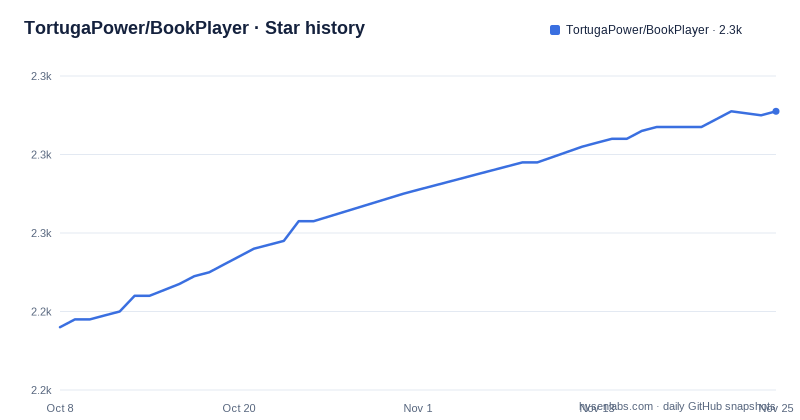
Star history
- TortugaPower/BookPlayer2,291 ★ · +55
| Repository | 2026-10-08 | 2026-11-25 |
|---|---|---|
| TortugaPower/BookPlayer | 2.2k | 2.3k |
55 Stars in the last 48 days, measured from the daily GitHub snapshot. Compare with other projects
Editorial analysis
Five import routes, and none of them touches a store
BookPlayer only plays files you can already put on the device, and the README lists five ways to do it. You can send files by AirDrop from a Mac or iOS device, pick them from the Files app or other apps on the device, or use File Sharing in iTunes on a Mac or PC. The fourth route downloads audiobooks from your own AudiobookShelf or Jellyfin server. The fifth is zip archives, which the README says are supported and can be turned into playlists automatically.
The description line says Player for your DRM-free audiobooks, and the import list is consistent with that. Nothing in it connects to a book store, a library lending service or a subscription catalogue. If a title arrives in a protected format from a retailer, none of these routes is described as handling it.
The two server routes are the only network-based imports. They need a server you run yourself. The README names the Jellyfin SDK for Swift as the dependency that talks to Jellyfin, and it lists a BlurHashDecode file inside the repository for showing placeholder images from Jellyfin servers. For AudiobookShelf, the README names the server as an import source and lists no separate client library.
Folders play in turn, and a playlist tap starts at the first unfinished file
The Manage section covers library handling. You keep and view the progress of each book, mark books as finished, sort the library by drag and drop, and create folders. Folders are where the behavior gets specific. They can automatically play items in turn, tapping the playlist artwork plays the first unfinished file, and files can be moved into a playlist from the library or imported straight into it.
That suits audiobooks that arrive as many chapter files, which is how the zip import ties in: an archive becomes a playlist, and the playlist remembers where you stopped. The README does not say how unfinished is decided beyond the mark-as-finished control, so if you rely on the tap-to-resume behavior, mark finished books yourself rather than assuming the app infers it.
The Manage list also includes tracking your library on Hardcover, automatically. The README credits Hardcover support to a single contributor, who also worked on Jellyfin multi-file and folder download support. It does not say what is sent to Hardcover or what the integration needs from you, so read the wiki FAQ before connecting an account.
Listening controls: chapters, smart rewind, volume boost and a sleep timer
The Listen list is the longest in the README. You can control playback from the lock screen or the control center, navigate a book by chapters, jump to the start of the current book, and change the playback speed. Smart rewind, Volume Boost and a sleep timer with adjustable duration are named as separate features. Remote events from headset buttons and the lock screen are supported, along with VoiceOver and a dark mode.
The contributors list shows where several of these came from: Smart rewind from one contributor, speed control and autoplay from another, Volume Boost from a third, and VoiceOver support from a fourth. AirDrop support and zip support are also credited by name. That is useful context if you want to find the code, since each feature was added by a different person rather than designed as one block.
The README gives no numbers for any of these. The range of speed steps, the length of a smart rewind and the gain applied by Volume Boost are not stated. If a listening habit depends on a particular rewind of fifteen seconds or a specific speed ladder, check the app or the wiki before assuming it matches.
BookPlayer Pro sells sync, Watch playback and themes
The README names a BookPlayer Pro tier with five items: cloud sync, stand-alone playback on your Apple Watch, support for open source development, additional color themes and a choice of alternative app icons. Cloud sync and Watch playback are functional. The other three are cosmetic or are a way to fund the project.
This answers the common question of whether the app is free in a limited way. The source code is GPL-3.0, and the repository is the whole app, with folders for the Watch app, widgets, a share extension and unit and UI tests. The README does not state a price for Pro or a trial length. For the dependency list it does mention RevenueCat for managing in-app purchases, and the repository holds an IAP-Configuration.storekit file, so purchases run through Apple's in-app system.
A practical consequence: if you need to listen on the Watch without the phone, that is a paid feature according to the README. A reader who only wants to play files on the phone can use the free list above. The README does not describe whether the free tier carries any playback limits, and the wiki FAQ is where such details would live.
Where the Swift code lives and what the app depends on
Dependencies are managed with the Swift Package Manager, and the README lists them with a reason each. DeviceKit supplies device information for support requests. DirectoryWatcher gives events on the document's folder, which is how new imports are noticed. JellyfinAPI talks to Jellyfin servers, Kingfisher loads contributors' profile pictures, MarqueeLabel handles scrolling labels, and RevenueCat manages in-app purchases. Sentry handles crash reporting, Sweetercolor handles artwork colors, Themeable provides custom app themes, and ZipArchive handles zip files.
Two tools come from Homebrew: SwiftLint and Sourcery. The repository has a .sourcery.yml, a .swiftlint.yml, a .swiftformat and a .swift-format, matching them. The top-level folders split the product: BookPlayer, BookPlayerKit, BookPlayerShareExtension, BookPlayerWatch, BookPlayerWatchKit, BookPlayerWidgets and Shared, plus BookPlayerTests and BookPlayerUITests.
The README says a developer guide in the wiki explains how to add new themes and icons, and the contributing section points to a Setup Guide in the same wiki for the local environment. The README itself carries no build commands. There is also a CLAUDE.md in the top-level entries, which the README does not explain.
Platform scope: Apple devices only, as far as the README says
The README links to the App Store listing three times and talks about AirDrop, Files, the lock screen, the control center and Apple Watch. Its only mention of other computers is File Sharing in iTunes on a Mac or PC, and that is a transfer path onto the device, not a PC version of the player. Nothing documents a Windows, Android or Mac desktop build.
So the answer to the usual platform questions is narrow. An iPhone is the home platform, an Apple Watch is supported through the Pro tier, and no client for Android or Windows is described in any of the repository text. If you read about one elsewhere, it is not in this README.
The README also lists locales. English plus 22 other languages are named with translator credits, among them Czech, German, Russian, Spanish, Swedish, Chinese Simplified, Danish, Dutch, French, Romanian, Turkish, Italian, Ukranian, Slovak, Portuguese, Polish, Hungarian, Arabic, Finnish, Greek, Catalan and Japanese. That makes it one of the better localized projects of its size, though the README does not say how complete each translation is.
Report bugs on GitHub or in one Discord channel, not in chat
The contributing section welcomes pull requests and ideas and asks for an issue for any suggestion or bug. It points to Contribution Guidelines in CONTRIBUTING.md. For community talk it links a Discord server, with a firm rule: bugs and feature requests belong in the #bugs-and-feedback forum channel or in a GitHub issue, and should not be reported in the chat channels. The maintainers drop by once in a while, and the README says a chat is not a bugtracker.
Two maintainers are named: one for the original idea and creation, one for UI design and artwork. A roadmap lives in a GitHub organization project rather than in the repository.
On upkeep, the repository is not archived. Release 6.0.0 was published on 2026-10-24, the last push came on 2026-10-25, and the two releases before it are 5.22.0 on 2026-08-30 and 5.21.1 on 2026-07-15. The license is GPL-3.0, so a modified version you distribute carries the same terms. The top-level entries also include privacy policy and terms documents. Read PRIVACY_POLICY.md before use, given that the dependency list includes Sentry for crash reporting.
Editorial conclusion
Use BookPlayer if your audiobooks are DRM-free files you already own and you listen on an iPhone, with an Apple Watch as an optional extra. Skip it if your library is locked to a store's own app or if you need a client for Windows or Android, since nothing in the README describes either. Before installing, decide whether you need cloud sync or stand-alone Watch playback, because those are the Pro features, and check whether your zip archives and server downloads match the import routes listed.
Frequently asked questions
Is BookPlayer free?
The source code is GPL-3.0 and the app plays DRM-free files you import. The README also lists a BookPlayer Pro tier with cloud sync, stand-alone Apple Watch playback, extra themes and alternative icons. It states no price.
Is BookPlayer available for PC?
The README describes an App Store app for Apple devices and does not document a Windows or PC version. It mentions a PC only for iTunes File Sharing, which is a way to copy files onto the device.
What is BookPlayer?
BookPlayer is a Swift player for DRM-free audiobooks. It imports from AirDrop, Files, iTunes File Sharing, zip archives, AudiobookShelf and Jellyfin, and adds chapters, speed control, smart rewind and a sleep timer.
How do I use BookPlayer?
Put your audiobook files on the device with AirDrop, the Files app, iTunes File Sharing or a download from your own AudiobookShelf or Jellyfin server. Then play them from the library, which can hold folders that play in turn.
Official sources
Add this badge to your README
If you maintain this project, the badge below links readers to this analysis and shows its maintenance status from the daily GitHub snapshot. Paste the markdown into your README; add ?metric=license or ?metric=stars to the image URL for a different field.

[](https://hysenlabs.com/projects/tortugapower-bookplayer)Star history chart for your README
[](https://hysenlabs.com/projects/tortugapower-bookplayer)Was this useful?