SwiftUIX: the SPM dependency is pinned to a branch
An exhaustive expansion of the standard SwiftUI library.
At a glance
- What is it?
- SwiftUIX is a Swift package of SwiftUI views and modifiers that port UIKit and AppKit classes the framework never wrapped. Its documentation site is a work in progress by the project's own admission, and the recommended install tracks the master branch rather than a version, so a consumer's build moves when the project commits.
- Who is it for?
- Adopt SwiftUIX if you are writing Apple-platform UI, need the UIKit classes SwiftUI skipped, and can accept a dependency that moves with the project's master branch. Do not adopt it if you need complete documentation today.
- Can I use it commercially?
- Yes. MIT is a permissive licence: you can use, modify and sell software built on it, as long as you keep its copyright and licence notices.
- Is it still maintained?
- Yes. The repository last received commits 58 days ago.
- What is it written in?
- Mainly Swift, according to GitHub's language statistics.
Answers come from the project's GitHub data, last synced on November 15, 2026, and from our analysis. They are not legal advice.
Star history
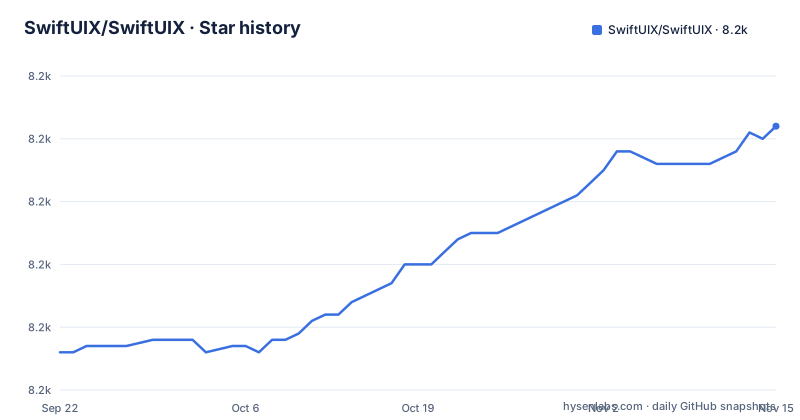
- SwiftUIX/SwiftUIX8,202 ★ · +36
| Repository | 2026-09-22 | 2026-11-15 |
|---|---|---|
| SwiftUIX/SwiftUIX | 8.2k | 8.2k |
36 Stars in the last 54 days, measured from the daily GitHub snapshot. Compare with other projects
Editorial analysis
Swift 5.10, Xcode 15.4, and six deployment targets
The requirements section is specific and worth reading twice. Swift 5.10 is the minimum Swift version required to build SwiftUIX, and Swift 5.9 is no longer supported.
Deployment targets are iOS 13, macOS 11, Mac Catalyst 13, tvOS 13, watchOS 6 and visionOS 1. Minimum Xcode is 15.4+. Then the CI details, which are the part most packages leave out: Xcode 16.x and 26.x are the CI-verified versions, and the CI-verified destinations are iOS, macOS, Mac Catalyst, tvOS, watchOS and visionOS.
The distinction between minimum and verified is the useful one. You can build with Xcode 15.4 and nothing in the repository claims a test run happened there. The six verified destinations also tell you what the maintainers actually exercise, which for a package this size is a reasonable proxy for what will break.
The SPM dependency is pinned to master, not to a version
The preferred installation is Swift Package Manager, and the snippet the README gives is this:
/// Package.swift
/// ...
dependencies: [
    .package(url: "https://github.com/SwiftUIX/SwiftUIX.git", branch: "master"),
]
/// ...
The Xcode steps match: open the project, go to File, Swift Packages, Add Package Dependency, paste `https://github.com/SwiftUIX/SwiftUIX`, and for Rules select Branch with the branch set to `master`. Then add SwiftUIX.framework to Linked Frameworks and Libraries and set its Status to Optional.
So the documented integration tracks a branch. Your resolved dependency moves when the project commits to master, not when a release is published. For a prototype that is convenient, and for anything you ship it means your build is only as stable as your last resolve. Pinning a revision after the first successful build is the fix, and the README does not walk through it.
Where SwiftUI has something, SwiftUIX prefixes it Cocoa
The UIKit to SwiftUI table is the clearest description of the package's shape, and the naming convention falls out of it. Where SwiftUI offers nothing, the SwiftUIX name carries no prefix: `UIActivityIndicatorView` becomes `ActivityIndicator`, `UIBlurEffect` becomes `BlurEffectView`, `UICollectionView` becomes `CollectionView`, `UIPageViewController` becomes `PaginationView`, `UISearchBar` becomes `SearchBar`, `UIWindow` becomes `WindowOverlay`.
Where SwiftUI already has a type, SwiftUIX uses a `Cocoa` prefix: `UIScrollView` maps to SwiftUI's `ScrollView` and to `CocoaScrollView`, `UITableView` to `List` and to `CocoaList`, `UITextField` to `TextField` and to `CocoaTextField`.
That convention is the API decision worth internalising before you write code against it. The prefixed types are SwiftUIX alternatives to types SwiftUI already has, and the unprefixed ones fill gaps where SwiftUI has nothing. `ModalPresentationStyle`, `SwipeGestureOverlay`, `DeviceLayoutOrientation`, `Screen`, `ImagePicker` and `UIHostingControllerTransitioningDelegate` fill in the rest of the map.
isScrollEnabled does nothing on SwiftUI's own ScrollView
One entry in the documentation is worth reading literally, because it states its own boundary. `View/isScrollEnabled(_:)` adds a condition controlling whether users can scroll within a view, and it works with `CocoaList`, `CocoaScrollView`, `CollectionView` and `TextView`.
Then the last line: does not work with SwiftUI's `ScrollView`.
That is a modifier whose usefulness depends on which scroll container you chose.
The same pattern shows up elsewhere in the contents. The keyboard section offers a `Keyboard` object and a `View/padding(.keyboard)` modifier that pads by the active system keyboard height, and the navigation bar section has four separate modifiers for colour, translucency, transparency and the large-title view, each named `View/navigationBar...`.
`PaginationView` shows the same shape with configuration rather than a plain view: an axis, a `ForEach` over your pages, then `.currentPageIndex($...)`, `.pageIndicatorAlignment(...)`, `.pageIndicatorTintColor(...)` and `.currentPageIndicatorTintColor(...)`. Four modifiers, three of them for the indicator, is a lot of surface for one component, and it is the surface you would write by hand against `UIPageViewController`.
The library is stable and the documentation is not
The sentence that frames everything else is in the Contents introduction: while the project itself is stable and heavily being used in production, its documentation is work-in-progress, and contributions are welcomed.
That distinction matters for an adoption decision. A stable library with unfinished documentation is a different risk from an unstable one: the code is the part you can trust, and the learning curve is the part you pay for.
The documentation itself is split in two. The DocC site at swiftuix.github.io holds what has been migrated, and the repository wiki holds everything that hasn't. So a feature's documentation may live in one place or the other.
The Contents are organised by concern rather than by type: Activity, Appearance, CollectionView, Error Handling, Geometry, Keyboard, Link Presentation, Navigation Bar, Pagination, Scrolling, Search. Appearance is a single entry, `View/visible(_:)`, and Error Handling is a single button, `TryButton`, which performs a throwing function.
Geometry is three items, and they are the clearest sign of the package's purpose. `flip3D(_:axis:reverse:)` flips a view, `RectangleCorner` names a corner of a rectangle, and `ZeroSizeView` exists for the case where `EmptyView` does not work. Each is small and each replaces a workaround.
0.3.x releases, and the version number is below one
The release record shows a pre-1.0 line moving steadily: 0.3.0 on 2026-04-20, 0.3.1 on 2026-07-14 and 0.3.2 on 2026-09-18, roughly every two to three months. The last push was on 2026-09-18 and the repository is not archived.
A 0.x version is the Swift Package Manager's way of saying the API is not settled, and combined with a branch-based dependency it means two things. Your build can change without a version bump, and the API can change in a way that would be a major bump if the package were 1.0.
The repository layout is small and conventional for a Swift package: `Package.swift` at the root, `Sources/` for the code, `Tests/` for the test suite, `Assets/` for resources, `Scripts/` for tooling, plus `Documentation.md` and the MIT `LICENSE`. There is no application target and no example project at the root, so what you get is a library and its tests.
CollectionView keeps the UIKit data-source shape
The CollectionView entry is the clearest example of the porting philosophy, because it does not try to hide what came from where. You use it inside a SwiftUI view, give it a data source and a way to build cells:
import SwiftUIX

struct MyCollectionView: View {
    let data: [MyModel] // Your data source

    var body: some View {
        CollectionView(data, id: \.self) { item in
            // Build your cell view
            Text(item.title)
        }
    }
}
A collection view is handed the data and a cell builder, which is recognisably the `UICollectionView` contract expressed as a SwiftUI initialiser rather than a delegate protocol. That is the pattern across the package: bring the UIKit shape across, keep it recognisable, and let the caller supply views.
`LinkPresentationView(url:)` takes a URL, and the README example sizes it with `.frame(height: 192)`. `AppActivityView` takes activity items, excluded activity types and cancel and complete handlers, which is `UIActivityViewController` with SwiftUI syntax rather than SwiftUI semantics.
Editorial conclusion
Adopt SwiftUIX if you are writing Apple-platform UI, need the UIKit classes SwiftUI skipped, and can accept a dependency that moves with the project's master branch. Do not adopt it if you need complete documentation today. Before you add it, read the UIKit to SwiftUIX table in the README to see which names collide with standard SwiftUI types, and plan to pin a revision once you go past a prototype.
Frequently asked questions
How do I install SwiftUIX?
Through Swift Package Manager. Add `.package(url: "https://github.com/SwiftUIX/SwiftUIX.git", branch: "master")` to your dependencies, or use Xcode's Add Package Dependency dialog with the branch rule set to master, then link SwiftUIX.framework and set its status to Optional.
What platforms and toolchain does SwiftUIX require?
Swift 5.10 or newer to build, with Swift 5.9 no longer supported, Xcode 15.4 or newer, and deployment targets of iOS 13, macOS 11, Mac Catalyst 13, tvOS 13, watchOS 6 and visionOS 1. The CI-verified combinations are Xcode 16.x and 26.x across all six destinations.
What does SwiftUIX add that SwiftUI does not have?
SwiftUI ports of UIKit and AppKit classes the framework never wrapped, including ActivityIndicator, AppActivityView, BlurEffectView, CollectionView, LinkPresentationView, PaginationView, SearchBar, Screen, WindowOverlay, ModalPresentationStyle and UIHostingControllerTransitioningDelegate. Where SwiftUI already has a type, SwiftUIX offers a Cocoa-prefixed alternative such as CocoaList, CocoaScrollView and CocoaTextField.
Is SwiftUIX's documentation complete?
No, and the README says so: the project itself is stable and heavily used in production, while its documentation is work-in-progress. The DocC site at swiftuix.github.io holds what has been migrated, and everything else is in the repository wiki, so a feature's documentation may live in either place.
Official sources
Add this badge to your README
If you maintain this project, the badge below links readers to this analysis and shows its maintenance status from the daily GitHub snapshot. Paste the markdown into your README; add ?metric=license or ?metric=stars to the image URL for a different field.

[](https://hysenlabs.com/projects/swiftuix-swiftuix)Star history chart for your README
[](https://hysenlabs.com/projects/swiftuix-swiftuix)Was this useful?