CloudBurn for Terraform, CloudFormation, and AWS Cost Review
Open-source policy engine that blocks bad AWS spending patterns before they ship and remediates what's already burning.
At a glance
- What is it?
- CloudBurn is a TypeScript-based open-source policy engine that checks infrastructure code before deployment and applies the same cost rules to live AWS resources. It suits DevOps, platform, and FinOps teams that want deterministic cost findings in CI, the CLI, an editor, or agent tooling.
- Who is it for?
- Adopt CloudBurn when the team needs repeatable AWS cost checks across Terraform, CloudFormation, and deployed resources, especially if CI enforcement is useful. Do not adopt it as a general AWS security scanner, a multi-region discovery replacement, or a complete remediation service.
- Can I use it commercially?
- Yes. Apache-2.0 is a permissive licence: you can use, modify and sell software built on it, as long as you keep its copyright and licence notices.
- Is it still maintained?
- Yes. The repository last received commits 1 day ago.
- What is it written in?
- Mainly TypeScript, according to GitHub's language statistics.
Answers come from the project's GitHub data, last synced on October 23, 2026, and from our analysis. They are not legal advice.
Star history
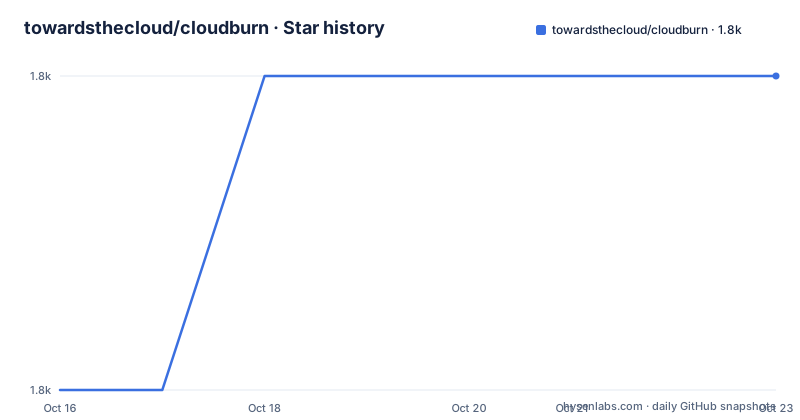
- towardsthecloud/cloudburn1,800 ★ · +1
| Repository | 2026-10-16 | 2026-10-23 |
|---|---|---|
| towardsthecloud/cloudburn | 1.8k | 1.8k |
1 Stars in the last 7 days, measured from the daily GitHub snapshot. Compare with other projects
Editorial analysis
CloudBurn's Two Cost-Control Surfaces
CloudBurn addresses two related AWS cost problems. The first is prevention: Terraform and CloudFormation files can contain resource settings that create unnecessary or expensive spending before they reach an AWS account. The second is detection after deployment, where a live account may already contain resources that should be changed. The project uses the same deterministic AWS cost rules for both situations. The `scan` command examines infrastructure-as-code files, while `discover` examines deployed AWS resources.
The intended users are teams working with AWS infrastructure who want findings in pull requests, CI jobs, release pipelines, command-line sessions, or editor workflows. The README describes 82 deterministic AWS cost rules. It does not present CloudBurn as a general cloud security scanner. Its subject is cost patterns, including categories such as EBS, RDS, EC2, S3, and tagging. The project also offers a GitHub Action, a TypeScript SDK, an MCP plugin for supported AI agents, and a VS Code extension preview.
That scope matters because the project does not need a separate rule model for code and live accounts. A team can compare an infrastructure definition with a deployed account, although the available inputs and permissions are not identical. The README documents live discovery through AWS Resource Explorer, and it calls account-wide tagging rules opt-in because they require an accessible aggregator.
Installing CloudBurn and Running a First Scan
CloudBurn documents three installation paths. On macOS and Linux, Homebrew installs the CLI and can install Node.js automatically if it is missing.
brew install towardsthecloud/tap/cloudburnFor npm users, the README requires Node.js 24 or later.
npm install --global cloudburnA team can also run the CLI without installing it globally. This example scans a Terraform file:
npx cloudburn scan ./main.tfThe first useful local step is usually to generate a configuration file, then scan the infrastructure directory. Configuration is optional, so this is a way to create an explicit starting point rather than a required setup step.
cloudburn config --init
cloudburn scan ./iac --exit-code
The scan command accepts a file or directory. The README uses `./main.tf` for Terraform and `./template.yaml` for CloudFormation. The `--exit-code` option makes the process return a non-zero status when findings meet the selected failure behavior. Teams that want severity-based CI behavior can use `--fail-on high` or the equivalent `fail-on` configuration key.
CloudBurn Configuration and CI Enforcement
CloudBurn reads `.cloudburn.yml` or `.cloudburn.yaml`. It searches upward from the current directory until it finds a configuration file or reaches the git root. CI skips implicit configuration discovery, so workflows that want configuration must pass an exact file with `--config <path>`.
The following configuration enables selected rules, disables a rule, and sets output and failure behavior for each mode:
iac:
  enabled-rules:
    - CLDBRN-AWS-EBS-1
    - CLDBRN-AWS-RDS-1
  disabled-rules:
    - CLDBRN-AWS-EC2-2
  format: table
  fail-on: high

discovery:
  enabled-rules:
    - CLDBRN-AWS-EBS-1
  disabled-rules:
    - CLDBRN-AWS-S3-1
  format: json
  fail-on: medium
`enabled-rules` restricts a mode to a specified set. `disabled-rules` subtracts selected rules from the active set. `format` controls `json` or `table` output. `fail-on` can use `high`, `medium`, or `low` severity. The public rule IDs are part of the configuration interface, and the README points to a compatibility policy for pinned configurations.
For pull requests, the GitHub Action can annotate findings, add a sticky comment, and fail a job according to severity. The documented workflow example is:
- uses: towardsthecloud/cloudburn-action@v1
  with:
    path: .
    fail-on: high
This integration avoids a separate Node.js setup or CLI install. It also introduces an important policy decision: `fail-on: high` blocks a pipeline for some findings while allowing lower severities through. A team should choose that threshold deliberately rather than assuming every cost finding deserves to stop a deployment.
Live AWS Discovery and Resource Explorer
CloudBurn's `discover` mode applies the same rules to live AWS resources. The documented prerequisite is AWS Resource Explorer, which must be initialized first. The CLI can use the current region or an explicitly named region, and it can filter by service or rule.
cloudburn discover init
cloudburn discover
cloudburn discover --region eu-central-1
cloudburn discover --service ec2,s3
cloudburn discover --enabled-rules CLDBRN-AWS-TAGGING-1
Account-wide rules are not part of the default behavior in every case. The README specifically identifies `CLDBRN-AWS-TAGGING-1` as opt-in because it requires an accessible Resource Explorer aggregator. That constraint means a successful Terraform scan does not prove that all account-wide checks will work in live discovery.
The CLI handles one region at a time. Multi-region discovery remains available through the SDK. This is a concrete limitation for organizations that want one command to inspect a global AWS estate. It also means that the operational result depends on the region selected and on the resources visible to CloudBurn in that region.
The README gives `--fail-on high` for discovery as well as scan. That allows the same policy vocabulary to be used in a command-line check and in a pipeline, but the live mode still requires AWS-side setup and access. CloudBurn's documentation does not describe a rollback command or an automatic process for applying every suggested fix.
Suppression, Output, and Agent Interfaces
CloudBurn supports targeted exceptions for accepted findings. In Terraform and CloudFormation YAML, a suppression comment can appear immediately above or inside the relevant resource. The example uses a rule ID and a reason:
# cloudburn-ignore CLDBRN-AWS-EBS-1 migration scheduled
resource "aws_ebs_volume" "legacy" {
  type = "gp2"
}
A resource can use `cloudburn-ignore-all <reason>` for a broader exception. Suppressed findings remain in JSON output under `suppressed`, which gives teams an audit record even though those findings do not trigger `--exit-code` or `--fail-on`. CloudFormation JSON cannot contain comments, so inline suppression is supported only in Terraform and CloudFormation YAML.
The command-line output is available as `json` and `table`. JSON is relevant for CI annotations, SDK consumers, and other tooling. The README also documents an SDK for running CloudBurn inside custom tools and an MCP plugin for Claude Code, Codex, and other supported agents. The plugin provides read-only CloudBurn tools and a skill for reviewing infrastructure code and live accounts.
The VS Code extension is available as a local VSIX preview and is intended to run the CLI on save, with findings shown in the Problems view. These integrations reduce the distance between a cost finding and the place where infrastructure work occurs. They do not change the underlying fact that CloudBurn is a policy evaluation tool, not an infrastructure editor.
License, Releases, and Maintenance Boundaries
CloudBurn is licensed under Apache-2.0. The repository lists the project as not archived, and its last push was on 2026-10-13. That is current maintenance activity relative to the repository information, but the project is still early in its published release history. The recent releases listed are for `@cloudburn/vscode`, versions 0.1.1, 0.1.2, and 0.1.3. The VS Code extension is therefore the component with the most recent release activity in the recent release list, while the README presents it as a local VSIX preview.
The monorepo uses TypeScript and declares Node.js `>=24.0.0` for repository development. Its package scripts include `build`, `typecheck`, `test`, `lint`, and `verify`. The project uses `[email protected]` and Turbo for workspace tasks. These repository details indicate a multi-package TypeScript project with explicit verification scripts, but they do not establish how quickly every package receives releases.
The Apache-2.0 license permits use and modification under its terms, subject to the license's conditions and notices. Teams should review the license text for their own distribution, notice, and compliance requirements rather than treating this article as legal advice. Upgrade planning should also account for pinned rule IDs, the compatibility policy, Node.js 24, and separate package versions such as the CLI, SDK, action, plugin, and VS Code extension.
CloudBurn Compared with Native AWS Cost Visibility
A real alternative is to inspect AWS cost and usage through the AWS management tools, billing data, or an organization's existing FinOps reporting system. The practical difference is that CloudBurn evaluates infrastructure definitions before deployment and can block a pipeline. A cost dashboard or billing report generally describes usage after it exists, so it may identify an expense later but cannot prevent a Terraform resource from being merged.
Another alternative is to encode organization-specific cost checks in custom CI scripts or policy-as-code tools. CloudBurn supplies a fixed set of AWS cost rule IDs, shared `scan` and `discover` modes, and integrations including a GitHub Action, SDK, MCP plugin, and VS Code extension. A custom system can offer more organization-specific logic, but the repository documentation does not claim that it supports the same rule catalog or the same set of integrations.
CloudBurn is the wrong choice when the requirement is automatic remediation of deployed AWS resources, complete multi-region CLI coverage, or broad security and compliance assessment. It is also a poor fit for infrastructure formats not named in the README. Its strongest use is as a repeatable pre-deployment cost gate paired with a narrower live discovery process.
Editorial conclusion
Adopt CloudBurn when the team needs repeatable AWS cost checks across Terraform, CloudFormation, and deployed resources, especially if CI enforcement is useful. Do not adopt it as a general AWS security scanner, a multi-region discovery replacement, or a complete remediation service. Verify first that Node.js 24 is available for npm or plugin use, AWS Resource Explorer is initialized for relevant account-wide rules, and the selected severity threshold matches the team's pipeline policy. The first project-specific judgement is that CloudBurn is suitable when deterministic cost policies and CI feedback matter more than automatic infrastructure repair.
Frequently asked questions
How do I install CloudBurn for Terraform and CloudFormation scanning?
Use Homebrew on macOS or Linux with `brew install towardsthecloud/tap/cloudburn`, or install the npm package globally with `npm install --global cloudburn`. The npm path requires Node.js 24 or later. You can also run `npx cloudburn scan ./main.tf` without a global install.
What does CloudBurn do after a Terraform or CloudFormation file is deployed?
The `discover` command runs the same cost rules against live AWS resources. It requires AWS Resource Explorer, targets one region at a time through the CLI, and can filter by region, service, or enabled rule.
Can CloudBurn fail a GitHub Actions workflow?
Yes. The documented action accepts `fail-on`, with `high` shown as the example threshold. It also scans paths, annotates findings on pull requests, and posts a sticky comment. The action is available as `towardsthecloud/cloudburn-action@v1`.
Official sources
Add this badge to your README
If you maintain this project, the badge below links readers to this analysis and shows its maintenance status from the daily GitHub snapshot. Paste the markdown into your README; add ?metric=license or ?metric=stars to the image URL for a different field.

[](https://hysenlabs.com/projects/towardsthecloud-cloudburn)Star history chart for your README
[](https://hysenlabs.com/projects/towardsthecloud-cloudburn)Was this useful?