openFPGALoader: one bitstream flasher for seven FPGA vendors and every cable in between
Universal utility for programming FPGA
At a glance
- What is it?
- openFPGALoader replaces the vendor tools with a single command line utility that writes bitstreams to SRAM or flash over JTAG, DFU and SPI, across Xilinx, Intel, Lattice, Gowin, Efinix, Anlogic and Cologne Chip devices. The board and cable databases are the part that has to be trusted, and the project publishes them separately.
- Who is it for?
- Adopt openFPGALoader if you work with more than one FPGA vendor, or if you want a single command line for programming SRAM and flash instead of a separate vendor tool per family, and you are willing to check the published board and cable compatibility lists before you start.
- Can I use it commercially?
- Yes. Apache-2.0 is a permissive licence: you can use, modify and sell software built on it, as long as you keep its copyright and licence notices.
- Is it still maintained?
- Yes. The repository received new commits within the last day.
- What is it written in?
- Mainly C++, according to GitHub's language statistics.
Answers come from the project's GitHub data, last synced on November 7, 2026, and from our analysis. They are not legal advice.
Star history
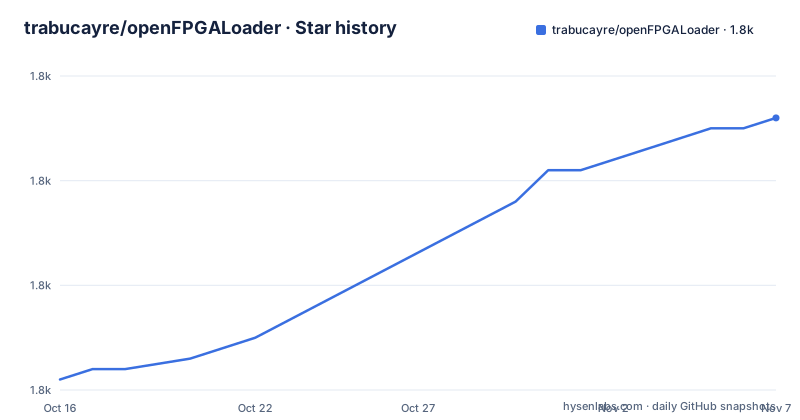
- trabucayre/openFPGALoader1,786 ★ · +25
| Repository | 2026-10-16 | 2026-11-07 |
|---|---|---|
| trabucayre/openFPGALoader | 1.8k | 1.8k |
25 Stars in the last 22 days, measured from the daily GitHub snapshot. Compare with other projects
Editorial analysis
Seven vendors, and the compatibility lists are the real specification
openFPGALoader is described as a universal utility for programming FPGAs, compatible with many boards, cables and FPGAs from major manufacturers, and the README names them: Xilinx, Altera/Intel, Lattice, Gowin, Efinix, Anlogic and Cologne Chip. It runs on Linux, Windows, macOS and OpenBSD.
Seven vendors behind one command line is the whole value proposition. The alternative is a tool per vendor, each with its own syntax, its own cable driver assumptions and its own idea of what a bitstream file is called. A lab with an Intel board for work and a Lattice board for a hobby project needs two tools and two sets of habits, and openFPGALoader replaces that with one syntax and one set of habits.
The project is careful about what it claims. Rather than saying it supports everything, it tells you how to find out: check the FPGA compatibility list, the board compatibility list and the cable compatibility list, all hosted on the project's documentation site, and each manufacturer also has a vendor-specific page, for Anlogic, Cologne Chip, Efinix, Gowin, Intel/Altera, Lattice and Xilinx. The board list is not a marketing list; it is the set of board configurations the tool actually knows, which is why the quick usage example names a board, `arty`, and says it is one of the many configurations listed there.
The project is Apache-2.0 licensed, its documentation lives at trabucayre.github.io/openFPGALoader, and there is a dedicated channel on the libera.chat IRC network at `#openFPGALoader`.
The last push was on 2026-10-18, the day before this release of the documentation, and the tagged releases v1.1.0 and v1.1.1 both landed in March 2026.
Two lines cover the two things you actually do with a bitstream
The quick usage section is deliberately tiny, because the two operations that matter are the two operations everybody performs: putting a design into volatile memory for a quick test, and writing it to flash so it survives a power cycle.
openFPGALoader -b arty arty_bitstream.bit # Loading in SRAM
openFPGALoader -b arty -f arty_bitstream.bit # Writing in flash
The difference is the `-f` flag, and the default is the opposite. The usage listing shows `-m, --write-sram` as the option to write the bitstream in SRAM with a default of true, and `-f, --write-flash` as the option to write it in flash with a default of false. So the bare command loads into SRAM, and adding `-f` switches to flash.
The board is identified with `-b`, and the usage text notes that the board name may be used instead of the cable. That is the more convenient form when you have a known board, because the board configuration implies the cable and the FPGA family.
If you do not have a board configuration, you can name the cable instead, and the complete list of cables is published separately:
openFPGALoader -c cmsisdap fpga_bitstream.bitThe rest of the option list is where a tool designed for real benches shows its experience: the `--freq` option to set the JTAG frequency in hertz, `--index-chain` for a device's index in a JTAG chain, `--misc-device` to add non-FPGA devices to the chain in the form `<idcode,irlen,name>`, and `--secondary-bitstream` for some Xilinx UltraScale boards. There is also `--secondary-bitstream` and `--target-flash` for boards with multiple flash chips, where you choose the primary, the secondary or both.
Probe selection is where the flag list gets long
The options dealing with the programmer itself are numerous, and they are numbered the way a person with several different probes would want them.
There is `--vid` and `--pid` for the probe vendor and product ID, `--cable-index` to pick a probe by index for FTDI and cmsisDAP, `--busdev-num` to select a probe by its bus and device number in the form `bus_num:device_addr`, and `--usb-serial-num` which takes an FTDI chip serial number or an ESP32 iSerialNumber substring. There is also `--ftdi-serial`, marked deprecated in the listing, and `--ftdi-channel` for choosing among the four FTDI channels, which map to A through D.
The deprecated flag tells you something about the direction of the project. A serial-number option is being replaced by one that works across probe families, which matters when a bench has an FTDI cable, a CMSIS-DAP probe and an ESP32 based programmer on the same desk.
Beyond selection, there are options that change the electrical behaviour. `--status-pin` sets a GPIO pin to use as a status indicator with active low semantics, `--invert-read-edge` reads on the negative edge instead of the positive, and `--pins` configures the pin order in the `TDI:TDO:TCK:TMS` form or the `MOSI:MISO:SCK:CS[:HOLDN:WPN]` form for a bitbang style connection. The `--probe-firmware` option takes firmware for a JTAG probe, listed for the usbBlasterII and xilinxPlatformCableUsb, which is a vendor tool's job being absorbed into the open source utility.
For a remote setup, `--ip` takes an IP address for the XVC and remote bitbang clients, so the programming side does not have to be the machine sitting next to the board.
Flash maintenance commands beyond programming
Once a board is in the lab, the flash chip needs more than writing a bitstream, and the option list covers the operations a hardware engineer reaches for.
`--dump-flash` reads the flash contents, with `--file-size` to provide a size in bytes for the dump and `--file-type` to state the file type instead of having it deduced from the extension. `--bulk-erase` erases the flash. `--protect-flash` protects an area of the SPI flash. `--enable-quad` and `--disable-quad` control quad mode for SPI flash, which is a real performance setting on the parts that support it. `--external-flash` selects external storage for a device that has both internal and external. `--flash-sector` selects a flash sector, with the usage text noting that this applies to Lattice and Altera MAX10 parts only. `--offset` gives a start address in bytes for reading or writing into non-volatile memory, defaulting to 0.
There is also `--detect`, which detects the FPGA, and the usage text notes that adding `-f` to it shows the connected flash. That is the command to run first when a board is not responding, and it is the one that tells you whether the tool can see the device at all before you blame the bitstream.
Two listing options complete the picture. `--list-boards`, `--list-cables` and `--list-fpga` print what the tool knows about, which is a faster way to check the database than searching the documentation site, and the three are the offline mirror of the three compatibility lists.
SPI over JTAG and BPI live in their own directories
The repository layout shows two subsystems that get their own directories: `spiOverJtag/` and `bpiOverJtag/`. SPI over JTAG is a way of programming a flash chip through the JTAG port of the FPGA, which is how a board with a flash wired only to the JTAG pins gets a bitstream, and BPI is the parallel equivalent used on some Xilinx devices.
The options tie into that. `-B, --bridge` disables the spiOverJtag model detection by providing a bitstream for the Intel or Xilinx device, which is what you do when the automatic detection picks the wrong model. The `--target-flash` option exists for boards with multiple flash chips, naming the primary, the secondary or both, and the `--secondary-bitstream` option takes the second bitstream for some Xilinx UltraScale boards.
The `--external-flash` option fits the same family: a device with both internal and external storage needs to be told which one the operation applies to.
This is the part of the project that is hardest to review from documentation alone, because it is board and part specific. The vendor pages and the board compatibility list are where the specifics live, and the `--bridge` and `--target-flash` options are the escape hatches for the cases the automatic detection gets wrong.
udev rules and a Blueprint for probe access
Two files at the repository root handle the Linux side of hardware access, and they are easy to miss until a program run fails with a permission error.
`70-openfpgaloader.rules` and `99-openfpgaloader.rules` are udev rules, and the numbering is the convention for ordering: a rule in the 70 range runs before one in the 99 range, and the split usually reflects the difference between a device that is present at boot and one that appears later. The rules grant access to the USB probes so that a non-root user can program a board, which is the difference between a tool that works out of the box and one that needs `sudo`.
The `.btd.yml` file is a Blueprint description, the format used by distributions to describe how a device should be handled on first plug-in, including the vendor and product identifiers and the access permissions to apply. Between the udev rules and the Blueprint, the project covers both the already-installed case and the first-time-plugged-in case.
The build system is CMake, with a `CMakeLists.txt` at the root and a `cmake/` directory holding the modules, plus `src/` for the sources, `scripts/` for helper scripts and `doc/` for the documentation sources that produce the site. The `Test.yml` workflow in the repository runs the test suite, and the README's first steps and install pages point to the site for build instructions, so the CMake configuration is where you go when the packaged binaries are not available for your platform.
Where openFPGALoader is the wrong tool
The first wrong case is a workflow that depends on a vendor specific feature. The option list is broad, but it is not the complete feature set of the vendor tools it replaces, and when a board needs something the open source path does not implement, the compatibility list is where you find out. Checking it before you commit to a board is the difference between a smooth build and a weekend of reading.
The second is a device with a flash chip that is not reachable. openFPGALoader needs a path to the flash, whether that is a JTAG cable, DFU, SPI over JTAG, BPI over JTAG or a remote XVC server. Some boards ship with a flash that is wired to pins you cannot reach from the JTAG header, and those need a specific board configuration or a hardware modification. The tool cannot invent a connection.
The third is a production flashing line with strict traceability requirements. The tool does what it does, and the visible documentation does not describe a serial-number log, a signed bitstream verification step or an audit of what was written to which device. That kind of requirement usually pushes a team towards the vendor tool or towards writing that layer themselves.
The fourth is an expectation of a stable release rhythm. The release list contains a `nightly` tag dated 2021-12-30 next to v1.1.0 and v1.1.1 from March 2026, so the tags are not a clean sequence, and the project is on the `master` branch with pushes as recent as 2026-10-18. For a lab that pins a version, that means choosing a release and accepting that fixes arrive in the repository rather than in a tagged artefact.
Editorial conclusion
Adopt openFPGALoader if you work with more than one FPGA vendor, or if you want a single command line for programming SRAM and flash instead of a separate vendor tool per family, and you are willing to check the published board and cable compatibility lists before you start. Do not adopt it as a replacement for a vendor tool when you need a vendor specific feature it does not implement, because the compatibility lists are the contract and they are maintained separately from the tool. Before your first programming run, confirm the board or cable model against the compatibility list, and read the troubleshooting page, since most of the failure modes in JTAG programming are cabling and probing rather than the bitstream itself.
Frequently asked questions
How do I load a bitstream into an FPGA with openFPGALoader?
Use `openFPGALoader -b <board> <file>.bit` to write the bitstream to SRAM, and add `-f` to write it to flash instead, for example `openFPGALoader -b arty -f arty_bitstream.bit`. Writing to SRAM is the default behaviour.
Which FPGA vendors does openFPGALoader support?
The README names Xilinx, Altera/Intel, Lattice, Gowin, Efinix, Anlogic and Cologne Chip, and it runs on Linux, Windows, macOS and OpenBSD. Separate FPGA, board and cable compatibility lists are published on the project documentation site.
How do I check whether openFPGALoader sees my board?
The `--detect` option detects the FPGA, and adding `-f` to it shows the connected flash. The tool can also print what it knows with `--list-boards`, `--list-cables` and `--list-fpga`.
How do I select a specific JTAG probe when several are connected?
The options include `--vid` and `--pid` for vendor and product ID, `--cable-index` for FTDI and cmsisDAP probes, `--busdev-num` in the form bus_num:device_addr, and `--usb-serial-num` for an FTDI serial number or an ESP32 iSerialNumber substring. The `--ftdi-serial` option is marked deprecated.
Official sources
Add this badge to your README
If you maintain this project, the badge below links readers to this analysis and shows its maintenance status from the daily GitHub snapshot. Paste the markdown into your README; add ?metric=license or ?metric=stars to the image URL for a different field.

[](https://hysenlabs.com/projects/trabucayre-openfpgaloader)Star history chart for your README
[](https://hysenlabs.com/projects/trabucayre-openfpgaloader)Was this useful?